
1. Mbiview
The Canon PowerShot SD450 Digital ELPH camera is a compact digital camera designed for ease of use and high-quality imaging. It features a 5.0-megapixel sensor, a 3x optical zoom lens, and a 2.5-inch LCD display. The camera incorporates Canon's DIGIC II processor for efficient image processing and offers various shooting modes to suit different photographic situations.

Figura 1.1: Përpara view of the Canon PowerShot SD450 Digital ELPH camera with its lens retracted.
2. Çfarë ka në kuti
Verifikoni që të gjitha artikujt e mëposhtëm janë të përfshirë në paketën tuaj:
- PowerShot SD450 body
- Lithium battery pack NB-4L
- Battery charger CB-2LV
- 16 MB SD memory card SDC-16M
- Wrist strap WS-600
- CD-ROM i zgjidhjes së kamerës dixhitale
- USB interface cable IFC-400PCU
- Audio-video cable AVC-DC300
3. Konfigurimi
3.1. Ngarkimi i baterisë
- Insert the Lithium battery pack NB-4L into the battery charger CB-2LV.
- Lidheni karikuesin në një prizë elektrike. Drita treguese e karikimit do të ndizet.
- Once charging is complete, the indicator light will change or turn off. Remove the battery.
3.2. Vendosja e baterisë dhe kartës SD
- Hapni kapakun e ndarjes së baterisë/kartës që ndodhet në pjesën e poshtme të kamerës.
- Insert the charged battery pack into the compartment, ensuring correct orientation.
- Insert the SD memory card into the card slot until it clicks into place.
- Mbyllni mirë kapakun e ndarjes.
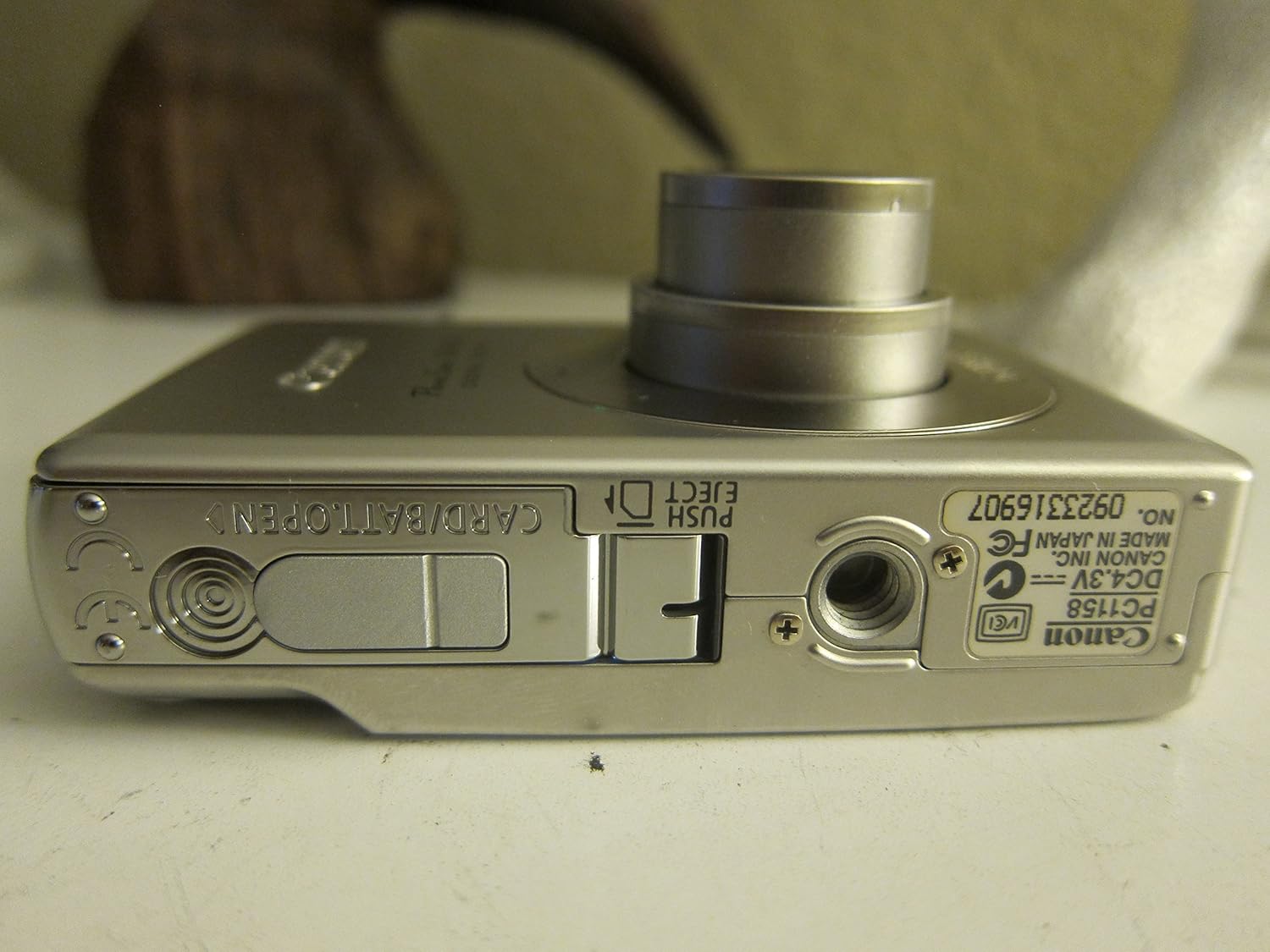
Figura 3.1: Fundi view of the camera, illustrating the battery and SD card compartment.
3.3. Ndezja fillestare dhe cilësimet bazë
- Shtypni ON/FIKUR butoni për të ndezur kamerën.
- Ndiqni udhëzimet në ekran për të vendosur datën, orën dhe gjuhën.

Figura 3.2: Top view të kamerës, duke theksuar butonin e ndezjes dhe lirimin e diafragmës.
4. Përdorimi i Kamerës
4.1. Fotografi Bazë
- Ndezja/Fikja e energjisë: Shtypni ON/FIKUR butonin.
- Marrja e një fotografie: Shtypni butonin e diafragmës deri në gjysmë për të fokusuar, pastaj shtypeni plotësisht për të kapur imazhin.
- Zmadhimi: Përdorni levën e zmadhimit rreth butonit të diafragmës për të rregulluar zmadhimin optik 3x.

Figura 4.1: Përpara view of the camera with the optical zoom lens extended.
4.2. Mënyrat e Xhirimit
The PowerShot SD450 offers various shooting modes to optimize settings for different scenes. Rotate the mode dial to select:
- Auto: Camera automatically sets optimal exposure and focus.
- manual: Allows for more control over settings like white balance and color tones (black and white, sepia, vivid, neutral).
- Portret: Mjegullon sfondin për të theksuar subjektin.
- Peizazhi: Ensures sharp focus on distant subjects.
- Pamje e shkurtër e natës: Për të xhiruar në kushte të dritës së dobët.
- Mënyrat e skenës: Includes specific settings for Kids & Pets, Foliage, Fireworks, Snow, Underwater, Beach, and Indoor.
- Ngjyrat e Mia: Aplikoni efekte speciale si Ndërrimi i Ngjyrave ose Ngjyra e Personalizuar direkt në kamera.
4.3. Fokusimi dhe Ekspozimi
- AiAF: The 9-point Artificial Intelligence Auto Focus system automatically focuses on subjects, even if off-center.
- Kontrolli i ekspozimit: Select from Evaluative, Center-weighted, or Spot metering.
- Ndjeshmëria ISO: Adjustable to Auto, 50, 100, 200, or 400 to control light sensitivity.
4.4. Regjistrimi i videos
The camera can record high-quality movies:
- Rezolutat: VGA (640x480) or QVGA (320x240) at 30 or 15 frames per second.
- Fast Frame Rate Movie Mode: Records at 60 frames per second for slow-motion playback.
- Compact Movie Mode (QQVGA): 160x120 at 15 frames per second, suitable for email sharing.
- Continuous filming is available until the file size reaches 1 GB or 60 minutes.
4.5. Riprodhimi dhe Riprodhimiview
Shqyerjeview your photos and videos:
- Shtypni Riprodhimi butonin.
- Use the directional pad to navigate through images and videos.
- Intelligent Orientation Sensor: Automatically rotates stored images for correct playback when the camera is rotated.
- Slideshow Functions: Create impressive slideshows with transition effects directly on the camera.

Figura 4.2: E pasme view of the camera, showing the LCD display during image playback.
4.6. Printimi i imazheve
The PowerShot SD450 supports direct printing:
- PictBridge: Connect directly to PictBridge-compatible printers (e.g., Canon PIXMA printers) for printing without a PC.
- Butoni Print/Share: Simplifies direct printing and image uploading to Windows XP or Mac OS X.
5. Mirëmbajtja
5.1. Pastrimi i Kamerës
- Përdorni një leckë të butë dhe të thatë për të pastruar trupin e kamerës.
- For the lens and LCD screen, use a lens cleaning cloth and specialized cleaning solution if necessary. Avoid harsh chemicals.
5.2. Kujdesi për baterinë
- Ruani bateritë në një vend të freskët dhe të thatë kur nuk janë në përdorim.
- Shmangni shkarkimin e plotë të baterisë shpesh për të zgjatur jetëgjatësinë e saj.
- Recharge the battery using only the provided Canon charger.
5.3. Magazinimi
- Kur e ruani kamerën për periudha të gjata, hiqeni baterinë.
- Store the camera in a protective case to prevent dust and scratches.
6. Troubleshooting
| Problem | Zgjidhje |
|---|---|
| "Memory Error" message appears. |
|
| Imazhet janë të paqarta. |
|
| Flash is too strong or washes out subjects. |
|
| Bateria zbrazet shpejt. |
|
| Kamera nuk ndizet. |
|
7. Specifikimet
| Markë | Canon |
| Emri i modelit | Canon PowerShot SD450 |
| Rezolutë ende efektive | 5 megapikselë |
| Zmadhimi optik | 3x |
| Madhësia e ekranit | 2.5 inç |
| Stabilizimi i imazhit | Dixhitale, Optike |
| Gama ISO | Auto, 50, 100, 200, 400 |
| Min Shpejtësia e diafragmës | 15 sekonda |
| Shpejtësia maksimale e diafragmës | 1/1500 Sekonda |
| Rezolucioni i kapjes së videos | SD VGA 480p |
| Formati i kapjes së videos | AVI |
| File Formati | JPEG, RAW |
| Dimensionet (J x P x H) | 3.39 x 0.87 x 2.13 inç |
| Pesha e artikullit | 5.44 ons |
| Ngjyra | Argjendi |
| Ka kohëmatës | po |
| Niveli i rezistencës ndaj ujit | Jo Rezistent ndaj ujit |
8. Garancia dhe Mbështetja
Për informacion të detajuar mbi garancinë, ju lutemi referojuni kartës së garancisë të përfshirë me produktin tuaj ose vizitoni faqen zyrtare të Canon. website. The camera comes bundled with Canon software (ZoomBrowser EX 5.5, PhotoRecord 2.2, ImageBrowser 5.5, PhotoStitch 3.1, Movie Edit Task) for image management and editing. Purchasers are also eligible for membership to Canon iMAGE Gateway for additional support and services.
For technical support, driver downloads, or service inquiries, please visit the official Canon support webfaqe interneti ose kontaktoni shërbimin ndaj klientit të Canon.