
Bytech BYTECH Wireless Optical Mouse
BYTECH Wireless Optical Mouse User Manual
Model: BYTECH Wireless Optical Mouse
Hyrje
This manual provides detailed instructions for the setup, operation, maintenance, and troubleshooting of your BYTECH Wireless Optical Mouse. Please read this manual thoroughly before using the device to ensure optimal performance and longevity.
Produkti Mbiview
The BYTECH Wireless Optical Mouse is designed for comfortable and efficient navigation. It features a precise optical sensor, a scroll wheel, and a DPI adjustment button for customizable sensitivity. Its ergonomic design and wireless connectivity provide a clutter-free workspace.

Figura 1: Nga lart-poshtë view of the BYTECH Wireless Optical Mouse. The mouse is black with a silver stripe along its sides. A scroll wheel and a DPI button are visible on the top surface.
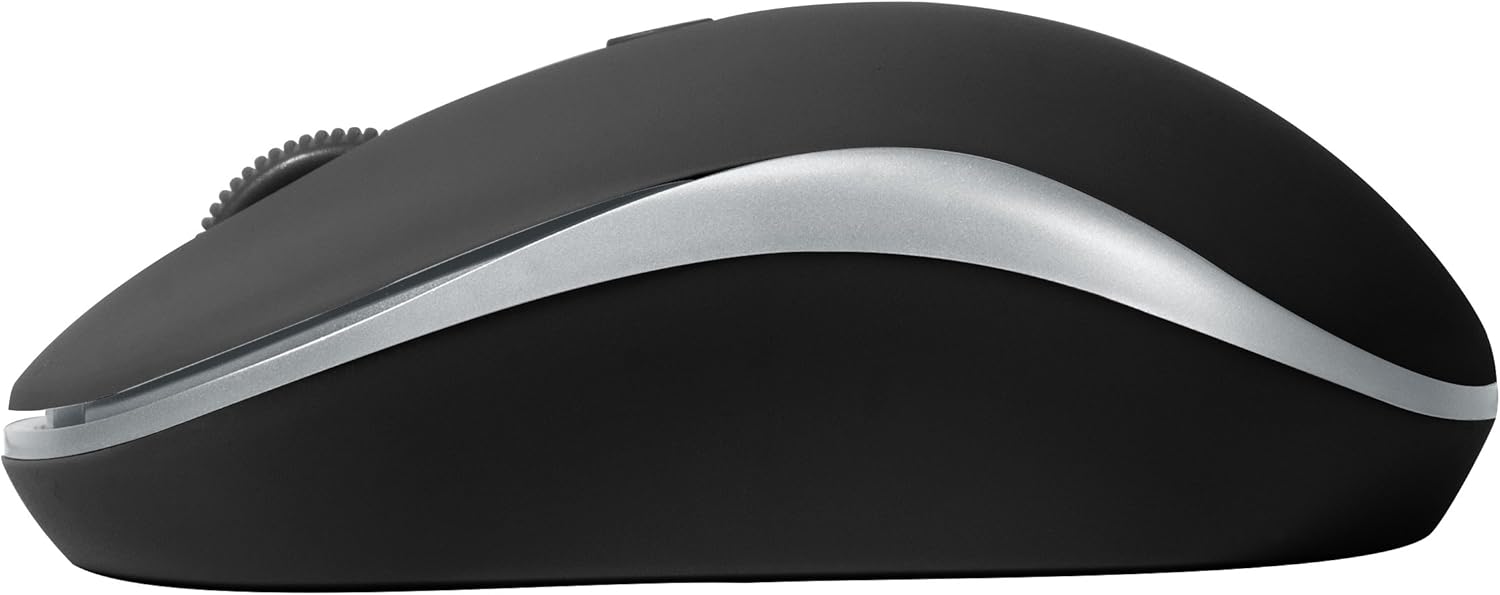
Figura 2: Ana view of the BYTECH Wireless Optical Mouse. This angle highlights the ergonomic curve and the silver accent line that runs along the side of the mouse.
Konfigurimi
1. Instalimi i baterisë
- Gjeni ndarjen e baterisë në pjesën e poshtme të miut.
- Hapni kapakun e ndarjes së baterisë.
- Insert one AA battery (not included) into the compartment, ensuring the correct polarity (+/-) as indicated inside.
- Mbyllni mirë kapakun e ndarjes së baterisë.
2. Lidhja e marrësit USB
- Hiqeni marrësin USB nga vendi i tij i ruajtjes, zakonisht i vendosur brenda ndarjes së baterisë ose afër saj.
- Lidheni marrësin USB në një portë USB të disponueshme në kompjuterin ose laptopin tuaj.
- Sistemi juaj operativ duhet të zbulojë dhe instalojë automatikisht drajverët e nevojshëm. Kjo mund të zgjasë disa çaste.
3. Aktivizimi
- Locate the On/Off switch on the underside of the mouse.
- Slide the switch to the "On" position. The mouse should now be ready for use.
Udhëzimet e funksionimit
Funksionet Bazë
- Klikoni majtas: Shtypni butonin e majtë për të zgjedhur artikuj, për të hapur lidhje ose për të aktivizuar funksione.
- Klikoni me të djathtën: Shtypni butonin e djathtë për të hapur menutë e kontekstit ose për të aksesuar opsione shtesë.
- Rrota e lëvizjes: Rrotulloni rrotën lart ose poshtë për të shfletuar dokumentet ose web pages. Press the scroll wheel for middle-click functionality (e.g., opening links in new tabs).
Rregullimi i DPI
The mouse features a DPI (Dots Per Inch) button, typically located behind the scroll wheel. Press this button to cycle through different sensitivity settings. Each press will change the cursor speed, allowing you to find the optimal setting for your task.
- Shtypni Butoni DPI once to switch to the next sensitivity level.
- Repeat until you find your preferred cursor speed.
Modaliteti i kursimit të energjisë
To conserve battery life, the BYTECH Wireless Optical Mouse is designed to automatically enter a sleep mode after a period of inactivity. To wake the mouse, simply move it or click any button.
Mirëmbajtja
Pastrimi
- Sigurohuni që mausi të jetë i fikur para pastrimit.
- Përdorni një leckë të butë, pa garzë pak dampe mbushur me ujë ose me një zgjidhje të butë pastrimi.
- Fshijeni sipërfaqen e mausit butësisht. Shmangni lagështinë e tepërt.
- For the optical sensor, use a dry cotton swab to carefully remove any dust or debris.
- Do not use abrasive cleaners, alcohol, or solvents, as these may damage the surface.
Ndërrimi i baterisë
When the mouse performance degrades or the cursor becomes erratic, it may be time to replace the battery. Follow the battery installation steps outlined in the "Setup" section.
Magazinimi
When not in use for an extended period, it is recommended to turn off the mouse to conserve battery life. The USB receiver can be stored in its dedicated slot on the mouse's underside to prevent loss.
Zgjidhja e problemeve
- Mausi nuk përgjigjet:
- Sigurohuni që miu të jetë i ndezur.
- Kontrolloni nivelin e baterisë dhe zëvendësojeni nëse është e nevojshme.
- Verifikoni që marrësi USB është i lidhur mirë në një portë USB që funksionon. Provoni një portë tjetër USB.
- Rinisni kompjuterin tuaj.
- Cursor erratic or jumping:
- Pastroni sensorin optik në pjesën e poshtme të mausit.
- Ensure you are using the mouse on a suitable surface (non-reflective, non-transparent). A mouse pad is recommended.
- Kontrolloni për ndërhyrje të forta elektromagnetike nga pajisje të tjera.
- Probleme me lidhjen:
- Reduce the distance between the mouse and the USB receiver.
- Remove any large metal objects or electronic devices that might be obstructing the wireless signal.
- If using a USB hub, try connecting the receiver directly to the computer.
Specifikimet
| Veçori | Detaj |
|---|---|
| Markë | Bytech |
| Model | BYTECH Wireless Optical Mouse |
| Teknologjia e lidhjes | Wireless (Marrës USB) |
| Teknologjia e zbulimit të lëvizjes | Optike |
| Ngjyra | E zezë |
| Burimi i energjisë | Me bateri (1x AA, nuk përfshihen) |
| Përputhshmëria e Sistemit Operativ | macOS, Android (and generally Windows) |
| Pesha e artikullit | 3.56 ons |
| Dimensionet e produktit (LxWxH) | 1 x 1 x 1 inç (Përafërsisht) |
Shënim: Specifikimet mund të ndryshojnë pa njoftim.
Garancia dhe Mbështetja
Bytech products are manufactured to the highest quality standards. For information regarding warranty coverage, technical support, or service, please refer to the warranty card included with your product or visit the official Bytech webvend. Ruajeni faturën e blerjes si provë blerjeje për kërkesat e garancisë.
For further assistance, please contact Bytech customer support through their official channels.
Dokumentet përkatëseBYTECH Wireless Optical Mouse


Ask a question about this manual
Ask about setup, troubleshooting, compatibility, parts, safety, or missing instructions. Manuals+ will review the question and use this page’s manual context to help answer it.