
1. Hyrje
This manual provides essential information for the safe and efficient operation of your lightmaXX Nano Beam FX show effect light. Please read it thoroughly before use and retain it for future reference.
2. Udhëzimet e sigurisë
- Lexoni me kujdes të gjitha udhëzimet.
- Mbajeni këtë manual për referencë në të ardhmen.
- Mos e ekspozoni pajisjen ndaj shiut ose lagështisë.
- Siguroni ventilimin e duhur.
- Disconnect from power before cleaning or servicing.
- Use only specified power supply.
- Shmangni ekspozimin e drejtpërdrejtë të syve ndaj burimit të dritës.
- Kjo pajisje është vetëm për përdorim të brendshëm.
- Ensure the mounting bracket is securely fastened.
3. Përmbajtja e paketës
Verify that all items are present and in good condition.
- lightmaXX Nano Beam FX Unit
- Kabllo energjie
- Telekomandë
- Manual udhëzimi (ky dokument)

Image 1: lightmaXX Nano Beam FX unit, power cable, and remote control.
4. Produkti i Mbaruarview
4.1 Paneli i përparmë
The front panel features multiple lenses for projecting various light effects.
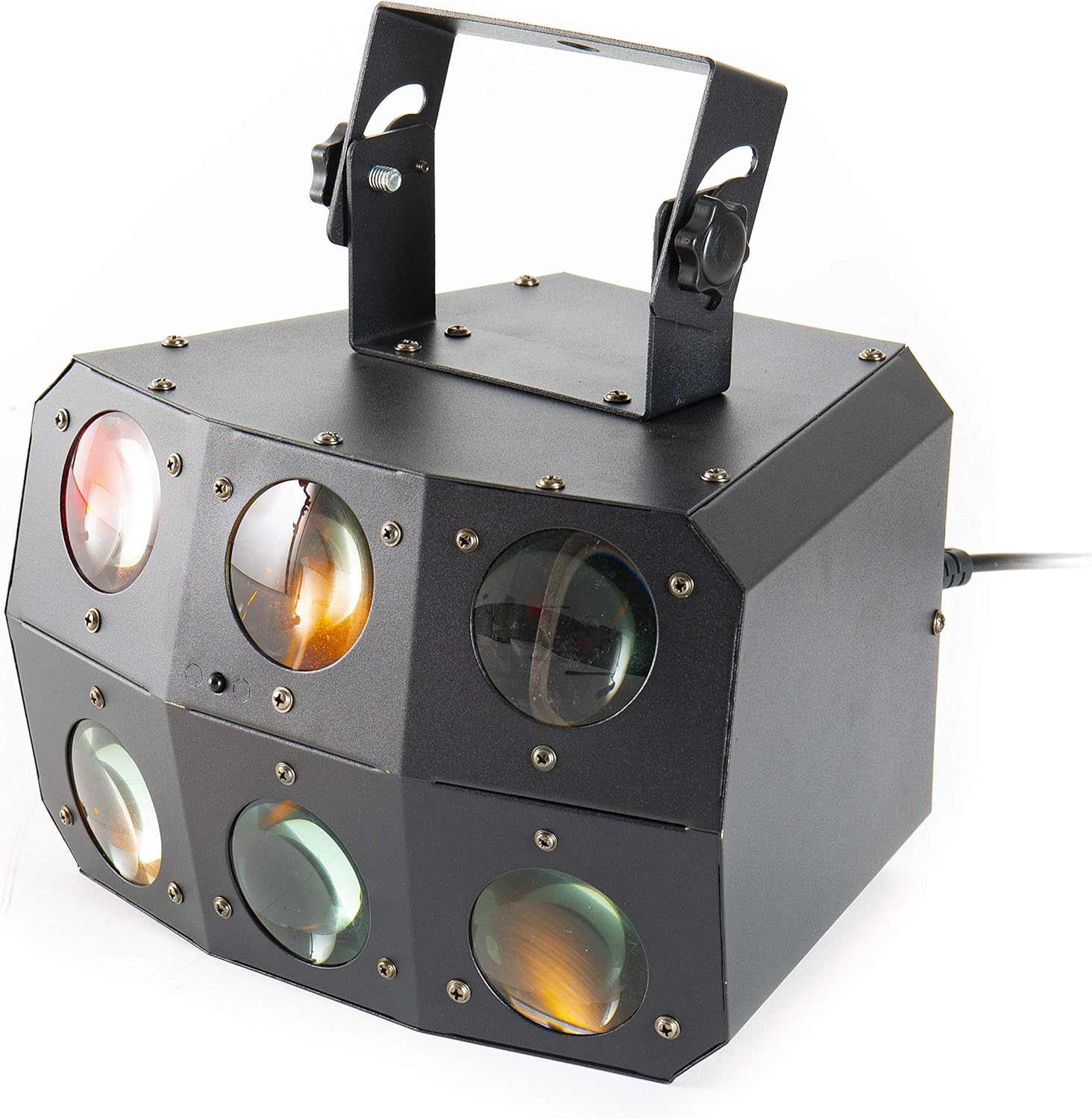
Imazhi 2: Pamje nga afër view of the front lenses.
4.2 Paneli i pasmë dhe lidhjet
The rear panel provides power input/output, DMX connections, and control interface.

Image 3: Rear panel with connections and control interface.
- FUQIA NË: Lidhni këtu kabllon e furnizimit të energjisë.
- FUNKSIONIMI: For daisy-chaining power to other units.
- DMX IN: Connect DMX controller or previous DMX device.
- DMX JASHT: Connect to the next DMX device in the chain.
- MIC: Built-in microphone for sound-activated modes.
- Ekrani dhe butonat: For menu navigation and settings (MENU, UP, DOWN, ENTER).
- SAFETY ROPE: Attachment point for a safety cable.
4.3 Telekomanda
The included remote control allows for convenient operation of the unit's functions.
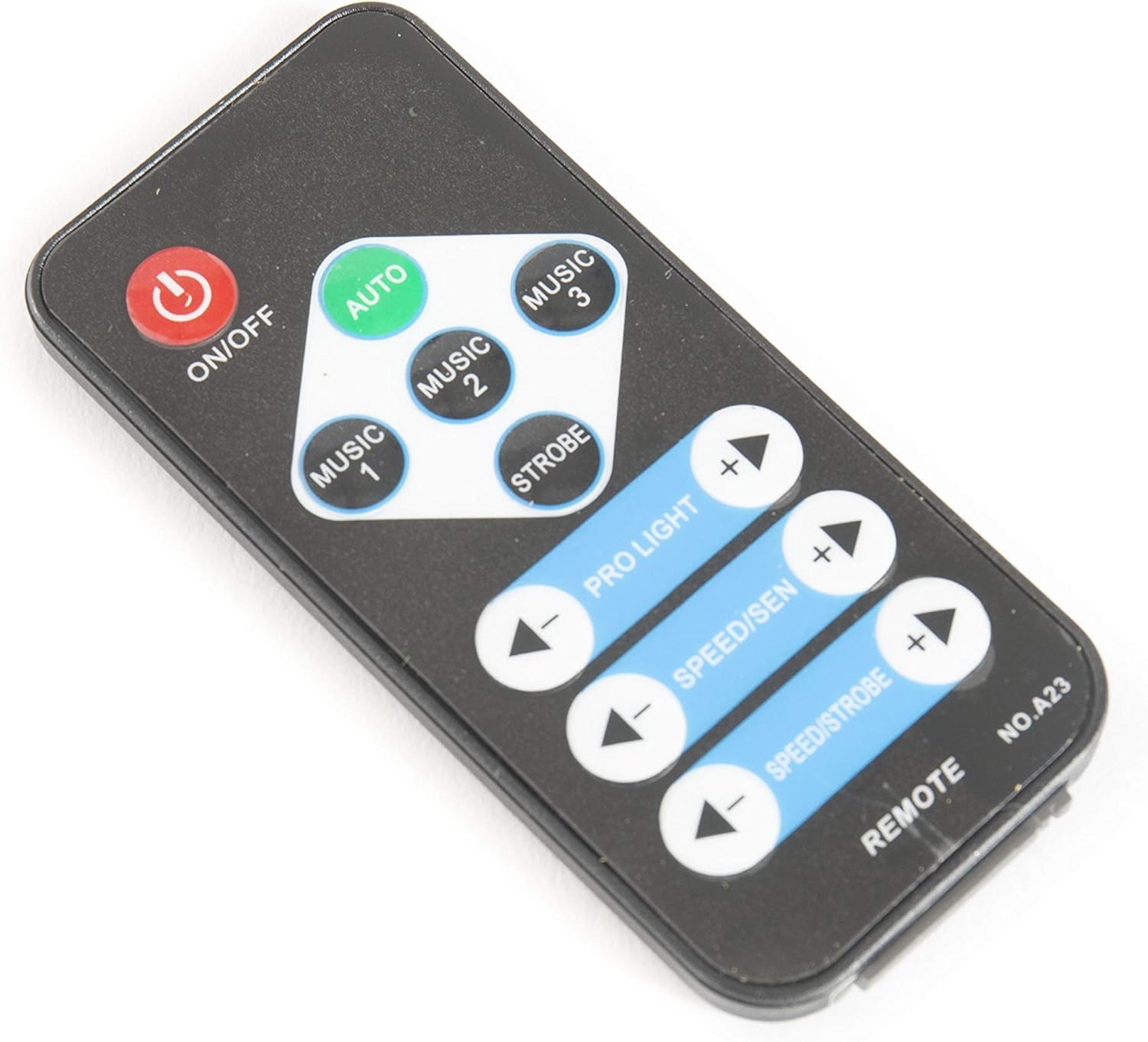
Image 4: Remote control for the Nano Beam FX.
- AKTIV/FIKUR: Power on or off the unit.
- MAKINA: Activates automatic program mode.
- MUZIKË 1/2/3: Aktivizon modalitetet e aktivizuara nga tingulli me ndjeshmëri ose modele të ndryshme.
- STROBE: Aktivizon efektin stroboskopik.
- PRO LIGHT: Adjusts light intensity or program selection.
- SPEED/SEN: Adjusts program speed or sound sensitivity.
5. Konfigurimi
5.1 Shpaketimi
Carefully remove the unit from its packaging. Inspect for any damage during transit. Retain packaging for future transport or storage.
5.2 Montimi
The Nano Beam FX unit is equipped with a mounting bracket for secure installation.

Image 5: Adjustable mounting bracket.
- Attach the unit securely to a truss, ceiling, or wall using appropriate clamps and hardware (not included).
- Always use a safety cable (not included) attached to the SAFETY ROPE point on the rear panel, ensuring it can hold the weight of the unit.
- Adjust the angle of the unit using the knobs on the mounting bracket.
5.3 Lidhja e energjisë
Connect the supplied power cable to the POWER IN socket on the rear panel and then to a suitable power outlet.
5.4 Lidhja DMX (Opsionale)
For advanced control, connect the unit to a DMX controller.
- Connect a DMX cable from your DMX controller's output to the DMX IN socket of the Nano Beam FX.
- If connecting multiple DMX devices, connect from the DMX OUT of the first unit to the DMX IN of the next.
- Refer to the DMX channel chart (not provided in product data) for specific DMX control parameters.
6. Operative
6.1 Ndez/Fik
Shtypni ON/FIKUR button on the remote control or ensure the unit is connected to power. The unit will power on automatically when connected to power.
6.2 Mënyrat e funksionimit
The Nano Beam FX offers several operating modes, selectable via the remote control or the rear panel display.
- Modaliteti AUTO: Shtypni AUTO button on the remote. The unit will cycle through its pre-programmed light shows automatically.
- Modaliteti MUZIKË: Shtypni MUZIK 1, MUZIK 2, ose MUZIK 3 on the remote. The unit will react to sound picked up by its internal microphone. Different music modes may offer varying sensitivities or patterns.
- Modaliteti STROBE: Shtypni Grep button on the remote to activate a flashing light effect.
- Modaliteti DMX: If connected to a DMX controller, the unit will respond to DMX signals. Use the rear panel display to set the DMX address.

Imazhi 6: P.sh.ample of light effects (blue and red).

Imazhi 7: P.sh.ample of light effects (green and yellow).

Imazhi 8: P.sh.ample of light effects (orange and red).
6.3 Adjustments via Remote Control
- PRO LIGHT: Përdorni + dhe - buttons to cycle through different light programs or adjust intensity in certain modes.
- SPEED/SEN: Përdorni + dhe - buttons to adjust the speed of automatic programs or the sensitivity of sound-activated modes.
7. Mirëmbajtja
7.1 Pastrimi
Disconnect the unit from power before cleaning. Use a soft, lint-free cloth to wipe the exterior. For lenses, use a specialized lens cleaner and cloth to avoid scratches. Do not use abrasive cleaners.
7.2 Ruajtja
When not in use, store the unit in its original packaging or a suitable case in a dry, dust-free environment.
8. Troubleshooting
| Problem | Shkaku i mundshëm | Zgjidhje |
|---|---|---|
| Njësia nuk ndizet. | Nuk ka furnizim me energji elektrike; kabllo e dëmtuar. | Kontrolloni lidhjen e kabllit të energjisë; provoni një prizë tjetër. |
| Telekomanda nuk funksionon. | Bateri e ngordhur; pengesë; jashtë rrezes së veprimit. | Replace remote battery; ensure clear line of sight; move closer to unit. |
| No light effects. | Unit in DMX mode without DMX signal; program not selected. | Select AUTO or MUSIC mode; check DMX connection and settings. |
| Sound-activated mode not responding. | Ndjeshmëria e mikrofonit është shumë e ulët; nuk ka hyrje zanore. | Increase sensitivity using remote; ensure sound source is close to the unit. |
9. Specifikimet
| Veçori | Detaj |
|---|---|
| Model | Nano Beam FX |
| Markë | lightmaXX |
| Dimensionet e produktit | 32 x 30 x 29 cm |
| Pesha e artikullit | 3.5 kg |
| Burimi i energjisë | Elektrike me kabllo |
| Burimi i dritës Wattage | 3 Watts (per light source) |
| Numri i burimeve të dritës | 24 |
| Referenca e prodhuesit | LIG0015648-000 |
| ASIN | B07JM9XVT4 |
10. Garancia dhe Mbështetja
Për informacion mbi garancinë dhe mbështetjen teknike, ju lutemi referojuni faqes zyrtare të prodhuesit webnë faqen e internetit ose kontaktoni shitësin tuaj. Ruajeni provën e blerjes për çdo kërkesë garancie.