
JOYACCESS JKB2B
JOYACCESS Wireless Keyboard Instruction Manual
Model: JKB2B
1. Hyrje
This manual provides detailed instructions for the setup, operation, and maintenance of your JOYACCESS 2.4G Slim and Compact Wireless Keyboard. Please read this manual thoroughly before using the product to ensure proper functionality and longevity.

Një e plotë view of the JOYACCESS 2.4G Slim and Compact Wireless Keyboard, showcasing its sleek design and full layout with a numeric pad.
2. Përmbajtja e paketës
- JOYACCESS Wireless Keyboard
- Marrës USB Nano
- Manuali i Përdoruesit (ky dokument)
- Shënim: Nevojiten 2 bateri AA të cilat nuk përfshihen.
3. Udhëzuesi i konfigurimit
3.1 Instalimi i baterisë
The keyboard requires two AA batteries for operation. Follow these steps to install them:
- Gjeni ndarjen e baterisë në pjesën e poshtme të tastierës.
- Hapni kapakun e ndarjes së baterisë.
- Vendosni dy bateri AA, duke u siguruar që polariteti të jetë i saktë (+/-).
- Mbyllni mirë kapakun e ndarjes së baterisë.

This image illustrates the location of the battery compartment and the USB nano receiver storage slot on the back of the keyboard. The text "BATTERIES NOT INCLUDED" is visible, along with an arrow pointing to the USB receiver.
3.2 Connecting the Keyboard (Plug and Play)
The JOYACCESS Wireless Keyboard uses a 2.4G wireless connection for easy setup:
- Remove the USB nano receiver from its storage slot in the keyboard's battery compartment.
- Plug the USB nano receiver into an available USB port on your computer (Laptop, PC, MacBook, etc.).
- Turn on the keyboard using the ON/OFF switch, usually located near the battery compartment.
- The keyboard will automatically connect to your computer. No additional drivers or software are required.

This image demonstrates the simple plug-and-play setup, showing the keyboard wirelessly connected to a laptop. It highlights the 2.4G wireless technology and a signal range of up to 33 feet.
4. Udhëzimet e funksionimit
4.1 Përdorimi bazë
Once connected, the keyboard functions like a standard full-size keyboard. The low-profile design and scissor-switch keys provide a comfortable and quiet typing experience.

This image focuses on the scissor-switch key mechanism, illustrating how it provides light, responsive, and quiet typing.
4.2 Dritat treguese
The keyboard features indicator lights for important functions:
- Blloko numrat: Indicates when the numeric keypad is active.
- Kyçja me kapele: Indicates when Caps Lock is enabled.
- Power/Battery Status: Indicates power status and low battery warning.

This image clearly labels the Num Lock, Caps Lock, and Power indicator lights located on the top right of the keyboard.
4.3 Tastet Multimediale dhe të Funksioneve
The keyboard includes 10 additional keys for quick access to multimedia and office functions. These are typically accessed by pressing the Fn key in combination with the corresponding F-key (F1-F12).
- Fn + F1-F12: Control volume, media playback, web browser, email, and other common applications. Refer to the key legends for specific functions.
4.4 Auto-Sleep Feature
To conserve battery life, the keyboard will enter a sleep state after 8 minutes of inactivity. To wake the keyboard, simply press any key. It will reconnect automatically.

This diagram visually explains the auto-sleep feature, showing the transition from active to sleep mode and back to active mode upon key press, designed to save battery power.
4.5 Përputhshmëri e Gjerë
Tastiera është e pajtueshme me një gamë të gjerë sistemesh operative dhe pajisjesh:
- Windows 2000 / ME / XP / Vista / 7 / 8 / 10
- MacBook, desktops, Chromebook, PC, Laptop, Computer, Smart TV, and more.

This image displays icons for various compatible devices and operating systems, including laptops, desktops, Windows, Mac, and MacBook Pro, illustrating the keyboard's broad compatibility.
5. Mirëmbajtja
5.1 Pastrimi i tastierës
Për të ruajtur pamjen dhe funksionalitetin e tastierës:
- Përdorni një leckë të butë dhe të thatë për të fshirë sipërfaqen e tastierës.
- Për papastërti kokëfortë, pakampsq leckën me ujë ose një pastrues të butë, jo gërryes.
- Avoid using excessive liquid or harsh chemicals, as they may damage the electronics.
- Përdorni ajër të kompresuar për të hequr pluhurin dhe mbeturinat midis çelësave.
5.2 Ndërrimi i baterisë
When the power indicator light flashes or the keyboard becomes unresponsive, it's time to replace the batteries. Refer to Section 3.1 for battery installation instructions.
6. Troubleshooting
| Problem | Shkaku i mundshëm | Zgjidhje |
|---|---|---|
| Tastiera nuk përgjigjet | Low or dead batteries. USB receiver not properly connected. Keyboard is off. | Replace batteries. Ensure USB receiver is firmly plugged into a working USB port. Turn on the keyboard. |
| Delayed response or intermittent connection | Too far from receiver. Interference from other wireless devices. | Move keyboard closer to the USB receiver (within 33 feet). Move other wireless devices away from the receiver. |
| Çelësa specifikë nuk funksionojnë | Debris under the key. Software issue. | Clean the key area. Restart your computer. |
| Tastiera numerike nuk funksionon | Num Lock është i çaktivizuar. | Press the Num Lock key to activate the numeric keypad. |
7. Specifikimet
- Modeli: JKB2B
- Lidhshmëria: 2.4G pa tel (Marrës USB)
- Gama e funksionimit: Deri në 33 këmbë (10 metra)
- Burimi i energjisë: 2 x bateri AA (nuk përfshihen)
- Lloji kyç: Gërshërë-Switch
- Numri i çelësave: 86
- Dimensionet: 15.03 x 5.7 x 1.9 inç (38.18 x 14.48 x 4.83 cm)
- Pesha e artikullit: 1.21 paund (0.55 kg)
- Përputhshmëria: Windows 2000/ME/XP/Vista/7/8/10, Mac, PC, Laptop, Chromebook, Smart TV
- Karakteristikat e veçanta: Ergonomic, Lightweight, Silent, Ultra Slim, Numeric Pad, Multimedia Keys, Auto-Sleep
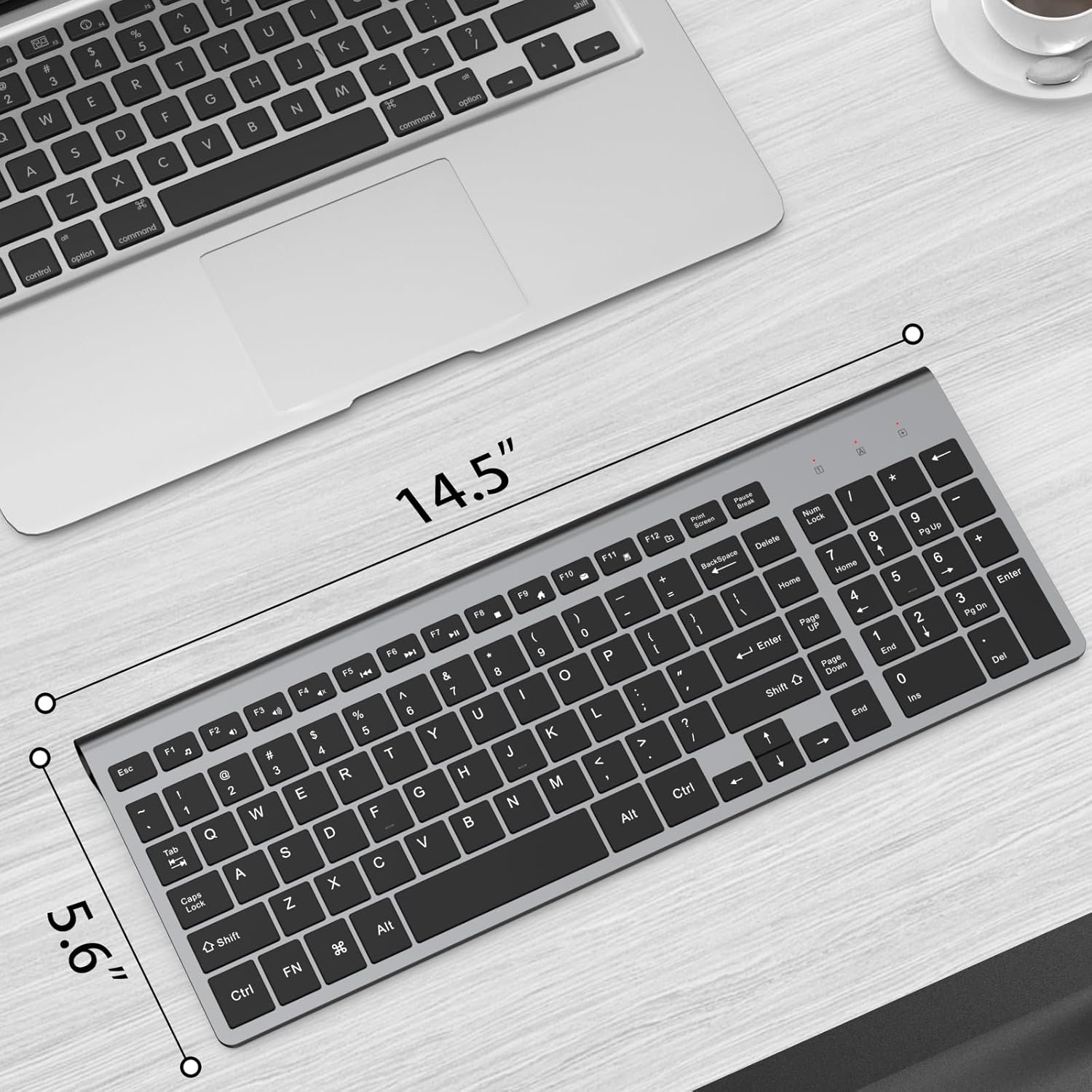
This image provides a visual representation of the keyboard's dimensions, indicating its length and width.

This diagram illustrates the ultra-slim design of the keyboard, showing its minimal thickness at both the front and back edges.
8. Garancia dhe Mbështetja
For warranty information, technical support, or customer service inquiries, please contact JOYACCESS customer support through the retailer's platform or visit the official JOYACCESS webfaqe interneti. Ju lutemi ruani provën e blerjes për kërkesat e garancisë.
Prodhuesi: J JOYACCESS
Dokumente të Ngjashme - JKB2B
 |
Kombinimi i tastierës dhe mausit pa tel JOYACCESS: Udhëzime për çiftëzimin Udhëzues hap pas hapi për çiftimin e pajisjeve të tastierës dhe mausit pa tel JOYACCESS duke përdorur marrësin USB. Përfshin udhëzime për konfigurimin e tastierës dhe mausit. |
Ask a question about this manual
Ask about setup, troubleshooting, compatibility, parts, safety, or missing instructions. Manuals+ will review the question and use this page’s manual context to help answer it.