
1. Udhëzime të rëndësishme sigurie
Ju lutemi lexoni me kujdes të gjitha udhëzimet e sigurisë dhe të përdorimit përpara se të përdorni këtë televizor. Ruajini këto udhëzime për referencë në të ardhmen.
- Burimi i energjisë: Connect the TV only to the power supply indicated on the label.
- Ventilimi: Siguroni ventilim të duhur. Mos i bllokoni hapjet e ventilimit.
- Pastrimi: Shkëputeni televizorin nga priza para pastrimit. Përdorni një leckë të butë dhe të thatë. Mos përdorni pastrues të lëngshëm ose pastrues me aerosol.
- Uji dhe lagështia: Do not use this TV near water, such as a bathtub, washbowl, kitchen sink, laundry tub, swimming pool, or in a wet basement.
- Nxehtësia: Position the TV away from heat sources such as radiators, heat registers, stoves, or other products (including amplifiers) që prodhojnë nxehtësi.
- Kabllot: Protect the power cord from being walked on or pinched, particularly at plugs, convenience receptacles, and the point where they exit from the TV.
- Rrufeja: Hiqeni këtë televizor nga priza gjatë stuhive me rrufe ose kur nuk përdoret për periudha të gjata.
- Servisimi: Do not attempt to service this TV yourself. Refer all servicing to qualified service personnel.
2. Produkti i Mbaruarview
The CHIQ L40H7N is a 40-inch Full HD Smart TV designed to provide an immersive viewing experience with integrated smart features. It offers a resolution of 1080p and includes connectivity options such as Wi-Fi and Bluetooth.
Karakteristikat kryesore:
- Full HD (1080p) Resolution: Ofron imazhe të qarta dhe të detajuara.
- Funksionaliteti i televizorit inteligjent: Access popular streaming services like Netflix, YouTube, and Prime Video.
- Integrated Wi-Fi and Bluetooth: For wireless connectivity and device pairing.
- Multiple Connectivity Ports: Includes 3 HDMI and 2 USB ports for various external devices.
- Tuner i trefishtë: Supports DVB-T/T2/C/S/S2 for versatile broadcast reception.
- Dolby Audio: Enhanced sound experience.
- Mbështetje HDR10: Provides improved contrast and color reproduction.
- Quad Core CPU: Ensures smooth performance for smart features and applications.

Imazhi: Përpara view of the CHIQ L40H7N Smart TV, showcasinkorniza dhe ekrani i tij i hollë.
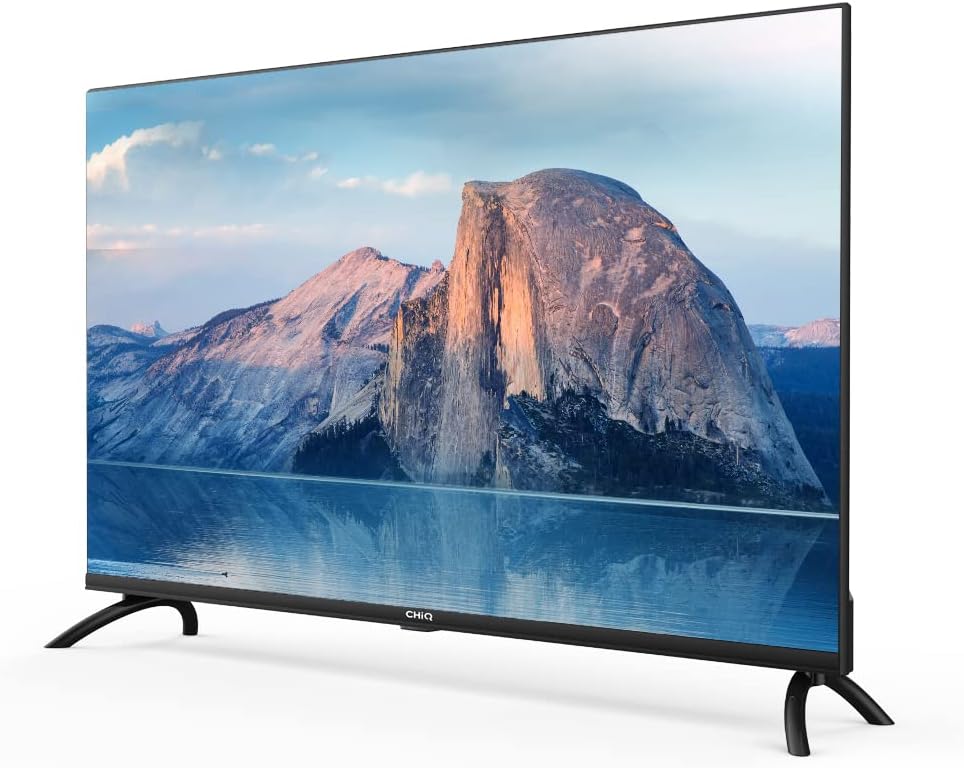
Imazh: Ana view of the CHIQ L40H7N Smart TV, highlighting its thin profile.
3. Konfigurimi
3.1 Shpaketimi
- Carefully open the packaging and remove the TV and all accessories.
- Ensure all components are present: TV unit, remote control, batteries, power cord, stand components, and user manual.
- Retain the packaging materials for future transport or servicing.
3.2 Instalimi i stendës
Për të instaluar mbështetësen e televizorit:
- Vendoseni televizorin me fytyrën poshtë mbi një sipërfaqe të butë dhe të sheshtë (p.sh., një batanije ose shkumë) për të parandaluar dëmtimin e ekranit.
- Vendosni këmbët e mbështetëses me hapësirat përkatëse në pjesën e poshtme të televizorit.
- Siguroni këmbët e mbështetëses duke përdorur vidat e dhëna. Sigurohuni që ato të jenë të shtrënguara fort.

Image: Diagram showing the dimensions of the CHIQ L40H7N TV, including height with stand (568.9mm), width (900.3mm), and depth with stand (178.9mm).
3.3 Montimi në Mur (Opsional)
If you choose to wall mount your TV, please consult a professional installer and refer to the specific instructions provided with your wall mount bracket. Ensure the wall mount is compatible with the TV's VESA mounting pattern.
3.4 Lidhja e pajisjeve periferike
Lidhni pajisjet e jashtme me portat e televizorit:
- HDMI: Connect Blu-ray players, game consoles, or set-top boxes to the HDMI ports (HDMI1, HDMI2, HDMI3).
- USB: Insert USB drives for media playback into the USB ports (USB1, USB2).
- Antena/kabllo: Lidhni antenën ose sinjalin e televizionit kabllor me hyrjen e duhur.
- Ethernet: Për një lidhje interneti me kabllo të qëndrueshme, lidhni një kabllo Ethernet në portën LAN.
3.5 Lidhja e energjisë
After connecting all necessary cables, plug the power cord into the TV's power input, then into a wall outlet.
3.6 Ndezja fillestare
Press the power button on the remote control or on the TV. Follow the on-screen instructions to complete the initial setup, including language selection, network connection, and channel scanning.
4. Përdorimi i televizorit
4.1 Funksionet e telekomandës
The remote control allows you to navigate the TV's features:
- Butoni i energjisë: Ndez ose fiket televizorin.
- Vëllimi +/-: Rregullon nivelin e volumit.
- Kanali +/-: Ndryshon kanalet televizive.
- Hyrja/Burimi: Zgjedh burimin e hyrjes (HDMI, USB, TV).
- Butonat e navigimit (Lart/Poshtë/Majtas/Djathtas/Në rregull): Lundron nëpër menu dhe konfirmon përzgjedhjet.
- Shtëpia/Qendra e Mençur: Qaset në ndërfaqen e Smart TV.
- Butonat e aplikacionit: Dedicated buttons for Netflix, YouTube, Prime Video, etc.
4.2 Karakteristikat e TV të Mençur
Your CHIQ L40H7N TV provides access to a range of smart features and applications:
- Hyrja në aplikacione: Press the Home button or dedicated app buttons to launch applications like Netflix, YouTube, and Prime Video.
- Dyqani i aplikacioneve: Shkarkoni dhe instaloni aplikacione shtesë nga dyqani i integruar i aplikacioneve.
- Ekran pasqyre: Cast content from compatible smartphones or tablets to your TV.

Image: The CHIQ Smart TV displaying the Netflix application interface, along with other streaming apps like YouTube and Prime Video.

Image: A CHIQ Smart TV screen showing a variety of content from streaming services, indicating a rich media experience.
4.3 Lidhja me rrjetin
To use Smart TV features, connect your TV to the internet:
- Wi-Fi: Shko te Cilësimet > Rrjeti > Wi-Fi, zgjidh rrjetin tënd dhe fut fjalëkalimin.
- Ethernet: Connect an Ethernet cable from your router to the TV's LAN port. The TV will automatically detect the wired connection.
4.4 Lidhshmëria Bluetooth
Pair Bluetooth devices like headphones or speakers:
- Enable Bluetooth on your external device and set it to pairing mode.
- On the TV, go to Settings > Remotes & Accessories > Bluetooth.
- Select your device from the list and follow the on-screen prompts to pair.
4.5 Zgjedhja e hyrjes
Press the 'Input' or 'Source' button on your remote to switch between connected devices (HDMI1, HDMI2, HDMI3, USB, TV Tuner).
4.6 Cilësimet e figurës dhe zërit
Adjust display and audio preferences via the Settings menu:
- Modaliteti i figurës: Zgjidhni nga cilësimet standarde, dinamike, të filmit ose të personalizuara.
- Shkëlqimi/Kontrasti/Ngjyra: Përmirësoni cilësinë e imazhit.
- Modaliteti i tingullit: Zgjidhni paracaktimet audio si standarde, muzikë, film ose të personalizuara.
- Dolby Audio: The TV supports Dolby Audio for enhanced sound.
- HDR10: Experience improved contrast and color with HDR10 content.

Image: The CHIQ L40H7N TV displaying a scene with the Dolby Audio logo, indicating support for enhanced sound.

Image: A split-screen comparison on the CHIQ L40H7N TV, demonstrating the visual improvement with HDR10 technology, showing richer colors and contrast.

Image: An illustration of a Quad Core CPU, representing the processing power within the CHIQ L40H7N TV for smooth operation.

Image: The CHIQ L40H7N TV positioned on a media console in a living room, showcasing its aesthetic integration into a home environment.
5. Mirëmbajtja
5.1 Pastrimi i televizorit
Për të ruajtur pamjen dhe performancën e televizorit:
- Ekrani: Fshijeni butësisht ekranin me një leckë të butë pa push. Për shenja kokëforta, fshijeni lehtë.ampLani leckën me ujë ose me një pastrues të specializuar për ekranin (mos e spërkatni direkt mbi ekran).
- Kabineti: Fshijeni kabinetin e televizorit me një leckë të butë dhe të thatë. Shmangni përdorimin e pastruesve ose tretësve gërryes.
- Gjithmonë shkëputeni televizorin nga priza para se ta pastroni.
5.2 Përditësimet e softuerit
Regular software updates can improve performance and add new features:
- Përditësimet automatike: Sigurohuni që televizori juaj të jetë i lidhur me internetin për përditësime automatike.
- Kontroll manual: You can manually check for updates in the Settings menu (e.g., Settings > About > System Update).
6. Troubleshooting
Nëse hasni probleme me televizorin tuaj, referojuni problemeve dhe zgjidhjeve të zakonshme të mëposhtme:
- Pa fuqi:
- Check if the power cord is securely plugged into the TV and the wall outlet.
- Ensure the wall outlet is functioning by testing it with another device.
- Try pressing the power button on the TV itself, not just the remote. - Nuk ka figurë, por ka zë:
- Check the input source. Ensure it matches the device you are trying to view (e.g., HDMI1 for a Blu-ray player).
- Verify that the external device is powered on and functioning correctly.
- Try a different HDMI cable or port. - Nuk ka tingull, por imazhi është i pranishëm:
- Check the volume level and ensure the TV is not muted.
- Verify audio output settings in the TV menu (e.g., internal speakers, external audio system).
- If using an external device, check its volume and audio settings. - Telekomanda nuk funksionon:
- Zëvendësoni bateritë në telekomandë.
- Sigurohuni që të mos ketë pengesa midis telekomandës dhe sensorit IR të televizorit.
- Point the remote directly at the TV. - Probleme me lidhjen e rrjetit:
- Rinisni routerin dhe modemin tuaj.
- Check Wi-Fi password if connecting wirelessly.
- If using a wired connection, ensure the Ethernet cable is properly connected.
If the problem persists, consult the CHiQ customer support or a qualified technician.
7. Specifikimet
Below are the technical specifications for the CHIQ L40H7N Smart TV:
| Veçori | Specifikimi |
|---|---|
| Markë | CHiQ |
| Emri i modelit | L40H7N |
| Madhësia e ekranit | 40 inç |
| Teknologjia e shfaqjes | LCD |
| Rezolucioni | 1080p (HD e plotë) |
| Shpejtësia e rifreskimit | 60 Hz |
| Veçori e veçantë | Full HD, Smart TV, HDR10, Dolby Audio |
| Teknologjia e lidhjes | Bluetooth, Ethernet, HDMI (3 porta), USB (2 porta), Wi-Fi |
| Shërbimet e mbështetura në internet | Amazon Instant Video, Netflix, YouTube |
| Pajisjet e përputhshme | Laptop, Smart Speaker, Smart Watch, Tablet, Car Audio System, Cellphone |
| Konsumi i energjisë (SDR) | 47.0 W |
| Klasa e efikasitetit të energjisë (SDR) | G |
| Screen Diagonal (cm) | 100.3 cm |
| Screen Resolution (pixels) | 1920 x 1080 |
| Përditësimet minimale të garantuara të softuerit deri më | 20-01-2030 |
| Minimum Guaranteed Spare Parts Until | 20-01-2029 |
Për informacion të detajuar mbi energjinë, ju lutemi referojuni bazës së të dhënave EPREL: https://eprel.ec.europa.eu/qr/454406

Image: The EU Energy Label for the CHIQ L40H7N TV, showing an energy efficiency class G and consumption of 47 kWh/1000h.
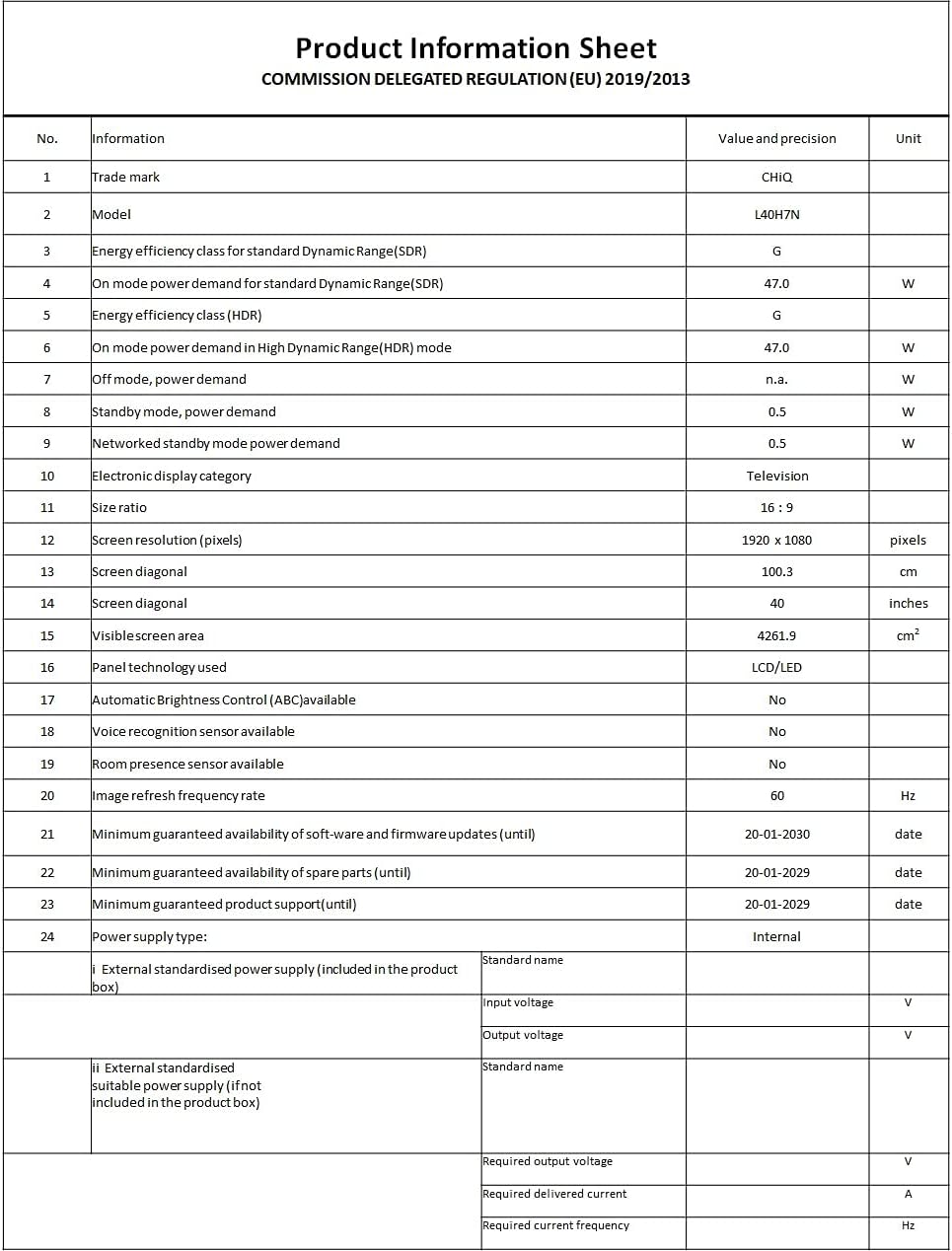
Image: A Product Information Sheet for the CHIQ L40H7N, detailing various specifications and compliance with COMMISSION DELEGATED REGULATION (EU) 2019/2013.
8. Garancia dhe Mbështetja
Your CHIQ L40H7N Smart TV comes with a manufacturer's warranty. Please refer to the warranty card included in your product packaging for specific terms and conditions, including warranty period and coverage details.
Mbështetja e klientit:
For technical assistance, troubleshooting, or warranty claims, please contact CHiQ customer support. Contact information can typically be found on the CHiQ official webnë faqen e internetit ose në dokumentacionin e produktit tuaj.