
1. Hyrje
Faleminderit për blerjenasing the Moukey MAMP1 220W Bluetooth Dual Channel Power Amplifies. Kjo amplifier is designed to provide powerful and versatile audio amplification for various applications, including karaoke, home theater systems, and general audio playback. It features multiple input options, Bluetooth 5.0 connectivity, and intuitive controls for an enhanced audio experience. Please read this manual thoroughly before use to ensure proper operation and to maximize the product's performance.
2. Udhëzimet e sigurisë
Për të parandaluar goditjen elektrike, zjarrin ose dëmtimin e pajisjes, ju lutemi të ndiqni masat paraprake të sigurisë si më poshtë:
- Mos e ekspozoni këtë njësi ndaj shiut ose lagështisë.
- Mos e hapni c-nëasing. Brenda nuk ka pjesë që mund të riparohen nga përdoruesi. Ia drejtoni të gjitha shërbimet personelit të kualifikuar.
- Sigurohuni që furnizimi me energji voltage përputhet me kërkesat e specifikuara në njësi.
- Place the unit on a stable, flat surface with adequate ventilation. Do not block ventilation openings.
- Mbajeni pajisjen larg burimeve të nxehtësisë, rrezeve të diellit direkte dhe pluhurit të tepërt.
- Disconnect the power plug from the outlet if the unit will not be used for an extended period.
- Mos e përdorni njësinë me duar të lagura.
3. Përmbajtja e paketës
Verifikoni që të gjitha sendet janë të pranishme në paketim:
- Moukey MAMP1 Fuqia AmpNjësi lifier
- Telekomandë
- Antenë FM
- Manuali i Përdoruesit (Ky dokument)
4. Produkti i Mbaruarview
4.1 Front Panel Controls and Functions
The front panel provides access to all primary controls and input ports for easy operation.

Image: Detailed diagram of the Moukey MAMP1 front panel, highlighting each control and port with corresponding numbers.
- Ndërprerësi i energjisë: Ndez ose fiket njësinë.
- USB / SD Slot: Për të luajtur audio files from USB drives (max 32GB) or SD cards (max 16GB).
- Butoni i modalitetit: Cycles through input modes (Bluetooth, USB, SD, AUX, FM).
- Butoni BT: Directly switches to Bluetooth mode.
- Prev Button: Skips to the previous track/station.
- Butoni i luajtjes / Pauzës: Luan ose ndalon riprodhimin e audios.
- Butoni tjetër: Skips to the next track/station.
- Ekran LED: Shows current mode, track information, or frequency.
- Folder / Track: Navigates through folders or tracks on USB/SD.
- Doreza kryesore e volumit: Rregullon volumin e përgjithshëm të daljes.
- Jack kufje: 3.5mm output for monitor headphones.
- Microphone 1 Input: 6.35mm jack for microphone connection.
- Microphone 2 Input: 6.35mm jack for a second microphone connection.
- Doreza e volumit të mikrofonit: Rregullon volumin e mikrofonave të lidhur.
- Doreza e jehonës: Controls the echo effect for microphones.
- Doreza e basit: Rregullon daljen audio me frekuencë të ulët.
- Doreza e trefishtë: Rregullon daljen audio me frekuencë të lartë.
- Doreza e bilancit: Rregullon balancën e kanalit majtas/djathtas.
- Foleja hyrëse AUX: Hyrje 3.5 mm për pajisje audio të jashtme.
- Përzgjedhësi i hyrjes: Rotary switch to select between CD, AUX, DVD, and MP3/W inputs.
4.2 Lidhjet e panelit të pasmë
The rear panel houses the main audio input and output connections.

Imazh: Pjesa e pasme view of the Moukey MAMP1 amplifier, showing all input and output ports.

Image: Detailed diagram of the Moukey MAMP1 rear panel, highlighting each connection point.
- Audio Input for DVD (RCA): Connect DVD players or other audio sources.
- Audio Input for CD (RCA): Connect CD players or other audio sources.
- Line Out Jack (RCA): Për t'u lidhur me një tjetër ampmë e gjallë ose pajisje regjistrimi.
- Priza e antenës FM: Lidhni antenën FM të përfshirë për marrjen e sinjalit radio.
- Speaker Output Jacks: Connect passive speakers (4-16 Ohm impedance).
- Hyrja e kabllit të energjisë: Lidhni kordonin e rrymës AC.
5. Konfigurimi
5.1 Vendosja
Vendosni amplifier on a flat, stable surface. Ensure there is sufficient space around the unit for proper ventilation to prevent overheating.
5.2 Lidhja e energjisë
Connect the power cable to the Power Cable Input on the rear panel of the amplifier, then plug the other end into a suitable AC power outlet (115V AC).
5.3 Lidhja e altoparlantit
MAMP1 amplifier supports two sets of passive speakers with an impedance of 4-16 Ohms. Use appropriate speaker wire to connect your speakers to the Speaker Output Jacks on the rear panel.

Image: Diagram illustrating how to connect speakers to the amplifier's binding posts.
- Rotate and loosen the speaker knob on the binding post.
- Insert the bare wire (remove approximately 10mm of insulation) into the hole. Ensure correct polarity (+ to + and - to -).
- Tighten the knobs to secure the wires firmly.
5.4 Lidhja e Pajisjes Hyrëse
Connect your audio sources (CD player, DVD player, tuner, etc.) to the corresponding RCA Audio Input jacks on the rear panel. For microphones, use the 6.35mm jacks on the front panel. For 3.5mm AUX devices, use the front panel AUX Input Jack.
6. Udhëzimet e funksionimit
6.1 Ndez/Fik
Shtypni Ndërprerësi i energjisë në panelin e përparmë për të ndezur amplifier on or off. The LED display will illuminate when the unit is powered on.
6.2 Zgjedhja e hyrjes
Përdorni Butoni i modalitetit on the front panel or the remote control to cycle through available input sources (Bluetooth, USB, SD, AUX, FM). Alternatively, use the Zgjedhësi i hyrjes knob on the front panel for RCA inputs (CD, AUX, DVD, MP3/W).
6.3 Kontrolli i volumit
- Vëllimi Master: Rrotulloni Çelës Master Vëllimi to adjust the overall output level of the ampmë i gjallë
- Volumi i mikrofonit: Përdorni Doreza e volumit të mikrofonit to control the volume of connected microphones independently.
6.4 Kontrolli i tonit
Adjust the audio characteristics using the Çelës basi dhe Çelësi i trefishtë to suit your preference. The Butoni i bilancit allows adjustment of the left and right channel output levels.

Image: Close-up of the Moukey MAMP1 showing the Bass and Treble adjustment knobs.
6.5 Echo Control
Kthejeni Doreza e jehonës to add or reduce the echo effect on the microphone inputs, suitable for karaoke applications.
6.6 Çiftimi Bluetooth
Për të lidhur një pajisje Bluetooth:
- Shtypni Butoni BT or cycle through modes until "BLUE" appears on the LED display.
- Aktivizoni Bluetooth në smartphone, tablet ose kompjuter.
- Kërko për "Moukey MAMP1" in your device's Bluetooth settings and select it to pair.
- Once paired, you can stream audio wirelessly. Playback will temporarily pause during phone calls to protect privacy.
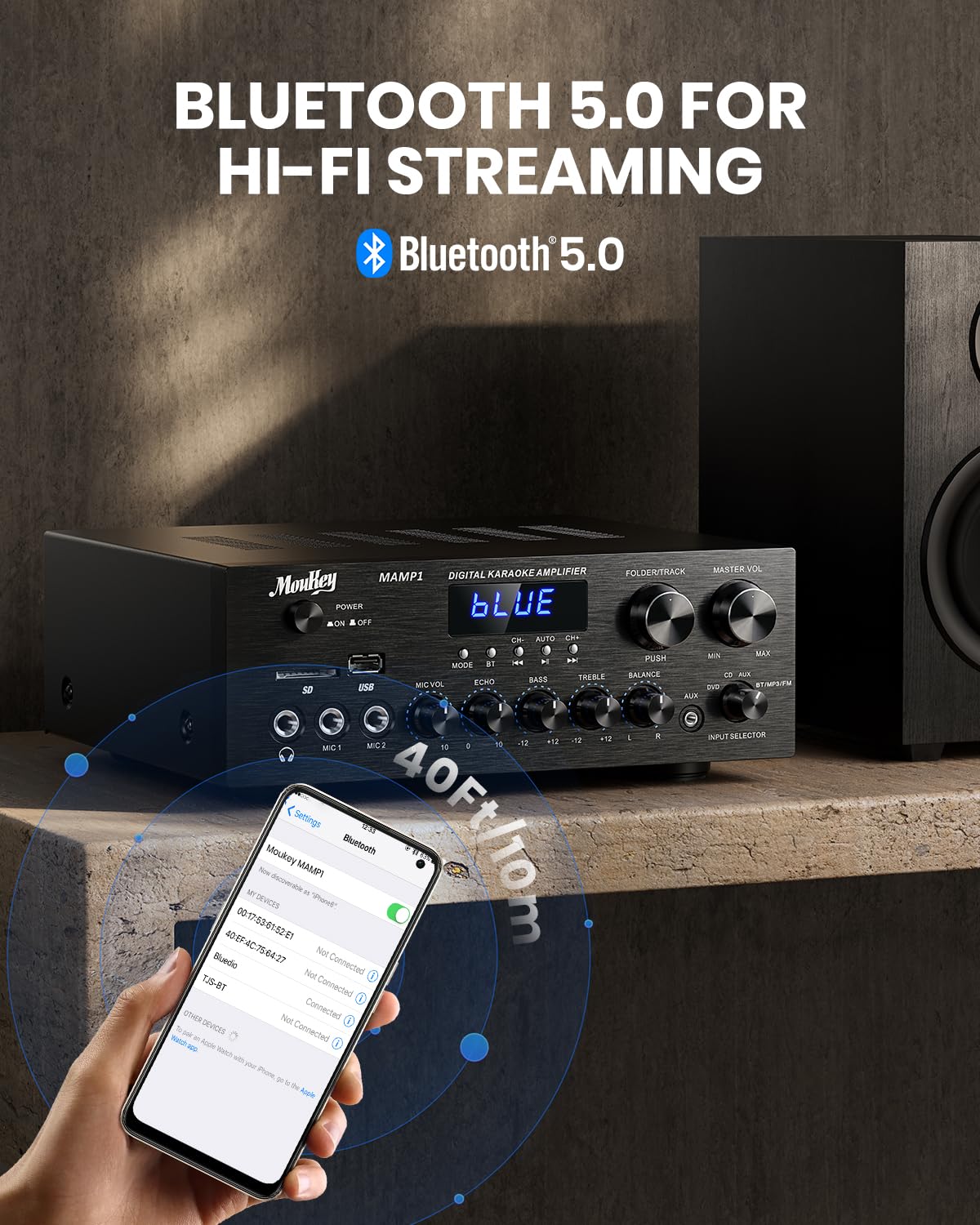
Image: The Moukey MAMP1 amplifier displaying "BLUE" on its screen, indicating Bluetooth mode, with a smartphone showing pairing options.
6.7 Luajtje me USB/SD
Insert a USB drive (max 32GB) or SD card (max 16GB) into the respective slot on the front panel. The amplifier will automatically switch to USB/SD mode and begin playback. Use the Prev, Luaj/Puzë, Tjetra, dhe Folder/Track butonat për të kontrolluar riprodhimin.
Radio FM 6.8
Ensure the FM antenna is connected to the rear panel. Select FM mode using the Butoni i modalitetit. Përdorni Prev dhe Tjetra buttons to tune to radio stations. The LED display will show the current frequency.
7. Mirëmbajtja
To maintain the performance and appearance of your ampme i gjalle:
- Pastrimi: Use a soft, dry cloth to wipe the exterior of the unit. Do not use liquid cleaners or abrasive chemicals.
- Ventilimi: Sigurohuni që hapjet e ventilimit të jenë të pastra nga pluhuri dhe mbeturinat.
- Magazinimi: Nëse e ruani pajisjen për një periudhë të gjatë kohore, shkëputeni nga energjia elektrike dhe ruajeni në një vend të freskët dhe të thatë.
8. Troubleshooting
If you encounter issues with your Moukey MAMP1 amplifier, refer to the following table for common problems and solutions:
| Problem | Shkaku i mundshëm | Zgjidhje |
|---|---|---|
| Asnjë fuqi | Kablloja e energjisë nuk është e lidhur; Priza e energjisë është me defekt; Çelësi i energjisë është i fikur. | Ensure power cable is securely connected. Try a different power outlet. Press the power switch to ON. |
| Nuk ka dalje zëri | Incorrect input selected; Volume too low; Speakers not connected; Speaker wires loose; Mute function active. | Select the correct input source. Increase Master Volume. Check speaker connections and polarity. Ensure mute is off. |
| Bluetooth nuk lidhet | Amplifier not in Bluetooth mode; Device too far; Device already paired to another unit. | Sigurohu amplifier is in Bluetooth mode ("BLUE" on display). Move device closer to amplifier. Disconnect from other devices. |
| Mikrofoni nuk punon | Microphone not connected; Mic volume too low; Echo knob set to minimum. | Connect microphone securely. Increase Microphone Volume. Adjust Echo knob. |
| Probleme me riprodhimin e USB/SD | E pambështetur file format; USB drive/SD card corrupted; Capacity exceeded. | Siguroni audio files are in supported formats (e.g., MP3). Try a different USB drive/SD card. Check capacity limits (USB max 32G, SD max 16G). |
Nëse problemi vazhdon pasi të provoni këto zgjidhje, ju lutemi kontaktoni mbështetjen e klientit.
9. Specifikimet
| Veçori | Specifikimi |
|---|---|
| Markë | Moukey |
| Model | MAMP1 |
| Fuqia dalëse | 220 Watts |
| Kanalet | 2 |
| Vëlltage | 115 volt (AC) |
| Impedanca e altoparlantit | 4-16 Ohm |
| Versioni Bluetooth | 5.0 |
| Gama e Bluetooth | Over 12 meters (40 feet) |
| USB/SD Card Support | USB: Max 32GB, SD: Max 16GB |
| Dimensionet (J x P x H) | 25cm x 21.3cm x 9.5cm (approx. 10in x 8in x 4in) |
| UPC | 715802779039 |
| Vendi i origjinës | Kinë |

Image: The Moukey MAMP1 amplifier with its dimensions labeled.
10. Garancia dhe Mbështetja
This Moukey MAMP1 Fuqia Amplifier vjen me një 1 vit garanci nga data e blerjes. Kjo garanci mbulon defektet e prodhimit dhe punën nën përdorim normal.
Garancia nuk mbulon:
- Damage caused by accident, abuse, misuse, flood, fire, or other natural causes.
- Dëmtimi i shkaktuar nga modifikimi ose riparimi i paautorizuar.
- Damage caused by improper installation or connection.
- Cosmetic damage, such as scratches, dents, and broken plastic on ports.
For warranty claims or technical support, please contact the retailer where you purchased the product or visit the official Moukey website for contact information. Please have your purchase receipt and product model number (MAMP1) ready when contacting support.