
Maxcom MM471
Manuali i Përdorimit të Telefonit Portativ Maxcom MM471 për të Moshuarit
1. Hyrje
This manual provides detailed instructions for the safe and efficient use of your Maxcom MM471 Senior Portable Phone. Designed with ease of use in mind, this device features large characters, big buttons, and an ergonomic design, making it ideal for seniors. Please read this manual thoroughly before operating your phone.

Figura 1: Përpara view of the Maxcom MM471 Senior Portable Phone.
2. Konfigurimi
2.1 Përmbajtja e paketës
Sigurohuni që të gjitha sendet janë të pranishme në paketim:
- Maxcom MM471 Senior Portable Phone
- Bateria
- Përshtatës i karikimit
- Manuali i Përdoruesit
2.2 Vendosja e Kartës SIM dhe Baterisë
The Maxcom MM471 supports dual SIM cards. Follow these steps to install your SIM card(s) and battery:
- Turn off the phone and disconnect it from any power source.
- Hiqni me kujdes mbulesën e pasme të telefonit.
- Vendosni kartën/kartat SIM në vendin/slotet e caktuara me kontaktet e arta poshtë.
- Vendosni baterinë, duke u siguruar që kontaktet të jenë të vendosura siç duhet.
- Vendoseni përsëri kapakun e pasmë derisa të fiksohet mirë në vendin e tij.

Figura 2: Mbrapa view with battery and SIM card area.
2.3 Ngarkimi i baterisë
Before first use, fully charge the phone's battery:
- Connect the charging adapter to the phone's charging port or place the phone in its charging dock.
- Futni përshtatësin në një prizë elektrike.
- Treguesi i baterisë në ekran do të tregojë statusin e karikimit.
- Pasi të jetë ngarkuar plotësisht, shkëputeni karikuesin.
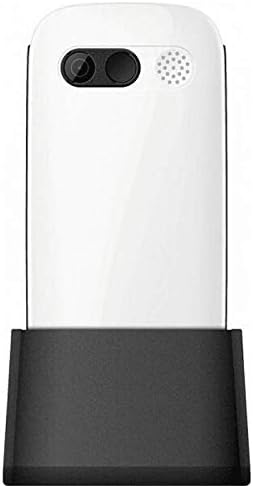
Figure 3: Phone in charging dock.
3. Udhëzimet e funksionimit
3.1 Ndezja/Fikja
- Për të ndezur: Shtypni dhe mbani shtypur Ndez/Mbyll thirrjen butonin derisa ekrani të ndizet.
- Për të fikur: Shtypni dhe mbani shtypur Ndez/Mbyll thirrjen button until the power-off options appear, then select 'Power Off'.
3.2 Kryerja e thirrjeve
- Nga ekrani kryesor, futni numrin e telefonit duke përdorur tastierën.
- Shtypni Thirrni butonin (butonin jeshil) për të filluar thirrjen.
- Për të përfunduar thirrjen, shtypni Ndez/Mbyll thirrjen buton (butoni i kuq).
3.3 Marrja e thirrjeve
- When a call comes in, the phone will ring and display the caller's number or name.
- Shtypni Thirrni button (green button) to answer.
- Për të refuzuar telefonatën, shtypni butonin Ndez/Mbyll thirrjen buton (butoni i kuq).
3.4 Dërgimi dhe marrja e mesazheve
- Shko te menyja 'Mesazhet' nga ekrani kryesor.
- Select 'New Message' to compose a text message.
- Shkruani numrin e marrësit dhe mesazhin tuaj.
- Shtypni 'Dërgo'.
- Received messages will appear in your 'Inbox'.
3.5 Menaxhimi i Kontakteve
The phonebook can store up to 300 names.
- Shko te menyja 'Kontaktet' ose 'Libri i Telefonave'.
- Select 'Add New Contact' to save a new number.
- Shkruani emrin dhe numrin e telefonit, pastaj ruajeni.
- To call a contact, select their name from the list and press the Thirrni butonin.
3.6 Përdorimi i Bluetooth
Për t'u lidhur me pajisjet Bluetooth:
- Shko te 'Cilësimet' > 'Bluetooth'.
- Aktivizo Bluetooth-in 'Aktivizo'.
- Zgjidh 'Kërko për devices' to find available Bluetooth accessories.
- Select the desired device and pair them.
3.7 Përdorimi i elektrik dore
Telefoni përfshin një elektrik dore të integruar për lehtësi.
- To turn on the flashlight, locate the dedicated flashlight button (if available) or access it through the 'Tools' menu.
- Press the button or select the option again to turn it off.
4. Mirëmbajtja dhe Kujdesi
To ensure the longevity and optimal performance of your Maxcom MM471 phone, follow these maintenance guidelines:
- Pastrimi: Use a soft, dry cloth to clean the phone's surface. Avoid liquid cleaners or abrasive materials.
- Temperatura: Do not expose the phone to extreme temperatures (hot or cold) or direct sunlight for extended periods.
- Lagështia: Keep the phone dry. Do not immerse it in water or expose it to high humidity.
- Magazinimi: When not in use for a long time, store the phone in a cool, dry place with the battery partially charged.
- Ndikimi: Shmangni rënien e telefonit ose ekspozimin e tij ndaj goditjeve të forta.
5. Troubleshooting
If you encounter issues with your phone, refer to the table below for common problems and solutions:
| Problem | Shkaku i mundshëm | Zgjidhje |
|---|---|---|
| Telefoni nuk ndizet | Bateria është shkarkuar ose nuk është futur siç duhet. | Karikoni baterinë. Sigurohuni që bateria është futur siç duhet. |
| Nuk mund të bësh ose të marrësh thirrje | No network signal, SIM card not inserted, or SIM card faulty. | Check network coverage. Reinsert SIM card(s). Contact your service provider. |
| Cilësi e dobët e thirrjes | Weak network signal, interference. | Zhvendosuni në një zonë me sinjal më të mirë. Shmangni pengesat. |
| Bateria zbrazet shpejt | Excessive usage, background applications, old battery. | Ul ndriçimin e ekranit. Mbyll aplikacionet e papërdorura. Konsidero zëvendësimin e baterisë nëse është e vjetër. |
| Tastiera nuk përgjigjet | Probleme me softuerin, dëmtime fizike. | Restart the phone. If the problem persists, contact support. |
6. Specifikimet teknike
Key technical details of the Maxcom MM471 Senior Portable Phone:
- Modeli: MM471
- Marka: Maxcom
- Ngjyra: E bardha
- Lidhshmëria: Bluetooth
- Mbështetja e SIM: SIM e dyfishtë
- Kapaciteti i Librit të Telefonave: 300 names
- Koha e bisedës: Deri në 14 orë
- Ndërfaqja: Butonat fizikë
- Karakteristikat e veçanta: Large characters, Big buttons, Ergonomic design, Speaker, Flashlight
7. Informacion mbi Garancinë dhe Mbështetjen
For detailed warranty information, please refer to the warranty card included with your product or visit the official Maxcom website. For technical support or service inquiries, please contact your retailer or the manufacturer's customer service department.