
Hyrje
Thank you for choosing the Anivia Y-901B-M 7.1 Surround Sound Gaming Headset. This manual provides detailed instructions for setting up, operating, and maintaining your headset to ensure optimal performance and an immersive audio experience. Please read this manual thoroughly before using the product.

Imazhi: Përpara view of the Anivia Y-901B-M Gaming Headset, showcasing its design with blue accents and the adjustable microphone.
Përmbajtja e paketës
Verifikoni që të gjitha artikujt janë të pranishëm në paketimin tuaj:
- Anivia Y-901B-M PC Gaming Headset
- Manuali i Përdoruesit
Produkti Mbiview
Përbërësit e kufjeve
- Shiriti i rregullueshëm i kokës: Për një përshtatje të rehatshme dhe të sigurt.
- Soft Memory Foam Earcups: Designed for extended wear and improved air permeability.
- Mikrofoni për anulimin e zhurmës: Flexible and adjustable for clear voice communication.
- In-line Controller: For volume adjustment, microphone on/off, and LED light control.
- Lidhës USB: For power and audio signal transmission.
- Ndriçimi LED: Integrated blue LED lights on earcups for aesthetic appeal.
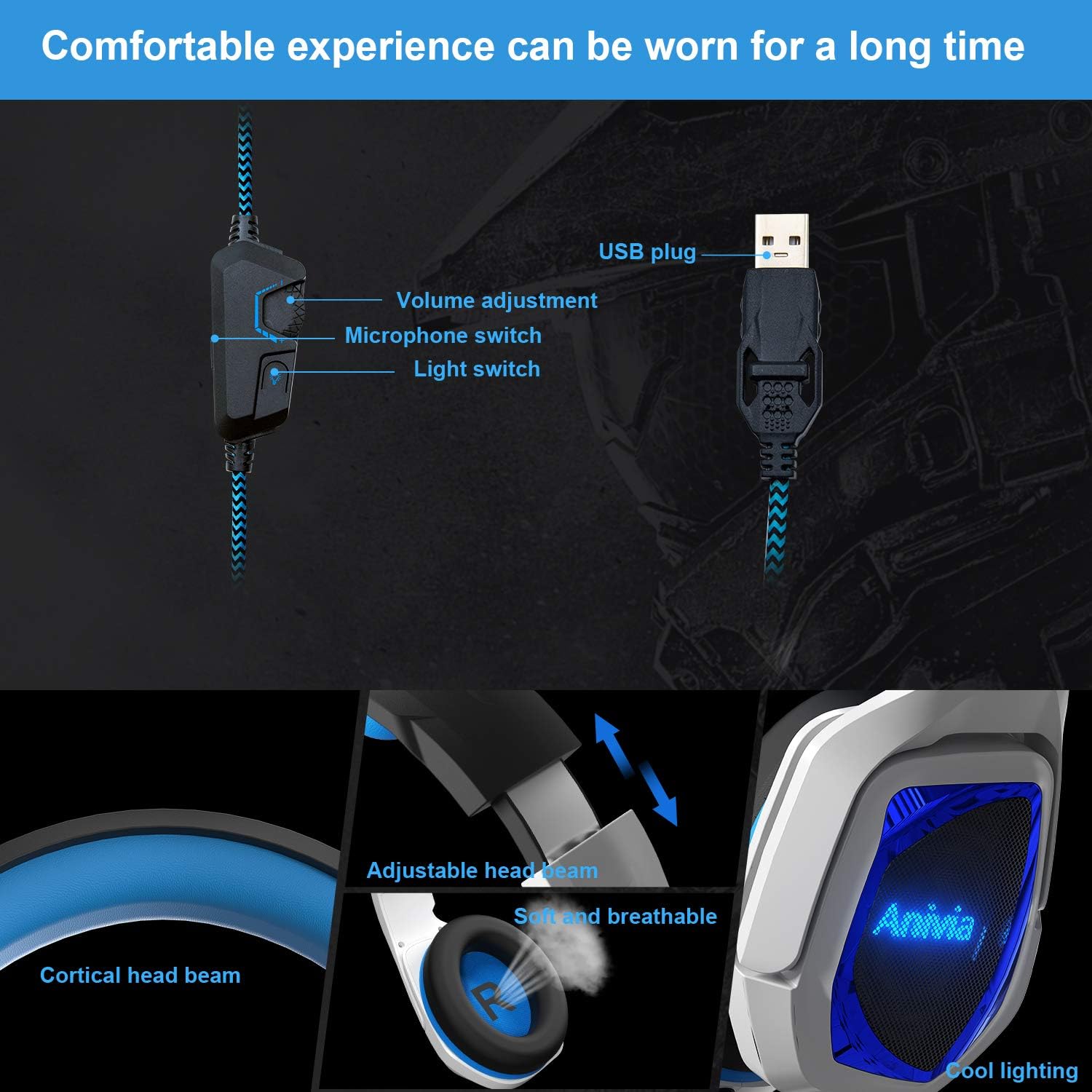
Imazh: I detajuar view of the headset's in-line controls, adjustable headband, soft earcups, and LED lighting.
Udhëzimet e konfigurimit
Po lidhet me pajisjen tuaj
- Locate an available USB port on your PC, laptop, or compatible gaming console (e.g., PS4/PS5).
- Insert the USB connector of the Anivia Y-901B-M headset firmly into the USB port.
- For most operating systems (Windows 7/8/8.1/10/XP), the headset will be recognized automatically, and necessary drivers will be installed.
- Once connected, the LED lights on the earcups should illuminate, indicating power.

Image: Illustration of connecting the USB headset to various devices including a PlayStation, laptop, and desktop PC.
Initial Configuration (PC/Laptop)
- Cilësimet e zërit të Windows: Right-click the speaker icon in your system tray and select "Sound Settings" or "Playback devices."
- Set as Default: Ensure the Anivia Y-901B-M headset is selected as the default playback and recording device.
- Niveli i mikrofonit: Go to the "Recording" tab, select the headset microphone, click "Properties," and adjust the microphone level as needed.
- 7.1 Tingulli rrethues: For 7.1 virtual surround sound, ensure your operating system's sound settings are configured for 7.1 audio output if applicable. Some games or applications may require specific in-game audio settings.
Udhëzimet e funksionimit
Kontrolli i volumit
Use the scroll wheel on the in-line controller to adjust the headset's volume. Scroll up to increase volume and down to decrease it.
Përdorimi i mikrofonit
The flexible microphone can be adjusted to your preferred position for clear voice pickup. Use the switch on the in-line controller to toggle the microphone on or off. When the microphone is off, the LED indicator on the microphone tip may change color or turn off (if applicable).
Ndriçim LED
The headset features integrated blue LED lights on the earcups. A dedicated switch on the in-line controller allows you to turn these lights on or off according to your preference.
7.1 Tingulli rrethues virtual
The Anivia Y-901B-M headset delivers an immersive 7.1 virtual surround sound experience through its high-precision 50mm neodymium audio drivers. This feature enhances spatial awareness in games, allowing you to pinpoint sound sources like footsteps or gunshots from various directions.

Image: Visual representation of 7.1 channel audio, showing how different sound effects are perceived from various directions.
Komoditet dhe përshtatje
The headset is designed for comfort during extended use. The headband is adjustable to fit various head sizes. Gently slide the earcups up or down along the headband until you achieve a snug yet comfortable fit. The soft memory foam earcups provide cushioning and breathability.

Image: Features emphasizing the headset's adjustable headband and soft, breathable earcups for comfortable wear.
Mirëmbajtja
Proper care will extend the life of your headset.
- Pastrimi: Use a soft, dry cloth to wipe the earcups and headband. Do not use harsh chemicals or abrasive cleaners.
- Magazinimi: Ruajeni kufjet në një vend të freskët dhe të thatë, larg rrezeve të diellit dhe temperaturave ekstreme. Shmangni vendosjen e objekteve të rënda mbi kufje.
- Kujdesi për kabllot: Shmangni përkuljet e mprehta ose tërheqjen e tepërt të kabllit USB për të parandaluar dëmtimin.
Zgjidhja e problemeve
| Çështja | Zgjidhja e mundshme |
|---|---|
| Nuk ka zë nga kufjet |
|
| Mikrofoni nuk punon |
|
| Dritat LED janë fikur |
|
| Tingulli është i shtrembëruar ose i paqartë |
|
Specifikimet
| Veçori | Detaj |
|---|---|
| Numri i modelit | Y-901B-M |
| Teknologjia e lidhjes | Me tel (USB) |
| Kufje Jack | USB |
| Diametri i altoparlantit | 50 mm |
| Impedanca e altoparlantit | 16Ω ± 15% |
| Ndjeshmëria e folësit | 100 ± 3dB (at 1kHz) |
| Përgjigja e frekuencës së altoparlantit | 20 Hz ~ 20 KHz |
| Mikrofoni | Anulimi i Zhurmës, i Rregullueshëm 360° |
| Lloji i kontrollit | In-line Volume Control, Mic On/Off, Light Switch |
| Gjatësia e Kabllit | 2.2 milion |
| Pesha e artikullit | 1.06 paund (rreth 480g) |
| Dimensionet e produktit | 7.87 x 3.94 x 6.3 inç |
| Pajisjet e përputhshme | Desktops, Laptops, PC, PS4/PS5 Console |
| Materiali | Plastic, Skin-friendly Leather (earpads) |
| Karakteristika të veçanta | Lightweight, Microphone Included, Noise Cancellation, LED Lighting |
Garancia dhe Mbështetja
Anivia products are manufactured to high quality standards. For warranty information or technical support, please refer to the documentation included with your purchase or contact Anivia customer service through their official webfaqen ose shitësin me pakicë ku është blerë produkti. Ju lutemi ruani provën e blerjes për kërkesat e garancisë.