
Bytech BY-AU-BS-152-BK
Bytech True Wireless Bluetooth Boost Link True Speaker User Manual
Model: BY-AU-BS-152-BK
Hyrje
Faleminderit për blerjenasing the Bytech True Wireless Bluetooth Boost Link True Speaker. This manual provides essential information for setting up, operating, and maintaining your new speakers. Please read this manual thoroughly before use to ensure proper operation and to maximize your listening experience. These speakers feature True Wireless Stereo (TWS) functionality, Bluetooth connectivity, FM Radio, and Bass Boost for rich audio.
Informacioni i Sigurisë
- Do not expose the speakers to extreme temperatures, humidity, or direct sunlight.
- Shmangni rrëzimin ose ekspozimin e altoparlantëve ndaj goditjeve të forta.
- Do not disassemble, repair, or modify the speakers yourself. Refer all servicing to qualified personnel.
- Keep the speakers away from water and other liquids.
- Përdorni vetëm kabllon e karikimit dhe adaptorin e energjisë të specifikuar.
- Clean the speakers with a soft, dry cloth. Do not use abrasive cleaners or solvents.
- Dëgjoni në nivele të moderuara të volumit për të shmangur dëmtimin e dëgjimit.
Përmbajtja e paketës

Image: The Bytech Boost Link True Wireless Speakers shown in their retail packaging, highlighting the two speakers and the Bluetooth connectivity feature.
Ju lutemi kontrolloni që të gjitha artikujt janë të pranishëm dhe në gjendje të mirë:
- 2 x Bytech Boost Link True Wireless Speakers
- 1 x Kabllo karikimi (USB)
- 1 x Manual Përdoruesi (ky dokument)
Produkti Mbiview

Imazh: Një pamje nga afër e përparme view of the two Bytech Boost Link True Wireless Speakers, showing the speaker grilles and control buttons at the bottom.
Njihuni me komponentët dhe kontrollet e altoparlantit:
- Grilë e folësit: Protects the speaker driver.
- Butonat e kontrollit:
- Butoni i energjisë: Power On/Off, Play/Pause.
- Butoni i modalitetit: Switch between Bluetooth, FM Radio, etc.
- Kënga e mëparshme/Butoni i uljes së volumit: Shtypje e shkurtër për këngën e mëparshme, shtypje e gjatë për uljen e volumit.
- Kënga tjetër / Butoni i rritjes së volumit: Shtypje e shkurtër për këngën tjetër, shtypje e gjatë për të rritur volumin.
- Porta e karikimit: Për lidhjen e kabllit të karikimit USB.
- Treguesi LED: Shows power status, charging status, and pairing status.
Konfigurimi
Ngarkimi i altoparlantëve
Before first use, fully charge both speakers. Connect the supplied USB charging cable to the charging port on each speaker and plug the other end into a USB power adapter (not included) or a computer's USB port. The LED indicator will show charging status and turn off or change color when fully charged.
Ndezja/Fikur
- Për të ndezur: Press and hold the Power button on each speaker until the LED indicator lights up and you hear a power-on prompt.
- Për të fikur: Press and hold the Power button on each speaker until the LED indicator turns off and you hear a power-off prompt.
Udhëzimet e funksionimit
Çiftimi me Bluetooth (Modaliteti me një altoparlant të vetëm)
- Sigurohuni që altoparlanti të jetë i ndezur dhe në modalitetin e çiftëzimit Bluetooth (treguesi LED do të ndizet).
- Në pajisjen tuaj (smartfon, tablet, laptop), aktivizoni Bluetooth dhe kërkoni për pajisje të disponueshme.
- Select "BYTECH BOOST LINK" (or similar name) from the list.
- Pasi të çiftëzohet, treguesi LED do të ndalojë së pulsuari dhe do të mbetet i ndezur, dhe do të dëgjoni një tingull konfirmimi.
Çiftim Stereo True Wireless (TWS) (Dy Altoparlantë)
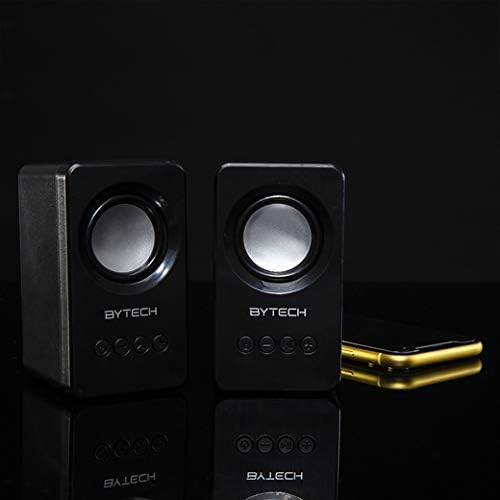
Image: The two Bytech Boost Link True Wireless Speakers positioned next to a smartphone, symbolizing their ability to connect wirelessly to each other and a device for stereo sound.
For a true stereo sound experience, you can pair both speakers together:
- Power on both Bytech Boost Link speakers. Do not connect them to your Bluetooth device yet.
- The speakers will automatically attempt to pair with each other. You will hear a confirmation sound when they are successfully linked for TWS. One speaker will become the master (left channel) and the other the slave (right channel).
- Once TWS paired, the master speaker will enter Bluetooth pairing mode (LED flashing).
- On your device, enable Bluetooth and search for "BYTECH BOOST LINK". Connect to this single entry.
- Të dy altoparlantët tani do të luajnë audio në stereo.
- Shënim: If the speakers do not automatically pair, try double-pressing the Mode button on one of the speakers to initiate TWS pairing.
Funksionimi i radios FM
- Power on the speaker(s).
- Shtypni Modaliteti button repeatedly until you hear the FM radio prompt.
- Për të skanuar automatikisht dhe ruajtur stacionet, shtypni dhe mbani shtypur butonin Luaj/Puzë button. The speaker will scan and store available FM stations.
- Përdorni Kënga e mëparshme dhe Pjesa tjetër butona për të lundruar midis stacioneve të ruajtura.
Audio Playback and Volume Control
- Luaj/Ndalu: Shtypni shkurt butonin e energjisë.
- Pjesa tjetër: Short press the Next Track/Volume Up button.
- Pjesa e mëparshme: Short press the Previous Track/Volume Down button.
- Vëllimi lart: Long press the Next Track/Volume Up button.
- Ule volumin: Long press the Previous Track/Volume Down button.
Mirëmbajtja
- Pastrimi: Use a soft, dry, lint-free cloth to clean the surface of the speakers. Do not use liquid cleaners, aerosols, or solvents.
- Magazinimi: Kur nuk i përdorni për periudha të gjata, ruajini altoparlantët në një vend të freskët dhe të thatë, larg rrezeve të diellit dhe temperaturave ekstreme.
- Kujdesi për baterinë: To prolong battery life, avoid fully discharging the battery frequently. Charge the speakers regularly, even if not in use.
Zgjidhja e problemeve
| Problem | Shkaku i mundshëm | Zgjidhje |
|---|---|---|
| Altoparlanti nuk ndizet. | Bateri e ulët. | Ngarkoni altoparlantin plotësisht. |
| Nuk mund të çiftëzohet nëpërmjet Bluetooth. | Altoparlanti nuk është në modalitetin e çiftëzimit; Bluetooth-i i pajisjes është i fikur; Shumë larg pajisjes. | Sigurohuni që drita LED e altoparlantit po pulson; Aktivizoni Bluetooth në pajisjen tuaj; Afroni altoparlantin më shumë me pajisjen (brenda 10 metrave). |
| Asnjë zë. | Volume too low; Speaker not connected; Incorrect mode. | Increase volume on speaker and device; Re-pair Bluetooth; Ensure correct mode (Bluetooth/FM). |
| Çiftimi TWS dështon. | Altoparlantët janë lidhur tashmë me një pajisje; Altoparlantët janë shumë larg njëri-tjetrit. | Disconnect speakers from any device; Power off and on both speakers, then try TWS pairing again; Ensure speakers are close to each other. |
| Marrje e dobët e radios FM. | Sinjal i dobët; Ndërhyrje. | Relocate the speaker to an area with better reception; Extend the charging cable (can act as an antenna). |
Specifikimet
- Modeli: BY-AU-BS-152-BK
- Marka: Bytech
- Teknologjia e lidhjes: Wireless (Bluetooth)
- Mënyra e daljes së audios: Rrethojnë
- Lloji i folësit: Tingulli rrethues
- Karakteristikat e veçanta: Wireless Bluetooth, Bass Boost, FM Radio, True Wireless Stereo (TWS)
- Përdorimet e rekomanduara: Për luajtësit e muzikës
- Pajisjet e përputhshme: Laptop, Tablet, Smartphone
- Lloji i kontrolluesit: Butonat në pajisje
- Dimensionet e paketës: 20.7 x 16 x 9 cm
- Pesha: 560 g
Garancia dhe Mbështetja
Bytech products are designed and manufactured to the highest quality standards. For information regarding warranty coverage, technical support, or service inquiries, please refer to the warranty card included with your purchase or visit the official Bytech webfaqe interneti. Ju lutemi ruani provën e blerjes për kërkesat e garancisë.
For further assistance, please contact Bytech customer support.
Dokumentet përkatëseBY-AU-BS-152-BK

Ask a question about this manual
Ask about setup, troubleshooting, compatibility, parts, safety, or missing instructions. Manuals+ will review the question and use this page’s manual context to help answer it.