
iHip WLG-PP27
iHip 3ft PVC Micro USB High-Speed Data and Charging Cable
Model: WLG-PP27
Hyrje
This manual provides essential information for the proper use, setup, maintenance, and troubleshooting of your iHip 3ft PVC Micro USB High-Speed Data and Charging Cable. Please read this manual thoroughly before using the product.
The iHip Micro USB cable is designed for fast charging and high-speed data transfer, compatible with a wide range of devices including Android phones, tablets, gaming consoles, and other devices with a Micro USB interface. It features a durable rubber finish and a metal tip, engineered for longevity with a 10,000 bend test certification.
Përmbajtja e paketës
- 1 x iHip 3ft PVC Micro USB High-Speed Data and Charging Cable
Konfigurimi
The iHip Micro USB cable is designed for plug-and-play functionality. Follow these steps to connect your device:
- Identifikoni Portet: Locate the Micro USB port on your device (e.g., smartphone, tablet, game controller) and a standard USB-A port on your power adapter, computer, or other charging/data source.
- Lidhu me pajisjen: Gently insert the Micro USB connector (the smaller, trapezoidal end) into the Micro USB port on your device. Ensure it is inserted horizontally and correctly to avoid damage.
- Lidhu me energjinë/burimin e të dhënave: Insert the standard USB-A connector (the larger, rectangular end) into a compatible USB-A port on your power adapter, computer, or other charging/data source.
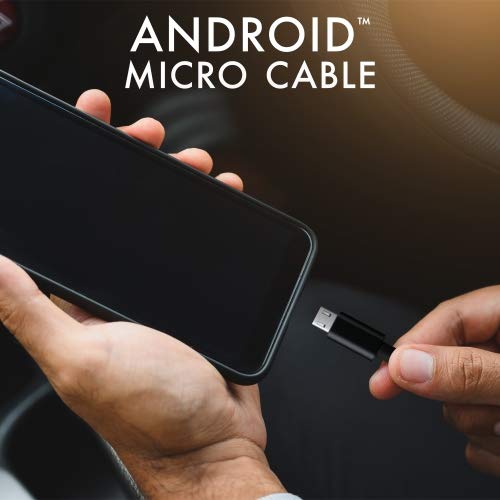
Image: Connecting the iHip Micro USB cable to a smartphone. The cable is designed for easy and secure connection.
Udhëzimet e funksionimit
Ngarkimi i pajisjes suaj
To charge your device using the iHip Micro USB cable:
- Lidhni kabllon siç përshkruhet në seksionin "Konfigurimi".
- Ensure your power adapter or USB port provides sufficient power. For fast charging, use a Quick Charge compatible power adapter (e.g., 9V/2A output) or a standard power adapter with 5V/2.4A output.
- The device's charging indicator should activate, confirming that charging has begun.
Transferimi i të dhënave
Për të transferuar të dhëna midis pajisjes suaj dhe një kompjuteri:
- Connect the Micro USB end to your device and the USB-A end to a USB port on your computer.
- Your computer should recognize the connected device. You may need to select "File Transfer" or "MTP" mode on your device's screen if prompted.
- You can now access your device's storage to transfer files at speeds up to 480Mb/s.
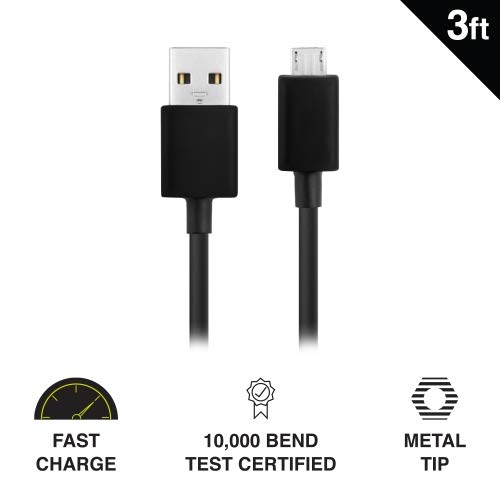
Image: Key features of the iHip Micro USB cable, highlighting its fast charge capability, durability, and robust metal tip.
Mirëmbajtja dhe Kujdesi
To ensure the longevity and optimal performance of your iHip Micro USB cable, follow these maintenance guidelines:
- Trajtimi i duhur: Always grasp the connector head when plugging or unplugging the cable. Avoid pulling directly on the cable itself, as this can damage the internal wires.
- Magazinimi: Store the cable in a clean, dry place away from extreme temperatures and direct sunlight. Avoid tightly coiling or bending the cable at sharp angles.
- Pastrimi: Nëse lidhësit ndoten, fshijini butësisht me një leckë të thatë dhe pa push. Mos përdorni lëngje ose pastrues gërryes.
- Shmangni stresin: Do not place heavy objects on the cable or allow it to be pinched, which can lead to internal damage.
Zgjidhja e problemeve
If you encounter issues with your iHip Micro USB cable, try the following troubleshooting steps:
- Pajisja nuk ngarkohet:
- Sigurohuni që të dy skajet e kabllit të jenë të lidhura mirë.
- Provoni të përdorni një përshtatës tjetër të energjisë ose një portë USB.
- Test the cable with a different compatible device to rule out a device issue.
- Check the Micro USB port on your device for any debris or damage.
- Karikimi i ngadalshëm:
- Ensure you are using a power adapter with adequate output (e.g., 5V/2.4A or Quick Charge compatible).
- Avoid charging from low-power USB ports (e.g., some laptop USB 2.0 ports).
- Problemet e transferimit të të dhënave:
- Verify that your device is set to "File Modaliteti "Transfer" ose "MTP" kur është i lidhur me një kompjuter.
- Provoni një port tjetër USB në kompjuterin tuaj.
- Rinisni si pajisjen ashtu edhe kompjuterin tuaj.
Specifikimet
| Veçori | Detaj |
|---|---|
| Numri i modelit | WLG-PP27 |
| Gjatësia e Kabllit | 3 këmbë (rreth 0.91 metra) |
| Lloji i lidhësit | USB-A to Micro USB |
| Materiali | PVC with Rubber Finish, Metal Tip |
| Shpejtësia e transferimit të të dhënave | Deri në 480 Mb/s |
| Qëndrueshmëria | 10,000+ bend lifespan certified |
| Përputhshmëria | Android Cell Phones, Tablets, Windows Phones (Samsung Note/Galaxy, Nokia Lumia, LG, HTC), MP4, hard drives, PlayStation 4, Xbox One controller, and other Micro USB devices. |
| Dimensionet e produktit | 6.5 x 3 x 1 inç; 1.76 ons |

Image: The iHip 3ft PVC Micro USB cable, showcasing its compact and flexible design.
Garancia dhe Mbështetja
The iHip Micro USB cable comes with a lifetime guarantee. For detailed warranty information and support, please visit the official iHip webfaqe:
For any further assistance or inquiries, please refer to the contact information provided on the iHip webfaqe.