
1. Hyrje
The Sonoro Easy is a compact and portable digital radio designed to provide powerful sound for various occasions. It features FM, DAB+, and Bluetooth connectivity, along with an AUX input for external devices. Its small footprint allows for easy placement in any room, and the intuitive controls ensure straightforward operation. The integrated LED night light and USB charging port add to its versatility, making it an ideal companion for your bedroom, kitchen, or on the go.
2. Konfigurimi
2.1 Shpaketimi
Carefully remove the Sonoro Easy radio from its packaging. Ensure all components are present:
- Sonoro Easy Digital Radio
- Përshtatës i energjisë
- Manuali i Përdoruesit (ky dokument)
2.2 Aktivizimi
The Sonoro Easy can be powered via the included mains adapter or by batteries for portable use.
Fuqia kryesore:
- Connect the power adapter to the "12V - 2.5A" DC input port on the rear of the radio.
- Lidhni adaptorin e energjisë në një prizë muri të përshtatshme.
- Shtypni Fuqia button on the front panel to turn on the device.
Fuqia e baterisë:
The radio supports alkaline or NiMH rechargeable batteries (not included). The battery compartment is located on the bottom of the unit.
- Hapni kapakun e ndarjes së baterisë.
- Futni bateritë e nevojshme, duke siguruar polaritetin e duhur.
- Mbyllni mirë kapakun e ndarjes së baterisë.
- Shtypni Fuqia butonin për të ndezur pajisjen.

Figure 1: Rear panel connections including power input and antenna.
2.3 Initial Setup and Antenna
Upon first power-on, the radio may perform an initial scan for DAB+ stations. Extend the telescopic antenna for optimal reception for both FM and DAB+ radio.

Figure 2: Front display and controls of the Sonoro Easy radio.
3. Udhëzimet e funksionimit
3.1 Kontrollet bazë
The Sonoro Easy features intuitive controls located on the top and front panels.
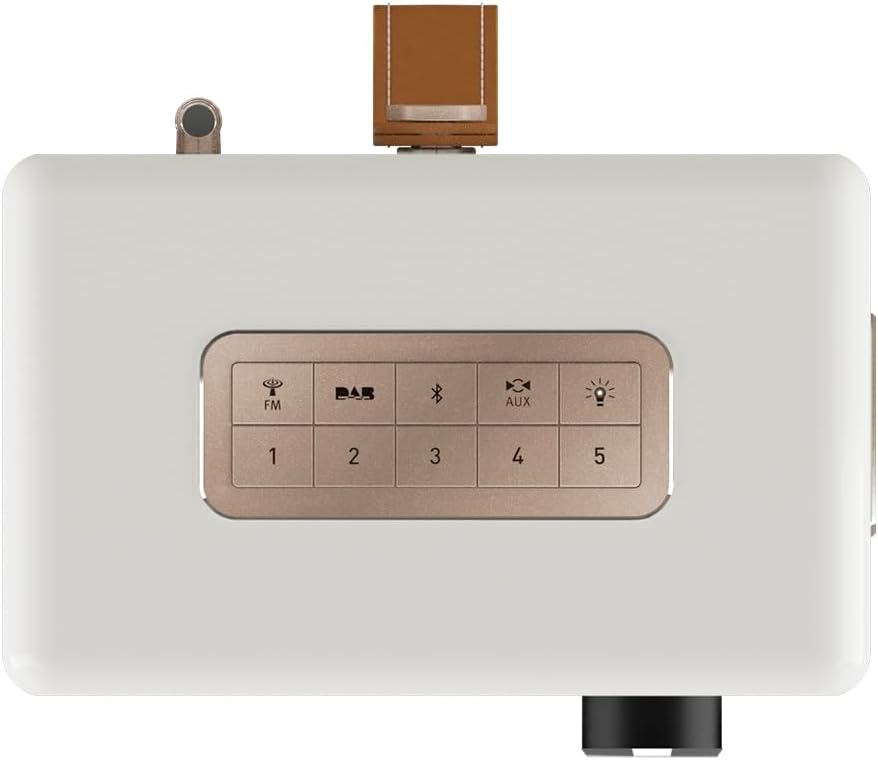
Figure 3: Top panel controls including preset and function buttons.
- Butoni i energjisë: Ndez ose fiket radion.
- Çelës rrotullues: Used for volume control, menu navigation, and selection.
- Butonat e paracaktuar (1-5): Store and recall your favorite radio stations.
- Function Buttons (FM, DAB, Bluetooth, AUX, Night Light): Zgjidhni mënyrën e dëshiruar të funksionimit.
3.2 Radio Modes (DAB+ / FM)
Radio DAB+:
- Shtypni DAB button to enter DAB+ mode.
- The radio will automatically scan for available stations.
- Use the rotary knob to scroll through the station list and press to select.
- Për të ruajtur një stacion si një parazgjedhje, shtypni dhe mbani shtypur një nga Butonat e paracaktuar (1-5) until the display confirms.
FM radio:
- Shtypni FM butonin për të hyrë në modalitetin FM.
- Use the rotary knob to manually tune to a frequency or press and hold to auto-scan for the next available station.
- Për të ruajtur një stacion si një parazgjedhje, shtypni dhe mbani shtypur një nga Butonat e paracaktuar (1-5) until the display confirms.
3.3 Lidhshmëria Bluetooth
- Shtypni Bluetooth button to activate Bluetooth pairing mode. The display will show "Pairing".
- On your mobile device, enable Bluetooth and search for "Sonoro Easy".
- Select "Sonoro Easy" from the list of available devices to connect.
- Once connected, you can stream audio from your device to the radio.
3.4 Hyrja AUX
- Connect an external audio device (e.g., MP3 player) to the "AUX IN" port on the rear of the radio using a 3.5mm audio cable (not included).
- Shtypni AUX button to select AUX input mode.
- Kontrolloni riprodhimin nga pajisja juaj e jashtme.
3.5 Ora me zile dhe kohëmatësi i gjumit
The Sonoro Easy features a dual alarm function and a sleep timer.
- Vendosja e alarmeve: Access the alarm settings through the menu (usually by pressing the rotary knob and navigating). Follow on-screen prompts to set alarm time, source (buzzer, FM, DAB+), and volume.
- Kohëmatësi i gjumit: The sleep timer allows the radio to turn off automatically after a set period. This function is typically accessed via the menu.
- Funksioni i gjumit: When an alarm sounds, pressing the rotary knob or a designated snooze button will temporarily pause the alarm.
3.6 Night Light and USB Charging
- Drita e natës: Shtypni Drita e natës button (often represented by a light bulb icon) to activate the integrated LED night light on the rear of the unit. This provides subtle background illumination.
- Ngarkimi USB: The USB port (5V - 2.1A) on the side of the radio can be used to charge compatible smartphones or other small devices. Connect your device using its charging cable.
4. Mirëmbajtja
4.1 Pastrimi
To maintain the appearance of your Sonoro Easy radio:
- Sigurohuni që pajisja të jetë e fikur dhe e shkëputur nga priza përpara pastrimit.
- Përdorni një leckë të butë, të thatë dhe pa push për të fshirë sipërfaqet.
- Për shenja kokëforta, paksaampen the cloth with water. Avoid abrasive cleaners, solvents, or chemical sprays.
4.2 Ruajtja
When not in use for extended periods, store the radio in a cool, dry place away from direct sunlight and extreme temperatures. If using batteries, remove them to prevent leakage.
5. Troubleshooting
| Problem | Shkaku i mundshëm | Zgjidhje |
|---|---|---|
| Nuk ka energji / Radioja nuk ndizet. | Power adapter not connected or faulty. Batteries depleted or incorrectly inserted. | Check power adapter connection and wall outlet. Replace or recharge batteries, ensuring correct polarity. |
| Poor radio reception (DAB+ / FM). | Antenna not extended. Weak signal in the area. Interference from other electronics. | Fully extend the telescopic antenna. Try repositioning the radio. Move away from other electronic devices. |
| Pajisja Bluetooth nuk mund të lidhet. | Radio not in pairing mode. Device too far away. Bluetooth disabled on source device. | Ensure radio is in Bluetooth pairing mode. Move device closer to the radio. Enable Bluetooth on your source device. |
| Nuk ka zë nga hyrja AUX. | AUX cable not connected properly. Radio not in AUX mode. Volume too low on radio or source device. | Check AUX cable connection. Select AUX mode on the radio. Increase volume on both the radio and the external device. |
| Ekrani është shumë i ndritshëm ose shumë i zbehtë. | Display brightness setting needs adjustment. | Adjust display brightness through the radio's menu settings. |
6. Specifikimet
| Veçori | Detaj |
|---|---|
| Markë | Sonoro |
| Numri i modelit | 88f59bc4-6f28-4e95-95de-ba49a597f237 |
| Ngjyra | Mat të bardhë |
| Teknologjia e Akordimit | DAB+, FM |
| Lidhshmëria | Bluetooth, AUX In, USB (charging) |
| Karakteristika të veçanta | Portable, Dual Alarm, Sleep Timer, Snooze, Dimmable Display, LED Night Light, USB Charging Port |
| Burimi i energjisë | Mains (12V - 2.5A), Battery (Alkaline or NiMH, not included) |
| Dalje USB | 5V - 2.1A (for charging external devices) |
| Dimensionet (J x P x H) | 18.6 cm x 15.6 cm x 11.8 cm |
| Folësi | 3" Full-range speaker with Bass Reflex tube |
| Materiali | Hand-polished wooden cabinet |
7. Garanci dhe Mbështetje
7.1 Garancia e Produktit
The Sonoro Easy Digital Radio comes with a Garanci 2-vjeçare e prodhuesit nga data e blerjes. Kjo garanci mbulon defektet në materiale dhe prodhim nën përdorim normal. Ju lutemi ruani provën e blerjes për kërkesat e garancisë.
Garancia nuk mbulon:
- Dëmet e shkaktuara nga aksidenti, abuzimi, keqpërdorimi, përmbytja, zjarri, tërmeti ose shkaqe të tjera të jashtme.
- Damage caused by operating the product outside the permitted or intended uses described in this manual.
- Damage caused by service performed by anyone who is not an authorized representative of Sonoro.
- Products or parts that have been modified to alter functionality or capability without the written permission of Sonoro.
7.2 Mbështetja e klientit
For technical assistance, warranty claims, or further information, please contact Sonoro customer support. Contact details can typically be found on the official Sonoro webnë vend ose në paketimin e produktit.
Please visit the official Sonoro website for the most up-to-date support information and contact options.