
iotwe A4300
IOTWE A4300 Full HD 1080P Projector User Manual
Modeli: A4300
1. Hyrje
The IOTWE A4300 Projector is a versatile home theater device designed to deliver a high-quality viewing experience. Featuring native 1080P resolution with 4K support, 5G WiFi, and Bluetooth connectivity, this projector is compatible with a wide range of devices including smartphones, PCs, TV boxes, and gaming consoles. Its portable design makes it suitable for various applications, from immersive home cinema to outdoor entertainment.

Figure 1.1: The IOTWE A4300 Projector, highlighting its 5G WiFi and Bluetooth capabilities, alongside a projected image and carrying case.
2. Përmbajtja e paketës
Ju lutemi kontrolloni përmbajtjen e paketimit pasi ta hapni kutinë për t'u siguruar që të gjitha artikujt janë të pranishëm dhe në gjendje të mirë.
- IOTWE A4300 Projector
- Projector Carrying Case
- Telekomandë (bateritë nuk përfshihen)
- Manuali i Përdoruesit
- Pëlhurë pastrimi
- Cable AV
- Kabllo HDMI
- Kabllo energjie
- Kapaku i lentes

Figure 2.1: All items included in the IOTWE A4300 Projector package.
3. Karakteristikat e produktit dhe më shumëview
The IOTWE A4300 Projector offers several advanced features for an enhanced viewpërvojë.
3.1 High Brightness and Resolution
Experience vivid and clear images with native 1080P resolution and 9200 Lumens brightness, providing a superior visual quality compared to standard projectors.

Figure 3.1: Visual comparison of IOTWE's 1080P resolution and 9200 Lumens output against other projectors.
3.2 Large Screen Projection
The projector is capable of projecting images up to 200 inches, offering a cinematic experience. For optimal viewrekomandohet një madhësi ekrani midis 60-100 inç.
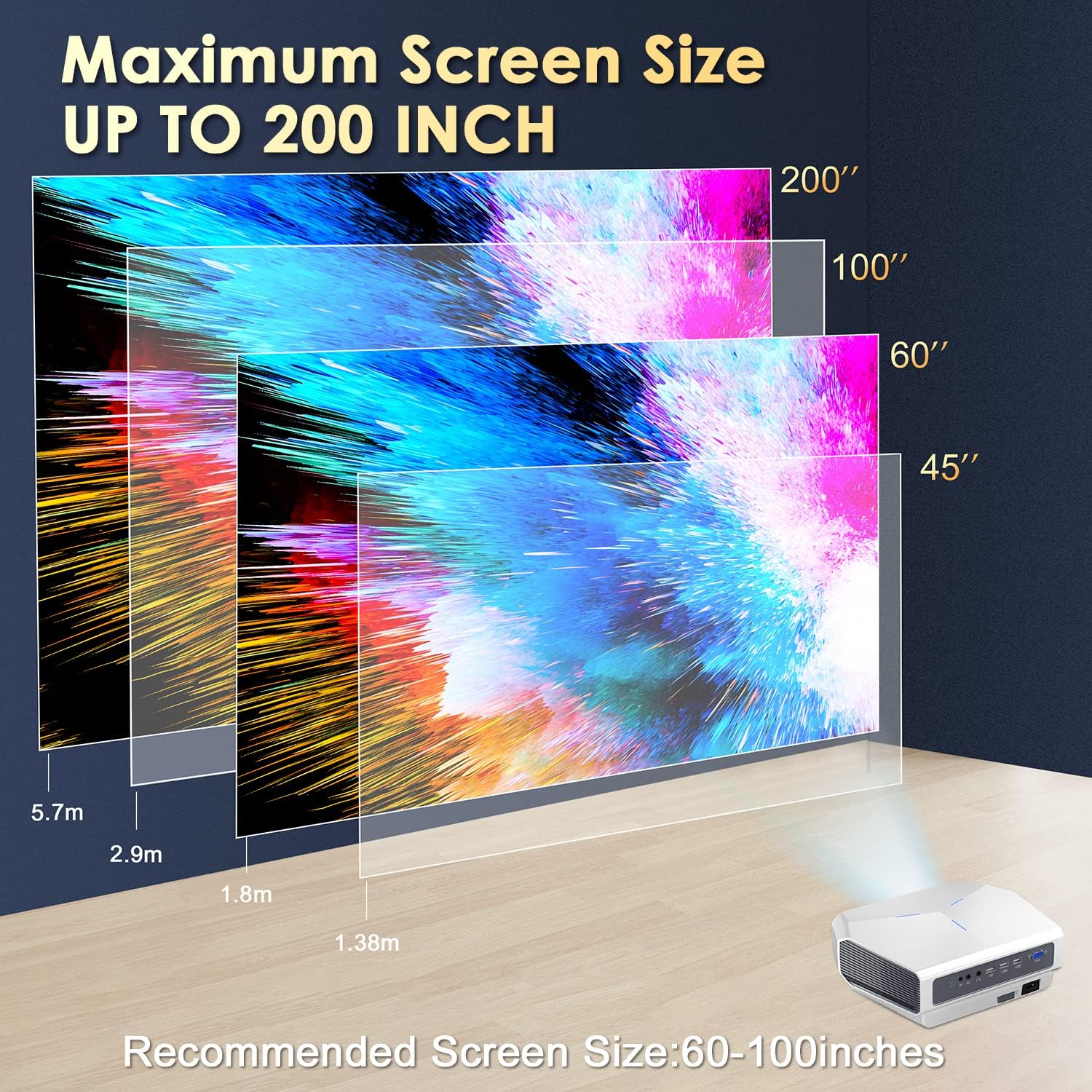
Figure 3.2: Projection distance and screen size guide for the IOTWE A4300.
3.3 Manual Focus and Keystone Correction
Adjust the image clarity using the manual focus wheel and correct trapezoidal distortion with the ±15° keystone correction feature to ensure a perfectly rectangular image.
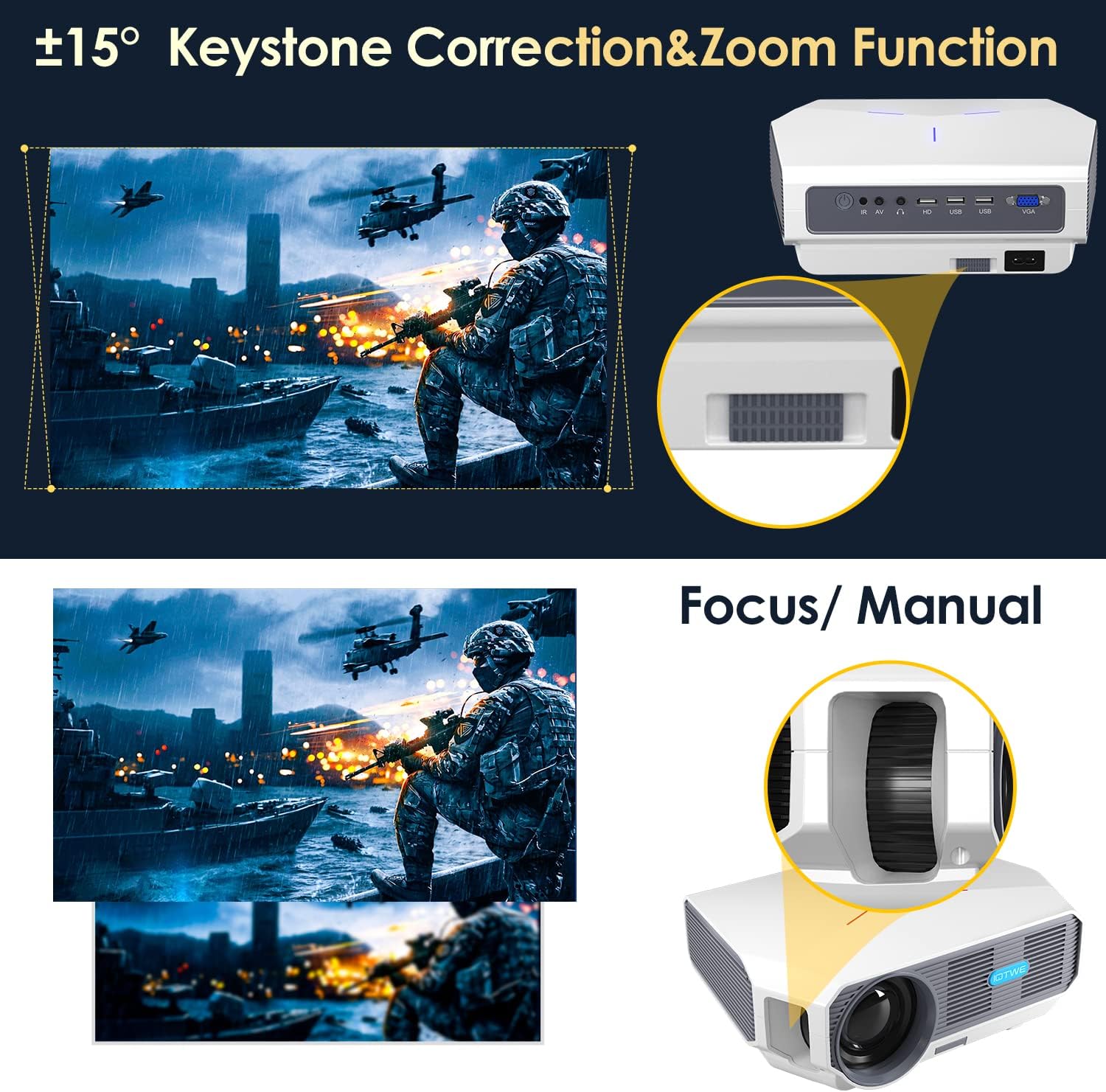
Figure 3.3: Details on adjusting focus and keystone correction.
3.4 Superior Optical Lens System
The projector incorporates a high-quality optical lens system designed for precise projection and extended lamp jetëgjatësi deri në 100,000 orë.

Figura 3.4: E brendshme view of the projector's optical components.
4. Konfigurimi
4.1 Metodat e Vendosjes
The IOTWE A4300 Projector offers flexible placement options to suit various environments:
- Vendosja në tavolinë: Vendoseni projektorin në një sipërfaqe të sheshtë dhe të qëndrueshme.
- Mount Tripod: Utilize the tripod screw hole at the bottom for tripod mounting.
- Montimi i tavanit: Mount the projector to the ceiling using a compatible projector mount.

Figure 4.1: Different placement options for the projector.
4.2 Ndezja fillestare
- Connect the power cable to the projector and a power outlet.
- Shtypni butonin e ndezjes në projektor ose në telekomandë për ta ndezur.
- Adjust the focus and keystone correction as described in Section 3.3 to achieve a clear and rectangular image.
5. Udhëzimet e funksionimit
5.1 Lidhja e pajisjeve të jashtme
The IOTWE A4300 Projector supports multiple input sources:
- HDMI: Connect laptops, gaming consoles, TV sticks, etc.
- USB: Luaj media direkt nga disqet USB.
- VGA: Connect older computers or devices.
- NGA: Connect legacy devices using the included AV cable.
- Xhek audio: Lidhni altoparlantë ose kufje të jashtme.

Figure 5.1: Available ports for connecting various devices.
5.2 Wireless Screen Mirroring (WiFi)
Mirror your smartphone, iOS, Android, or iPad screen wirelessly to the projector.

Figure 5.2: Wireless screen mirroring in action.
Për pajisjet iOS:
- Turn on the projector and select the screen mirroring option: MCAST.
- Select the WiFi setting and establish a WiFi connection with the projector. Ensure your phone is also connected to the same WiFi network.
- Return to the previous user interface, select the iOS/iPhone/iPad Chromecast module, and find the iOS screen mirroring option.
- Turn on the screen mirroring function on your phone, select DUAL-CAST***, and the screen mirroring connection will be successful.
Për pajisjet Android:
- Turn on the projector and select the screen mirroring option: MCAST.
- Select the Android/Windows Miracast module and find the Android Miracast option.
- Connect your mobile phone with the Multi-Screen or Miracast function of Android devices.
- Select DUAL-CAST*** to establish the connection.

Figure 5.3: Detailed steps for WiFi connection on iOS and Android.
5.3 Lidhja Bluetooth
Connect Bluetooth headphones or speakers for an enhanced audio experience.
- Shko te cilësimet e Bluetooth në projektor.
- Aktivizo Bluetooth dhe kërko për pajisjet e disponueshme.
- Zgjidhni kufjet ose altoparlantin tuaj Bluetooth nga lista për t'i çiftuar.

Figure 5.4: Connecting Bluetooth audio devices.
6. Mirëmbajtja
6.1 Pastrimi i Projektorit
- Lente: Use the provided cleaning cloth or a professional lens cleaning solution and cloth to gently wipe the lens. Avoid abrasive materials.
- Trupi: Fshijeni pjesën e jashtme të projektorit me një leckë të butë dhe të thatë. Mos përdorni pastrues të lëngshëm direkt mbi pajisje.
- Ventilimi: Sigurohuni që hapjet e ventilimit të jenë të pastra nga pluhuri dhe pengesat për të parandaluar mbinxehjen.
6.2 Lamp Jeta
The IOTWE A4300 Projector features an LED lamp with an impressive lifespan of up to 100,000 hours, significantly reducing the need for frequent lamp zëvendësimet.
7. Troubleshooting
This section addresses common issues you might encounter with your IOTWE A4300 Projector.
| Problem | Shkaku i mundshëm | Zgjidhje |
|---|---|---|
| Asnjë imazh nuk shfaqet | Kablloja e energjisë nuk është e lidhur; Është zgjedhur burim i gabuar hyrjeje; Kapaku i lentes është i vendosur. | Ensure power cable is securely connected; Select the correct input source (HDMI, USB, etc.); Remove the lens cap. |
| Imazhi i paqartë | Fokusi nuk është rregulluar; Projektori është shumë afër/larg ekranit. | Adjust the manual focus wheel; Adjust projection distance. |
| Imazh trapezoidal | Projektori nuk është pingul me ekranin. | Adjust keystone correction (±15°); Reposition the projector. |
| Asnjë zë | Volume too low; External audio device not connected properly; Muted. | Increase volume; Check audio cable connections or Bluetooth pairing; Unmute the projector. |
| WiFi screen mirroring issues | Incorrect network connection; Device compatibility. | Ensure both projector and device are on the same WiFi network; Refer to Section 5.2 for detailed steps; Check device's mirroring capabilities. |
8. Specifikimet
Detailed technical specifications for the IOTWE A4300 Projector.
| Veçori | Specifikimi |
|---|---|
| Markë | IOTWE |
| Numri i modelit | A4300 |
| Dimensionet e produktit | 26 x 19 x 9 cm |
| Pesha e artikullit | 2.27 kilogramë |
| Rezolucioni i ekranit | Native 1920 x 1080 (Full HD) |
| Rezolucioni maksimal i ekranit | 1920 x 1080 (4K Support) |
| Shkëlqimi | 9200 Lumens |
| Raporti i kontrastit | 10000:1 |
| Teknologjia e lidhjes | VGA, Bluetooth, USB, HDMI, WiFi (5G) |
| Lloji i ekranit | LCD |
| Faktori i formës | Portativ |
| Lloji i montimit | Tavolinë, montim në mur |
| Aplikacionet e rekomanduara | Kinema në shtëpi |
| Lamp Jetëgjatësia | Deri në 100,000 orë |
9. Garancia dhe Mbështetja
For warranty information, technical support, or service inquiries, please refer to the official IOTWE website or the contact information provided in your product's original packaging. Keep your purchase receipt as proof of purchase for warranty claims.