
Hyrje
Thank you for choosing the IMICE T98 Wired Gaming Mouse. This manual provides detailed instructions on how to set up, operate, and maintain your new gaming mouse. Please read this manual carefully before use to ensure optimal performance and a satisfying gaming experience.
Karakteristikat e produktit
- Sensori me precizion të lartë: Up to 7200 DPI for accurate tracking.
- DPI e rregullueshme: Six adjustable DPI levels (1200, 1600, 2400, 3200, 4800, 7200) to suit various tasks and games.
- 6 butona të programueshëm: Includes Left, Right, DPI, Scroll Wheel, Forward, and Backward buttons for enhanced control.
- Dynamic RGB LED Lighting: Features 6 colorful LED lights for an immersive gaming atmosphere.
- Dizajni ergonomik: Comfortable grip for extended use, designed for both left and right-handed users.
- Lightweight Honeycomb Shell: Reduces weight and enhances airflow to prevent hand sweat.
- Kujtesa në bord: Stores up to four custom configurations without requiring driver software after initial setup.
- Durable USB Cable: High-quality 1.5-meter wired USB connection.
Udhëzuesi i konfigurimit
- Shpaketojeni mausin: Carefully remove the IMICE T98 Gaming Mouse from its packaging.
- Lidhu me kompjuterin: Plug the USB connector of the mouse into an available USB port on your computer or laptop.
- Instalimi i shoferit: The mouse is plug-and-play and typically does not require additional drivers for basic functionality. Your operating system (Windows, Mac, Vista) will automatically detect and install the necessary drivers.
- Verifikoni funksionalitetin: Once connected, the mouse's LED lights should illuminate, and the cursor should respond to movement.
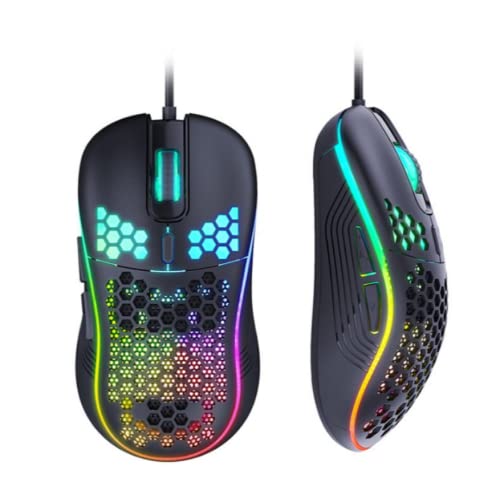
Image: The IMICE T98 Gaming Mouse with its USB cable, ready for connection.
Udhëzimet e funksionimit
Funksionet Bazë
- Klikoni majtas: Butoni kryesor i veprimit.
- Klikoni me të djathtën: Buton dytësor veprimi, zakonisht për menutë e kontekstit.
- Rrota e lëvizjes: Lëviz lart ose poshtë në dokumente dhe web faqe. Mund të shtypet edhe për një funksion klikimi në mes.
- Butonat Përpara/Prapa: Të vendosura në anë, këto butona zakonisht lëvizin përpara ose prapa në web shfletuesit ose file eksplorues.
Rregullimi i DPI
The IMICE T98 mouse features a dedicated DPI button to cycle through six sensitivity levels. Press the Butoni DPI (usually located behind the scroll wheel) to change the cursor speed. Each press will switch to the next DPI setting:
- 1200 DPI (Default for browsing)
- 1600 DPI (Daily office/design)
- 2400 DPI (MOBA games)
- 3200 DPI
- 4800 DPI (FPS games)
- 7200 DPI

Image: The DPI button and visual representation of the six adjustable DPI speeds.
Ndriçim LED
The mouse features dynamic RGB LED lighting. The lighting patterns are pre-programmed and enhance the aesthetic appeal of the mouse. Some lighting modes might be adjustable via the customization software.

Image: Two IMICE T98 mice displaying their vibrant RGB LED lighting.
Customization and Software
The IMICE T98 mouse supports customization through dedicated macro definition software. This software allows you to:
- Rimarrëveshja e butonit: Reset mouse buttons as multimedia buttons or assign custom macro functions.
- Menaxhimi makro: Record and manage macros according to your personal preferences for complex operations.
- Cilësimet e avancuara: Adjust mouse pointer speed, fire speed, return rate, and DPI values.
- Cilësimet e LED: Customize backlight modes and colors.
The mouse also features onboard memory, allowing it to store up to four configurations. Once configured using the software, these settings can be used on other computers without needing the driver software installed.

Image: Screenshot of the IMICE macro definition software, showing options for button settings, macros, advanced settings, and LED control.
Mirëmbajtja
To ensure the longevity and optimal performance of your IMICE T98 Gaming Mouse, follow these maintenance guidelines:
- Pastrimi: Përdorni një leckë të butë dhe të thatë për të fshirë sipërfaqen e mausit. Për papastërti kokëfortë, fërkojeni pak.ampLani leckën me ujë ose me një tretësirë të butë pastrimi. Shmangni përdorimin e kimikateve të ashpra ose materialeve gërryese.
- Kujdesi i sensorit: Keep the optical sensor on the underside of the mouse clean from dust and debris. Use a cotton swab or compressed air if necessary.
- Menaxhimi i kabllove: Shmangni përkuljet e mprehta ose tërheqjen e tepërt të kabllit USB për të parandaluar dëmtimin.
- Magazinimi: Kur nuk është në përdorim, ruajeni mausin në një mjedis të pastër dhe të thatë, larg temperaturave ekstreme.
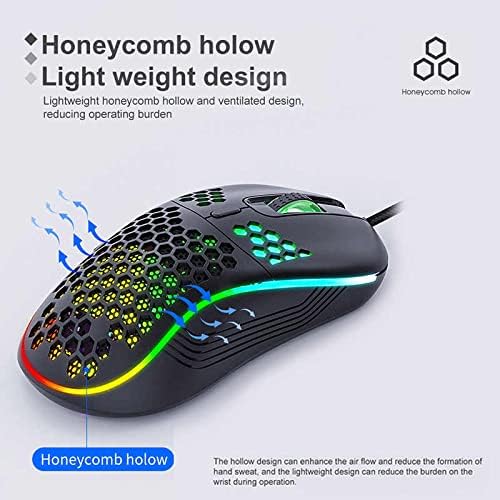
Image: The honeycomb hollow design of the IMICE T98 mouse, which aids in ventilation and reduces hand sweat.
Zgjidhja e problemeve
| Problem | Zgjidhja e mundshme |
|---|---|
| Miu nuk përgjigjet |
|
| Lëvizja e kursorit është e çrregullt ose e ngadaltë |
|
| Dritat LED nuk funksionojnë |
|
| Buttons are not working or performing incorrectly |
|
Specifikimet
| Veçori | Detaj |
|---|---|
| Markë | IMICE |
| Model | T98 |
| Teknologjia e lidhjes | USB (me tel) |
| Karakteristika të veçanta | LED Lighting, Adjustable DPI, Programmable Buttons, Onboard Memory |
| Sasia e butonave | 6 |
| Orientimi i dorës | Ambidekstë |
| Përdorimi i rekomanduar | Lojëra |
| Pajisjet e përputhshme | Kompjuter Personal, Laptop |
| Përputhshmëria e Sistemit Operativ | Windows, Vista, Mac (implied) |
| Stili | Moderne |
| Lloji i përfundimit | Mat |
| Gjatësia e Kabllit | 1.5 metra |
| Bateritë e përfshira | Nr |
Garancia dhe Mbështetja
Për informacion mbi garancinë dhe mbështetje teknike, ju lutemi referojuni dokumentacionit të dhënë me blerjen tuaj ose kontaktoni drejtpërdrejt shitësin/prodhuesin. Ruajeni provën e blerjes për kërkesat e garancisë.


