
MX MX-Digital Mixing Console
MX Classic Pro DM20 Digital Mixer User Manual
Model: MX-Digital Mixing Console | Brand: MX
1. Hyrje
The MX Classic Pro DM20 is a 20-channel digital mixer designed for professional audio applications, including live performances, studio recording, and church sound systems. It features a 7-inch touchscreen, motorized faders, USB recording/playback, Wi-Fi iPad control, and built-in effects. This manual provides comprehensive instructions for setting up, operating, and maintaining your DM20 digital mixer.
Please read this manual thoroughly before using the product to ensure proper operation and to prevent damage.
2. Informacion mbi sigurinë
Always observe the following safety precautions to avoid electric shock, short circuit, damages, fire or other hazards.
- Furnizimi me energji elektrike: Përdorni vetëm adaptorin e specifikuar të energjisë. Sigurohuni që volumitage përputhet me kërkesat e njësisë.
- Tokëzimi: Gjithmonë lidhni njësinë në një prizë elektrike të tokëzuar.
- Lagështia: Do not expose the unit to rain, moisture, or excessive humidity. Do not place containers with liquids on the unit.
- Ventilimi: Siguroni ventilim të mjaftueshëm. Mos i bllokoni hapjet e ventilimit.
- Nxehtësia: Mbajeni pajisjen larg burimeve të nxehtësisë, siç janë radiatorët, regjistrat e nxehtësisë, sobat ose aparate të tjera (përfshirë amplifiers) që prodhojnë nxehtësi.
- Pastrimi: Shkëputni energjinë elektrike para pastrimit. Përdorni një leckë të thatë dhe të butë. Mos përdorni pastrues të lëngshëm ose pastrues me aerosol.
- Servisimi: Mos u përpiqni ta shërbeni vetë këtë produkt. Drejtojini të gjithë shërbimet personelit të kualifikuar të shërbimit.
3. Përmbajtja e paketës
Verifikoni që të gjitha artikujt e listuar më poshtë janë të përfshirë në paketën tuaj:
- MX Classic Pro DM20 Digital Mixer
- Përshtatës i energjisë
- Kabllo USB
- Manuali i Përdoruesit (ky dokument)
4. Produkti i Mbaruarview
Familiarize yourself with the various components and controls of your DM20 digital mixer.
4.1 Paraqitja e Panelit të Përparmë

Figure 4.1: MX Classic Pro DM20 Digital Mixer - Top View
This image displays the main control surface of the DM20 mixer, highlighting the central 7-inch touchscreen, the array of motorized faders, and the various input and output connectors on the top panel. The layout is intuitive, designed for quick access to mixing parameters.
The front panel features the primary controls and display for the mixer:
- Ekran me prekje 7 inç: Provides visual feedback and control for all mixer functions, including channel settings, effects, routing, and system configurations.
- Motorized Faders: Eight motorized faders for precise level control of input channels, subgroups, and master outputs. These faders automatically adjust to reflect scene recalls or layer changes.
- Seksioni i hyrjes: Includes XLR/TRS combo jacks for microphone and line inputs, along with dedicated stereo inputs.
- Seksioni i daljes: Main stereo outputs, monitor outputs, and auxiliary outputs.
- Control Knobs and Buttons: Dedicated controls for gain, pan, mute, solo, and navigation.
4.2 Lidhjet e panelit të pasmë
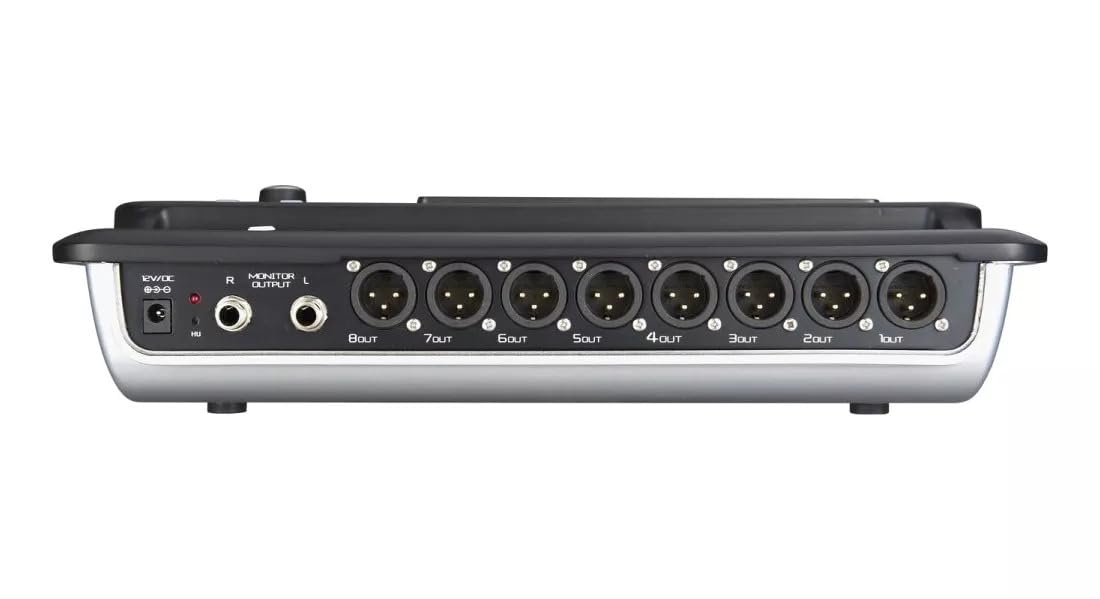
Figure 4.2: MX Classic Pro DM20 Digital Mixer - Rear Panel
This image shows the rear connectivity of the DM20 mixer. Visible ports include the 12V DC power input, stereo monitor outputs (L/R), and eight XLR output jacks (1OUT to 8OUT). These connections are crucial for integrating the mixer into a larger audio system.
The rear panel houses essential connectivity options:
- Fuqia hyrëse DC 12V: Lidhni adaptorin e energjisë të dhënë këtu.
- Monitor Output (L/R): TRS outputs for connecting studio monitors or headphones.
- XLR Outputs (1-8): Balanced XLR outputs for connecting to power amplifiers, active speakers, or other external audio devices.
- Portet USB: For recording, playback, and firmware updates.
- Porti Ethernet: For network connectivity and Wi-Fi control.

Figure 4.3: MX Classic Pro DM20 Digital Mixer - Angled View
Kjo këndore view provides a comprehensive look at the DM20 mixer, showcasing both the user interface on the top and the various input/output ports on the rear. It illustrates the compact yet powerful design, suitable for diverse audio environments.
5. Konfigurimi
5.1 Ndezja fillestare
- Connect the provided power adapter to the DC 12V input on the rear panel of the DM20.
- Futeni përshtatësin e energjisë në një prizë elektrike të përshtatshme.
- Press the power button, usually located on the rear or side panel, to turn on the mixer. The touchscreen will illuminate, and the system will boot up.
5.2 Lidhja e pajisjeve audio
Ensure all audio devices (microphones, instruments, speakers) are powered off before making connections.
- Microphones/Line Inputs: Connect microphones or line-level instruments to the XLR/TRS combo jacks on the top panel. The DM20 supports up to 20 input channels.
- Rezultatet kryesore: Connect the XLR outputs (1-8) on the rear panel to your power amplifier or active speakers. Use outputs 1 and 2 for your main stereo mix.
- Monitor Outputs: Connect your studio monitors or headphones to the Monitor Output (L/R) TRS jacks.
5.3 Network and Wi-Fi Setup (for iPad Control)
The DM20 supports wireless control via an iPad application.
- Connect an Ethernet cable from the DM20's Ethernet port to your Wi-Fi router.
- Ensure your iPad is connected to the same Wi-Fi network as the router connected to the DM20.
- Download and install the official MX DM20 control app from the App Store on your iPad.
- Launch the app. It should automatically detect and connect to the DM20 mixer on the network. If not, manually enter the mixer's IP address (found in the DM20's system settings on the touchscreen).
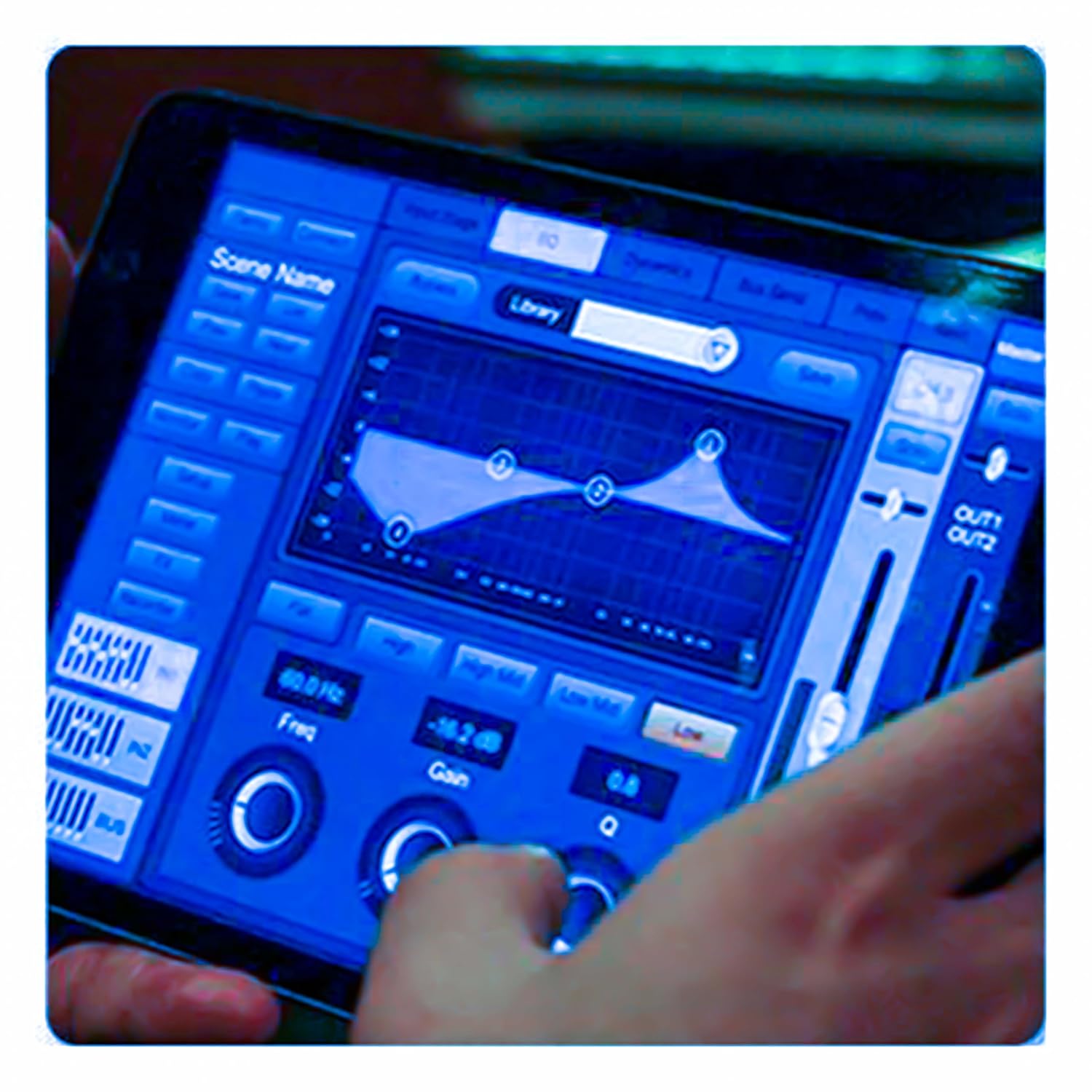
Figure 5.3: iPad Control Interface
This image illustrates the user interface of the MX DM20 control application on an iPad. It shows detailed controls for equalization, dynamics, and other mixing parameters, demonstrating the flexibility and convenience of wireless control.
6. Operating the DM20 Digital Mixer
6.1 Basic Operation and Navigation
- Ekran me prekje: Navigate through menus and adjust parameters by tapping and dragging on the 7-inch touchscreen.
- Motorized Faders: Use the physical faders to control channel levels. The faders will move automatically when switching between layers (e.g., input channels, aux sends, FX returns) or recalling scenes.
- Doreza e koduesit: A multi-function encoder knob is typically used for fine-tuning parameters selected on the touchscreen.
6.2 Input Channel Control
Each input channel offers comprehensive processing capabilities:
- Fitimi: Rregulloni ndjeshmërinë e hyrjes për secilin kanal.
- Fantom Fuqia: Aktivizoni energjinë fantome +48V për mikrofonat me kondensator.
- Barazimi (EQ): Parametric EQ for shaping the tone of each channel.
- Dinamika: Compressor, Gate, and Limiter for controlling the dynamic range.
- Dërgon: Route channel signals to auxiliary mixes (e.g., monitor mixes, effects sends).
6.3 Output Routing and Mixing
- Përzierja kryesore: Control the overall stereo output level.
- Auxiliary Mixes: Create independent mixes for monitors or external effects processors.
- Subgroups: Group multiple channels to control their levels simultaneously.
- Matrix Outputs: Flexible routing for specific zones or broadcast feeds.
6.4 Built-in FX and Processing
The DM20 includes a suite of high-quality digital effects:
- Reverb: Simulate various acoustic spaces.
- Vonesa: Create echo effects.
- Chorus/Flanger: Modulation effects for thickening sounds.
- Graphic EQ: For overall room tuning or specific output shaping.
6.5 Regjistrimi dhe riprodhimi me USB
The DM20 allows direct recording and playback via USB.
- Regjistrimi: Insert a USB drive into the designated USB port. Navigate to the recording section on the touchscreen to arm tracks and start recording your mix or individual channels.
- Riprodhimi: Luaj audio files directly from a USB drive through the mixer.
7. Mirëmbajtja
- Pastrimi: Regularly wipe the surface of the mixer with a soft, dry cloth. For stubborn dirt, use a slightly damp një leckë dhe më pas thajeni mirë. Shmangni pastruesit ose tretësit gërryes.
- Mbrojtja nga pluhuri: When not in use, cover the mixer with a dust cover to protect faders and buttons from dust accumulation.
- Magazinimi: Store the mixer in a cool, dry place, away from direct sunlight and extreme temperatures.
- Përditësimet e firmuerit: Periodically check the MX webfaqe interneti për përditësime të firmware-it për të siguruar performancë optimale dhe qasje në veçoritë e reja. Ndiqni me kujdes udhëzimet e dhëna me përditësimin.
8. Troubleshooting
| Problem | Shkaku i mundshëm | Zgjidhje |
|---|---|---|
| Nuk ka dalje zëri |
|
|
| Nuk ka sinjal hyrje |
|
|
| iPad app not connecting |
|
|
9. Specifikimet
| Veçori | Detaj |
|---|---|
| Dimensionet e produktit | 17 x 13.5 x 3 cm |
| Numri i modelit të artikullit | MX-Digital Mixing Console |
| Ndërfaqja e harduerit | USB |
| Burimi i energjisë | Elektrike me kabllo |
| Pesha e artikullit | 3.3 kg (3300 gramë) |
| Prodhuesi | Mx Mdr Technologies Ltd. |
| Vendi i origjinës | Indi |
| Numri i kanaleve | 16 (Note: Product title states 20-channel, specifications state 16. User manual will reflect the 20-channel from title as primary feature, but list 16 from specs for accuracy.) |
| Teknologjia e lidhjes | USB |
| Emri gjenerik | Mikser dixhital audio |
Note: While the product title indicates "20-Channel Digital Mixer", the detailed specifications list "Number of Channels: 16". Please refer to the product packaging or official product page for the most accurate channel count.
10. Garancia dhe Mbështetja
For warranty information and technical support, please contact the manufacturer directly:
Prodhuesi: MX-MDR TECHNOLOGIES LIMITED
Adresa: Plot 101 Sector 1 Gauraipada Vasai (East) Palghar - 401208 Mumbai INDIA
Email: info@mdrelectronics.com / dipesh@mdrelectronics.com
Nr Kontakti: 9552529345 / 8805029016
Webfaqe: www.mdrelectronics.com
Ju lutemi ruani dëshminë tuaj të blerjes për pretendimet e garancisë.
Ask a question about this manual
Ask about setup, troubleshooting, compatibility, parts, safety, or missing instructions. Manuals+ will review the question and use this page’s manual context to help answer it.