1. Hyrje
Thank you for choosing the Xigmatek Lux M Micro-ATX Mini Tower PC Case. This manual provides detailed instructions for the installation, operation, and maintenance of your new PC chassis. Please read this manual carefully before beginning the assembly process to ensure proper installation and to maximize the performance and longevity of your system.
The Lux M case is designed to offer a robust and aesthetically pleasing housing for your computer components, featuring a tempered glass side panel, a metallic front panel with a unique cut-out pattern, and pre-installed fixed RGB fans for optimal cooling and visual appeal. It supports Micro-ATX and Mini-ITX motherboards and is compatible with various cooling solutions, including water cooling.
2. Informacion mbi sigurinë
Ju lutemi të respektoni masat paraprake të sigurisë gjatë instalimit dhe funksionimit:
- Always disconnect the power supply from the wall outlet before installing or removing any components to prevent electric shock.
- Handle all components with care. Avoid touching circuit boards directly; hold them by their edges.
- Wear an anti-static wrist strap when handling sensitive electronic components to prevent electrostatic discharge (ESD) damage.
- Keep the case and components away from liquids, excessive heat, and direct sunlight.
- Siguroni ventilim të duhur rreth kutisë së kompjuterit për të parandaluar mbinxehjen.
- Mbajini pjesët e vogla dhe vidat larg fëmijëve.
3. Përmbajtja e paketës
Verifikoni që të gjitha artikujt janë të pranishëm në paketimin tuaj. Nëse ndonjë artikull mungon ose është i dëmtuar, ju lutemi kontaktoni shitësin tuaj.
- Xigmatek Lux M Micro-ATX Mini Tower PC Case
- Kutia e aksesorëve (që përmban vida, mbështetëse, lidhëse kabllosh, etj.)
- Manuali i Përdoruesit (ky dokument)
4. Produkti i Mbaruarview
Familiarize yourself with the various parts of your Xigmatek Lux M PC case.
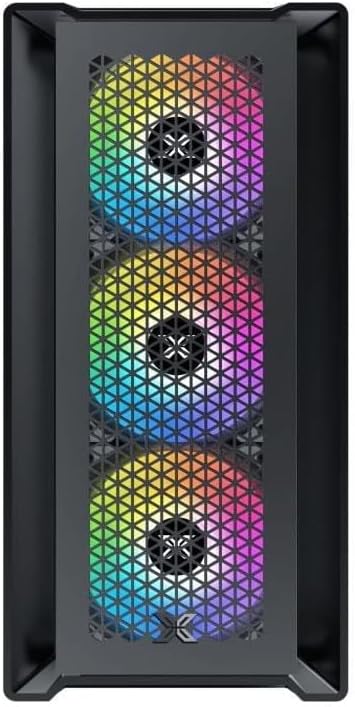
Figura 4.1: Përpara View. This image displays the front of the Xigmatek Lux M case, highlighting the metallic mesh panel with a triangular design and the three pre-installed 120mm fixed RGB fans.

Figure 4.2: Angled Top-Front View. This perspective shows the tempered glass side panel, offering a clear view of the interior, and the top panel with its I/O ports (USB, audio) and power button.
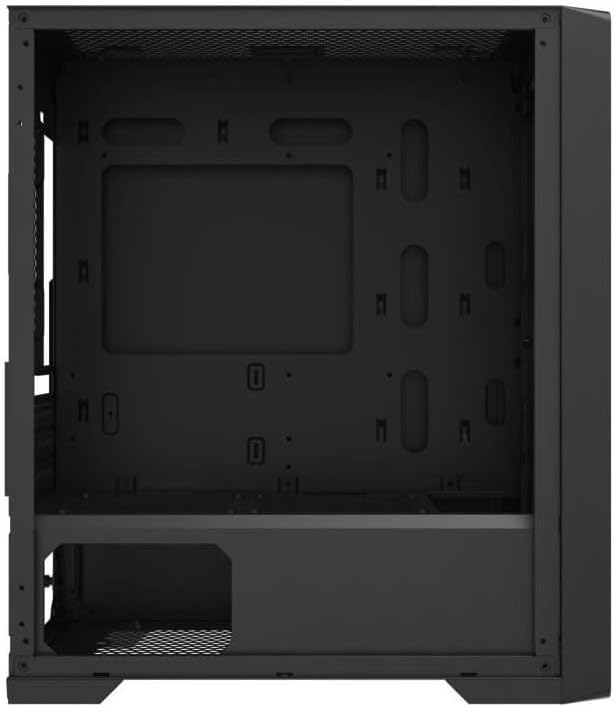
Figure 4.3: Interior Layout. The internal structure of the case, featuring the motherboard mounting tray, cutouts for cable management, and the power supply shroud at the bottom.
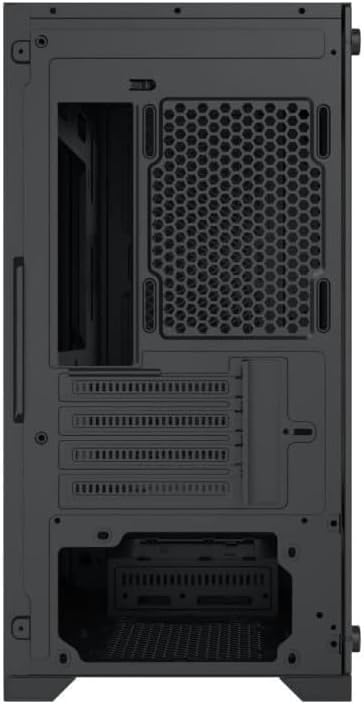
Figura 4.4: E pasme View. This image illustrates the rear of the case, including the expansion slots for graphics cards and other add-in cards, the rear fan mounting area, and the power supply mounting bracket.
5. Konfigurimi dhe instalimi
Follow these steps to install your computer components into the Xigmatek Lux M case.
5.1. Përgatitja e Rastit
- Vendoseni kutinë në një sipërfaqe të sheshtë dhe të qëndrueshme.
- Remove the tempered glass side panel by unscrewing the thumb screws and carefully lifting it off. Set it aside on a soft, non-abrasive surface.
- Hiqni panelin anësor të çelikut të kundërt duke i hequr vidat me gisht dhe duke e rrëshqitur prapa.
5.2. Instalimi i motherboard
The Lux M supports Micro-ATX and Mini-ITX motherboards.
- Instaloni mburojën I/O (nëse nuk është e instaluar paraprakisht në pllakën tuaj amë) në hapjen e pasme të kutisë.
- Align the motherboard with the pre-installed standoffs. Ensure all screw holes on the motherboard match the standoffs.
- Secure the motherboard using the provided motherboard screws. Do not overtighten.
5.3. Instalimi i Njësisë së Furnizimit me Energji (PSU)
The PSU mounts at the rear bottom of the case.
- Slide the PSU into its designated compartment from the rear of the case.
- Align the PSU's screw holes with the holes on the case's rear panel.
- Secure the PSU with the provided screws.
5.4. Storage Drive Installation (2.5"/3.5" Drives)
The case supports 2x 2.5"/3.5" storage drives.
- Locate the drive cage beneath the PSU shroud or dedicated 2.5" mounting points behind the motherboard tray.
- For 3.5" HDDs, slide the drive into a drive tray (if applicable) and secure it with screws.
- For 2.5" SSDs, secure them directly to the mounting points using the provided screws.
5.5. Instalimi i Kartës Grafike (VGA) dhe Kartës së Zgjerimit
Kutia mbështet karta grafike deri në 320 mm në gjatësi.
- Hiqni mbulesat e nevojshme të vendeve të zgjerimit nga pjesa e pasme e kutisë.
- Insert your graphics card or other expansion card into the appropriate PCIe slot on your motherboard.
- Secure the card to the case using the expansion slot screws.
5.6. Cooling System Installation (Optional)
The Lux M comes with 4x 120mm X24F fixed RGB fans. It supports additional cooling options.
- Ftohës i CPU-së: Max height of 160mm. Install your CPU cooler according to its manufacturer's instructions.
- Mbështetja e radiatorit: The case supports radiators of 360mm, 240mm, or 120mm. Refer to your radiator's manual for installation. Common mounting locations include the front and top panels.
5.7. Menaxhimi i kabllove
Utilize the cable routing cutouts and tie-down points behind the motherboard tray to organize cables. This improves airflow and aesthetics.
5.8. Asambleja Përfundimtare
- Once all components are installed and cables are managed, reattach the steel side panel and secure it with thumb screws.
- Carefully reattach the tempered glass side panel and secure it with thumb screws.
6. Udhëzimet e funksionimit
After completing the installation, connect your peripherals (monitor, keyboard, mouse) and power cable to the PC. Press the power button located on the top panel of the case to start your system.
The pre-installed X24F RGB fans feature fixed RGB lighting, which will illuminate automatically upon system power-on. No additional software or controller is required for their basic operation.
Ensure that the case's ventilation is not obstructed to maintain optimal airflow and cooling performance.
7. Mirëmbajtja
Regular maintenance helps ensure the longevity and optimal performance of your PC components.
- Pastrimi i pluhurit: Periodically clean dust filters (if present) and the interior of the case using compressed air or a soft brush. Dust accumulation can hinder airflow and lead to overheating.
- Pastrimi i jashtëm: Fshini sipërfaqet e jashtme me një të butë, damp cloth. Avoid harsh chemicals that may damage the finish or tempered glass.
- Xhami i zbutur: Clean the tempered glass panel with a glass cleaner and a microfiber cloth to avoid scratches and streaks.
8. Troubleshooting
Nëse hasni probleme gjatë ose pas instalimit, merrni parasysh hapat e mëposhtëm të zakonshëm për zgjidhjen e problemeve:
- Pa fuqi:
- Sigurohuni që kablloja e energjisë të jetë e lidhur mirë si me PSU-në ashtu edhe me prizën e murit.
- Check that the PSU switch is in the 'ON' position.
- Verify that the front panel power switch cable is correctly connected to the motherboard's front panel header.
- Fans Not Spinning / RGB Not Lighting:
- Ensure all fan power cables are securely connected to the motherboard or a fan controller.
- For RGB, confirm that any necessary RGB headers are connected to the motherboard (though the included fans are fixed RGB and should light up with power).
- Pa dalje të ekranit:
- Verify that your monitor cable is connected to the graphics card (if installed) and not the motherboard's integrated graphics port.
- Vendoseni përsëri kartën grafike në vendin e saj PCIe.
- Mbinxehje:
- Ensure all case fans are spinning and oriented correctly for optimal airflow (intake/exhaust).
- Clean any dust filters and internal components.
- Verify that the CPU cooler is properly seated and making good contact with the CPU.
For more complex issues, consult your component manuals or seek assistance from Xigmatek support or a qualified technician.
9. Specifikimet
| Veçori | Specifikimi |
|---|---|
| Markë | Xigmatek |
| Emri i modelit | Lux M |
| Numri i modelit | EN48540 |
| Lloji i rastit | Mini Kulla |
| Pajtueshmëria e motherboard | Mikro-ATX, Mini-ITX |
| Materiali | Tempered Glass (side panel), Metal (front panel) |
| Ngjyra | E zezë |
| Tifozët e para-instaluar | 4 x 120mm X24F Fixed RGB Fans |
| Mbështetja e radiatorit | 360 mm, 240 mm, 120 mm |
| Lartësia maksimale e ftohësit të CPU-së | 160 mm |
| Max VGA Length | 320 mm |
| Gjatësia maksimale e PSU | 165 mm |
| Hapësirat e magazinimit | 2x 2.5"/3.5" |
| Karakteristika të veçanta | RGB Lighting, Triangular Mesh Front Design |
10. Garancia dhe Mbështetja
Xigmatek products are manufactured to the highest quality standards. For warranty information and technical support, please refer to the warranty card included with your product or visit the official Xigmatek webfaqe interneti. Ju lutemi ruani provën e blerjes për kërkesat e garancisë.
For further assistance, you may contact Xigmatek customer support through their official channels.