
Hyrje
Thank you for choosing the sonoro Primus Internet Radio with Bluetooth. This manual provides essential information for setting up, operating, and maintaining your device to ensure optimal performance and longevity. Please read it thoroughly before use.
Udhëzime të rëndësishme të sigurisë
- Burimi i energjisë: Përdorni vetëm adaptorin e specifikuar të energjisë. Sigurohuni që volumitage përputhet me furnizimin tuaj lokal me energji elektrike.
- Ventilimi: Mos bllokoni asnjë hapje ventilimi. Mbani hapësirë të mjaftueshme rreth njësisë për qarkullim të duhur të ajrit.
- Uji dhe lagështia: Do not expose the unit to rain, moisture, dripping, or splashing. Keep liquids away from the device.
- Nxehtësia: Mos e instaloni pranë ndonjë burimi nxehtësie si radiatorë, regjistra ngrohjeje, soba ose aparate të tjera (përfshirë amplifiers) që prodhojnë nxehtësi.
- Pastrimi: Shkëputeni pajisjen nga priza para pastrimit. Përdorni vetëm një leckë të thatë.
- Servisimi: Mos u përpiqni ta shërbeni vetë këtë produkt. Drejtojini të gjithë shërbimet personelit të kualifikuar të shërbimit.
- Produkt lazer: This product contains a Class 1 laser. Do not open the casing.
Përmbajtja e paketës
Ju lutemi kontrolloni që të gjitha artikujt janë të pranishëm:
- sonoro Primus Internet Radio Unit
- Përshtatës i energjisë
- Telekomanda (me bateri)
- Manuali i Përdoruesit (ky dokument)
Konfigurimi
1. Shpaketimi dhe Vendosja
Carefully remove the unit from its packaging. Place the sonoro Primus on a stable, flat surface, ensuring adequate ventilation around the device. Avoid placing it near strong magnetic fields or direct sunlight.
2. Lidhja e energjisë
Connect the provided power adapter to the AC IN port on the rear of the unit. Plug the other end into a suitable wall outlet. The unit will enter standby mode.
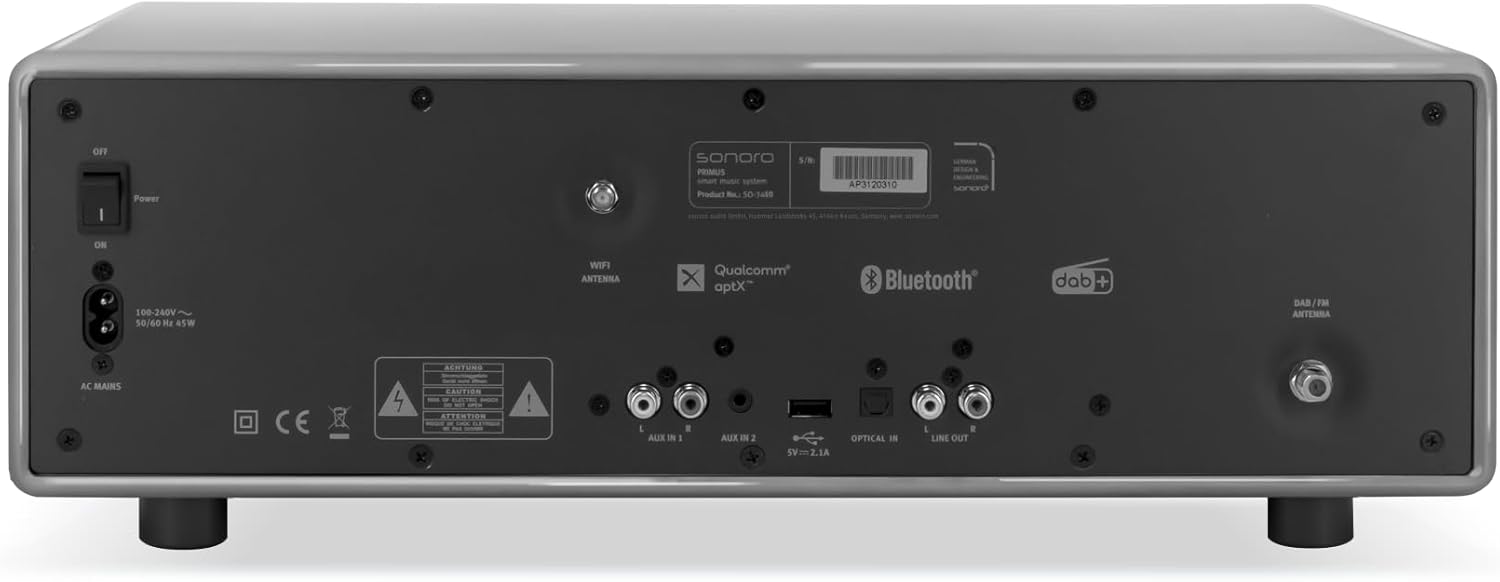
Imazhi: Rear panel of the sonoro Primus, highlighting the power input and other connectivity options like AUX-in, Optical-in, and antenna connections.
3. Lidhja e antenës
For optimal FM and DAB+ reception, connect the included antenna to the appropriate antenna input on the rear panel. Extend the antenna fully for best signal quality.
4. Ndezja fillestare
Press the Power button on the front panel or the remote control to turn on the unit. Follow the on-screen instructions for initial setup, including language selection and network configuration.

Imazhi: Përpara view of the sonoro Primus, displaying the central screen, control knobs, and various buttons for media playback and source selection.
Udhëzimet e funksionimit
Kontrollet Bazë
The sonoro Primus features intuitive controls on the front panel and a comprehensive remote control. Key controls include:
- Butoni i energjisë: E ndez/fik njësinë ose e kalon në modalitetin e gatishmërisë.
- Çelësi i volumit: Rregullon nivelin kryesor të volumit.
- Tune/Select Knob: Lundron nëpër menu dhe zgjedh opsione.
- Butonat e Burimit: Selects input sources (Internet Radio, DAB+, FM, Bluetooth, CD, AUX-in, Optical-in).
- Kontrollet e luajtjes: Play/Pause, Skip Forward/Backward for CD and streaming.
Internet Radio and Podcasts
Access over 25,000 internet radio stations and numerous podcasts worldwide. Ensure your device is connected to a stable Wi-Fi network. Navigate through the menu using the Tune/Select knob to find and save your favorite stations.
DAB+ and FM Radio
Switch to DAB+ or FM mode using the source buttons. The unit will automatically scan for available stations. You can manually tune or save presets for quick access to your preferred channels.
Lidhshmëria me Bluetooth
To connect a Bluetooth device (smartphone, tablet, laptop):
- Select the Bluetooth source on the sonoro Primus.
- Aktivizo Bluetooth në pajisjen tënde të jashtme.
- Kërko për "sonoro Primus" in your device's Bluetooth settings and pair.
- Pasi të lidheni, mund të transmetoni audio me valë në njësi.
Riprodhimi i CD-ve
Insert an audio CD into the CD slot. The unit will automatically detect and begin playback. Use the playback controls to manage your music.
Streaming Services (Spotify Connect, Amazon Music, Deezer)
The sonoro Primus supports various streaming services. To use Spotify Connect, Amazon Music, or Deezer, ensure your device is connected to Wi-Fi and you have an active subscription to the respective service. Follow the instructions within the service's app to connect to your sonoro Primus.
AUX-in and Optical-in
Connect external audio devices using the AUX-in (3.5mm jack) or Optical-in ports on the rear panel. Select the corresponding source on the unit to play audio from these inputs.
Mirëmbajtja
Pastrimi i njësisë
To clean the exterior of the unit, unplug it from the power source. Use a soft, dry, lint-free cloth. Do not use abrasive cleaners, waxes, or solvents as they may damage the finish.
Kujdesi për CD Player-in
Handle CDs by their edges to avoid fingerprints. If a CD is dirty, wipe it gently with a soft, dry cloth from the center outwards. Do not use solvents or abrasive cleaners on CDs.
Përditësimet e softuerit
Periodically check for software updates via the unit's menu (if available). Updates can improve performance and add new features. Ensure a stable internet connection during updates.
Zgjidhja e problemeve
| Problem | Shkaku i mundshëm | Zgjidhje |
|---|---|---|
| Asnjë fuqi | Kablloja e energjisë nuk është e lidhur; priza e energjisë është e dëmtuar. | Kontrolloni lidhjen e kabllit të energjisë; provoni një prizë tjetër. |
| Asnjë zë | Volume too low; wrong input source selected; mute activated. | Increase volume; select correct input source; deactivate mute. |
| Marrja e dobët e radios | Antenna not properly connected or extended; interference. | Adjust antenna position; move unit away from other electronic devices. |
| Çiftimi me Bluetooth dështoi | Device too far; Bluetooth not enabled on external device; unit not in pairing mode. | Ensure devices are close; enable Bluetooth; put sonoro Primus in pairing mode. |
| CD-ja nuk luhet | CD-ja është futur gabim; CD-ja është e ndotur ose e gërvishtur; formati i diskut nuk mbështetet. | Reinsert CD correctly; clean or replace CD; ensure it's an audio CD. |
| Probleme me lidhjen Wi-Fi | Fjalëkalim i gabuar; ruteri shumë larg; ndërhyrje në rrjet. | Verifikoni fjalëkalimin e Wi-Fi-t; afrojeni pajisjen me ruterin; rinisni ruterin. |
Nëse problemi vazhdon, ju lutemi kontaktoni mbështetjen e klientit.
Specifikimet
- Marka: sonoro
- Modeli: e60a53a9-4d44-4a55-b129-3386e8f3e186
- Teknologjia e sintonizuesit: FM, DAB+
- Mënyra e daljes së audios: Stereo
- Formatet e mbështetura të audios: MP3, AAC, WAV
- Konfigurimi i altoparlantit: 2.1 (Two coaxial speakers and a powerful 5.25 inch subwoofer)
- Lidhshmëria: Optical, Auxiliary, Bluetooth, WLAN
- Pajisjet e përputhshme: Laptop, MP3 player, Smartphone, Tablet
- Burimi i energjisë: Elektrike me kabllo
- Lloji i ekranit: LCD ose LED
- Komponentët e përfshirë: Power adapter, Remote control (with Lithium-metal batteries)
- Dimensionet (Paketa): 52.6 x 33.2 x 27.4 cm
- Pesha (Paketa): 9.45 kg
- Ngjyra: Chalk Grey (Note: Other colors may be available for different models)
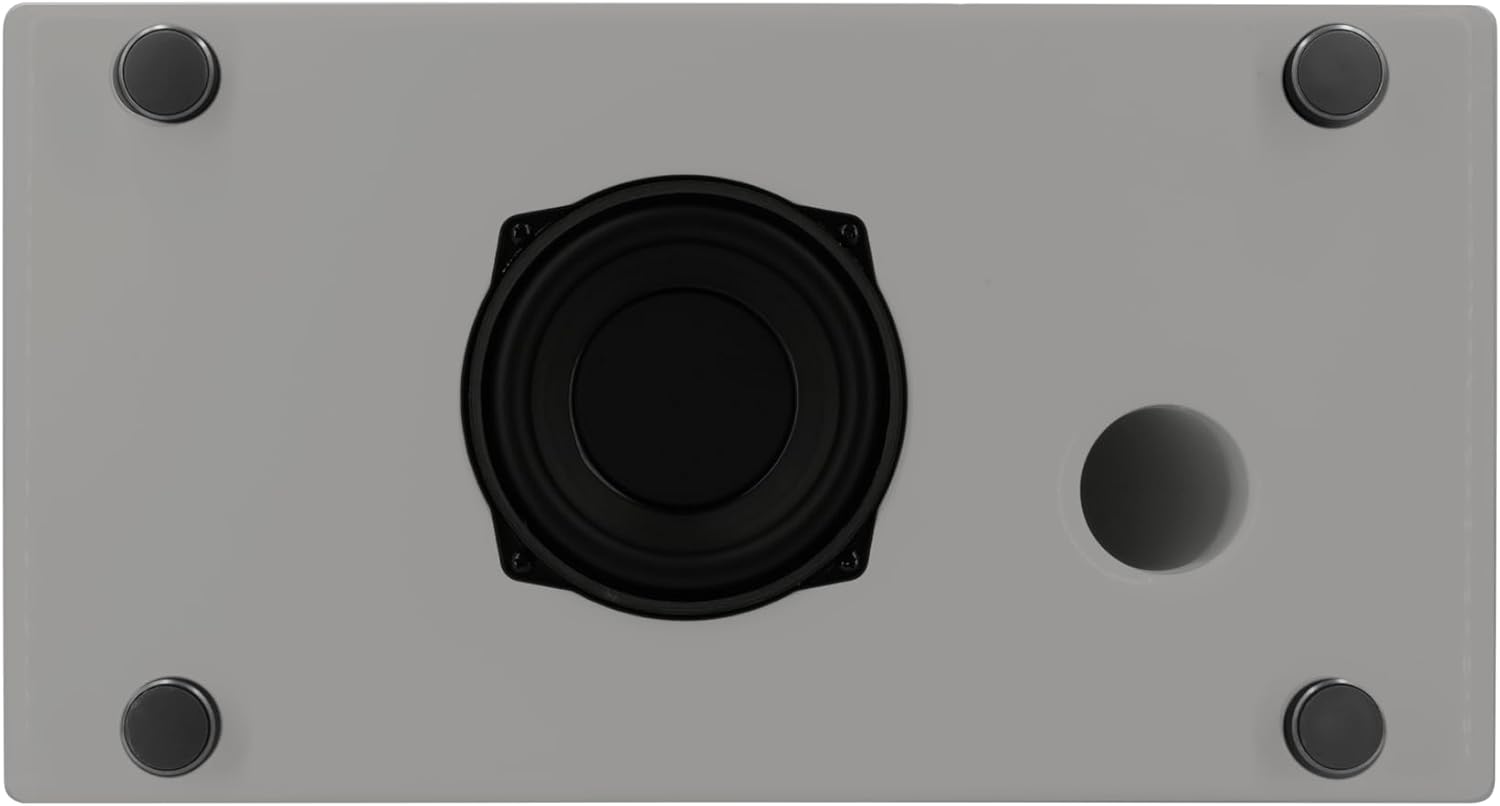
Imazhi: Underside of the sonoro Primus, revealing the integrated 5.25-inch subwoofer for enhanced bass performance.
Garancia dhe Mbështetja
The sonoro Primus comes with a standard manufacturer's warranty. Please refer to the warranty card included in your package for specific terms and conditions. For technical support, service, or warranty claims, please contact sonoro audio GmbH customer service through their official webfaqen ose informacionin e kontaktit të dhënë me blerjen tuaj.
Prodhuesi: sonoro audio GmbH
Data e parë e disponueshme: 2 janar 2023