
Hyrje
This manual provides instructions for the VINABTY COV33662806 replacement remote control. This remote is designed to function as a direct replacement for the original remote controls of various LG DVD player models, ensuring seamless operation of your device. Please read this manual carefully before use to ensure proper setup and functionality.
Konfigurimi: Instalimi i baterisë
The remote control requires two AAA batteries (not included) for operation. Follow these steps to install the batteries:
- Gjeni ndarjen e baterisë në pjesën e pasme të telekomandës.
- Press down on the tab and slide the battery cover downwards to open it.
- Vendosni dy bateri AAA, duke u siguruar që terminalet pozitive (+) dhe negative (-) të jenë në përputhje të saktë me shenjat brenda ndarjes.
- Rrëshqiteni kapakun e baterisë përsëri në vend derisa të klikojë mirë.
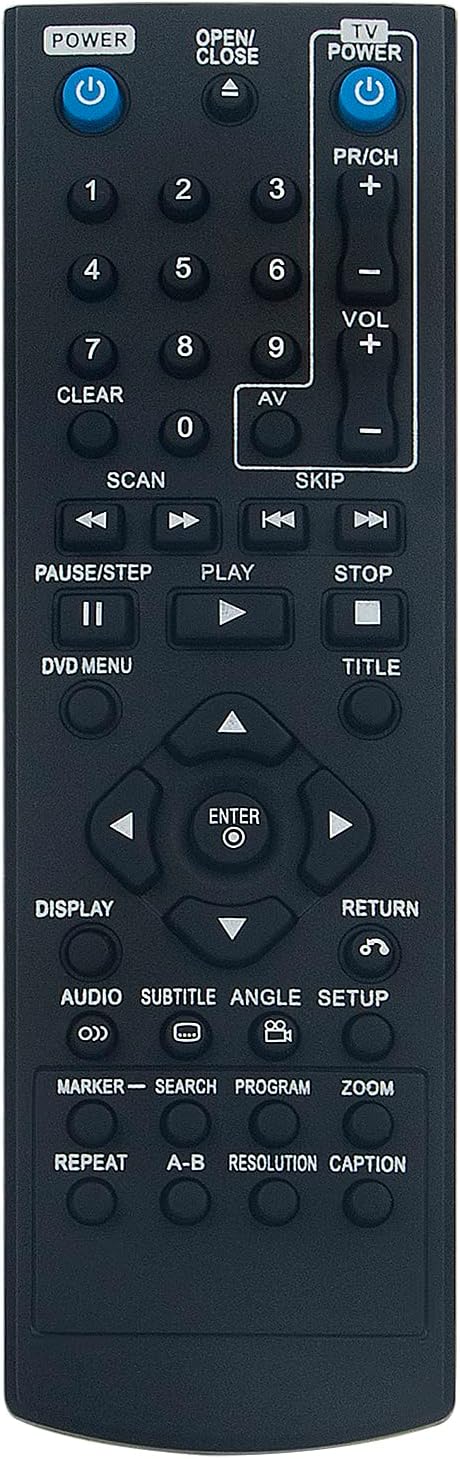
Image: Back of the remote control with the battery compartment open, illustrating the correct orientation for AAA battery insertion.
Funksionimi i telekomandës
Point the remote control directly at your LG DVD player. Ensure there are no obstructions between the remote and the device. The remote operates using infrared (IR) technology.
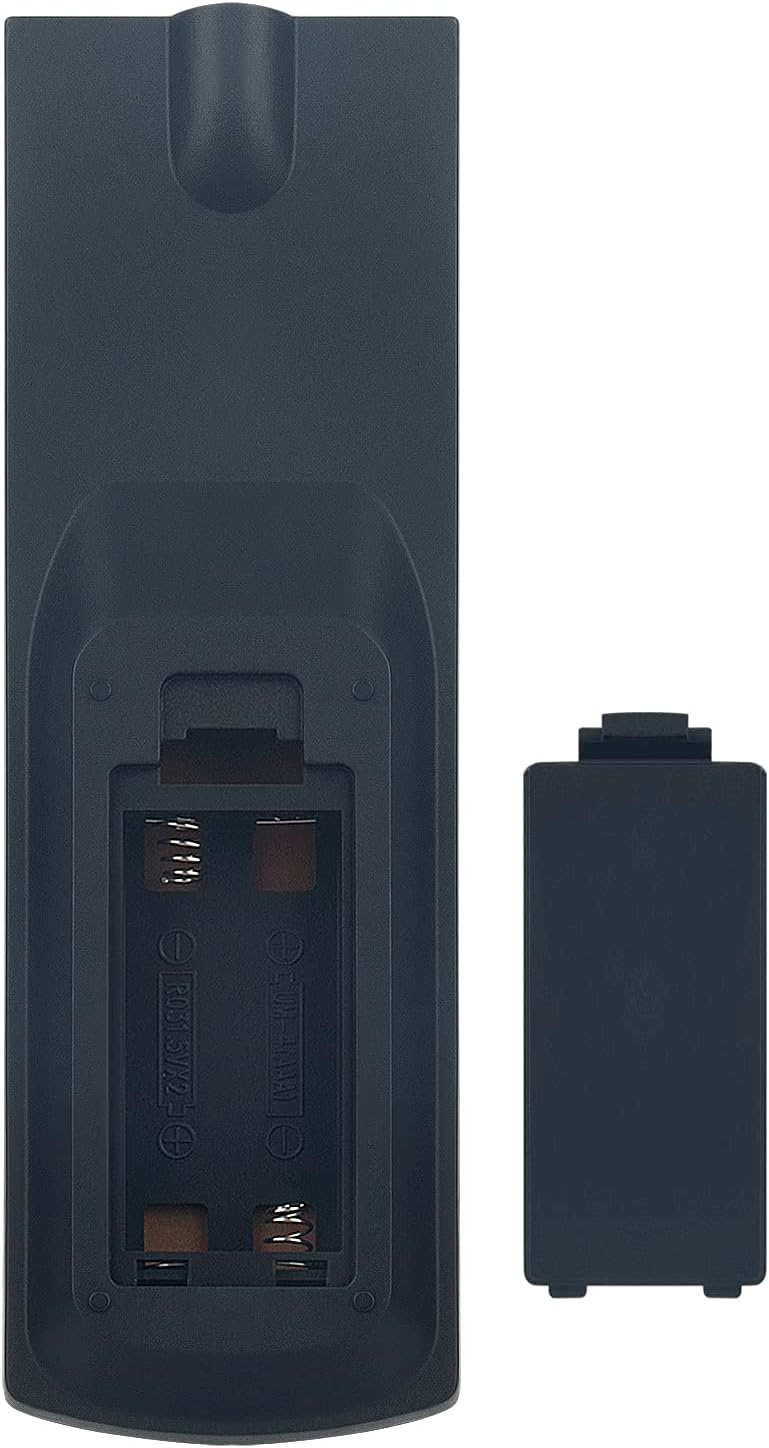
Imazhi: Përpara view of the remote control, displaying the layout of all functional buttons.
Key Button Functions:
| Butoni | Funksioni |
|---|---|
| POWER (DVD) | Aktivizon ose çaktivizon luajtësin DVD. |
| HAP/MBYLL | Opens or closes the DVD tray. |
| FUQIA TV | Turns the connected TV on or off (if compatible). |
| VOL +/- | Rregullon nivelin e volumit. |
| PR/CH +/- | Changes channels (if controlling a TV). |
| Numri i bllokut (0-9) | Direct input for track numbers or other numerical selections. |
| LUAJ (►) | Starts playback of a DVD or track. |
| PAUSE/STEP (▐▐) | Pauses playback or advances frame by frame. |
| NDALO (■) | Ndalon riprodhimin. |
| SCAN (◀◀ / ►►) | Fast reverse or fast forward during playback. |
| SKIP (◀◀| / |►►) | Kalon te kënga/kapitulli i mëparshëm ose tjetër. |
| Navigation (▲ ◀ ► ▼) | Navigon nëpër menu dhe përzgjedhje. |
| HYN | Confirms a selection in menus. |
| DVD MENU | Accesses the main DVD menu. |
| TITULLI | Accesses the DVD title menu. |
| SHPALL | Shfaq informacionin e shfaqur në ekran. |
| AUDIO | Ndryshon këngët audio ose gjuhët. |
| SUBTITLE | Toggles or selects subtitle options. |
| SETUP | Accesses the system setup menu. |
| KTHIMI | Kthehet në menunë ose ekranin e mëparshëm. |
Mirëmbajtja
Pastrimi:
Për të pastruar telekomandën, përdorni një leckë të butë dhe të thatë. Mos përdorni pastrues të lëngshëm, sprej ose materiale gërryese, pasi këto mund të dëmtojnë sipërfaqen ose pjesët e brendshme të telekomandës.
Ndërrimi i baterisë:
Replace batteries when the remote's response becomes sluggish or stops working. Always replace both batteries at the same time with new AAA alkaline batteries. Do not mix old and new batteries or different types of batteries. Remove batteries if the remote will not be used for an extended period to prevent leakage.
Magazinimi:
Ruajeni telekomandën në një vend të freskët dhe të thatë, larg rrezeve të diellit, temperaturave ekstreme dhe lagështisë së lartë.
Zgjidhja e problemeve
- Telekomanda nuk përgjigjet:
Check if the batteries are inserted correctly with the correct polarity (+/-). Replace old batteries with new ones. Ensure there is a clear line of sight between the remote and the DVD player's IR sensor. - Gamë e kufizuar:
Ensure batteries are fresh. Reduce the distance between the remote and the DVD player. Remove any obstructions. - Butona të caktuar që nuk funksionojnë:
This could indicate a faulty button or very low battery power. Try replacing batteries first. If the issue persists, contact customer support. - Remote controls other devices unintentionally:
This remote is specifically designed for LG DVD players. If it affects other devices, ensure you are pointing it directly at the intended LG DVD player.
Specifikimet e produktit
| Veçori | Detaj |
|---|---|
| Markë | VINABTY |
| Numri i modelit | COV33662806 |
| Pajisjet e përputhshme | LG DVD/Blu-ray Players (DP132H, DZ9500, DVX9500, DP540H, DP542H, DGK777, DGK778) |
| Teknologjia e lidhjes | Infra të kuqe (IR) |
| Numri i butonave | 10 (main functional buttons, excluding number pad) |
| Gama maksimale | 10 metra |
| Burimi i energjisë | 2 x bateri AAA (nuk përfshihen) |
| Përshkrimi i baterisë | Alkaline (recommended) |
| Ngjyra | E zezë |
| Veçori e veçantë | Dizajn ergonomik |
| Pesha e artikullit | 44 gram |
| Vendi i origjinës | Kinë |
Garancia dhe Mbështetja e Klientit
For any questions, technical assistance, or issues not covered in this manual, please contact the seller or manufacturer directly through your purchase platform. Please retain your proof of purchase for any warranty claims.