
1. Hyrje
This manual provides comprehensive instructions for the Maxcom Fit FW55 Aurum Pro Smartwatch. It covers essential information regarding product setup, operation, maintenance, and troubleshooting to ensure optimal performance and user experience. Please read this manual carefully before using your device.
2. Përmbajtja e paketës
Please verify that all items listed below are present in your product package:
- Maxcom Fit FW55 Aurum Pro Smartwatch
- Kabllo karikimi
- Manuali i Përdoruesit (ky dokument)
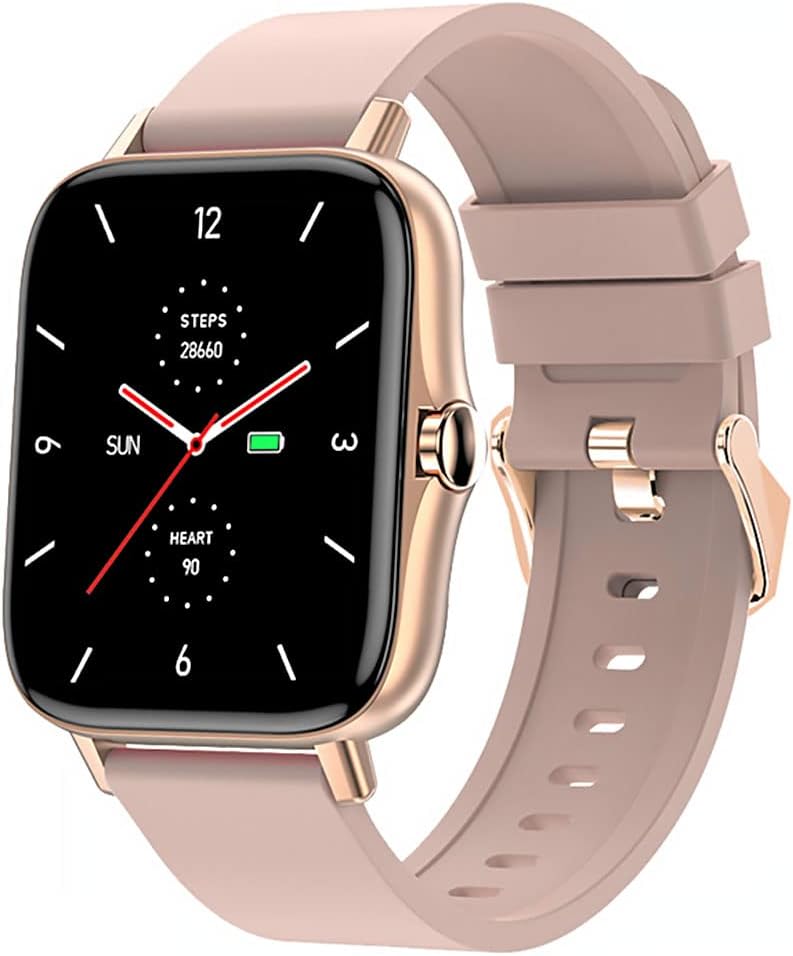
Image 1: Maxcom Fit FW55 Aurum Pro Smartwatch with a pink silicone band. The watch face displays steps, heart rate, and time.
3. Konfigurimi
3.1. Ngarkimi i orës inteligjente
Before initial use, fully charge your Maxcom Fit FW55 Aurum Pro Smartwatch. Connect the provided charging cable to the charging port on the back of the smartwatch and plug the other end into a standard USB power adapter (not included) or a computer's USB port. The watch display will indicate charging status.
- Ensure the charging pins are clean and properly aligned with the watch's charging contacts.
- Një karikim i plotë zakonisht zgjat afërsisht 2 orë.
3.2. Çiftimi me smartfonin tuaj
To unlock the full functionality of your smartwatch, you need to pair it with your smartphone via Bluetooth.
- Shkarkoni Aplikacionin: Kërko për the official Maxcom Fit application in your smartphone's app store (iOS App Store or Google Play Store) and install it.
- Aktivizo Bluetooth: Sigurohuni që Bluetooth të jetë i aktivizuar në smartphone tuaj.
- Hapni aplikacionin: Launch the Maxcom Fit application on your smartphone.
- Shto pajisje: Follow the in-app instructions to add a new device. Select "FW55 Aurum Pro" from the list of available devices.
- Konfirmo çiftimin: A pairing request may appear on both your smartphone and the smartwatch. Confirm the pairing on both devices.
Once successfully paired, the smartwatch will synchronize data with your phone, and you can customize settings through the app.
4. Përdorimi i orës inteligjente
4.1. Ndez/Fik
- Ndezja: Press and hold the side button for a few seconds until the Maxcom logo appears.
- Fike: From the watch face, swipe down to access quick settings, or navigate to the 'Settings' menu. Select 'Power Off' and confirm. Alternatively, press and hold the side button and select 'Power Off'.
4.2. Navigimi bazë
- Ekrani me prekje: The FW55 Aurum Pro features a 1.7-inch touch screen for intuitive interaction.
- Rrëshqitni lart/poshtë: Scroll through notifications, menus, or quick settings.
- Rrëshqitni majtas/djathtas: Access different widgets or main functions (e.g., heart rate, activity data).
- Trokit: Zgjidhni një artikull ose konfirmoni një veprim.
- Butoni anësor: Press to return to the watch face or wake the screen. A long press may access power options.
4.3. Karakteristikat kryesore
The Maxcom Fit FW55 Aurum Pro Smartwatch offers a range of features to support your daily activities and health monitoring:
- Ndjekja e aktivitetit: Monitoron hapat e bërë, distancën e përshkuar dhe kaloritë e djegura.
- Monitorimi i rrahjeve të zemrës: Ofron të dhëna për rrahjet e zemrës në kohë reale.
- Monitorimi i gjumit: Monitoron modelet dhe cilësinë e gjumit.
- Njoftimet: Merr njoftime për thirrje, mesazhe dhe njoftime aplikacionesh nga telefoni juaj i çiftuar.
- GPS: GPS i integruar për ndjekje të saktë të aktivitetit në natyrë.
- Fytyra të personalizueshme të orës: Personalize your watch face through the companion app.

Image 2: Maxcom Fit FW55 Aurum Pro Smartwatch featuring a gold metal mesh band. The watch face displays digital time, steps, and heart rate.
5. Mirëmbajtja
Proper care and maintenance will extend the lifespan of your smartwatch.
- Pastrimi: Regularly wipe the watch screen and body with a soft, dry, lint-free cloth. For stubborn dirt, slightly dampLani leckën me ujë. Shmangni përdorimin e kimikateve të ashpra ose materialeve gërryese.
- Kujdesi për rripin: Clean the watch strap according to its material. Silicone straps can be washed with mild soap and water. Metal straps may require specific cleaning agents.
- Shmangni kushtet ekstreme: Do not expose the smartwatch to extreme temperatures, direct sunlight for prolonged periods, or corrosive liquids.
- Rezistenca ndaj ujit: While the watch may have some water resistance, it is not suitable for diving or high-pressure water activities. Refer to the product specifications for detailed water resistance ratings.
6. Troubleshooting
If you encounter issues with your Maxcom Fit FW55 Aurum Pro Smartwatch, try the following solutions:
- Ora nuk ndizet: Sigurohuni që ora të jetë plotësisht e karikuar. Lidheni atë me karikuesin për të paktën 30 minuta.
- Nuk mund të çiftëzohet me smartphone:
- Sigurohuni që Bluetooth është i aktivizuar në telefon dhe në orën tuaj.
- Sigurohuni që ora të jetë brenda rrezes së Bluetooth-it të telefonit tuaj.
- Rinisni si telefonin ashtu edhe orën inteligjente.
- Provo ta ççiftëzosh pajisjen dhe ta riçiftosh atë përmes aplikacionit.
- Të dhëna të pasakta (hapat, rrahjet e zemrës):
- Sigurohuni që ora të mbahet fort në kyçin e dorës, rreth një gisht mbi gjerësinë e kockës së kyçit të dorës.
- Pastroni sensorin në pjesën e pasme të orës.
- Update the companion app to the latest version.
- Njoftimet nuk u morën:
- Check notification settings in the Maxcom Fit app.
- Sigurohuni që aplikacionit t'i jenë dhënë lejet për njoftimet në telefonin tuaj.
- Verify that the watch is successfully paired and connected to your phone.
If problems persist, consult the Maxcom support webfaqe ose kontaktoni shërbimin e klientit.
7. Specifikimet
Below are the technical specifications for the Maxcom Fit FW55 Aurum Pro Smartwatch:
| Veçori | Detaj |
|---|---|
| Markë | Maxcom |
| Numri i modelit | FW55 Aurum Pro |
| Madhësia e ekranit | 1.7 inç |
| Teknologjia e lidhjes | Bluetooth |
| Standardi i komunikimit pa tel | Bluetooth |
| Pajisjet e përputhshme | Smartphone |
| GPS | GPS i integruar |
| Forma | Sheshi |
| Audienca e synuar | Adult Unisex |
| Komponentët e përfshirë | Ngarkues |

Imazhi 3: Përpara view of the Maxcom Fit FW55 Aurum Pro Smartwatch with a pink silicone band, highlighting the square display.
8. Garancia dhe Mbështetja
For warranty information and customer support, please refer to the documentation included with your purchase or visit the official Maxcom webvend. Ruajeni provën e blerjes për kërkesat e garancisë.
For technical assistance or further inquiries, please contact Maxcom customer service through their official channels.