
Hyrje
Thank you for choosing the GOOJODOQ GD13+ Stylus Pen. This advanced stylus offers a seamless and precise writing and drawing experience on your compatible iPad. Featuring dual charging methods (wireless and Type-C), tilt recognition, palm rejection, and quick access functions, the GD13+ enhances your iPad productivity and creativity. Please read this manual carefully to ensure proper use and to maximize the pen's capabilities.

Image: The GOOJODOQ GD13+ Stylus Pen, a sleek black pen designed for use with iPad.
Konfigurimi
1. Ndezja/Fikur
To turn on the stylus, press and hold the power switch located at the top of the pen for 2 seconds. The indicator light will illuminate. To turn off, press and hold the power switch again for 2 seconds.
2. Ngarkimi fillestar
Before first use, ensure the stylus is fully charged. The GD13+ supports two charging methods:
- Karikimi me valë: For compatible iPad models, simply attach the stylus magnetically to the side of your iPad. The pen will automatically enter charging mode. Bluetooth pairing is not required for wireless charging functionality.
- Ngarkimi i tipit C: If your iPad does not support magnetic wireless charging, or if you prefer an alternative, use a Type-C cable to connect the stylus to a power source.

Image: The stylus magnetically attached to the side of an iPad, indicating wireless charging in progress.
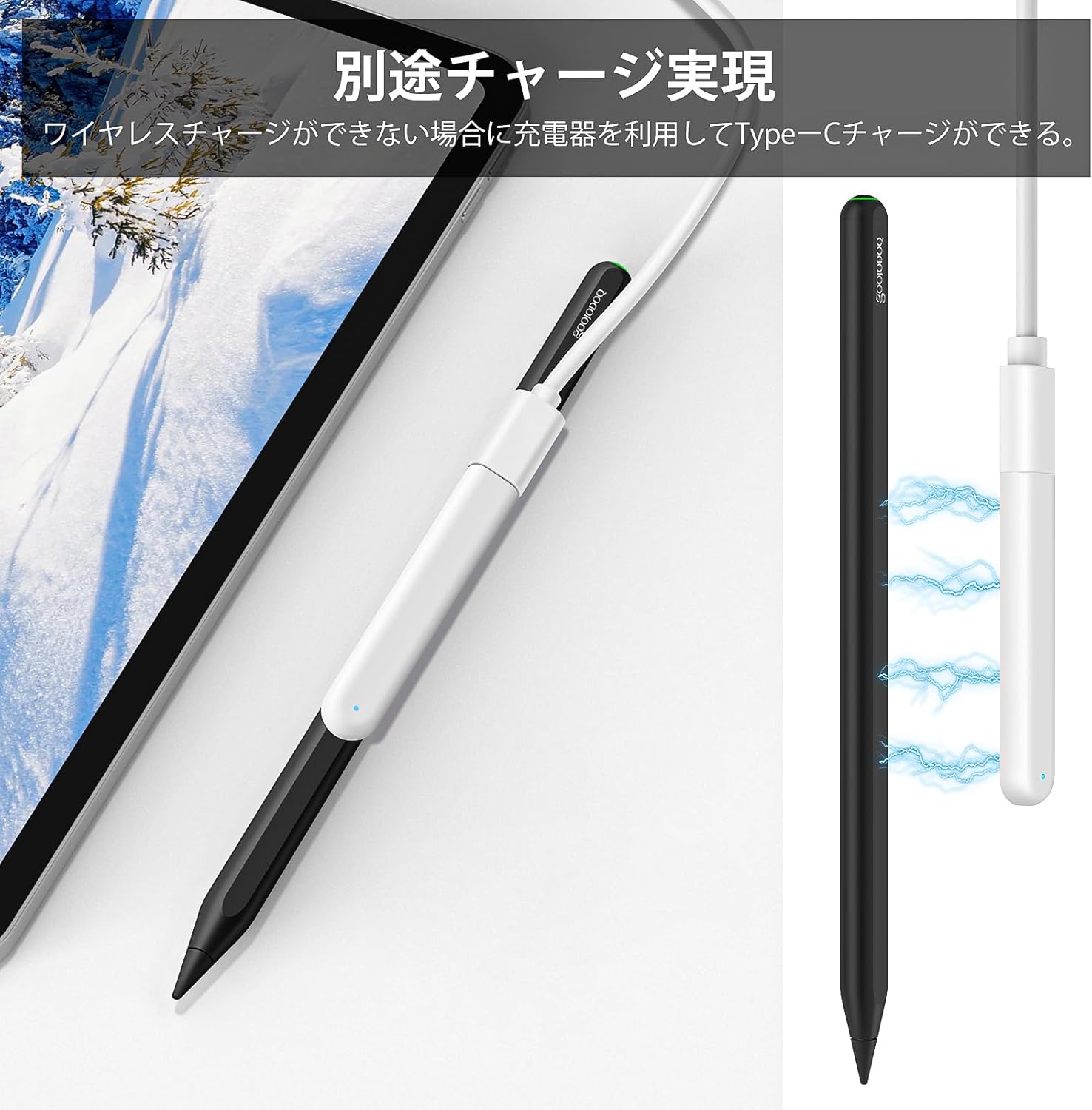
Image: The stylus connected via a Type-C cable for charging, showing the charging port.
3. Bluetooth Pairing (Optional for Battery Status)
While not required for basic writing, Bluetooth pairing allows you to monitor the stylus's battery level via an iPad widget. To pair:
- Ensure the stylus is powered on.
- Në iPad-in tuaj, shkoni te Cilësimet > Bluetooth.
- Select "GD13+" from the list of available devices to pair.
- Once paired, you can add a battery widget to your iPad's home screen to view the stylus's charge level.
Udhëzimet e funksionimit
1. Basic Writing and Drawing
Once powered on and charged, the GD13+ stylus is ready for use. Simply touch the pen tip to your iPad screen to begin writing, drawing, or navigating. The pen offers a smooth, lag-free experience, similar to using a traditional pencil.
2. Palm Rejection
The GD13+ features advanced palm rejection technology, allowing you to rest your palm comfortably on the iPad screen while writing or drawing without creating unwanted marks. This provides a natural and comfortable user experience.

Image: A hand resting on an iPad screen while using the stylus, demonstrating the palm rejection feature.
3. Ndjeshmëria ndaj pjerrësisë
The stylus supports tilt recognition, allowing you to adjust the thickness of your lines by simply tilting the pen. This feature is ideal for shading and creating varied strokes in drawing applications.

Image: A visual representation of how different tilt angles of the stylus produce varying line thicknesses on the iPad screen.
4. Quick Access Functions
The GD13+ stylus offers convenient shortcuts to enhance your iPad experience:
- Memo e shpejtë: Wake the screen and double-tap the screen with the pen to instantly access the Notes app for quick memos.
- Pamja e ekranit: Swipe from the bottom-left corner of the iPad screen towards the center with the pen to take an instant screenshot.
- Kthehu në shtëpi: After Bluetooth pairing, press the power switch once to return to the home screen.
- Task Manager: After Bluetooth pairing, press the power switch twice to open the task manager.

Image: A four-panel image demonstrating the quick memo, screenshot, home screen, and task manager functions using the stylus.
5. Replacing Nibs
The GD13+ comes with two types of replaceable nibs to suit different preferences and uses. To replace a nib:
- Rrotullojeni butësisht majën ekzistuese në kah të kundërt të akrepave të orës për ta hequr atë.
- Select your desired new nib.
- Carefully screw the new nib clockwise until it is secure. Do not overtighten.

Image: A close-up showing the two types of replaceable nibs included with the stylus, one standard and one metal-tipped.
Treguesi i karikimit dhe baterisë
The GD13+ stylus offers convenient charging and clear battery status indication.
1. Metodat e tarifimit
- Karikimi me valë: Attach the stylus magnetically to the side of compatible iPad models. The pen will automatically begin charging.
- Ngarkimi i tipit C: Use the Type-C port on the stylus with a compatible cable and power adapter.
When not in use, attaching the pen to the side of your iPad will automatically put it into sleep and charging mode, preventing you from forgetting to charge it.
2. Drita treguese e baterisë
The indicator light at the top of the stylus changes color to show the battery level and charging status:
- Drita e kuqe: 0-30% bateri e mbetur.
- Drita blu: 30-70% bateri e mbetur.
- Drita jeshile: 70-100% bateri e mbetur.

Image: A close-up of the stylus showing the power switch and indicator light, with examples of red, blue, and green lights indicating battery levels.
Përputhshmëria
The GOOJODOQ GD13+ Stylus Pen is designed for use with various iPad models. Please verify your iPad model name before purchase and use to ensure compatibility, especially for wireless charging.
To check your iPad model: Go to Cilësimet > Gjeneral > Rreth > Emri i modelit.
1. Wireless Charging Compatible Models
Wireless charging is only supported by iPad models that feature magnetic attachment for stylus charging.
- iPad Pro 12.9-inch (3rd, 4th, 5th, 6th Generation)
- iPad Pro 11-inch (1st, 2nd, 3rd, 4th Generation)
- iPad Air 10.9-inch (4th, 5th Generation)
- iPad mini (gjenerata e 6-të)
2. Type-C Charging Compatible Models
Type-C charging is compatible with all iPad models released after 2018.
3. Shënime të rëndësishme për përputhshmërinë
- iPad 7th, 8th, 9th, 10th Generation, 2024 new iPad Air (M2) 11-inch/13-inch, and iPad Pro (M4) 11-inch/13-inch do not support wireless charging. These models can still use the stylus for writing and drawing, but must be charged via Type-C.
- The GD13+ stylus is i papajtueshëm with 2025 iPad Pro (M5) 11-inch/13-inch and iPad mini 7 A17Pro.

Image: A table detailing iPad models compatible with wireless charging, including their model numbers.

Image: A table detailing iPad models compatible with Type-C charging, including their model numbers and noting those without magnetic charging.
Mirëmbajtja
1. Pastrimi
To clean the stylus, gently wipe the body with a soft, dry, lint-free cloth. Avoid using abrasive materials, solvents, or harsh chemicals, as these can damage the pen's matte finish. Do not immerse the pen in water.
2. Magazinimi
Store the stylus in a cool, dry place away from direct sunlight and extreme temperatures. When not in use, attaching it magnetically to your iPad is a convenient way to store it and keep it charged.
Zgjidhja e problemeve
If you encounter issues with your GD13+ Stylus Pen, please refer to the following common solutions:
- Pen not writing/responding:
- Ensure the pen is powered on and sufficiently charged. Check the indicator light.
- Verify that your iPad model is compatible with the stylus (refer to the Compatibility section).
- Check if the nib is securely attached. Replace if worn or damaged.
- Restart your iPad and the stylus.
- Ngarkimi pa tel nuk funksionon:
- Confirm your iPad model supports magnetic wireless charging for styluses.
- Ensure the stylus is correctly aligned and attached to the magnetic charging area on your iPad.
- Try charging via the Type-C port to confirm the pen's charging functionality.
- Lag or inaccurate input:
- Ensure your iPad's screen is clean.
- Close any unnecessary background applications on your iPad.
- If you have another stylus (e.g., Apple Pencil) previously paired, ensure it is disconnected or forgotten from your iPad's Bluetooth settings.
- Battery level not showing in widget:
- Ensure the stylus is successfully paired via Bluetooth (refer to Setup section).
- Check that the battery widget is correctly added to your iPad's home screen.
Nëse këto hapa nuk e zgjidhin problemin, ju lutemi kontaktoni mbështetjen e klientit.
Specifikimet
| Markë | GOOJODOQ |
| Model | GD13+ |
| Ngjyra | E zezë |
| Lloji i baterisë | 1 Bateri Litium-Jon (e përfshirë) |
| Pajisjet e përputhshme | Tablets (Specific iPad models as listed in Compatibility section) |
| Metodat e ngarkimit | Wireless (Magnetic) and Type-C |
| Veçoritë | Tilt Recognition, Palm Rejection, Replaceable Nibs, Battery Indicator |
| UPC | 747301573986 |
Garancia dhe Mbështetja
Informacioni i Garancisë
The GOOJODOQ GD13+ Stylus Pen comes with a Garanci 12-mujore e prodhuesit from the date of purchase. This warranty covers manufacturing defects and issues arising from normal use. It does not cover damage caused by misuse, accidents, unauthorized modifications, or normal wear and tear.
Mbështetja e klientit
If you have any questions, concerns, or require assistance with your product, please do not hesitate to contact our customer support team. For the fastest service, please have your purchase details and product model number (GD13+) ready.
Contact information can typically be found on the retailer's website where you purchased the product or on the GOOJODOQ official webfaqe.