
Hyrje
Thank you for choosing the R-MUSIC KARADUO Complete Karaoke Pack. This manual provides detailed instructions for the safe and efficient use of your new karaoke system, which includes a portable RGB speaker and two wireless microphones. Please read this manual thoroughly before operation and retain it for future reference.
Përmbajtja e paketës
Sigurohuni që të gjitha sendet janë të pranishme dhe në gjendje të mirë kur t'i hapni paketimin:
- 1 x R-MUSIC KARADUO Portable RGB Speaker
- 2 x Mikrofona me valë
- 1 x Kabë karikimi USB-C
- 1 x Manual Përdoruesi (ky dokument)

Image: The R-MUSIC KARADUO portable RGB speaker and two wireless microphones, as included in the package.
Produkti Mbiview
Speaker Components and Controls

Imazhi: Sipër view of the R-MUSIC KARADUO speaker, showing the control buttons.
- LED Animation Button: Press to cycle through 5 different LED light animations.
- Butoni i Volumit + / Këngës Tjetër: Shtypje e shkurtër për të rritur volumin. Shtypje e gjatë për të kaluar te kënga tjetër.
- ON / OFF / Pause / Play Button: Long press to power the speaker on or off. Short press to play or pause music.
- Butoni i Volumit - / Këngës së Mëparshme: Shtypje e shkurtër për të ulur volumin. Shtypje e gjatë për të shkuar te kënga e mëparshme.
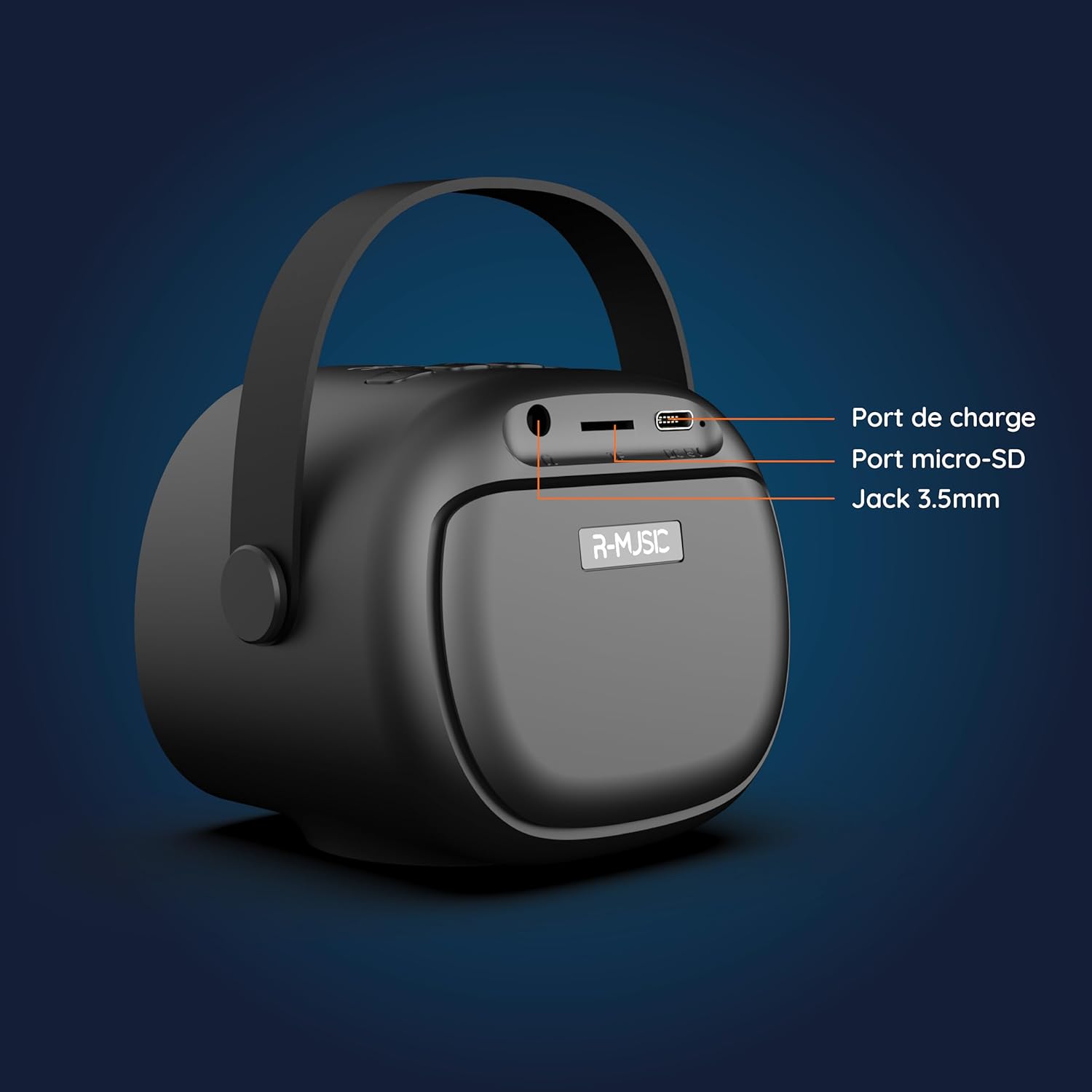
Imazh: Mbrapa view of the R-MUSIC KARADUO speaker, highlighting the charging port, Micro-SD card slot, and 3.5mm Jack port.
- Porta e karikimit (USB-C): Connect the provided USB-C cable for charging.
- Vendi i kartës Micro-SD: Insert a Micro-SD card for direct music playback.
- Porta AUX 3.5 mm: Connect external audio devices using a 3.5mm audio cable (not included).
Kontrollet e mikrofonit

Image: Close-up of the R-MUSIC wireless microphones, illustrating the power, volume, and mode buttons.
- Butoni i energjisë: Long press to power the microphone on or off.
- Volumi + Butoni: Rrit volumin e mikrofonit.
- Butoni i volumit: Ul volumin e mikrofonit.
- Butoni i modalitetit (M): Short press to cycle through 5 voice deformation effects and 3 karaoke modes.
Konfigurimi
1. Charging the Speaker and Microphones
Before first use, fully charge the speaker and both microphones.
- Folësi: Connect the provided USB-C charging cable to the speaker's charging port and a compatible USB power adapter (not included). The charging indicator will show the charging status.
- Mikrofonat: Each microphone has its own charging port (usually Micro-USB, check the microphone itself). Connect them to a USB power source using appropriate cables (not included, or check if included with microphones).
A full charge provides approximately 14 hours of speaker playback without LED lights, or 7 hours with LED lights activated.
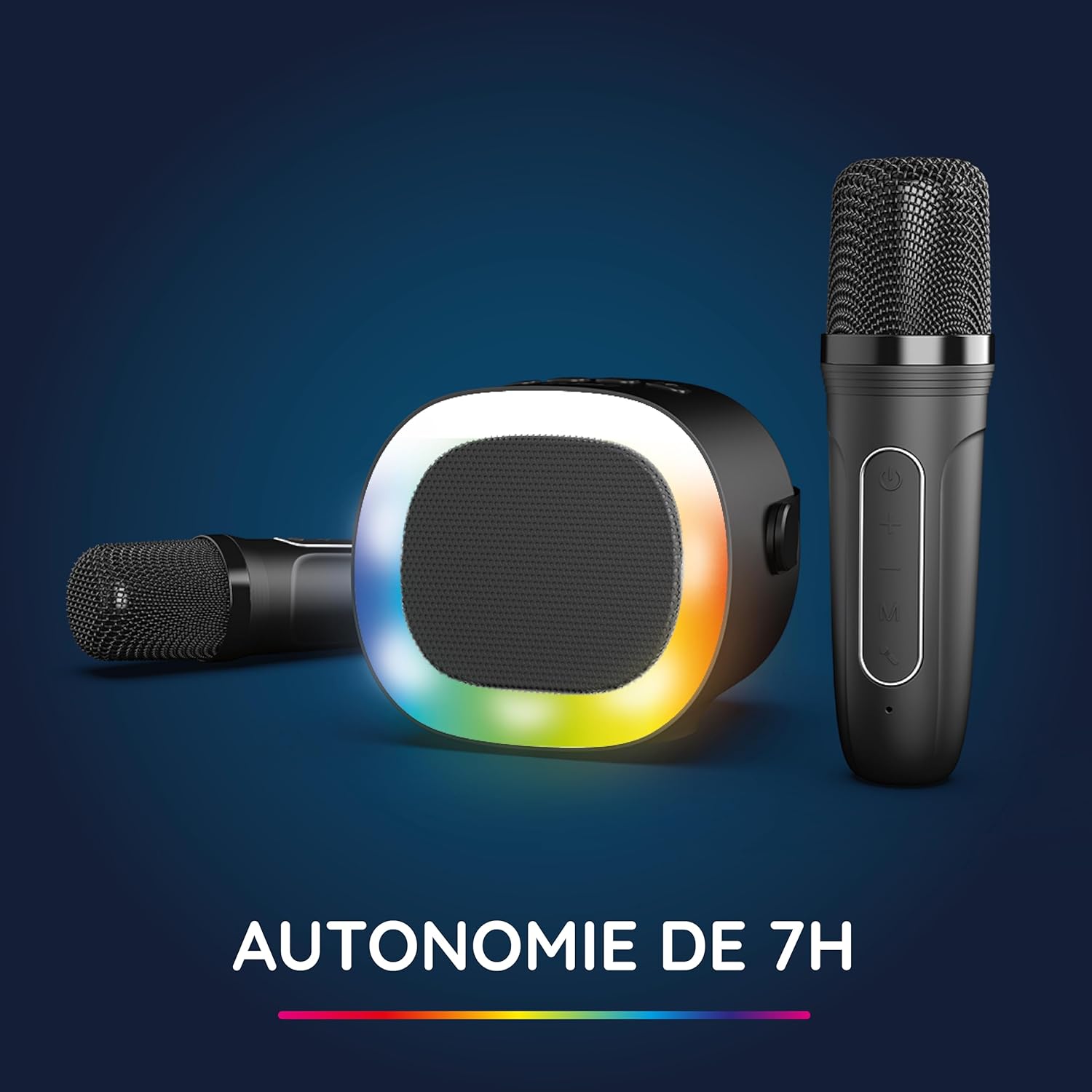
Image: The R-MUSIC speaker and microphones, illustrating the battery life with LED lights active.
2. Powering On and Pairing Microphones
- Ndezja e Altoparlantit: Long press the ON/OFF button on the speaker until it powers on.
- Ndezja e mikrofonave: Long press the Power button on each microphone until they power on.
- The microphones should automatically pair with the speaker. If not, ensure they are within close proximity and try powering them off and on again.
Udhëzimet e funksionimit
1. Lidhja me burimet audio
The KARADUO speaker offers multiple connectivity options:
- Bluetooth 5.0:
- Sigurohuni që altoparlanti të jetë i ndezur.
- Activate Bluetooth on your smartphone, tablet, PC, or other compatible device.
- Kërko për "KARADUO" in your device's Bluetooth settings and select it to pair. A confirmation sound will indicate a successful connection.
- The Bluetooth 5.0 technology ensures optimal sound quality and a stable connection up to 10 meters.
- Hyrja AUX:
- Connect a 3.5mm audio cable (not included) from your audio device's headphone jack to the speaker's 3.5mm AUX port.
- Altoparlanti do të kalojë automatikisht në modalitetin AUX.
- Micro-SD Card Playback:
- Insert a Micro-SD card containing MP3 audio files into the Micro-SD card slot on the back of the speaker.
- Altoparlanti do ta zbulojë automatikisht kartën dhe do të fillojë të luajë muzikë.
2. Speaker Operation
- Luaj/Ndalu: Short press the ON/OFF/Pause/Play button.
- Rregullimi i volumit: Short press the Volume + or Volume - buttons.
- Pjesa tjetër / e mëparshme: Long press the Volume + (next) or Volume - (previous) buttons.
- Mënyrat e dritës LED: Press the LED Animation button to cycle through 5 different LED light animations.

Image: The R-MUSIC speaker showcasing its dynamic LED light animations.
3. Funksionimi i mikrofonit
- Volumi i mikrofonit: Use the Volume + and Volume - buttons on the microphone to adjust your vocal volume.
- Voice Deformation Effects: Short press the 'M' (Mode) button on the microphone to cycle through 5 different voice deformation effects.
- Mënyrat e Karaoke: Continue pressing the 'M' button to cycle through 3 distinct karaoke modes.
Mirëmbajtja
To ensure the longevity and optimal performance of your R-MUSIC KARADUO system, follow these maintenance guidelines:
- Pastrimi: Use a soft, dry cloth to clean the speaker and microphones. Do not use abrasive cleaners, solvents, or harsh chemicals.
- Magazinimi: Ruajeni pajisjen në një vend të freskët dhe të thatë, larg rrezeve të diellit dhe temperaturave ekstreme kur nuk është në përdorim.
- Ekspozimi i ujit: Ky produkt nuk është i papërshkueshëm nga uji. Shmangni ekspozimin ndaj ujit ose lagështirës së tepërt.
- Ngarkimi: Only use the provided charging cable and a compatible USB power adapter. Do not overcharge the device.
Zgjidhja e problemeve
If you encounter issues with your KARADUO system, please refer to the following common problems and solutions:
| Problem | Shkaku i mundshëm | Zgjidhje |
|---|---|---|
| Asnjë fuqi | Bateria është e ulët ose pajisja është e fikur. | Charge the speaker/microphones. Long press the power button to turn on. |
| Nuk ka zë nga altoparlanti | Volume too low, incorrect input mode, or device not connected. | Increase speaker volume. Ensure correct input (Bluetooth, AUX, Micro-SD). Reconnect Bluetooth or check AUX cable. |
| Mikrofonat nuk funksionojnë | Microphones off, low battery, or not paired. | Ensure microphones are charged and powered on. They should automatically pair with the speaker. If not, power cycle them. |
| Shkyçja e Bluetooth-it | Device out of range, interference, or low battery. | Move the connected device closer to the speaker (within 10m). Ensure no major obstacles. Recharge the speaker. |
If the problem persists after trying these solutions, please contact R-MUSIC customer support.
Specifikimet
| Veçori | Detaj |
|---|---|
| Markë | R-MUZIK |
| Numri i modelit | 484437 RM |
| Ngjyra | E zezë |
| Teknologjia e lidhjes | Bluetooth 5.0 |
| Portet e lidhjes | 3.5mm Jack, USB Type-C (charging), Micro-SD Card Slot |
| Karakteristika të veçanta | 2 Wireless Microphones, Universal Connectivity, 5 Voice Deformation Effects, LED Lights |
| Pajisjet e përputhshme | PC, Smartphone, Tablet, TV (via AUX) |
| Burimi i energjisë | Mundësuar nga bateria |
| Speaker Battery Life | Up to 14 hours (without LED), 7 hours (with LED) |
| Gama e Bluetooth | Deri në 10 metra |

Image: Technical dimensions of the R-MUSIC KARADUO speaker, showing its height, width, and depth.
Garancia dhe Mbështetja
Information regarding specific warranty terms and conditions for the R-MUSIC KARADUO Complete Karaoke Pack is not available in this document. Please refer to the product packaging or the retailer's webfaqe për detajet e garancisë.
For technical support or further assistance, please contact R-MUSIC customer service through their official webfaqen ose informacionin e kontaktit të dhënë me blerjen tuaj.