
Hiwill HW210
Hiwill HW210 Soundbar with Subwoofer 2.1 Surround Sound System User Manual
Modeli: HW210
1. Hyrje
Thank you for choosing the Hiwill HW210 Soundbar with Subwoofer. This 2.1 channel surround sound system is designed to enhance your audio experience for televisions, PCs, gaming consoles, and other compatible devices. This manual provides detailed instructions for setup, operation, and maintenance to ensure optimal performance and longevity of your product. Please read this manual thoroughly before use and retain it for future reference.

Image 1.1: The Hiwill HW210 Soundbar and Subwoofer system, shown with a television for illustrative purposes.
2. Informacion mbi sigurinë
Për të zvogëluar rrezikun e goditjes elektrike, zjarrit ose dëmtimit të pajisjes, ju lutemi të ndiqni masat paraprake të sigurisë si më poshtë:
- Mos e ekspozoni këtë pajisje ndaj shiut ose lagështisë.
- Mos vendosni objekte të mbushura me lëngje, siç janë vazot, mbi pajisje.
- Sigurohuni që të ketë ventilim të duhur. Mos bllokoni asnjë hapje ventilimi.
- Mos e instaloni pranë ndonjë burimi nxehtësie si radiatorë, regjistra ngrohjeje, soba ose aparate të tjera (përfshirë amplifiers) që prodhojnë nxehtësi.
- Mbroni kordonin e rrymës nga ndezja ose mbërthimi, veçanërisht në priza, enë komoditeti dhe në pikën ku ato dalin nga pajisja.
- Përdorni vetëm bashkëngjitje/pajisje shtesë të specifikuara nga prodhuesi.
- Hiqeni këtë pajisje nga priza gjatë stuhive me rrufe ose kur nuk përdoret për periudha të gjata kohore.
- Referojuni të gjitha servisimet te personeli i kualifikuar i shërbimit. Servisimi kërkohet kur aparati është dëmtuar në çfarëdo mënyre, si p.sh. kordoni i furnizimit me energji elektrike ose spina është dëmtuar, lëngu është derdhur ose objekte kanë rënë në aparat, aparati është ekspozuar ndaj shiut ose lagështisë, nuk funksionon normalisht , ose është hequr.
3. Përmbajtja e paketës
Ju lutemi kontrolloni që të gjitha artikujt janë të pranishëm dhe në gjendje të mirë:
- Hiwill Soundbar
- Subwoofer me tela
- Telekomandë
- Përshtatës i energjisë
- Optical Cable (may vary by region)
- AUX Cable (may vary by region)
- Wall Mounting Kit (screws, anchors)
- Manuali i Përdoruesit (ky dokument)
4. Produkti i Mbaruarview
4.1 Soundbar Features
- Ultra-slim design (3.8 cm height)
- Integrated orbital aluminum diaphragm speakers
- Built-in HiFi and DSP technology for immersive 3D surround sound
- Maximum output power: 120 Watts
- Niveli i presionit të zërit: 106 dB
- Bluetooth 5.3 for wireless streaming
- Multiple input options: HDMI ARC, Optical, AUX, USB
- 3 adjustable EQ modes: Game, Movie, Music
- Adjustable bass and treble levels
4.2 Karakteristikat e subwoofer-it
- 9-liter capacity for deep, resonant bass
- Wired connection to the soundbar for stable audio transmission
4.3 Kontrollet dhe treguesit
The soundbar features an integrated display and control buttons, typically located on the top or front panel. The remote control provides full functionality.
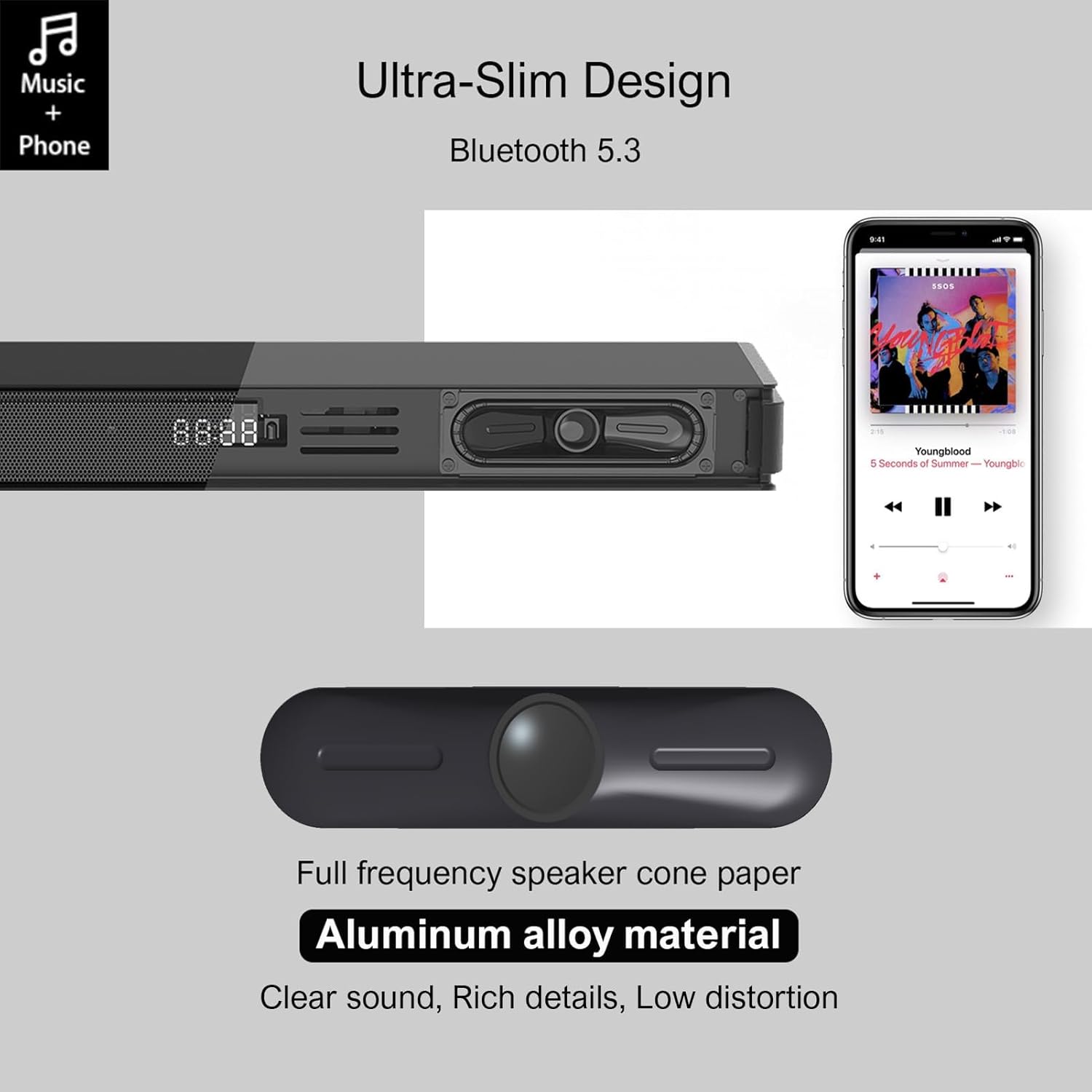
Image 4.1: Detail of the soundbar's ultra-slim design, showing the front display and integrated speakers.
4.4 Lidhjet e panelit të pasmë
The rear panel of the soundbar provides various ports for connecting to your audio sources and power.

Imazhi 4.2: E pasme view of the soundbar showing input ports: AUX, HDMI ARC, USB, Optical, Subwoofer Out, and DC In.
- AUX (3.5 mm): For connecting devices with a 3.5mm audio output.
- ARC (HDMI): For connecting to a TV's HDMI ARC port. Supports CEC for unified control.
- USB: Për të luajtur audio files nga një disk USB.
- OPTIKE: For connecting to a TV or other device with an optical audio output.
- NJOFTIM: For connecting the wired subwoofer.
- DC N IN: Për lidhjen e përshtatësit të energjisë.
5. Konfigurimi
5.1 Mundësitë e Vendosjes
The Hiwill HW210 soundbar offers flexible placement options to suit your home entertainment setup.

Image 5.1: Illustrates placing the soundbar on a tabletop in front of the TV or mounting it on the wall below the TV.
- Vendosja në tavolinë: Place the soundbar on a stable, flat surface directly in front of your TV. Ensure it does not obstruct the TV's remote sensor.
- Montimi në mur: The soundbar can be mounted on the wall below your TV. Use the provided wall mounting kit and follow these steps:
- Mark the desired mounting positions on the wall, ensuring the soundbar is centered with your TV.
- Shponi vrima pilot në pozicionet e shënuara.
- Insert wall anchors (if necessary for your wall type).
- Secure the mounting brackets (if separate) or the soundbar directly using screws.
- Vendosja e nënvuferit: Place the subwoofer on the floor near the soundbar. Experiment with placement to find the best bass response for your room.
5.2 Lidhja me energjinë elektrike
- Connect the power adapter to the DC IN port on the soundbar's rear panel.
- Futni anën tjetër të përshtatësit të rrymës në një prizë muri.
- Connect the wired subwoofer cable to the SUB OUT port on the soundbar.
5.3 Lidhja me burimet audio
Choose one of the following connection methods based on your device:
- HDMI ARC (Recommended for TVs):
- Connect one end of an HDMI cable (not included) to the ARC port on the soundbar.
- Connect the other end to the HDMI ARC port on your TV.
- Ensure HDMI CEC is enabled in your TV's settings for unified control.
- Optike:
- Connect the optical cable (included) to the OPTICAL port on the soundbar.
- Connect the other end to the optical audio output port on your TV or other device.
- Ensure your TV's audio output is set to "PCM" if you experience no sound.
- AUX (3.5 mm):
- Connect the 3.5mm AUX cable (included) to the AUX port on the soundbar.
- Connect the other end to the headphone jack or AUX output of your device.
- USB:
- Fusni një USB flash drive që përmban audio files në portën USB në shiritin e zërit.
6. Udhëzimet e funksionimit
6.1 Ndez/Fik
- Shtypni Fuqia butonin në soundbar ose në telekomandë për të ndezur ose fikur njësinë.
6.2 Zgjedhja e Burimit të Hyrjes
- Shtypni Input button on the remote control or the soundbar to cycle through available input sources (ARC, OPT, AUX, USB, BT). The selected input will be displayed on the soundbar's screen.
6.3 Çiftimi Bluetooth
- Turn on the soundbar and select the "BT" input source. The soundbar will enter pairing mode, indicated by a flashing "BT" on the display.
- Në pajisjen tuaj celulare, aktivizoni Bluetooth dhe kërkoni për pajisjet e disponueshme.
- Select "Hiwill HW210" (or similar name) from the list of devices.
- Once paired, the soundbar will emit a confirmation tone, and "BT" will stop flashing.
- To disconnect, turn off Bluetooth on your device or select a different input source on the soundbar.
6.4 Kontrolli i volumit
- Përdorni Vëllimi i lart (+) dhe Ule volumin (-) buttons on the soundbar or remote control to adjust the master volume.
- Shtypni Hesht button on the remote control to mute or unmute the sound.
6.5 EQ Modes and Tone Adjustment
The soundbar features three preset equalizer modes and adjustable bass/treble settings.

Image 6.1: Visual representation of the three equalizer modes: Game, Movie, and Music, optimized for different audio content.
- Shtypni EQ button on the remote control to cycle through the preset modes: Lojë, Film, dhe Muzikë.
- Përdorni Bas +/- buttons on the remote control to adjust the bass level.
- Përdorni Trefish +/- buttons on the remote control to adjust the treble level.
7. Mirëmbajtja
- Pastrimi: Use a soft, dry cloth to clean the surface of the soundbar and subwoofer. Do not use liquid cleaners or abrasive materials.
- Magazinimi: Nëse e ruani pajisjen për një periudhë të gjatë kohore, shkëputeni nga priza dhe ruajeni në një vend të freskët dhe të thatë.
- Shmangni pengesat: Ensure that the speaker grilles and ventilation openings are not blocked by dust or other objects.
8. Troubleshooting
| Problem | Shkaku i mundshëm | Zgjidhje |
|---|---|---|
| Asnjë fuqi | Kablloja e energjisë nuk është e lidhur; Priza e energjisë nuk është aktive | Ensure power cord is securely connected; Try a different power outlet. |
| Asnjë zë | Incorrect input source selected; Volume too low; Cables not connected properly; TV audio output settings incorrect. | Select the correct input source; Increase volume; Check all audio cables are securely connected; For Optical/ARC, ensure TV audio output is set to PCM. |
| Çiftimi me Bluetooth dështon | Soundbar-i nuk është në modalitetin e çiftëzimit; Pajisja është shumë larg; Ndërhyrje. | Ensure soundbar is in BT mode and flashing; Move device closer; Turn off other Bluetooth devices. |
| Telekomanda nuk funksionon | Bateritë janë shkarkuar; Ka pengesë midis telekomandës dhe soundbar-it. | Replace remote control batteries; Ensure clear line of sight to the soundbar's sensor. |
| Cilësi e dobët e zërit | Incorrect EQ mode; Source audio quality; Cable issues. | Adjust EQ modes and bass/treble settings; Try a different audio source; Check/replace audio cables. |
9. Specifikimet
| Emri i modelit | Hiwill HW210 Soundbar |
| Lloji i altoparlantit | Soundbar me Subwoofer me tela |
| Konfigurimi i tingullit rrethues | Kanali 2.1 |
| Fuqia maksimale e daljes së altoparlantit | 120 Watts |
| Teknologjia e lidhjes | Bluetooth 5.3, HDMI ARC, AUX (3.5mm), USB, Optical |
| Modaliteti i daljes audio | Rrethojnë |
| Karakteristika të veçanta | High-resolution audio support, 3 EQ modes, Adjustable Bass/Treble, Wall-mountable |
| Përdorimet e rekomanduara | TV, Gaming Consoles, Computers, Smartphones, Tablets, Music Players, DVD Players, Home Theater |
10. Garancia dhe Mbështetja
Hiwill products are designed and manufactured to the highest quality standards. For detailed warranty information, please refer to the warranty card included in your package or visit the official Hiwill website. If you encounter any issues or require technical assistance, please contact Hiwill customer support through the contact information provided on the product packaging or webfaqe.
Please have your model number (HW210) and purchase date ready when contacting support.
Ask a question about this manual
Ask about setup, troubleshooting, compatibility, parts, safety, or missing instructions. Manuals+ will review the question and use this page’s manual context to help answer it.