
Hyrje
This manual provides essential instructions for the proper setup, operation, and maintenance of your 3nStar PTA0157-432 All-in-One POS System. Please read this manual thoroughly before using the device to ensure optimal performance and longevity.
Informacioni i Sigurisë
Ndiqni masat paraprake të sigurisë për të parandaluar dëmtimin e pajisjes ose lëndimin tuaj dhe të të tjerëve:
- Mos e ekspozoni pajisjen ndaj ujit ose lagështirës së tepërt.
- Shmangni vendosjen e pajisjes pranë burimeve të nxehtësisë ose në rrezet e diellit direkte.
- Përdorni vetëm adaptorin AC të ofruar.
- Mos u përpiqni ta hapni ose riparoni vetë pajisjen. Ia drejtoni çdo shërbim personelit të kualifikuar.
- Sigurohuni që të ketë ventilim të duhur rreth pajisjes gjatë funksionimit.
Përmbajtja e paketës
Verifikoni që të gjitha sendet janë të pranishme në paketim:
- 3nStar PTA0157-432 All-in-One POS System
- Përshtatës AC
- Manuali i Përdoruesit (ky dokument)
Produkti Mbiview
The 3nStar PTA0157-432 is a 15.6-inch All-in-One Point of Sale system designed for various business environments. It features a 10-point capacitive touchscreen, runs on Android 11, and is powered by a Quad-Core processor with 4GB RAM and 32GB storage. Integrated Wi-Fi and Bluetooth connectivity are also included.

Figura 1: Përpara view of the 3nStar PTA0157-432 All-in-One POS System, showcasing the 15.6-inch display and integrated stand.

Figure 2: A user interacting with the 10-point capacitive touchscreen of the POS system, demonstrating its touch responsiveness.

Figura 3: E pasme view of the 3nStar POS System, showing the ventilation slots and the sturdy integrated stand.
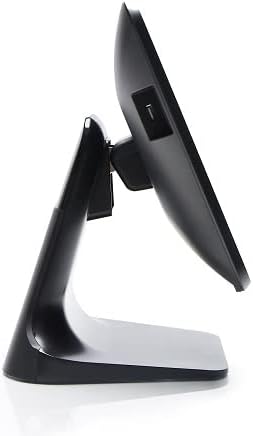
Figura 4: Profesioni anësorfile of the 3nStar POS System, highlighting its slim design and adjustable screen angle.
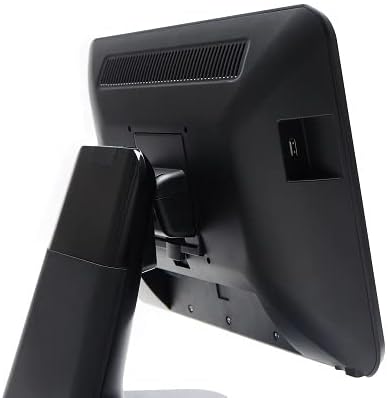
Figura 5: Ana e pasme view of the 3nStar POS System, illustrating the location of various connectivity ports for peripherals.
Konfigurimi
- Çpaketoni Sistemin: Carefully remove the POS system and all accessories from the packaging.
- Position the System: Place the POS system on a stable, flat surface, ensuring adequate ventilation around the device.
- Lidhni fuqinë: Connect the AC adapter to the power input port on the back of the POS system, then plug the adapter into a standard electrical outlet.
- Ndezja fillestare: Press the power button, usually located on the side or back of the display. The system will boot up to the Android 11 operating system.
- Konfigurimi fillestar: Follow the on-screen prompts to complete the initial Android setup, including language selection, Wi-Fi connection, and Google account setup (optional).
- Lidhni pajisjet periferike: Connect any necessary peripherals such as barcode scanners, receipt printers, or cash drawers to the available USB or other designated ports. Refer to the peripheral's manual for specific connection instructions.
Udhëzimet e funksionimit
The 3nStar PTA0157-432 operates on Android 11, providing a familiar and intuitive user experience.
Navigimi bazë
- Ekran me prekje: Use your fingers to tap, swipe, pinch, and zoom on the 15.6-inch capacitive display.
- Ekrani bazë: Access your installed applications and widgets from the main home screen.
- Sirtari i aplikacionit: Swipe up from the bottom of the screen or tap the app drawer icon to view të gjitha aplikacionet e instaluara.
- Njoftimet: Rrëshqitni poshtë nga maja e ekranit për të aksesuar njoftimet dhe cilësimet e shpejta.
Po lidhet me Wi-Fi
- Shko tek Cilësimet > Rrjeti dhe interneti > Wi-Fi.
- Aktivizo/çaktivizo Wi-Fi-në On.
- Zgjidhni rrjetin e dëshiruar nga lista dhe futni fjalëkalimin nëse ju kërkohet.
Lidhja e pajisjeve Bluetooth
- Shko tek Cilësimet > Pajisjet e lidhura > Preferencat e lidhjes > Bluetooth.
- Aktivizo Bluetooth On.
- Sigurohuni që pajisja juaj Bluetooth është në modalitetin e çiftëzimit.
- Select the device from the list to pair.
Using POS Software
The system is designed to run various Android-compatible Point of Sale applications. Install your preferred POS software from the Google Play Store or other trusted sources. Refer to your specific POS software's documentation for detailed usage instructions.
Mirëmbajtja
Pastrimi i pajisjes
- Ekrani: Përdorni një leckë të butë, pa garzë pak dampened with water or a screen cleaner specifically designed for electronic displays. Do not spray cleaner directly onto the screen.
- Trupi: Wipe the exterior surfaces with a soft, dry cloth. Avoid abrasive cleaners or solvents.
- Ventilimi: Ensure ventilation slots are free from dust and debris to prevent overheating. Use compressed air if necessary.
Përditësimet e softuerit
Regularly check for and install system updates for Android 11 to ensure optimal performance, security, and compatibility. Go to Cilësimet > Sistemi > Përditësimi i sistemit.
Menaxhimi i ruajtjes
Monitor the 32GB internal storage to ensure sufficient space for applications and data. Delete unnecessary files or uninstall unused applications to free up space. Go to Cilësimet > Magazinimi.
Zgjidhja e problemeve
| Problem | Shkaku i mundshëm | Zgjidhje |
|---|---|---|
| Pajisja nuk ndizet. | Power cable not connected properly; AC adapter malfunction. | Ensure the AC adapter is securely connected to the device and a working power outlet. Test the outlet with another device. |
| Ekrani me prekje nuk përgjigjet. | Software glitch; screen dirty; physical damage. | Restart the device. Clean the screen with a soft cloth. If the issue persists, contact support. |
| Probleme me lidhjen Wi-Fi. | Fjalëkalim i pasaktë; jashtë rrezes së veprimit; problem me ruterin. | Verify Wi-Fi password. Ensure the device is within range of the router. Restart the router and the POS system. |
| Peripheral (e.g., printer) not detected. | Incorrect connection; driver issue; peripheral not powered on. | Check physical connections. Ensure the peripheral is powered on. Install necessary drivers or apps for the peripheral. Restart the POS system. |
Specifikimet
| Veçori | Detaj |
|---|---|
| Numri i modelit | PTA0157-432 |
| Sistemi Operativ | Android 11 |
| Madhësia e ekranit | 15.6 inç |
| Rezolucioni i ekranit | 1920 x 1080 piksele |
| Ekran me prekje | 10-point Capacitive |
| Përpunues | Quad-Core (Rockchip 3568, 2 GHz) |
| RAM | 4 GB LPDDR4 |
| Magazinimi | 32GB SSD (Flash Memory) |
| Grafika | Grafika e integruar |
| Lidhshmëria | Wi-Fi, Bluetooth |
| Dimensionet e produktit (LxWxH) | 10 x 13 x 16 inç |
| Pesha e artikullit | 11 paund |
| Ngjyra | E zezë |
Garancia dhe Mbështetja
For warranty information, technical support, or service inquiries, please refer to the official 3nStar webnë faqen e internetit ose kontaktoni shitësin tuaj të autorizuar. Ruajeni faturën e blerjes si provë blerjeje për kërkesat e garancisë.
Online resources and frequently asked questions may be available on the manufacturer's support page: Mbështetje 3nStar