1. Hyrje
This manual provides detailed instructions for the installation, operation, and maintenance of your Hikity Android Carplay Wireless Autoradio. This multimedia system is specifically designed for the Seat Leon MK3 (Left-Hand Drive) models from 2013 to 2019, offering a 9-inch touchscreen display with advanced features such as wireless CarPlay, Android Auto, GPS navigation, Bluetooth, and support for a reversing camera.
Ju lutemi lexoni me kujdes këtë manual para instalimit dhe përdorimit për të siguruar funksionalitetin e duhur dhe për të maksimizuar përvojën tuaj si përdorues.
2. Informacion mbi sigurinë
- Instalimi profesional i rekomanduar: Për shkak të kompleksitetit të sistemeve elektrike të makinave, instalimi profesional rekomandohet fuqimisht për të parandaluar dëmtimin e njësisë ose të automjetit tuaj.
- Siguria në drejtimin e automjetit: Do not operate the system in a way that distracts you from driving. Always prioritize road safety.
- Furnizimi me energji elektrike: Ensure the unit is connected to a 12V DC power supply with a negative ground. Incorrect wiring can cause damage or fire.
- Shmangni lagështinë: Mos e ekspozoni pajisjen ndaj ujit ose lagështirës së tepërt.
- Temperatura: Avoid extreme temperatures. The operating temperature range is typically -20°C to +70°C.
- Ventilimi: Sigurohuni që të keni ventilim të mjaftueshëm rreth njësisë për të parandaluar mbinxehjen.
3. Përmbajtja e paketës
Verify that all items are present in your package before proceeding with installation:
- Hikity Android Autoradio Unit (9-inch touchscreen)
- Kabllo energjie
- RCA Cable
- Kabllo USB (x2)
- Kablloja e hyrjes së kamerës
- Antenë GPS
- Radio Antena
- Dekoderi Canbus
- AHD Rear Camera (optional, if included in your package)
- Mikrofoni
- Mjeti i instalimit
- Linja e kundërt

4. Konfigurimi dhe instalimi
This autoradio is designed for direct fitment in Seat Leon MK3 (2013-2019) Left-Hand Drive vehicles. Ensure your vehicle's dashboard matches the 'Before' image for compatibility.

4.1 Lidhjet e instalimeve elektrike
Refer to the wiring diagram provided with your unit and the image below for connecting the various cables. Incorrect wiring can lead to malfunction or damage.

- Kabllo të energjisë: Connect the main power harness to your vehicle's wiring. Ensure correct positive (B+) and accessory (ACC) connections, and a secure ground (GND). The Canbus decoder should be integrated as per the vehicle's specific wiring.
- Kabllot RCA: Për të jashtme amplifiers, subwoofers, or auxiliary audio/video input/output.
- Kabllot USB: Connect the two provided USB cables for media playback, phone charging, or wired CarPlay/Android Auto connections.
- Hyrja e kamerës: Connect the AHD rear camera cable here.
- GPS antenë: Montoni antenën GPS në një vend të pastër view të qiellit, zakonisht në pult ose nën xham të përparmë.
- Antena e Radios: Lidhni antenën e radios së automjetit tuaj.
- Mikrofoni: Lidhni mikrofonin e jashtëm për cilësi më të mirë të thirrjeve dhe komandave zanore.
Note: Some users have reported that the provided connection harness may not be a direct 'plug and play' for all Seat Leon FR models, requiring modifications or extensions for certain cables (e.g., the cable from the glove compartment CD unit). Please verify your vehicle's specific wiring before installation.
5. Udhëzimet e funksionimit
5.1 Sistemi Mbiview
The unit runs on Android 13 with a Quad Core processor, 2GB RAM, and 64GB ROM, providing a responsive user experience on its 9-inch Ultra HD touchscreen with a resolution of 1024*600 pixels.


5.2 CarPlay pa tel dhe Android Auto
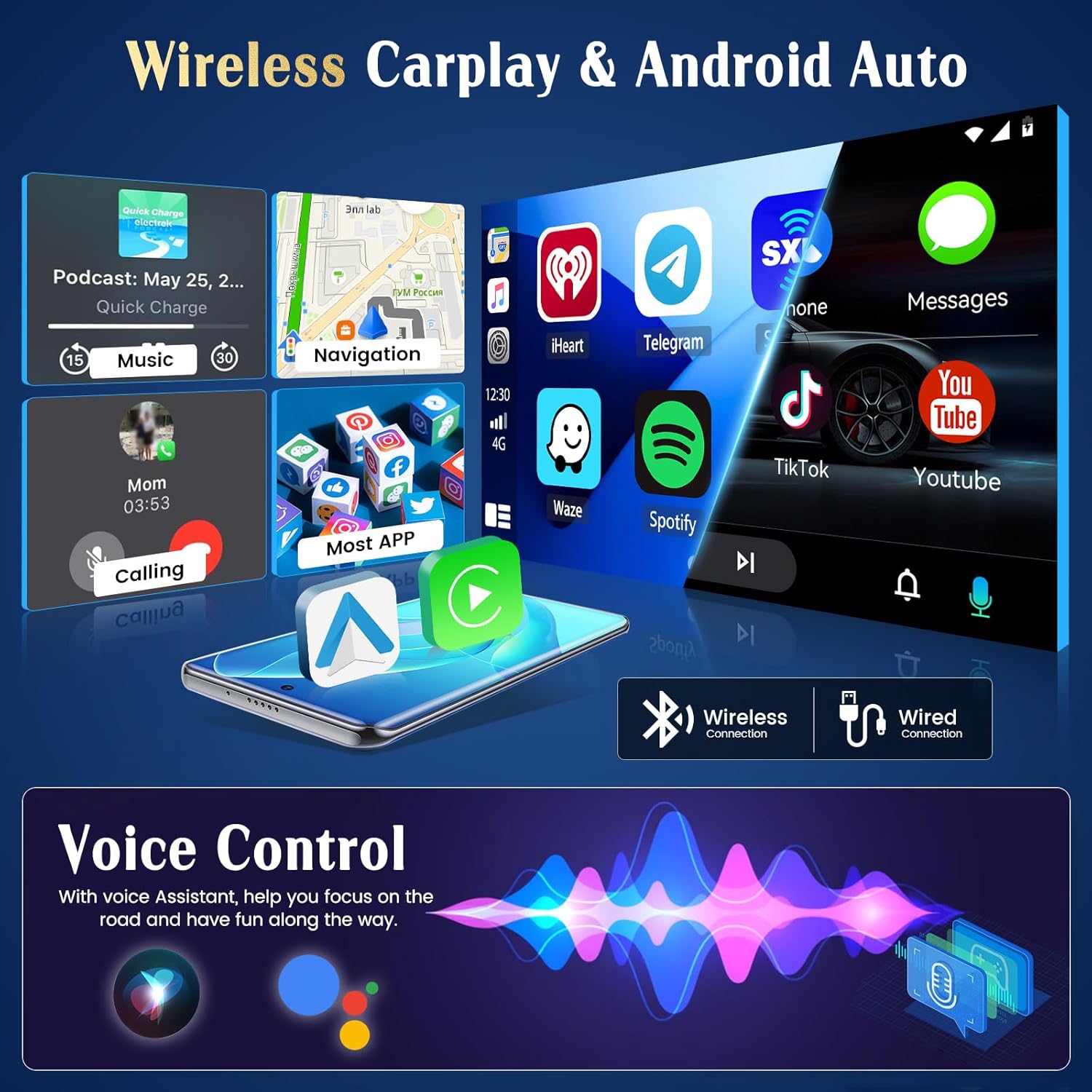
The unit supports both wireless and wired CarPlay and Android Auto. This feature integrates your smartphone's interface directly onto the car's display, allowing access to navigation, music, messages, and calls safely while driving.
- Lidhja: Connect your iPhone via Bluetooth for wireless CarPlay or a USB cable for wired CarPlay. For Android phones, connect via Bluetooth for wireless Android Auto or a USB cable for wired Android Auto.
- Funksionaliteti: Once connected, your phone's compatible apps will appear on the autoradio screen.

5.3 Navigimi GPS
The autoradio has an integrated GPS receiver and supports both online and offline maps. The pre-installed Herewego app allows you to download free offline maps for global navigation.
- Hartat Online: Requires a WiFi connection to access real-time traffic and map updates.
- Hartat jashtë linje: Download maps in advance to navigate without an internet connection.


5.4 Lidhja WiFi
Connect the autoradio to a WiFi network (e.g., your phone's hotspot) to access online features.
- Shkarkimet e aplikacioneve: Access the Google Play Store to download various applications.
- Online Browsing: Surfoni në web, stream content, and use online services.

Radio 5.5 FM/RDS
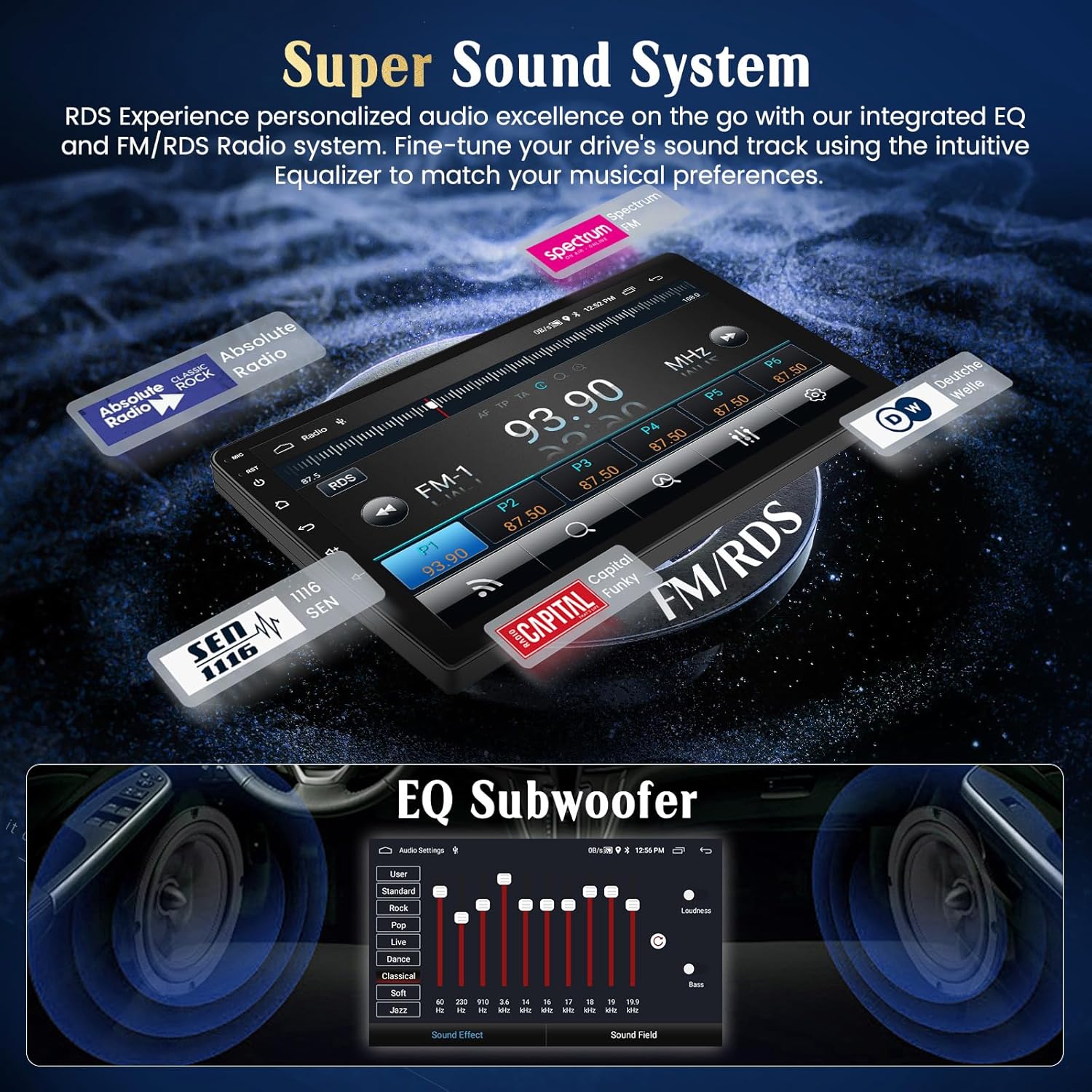
Tune into your favorite FM radio stations and enjoy real-time broadcast information via RDS (Radio Data System).
- Skanim automatik: Përdorni funksionin e skanimit automatik për të gjetur dhe ruajtur stacionet e disponueshme.
- Akordimi manual: Manually adjust the frequency to specific stations.
5.6 Funksionaliteti i Bluetooth-it
Lidhni smartfonin tuaj nëpërmjet Bluetooth për thirrje pa duar dhe transmetim audio.
- Çiftimi: Enable Bluetooth on your phone and search for the autoradio unit. Select it to pair.
- Thirrjet pa duar: Make and receive calls directly from the touchscreen.
- Transmetimi i audios: Luaj muzikë nga telefoni yt përmes altoparlantëve të makinës.
5.7 Kontrolli i timonit
The unit supports your vehicle's original steering wheel controls, allowing you to manage audio and other functions without taking your hands off the wheel.
- Konfigurimi: Access the 'Steering Wheel Control' settings in the system menu to map your vehicle's buttons to the desired functions (e.g., volume up/down, track skip, mode).

5.8 AHD Reversing Input (Backup Camera)
When your vehicle is shifted into reverse gear, the system automatically switches to the rear camera view, duke ofruar një imazh të qartë për të ndihmuar në parkim dhe manovrim.
- Karakteristikat: The supported AHD camera offers HD image quality, waterproof design, night vision, and a wide-angle view me udhëzime parkimi.


5.9 Sistemi i zërit
Customize your audio experience with the integrated equalizer (EQ) and subwoofer output.
- Barazimi: Adjust various frequency bands to tailor the sound to your preferences.
- Dalja e subwooferit: Connect an external subwoofer for enhanced bass.
5.10 Lidhja e Pasqyrës së Telefonit
Mirror your Android or iOS smartphone screen directly onto the autoradio display.
- Android: Connect via USB or WiFi.
- iOS: Connect via USB or WiFi.

5.11 Kontrolli inteligjent i zërit
Utilize voice commands through Siri (for CarPlay) or Google Assistant (for Android Auto) to control various functions, keeping your hands on the wheel and eyes on the road.
- Aktivizimi: Activate voice control through your connected smartphone's interface.
- Komandat: Use commands for navigation, music playback, calls, and messages.

5.12 Temat e Ndërfaqes së Përdoruesit
Personalize your user interface with a selection of 28 different UI themes.
- Ndryshimi i temave: Long-press on an empty space on the desktop to access theme options and switch between different designs.

6. Mirëmbajtja
- Pastrimi i ekranit: Përdorni një leckë të butë pa push për të pastruar ekranin me prekje. Për njollat kokëforta, fshijeni lehtë.ampPastrojeni leckën me ujë ose me një pastrues të sigurt për ekranin. Shmangni kimikatet e ashpra.
- Përditësimet e softuerit: Kontrolloni periodikisht për përditësime të softuerit përmes cilësimeve të sistemit ose të prodhuesit webfaqe për të siguruar performancë optimale dhe qasje në veçori të reja.
- Kujdesi i Përgjithshëm: Avoid placing heavy objects on the unit or exposing it to direct sunlight for extended periods when parked.
7. Troubleshooting
If you encounter issues with your Hikity Autoradio, refer to the following common problems and solutions:
| Problem | Shkaku i mundshëm | Zgjidhje |
|---|---|---|
| Njësia nuk ndizet. | Lidhje e lirshme e energjisë, siguresë e djegur, instalime elektrike të gabuara. | Check all power cables (B+, ACC, GND) for secure connection. Inspect vehicle fuses and the unit's fuse. Ensure correct 12V DC connection. |
| Asnjë zë. | Volumi është shumë i ulët, heshtja është aktivizuar, instalime elektrike të gabuara të altoparlantit, ampçështja lifier. | Increase volume. Check if mute is active. Verify speaker connections. If using an external ampçliruesin, kontrolloni fuqinë dhe lidhjet e tij. |
| Sinjali GPS i humbur ose i pasaktë. | Antena GPS e bllokuar ose e vendosur në mënyrë të papërshtatshme, antena me defekt. | Sigurohuni që antena GPS të ketë një pamje të qartë view of the sky. Check antenna connection. Try repositioning the antenna. |
| CarPlay/Android Auto nuk lidhet. | Bluetooth/USB connection issue, phone compatibility, app not updated. | Ensure Bluetooth is on and paired. Try a different USB cable. Update phone OS and CarPlay/Android Auto apps. Restart both phone and autoradio. |
| Kamera e pasme nuk shfaqet. | Camera not powered, incorrect camera input connection, reverse trigger wire issue. | Check camera power supply. Verify camera input cable is securely connected. Ensure the reverse trigger wire is correctly connected to the vehicle's reverse light circuit. |
| Kontrollet e timonit nuk funksionojnë. | Canbus connection issue, incorrect configuration. | Ensure Canbus decoder is correctly installed and connected. Re-enter the steering wheel control learning interface and re-map buttons. |
If the problem persists after trying these solutions, please contact Hikity customer support.
8. Specifikimet
| Veçori | Detaj |
|---|---|
| Markë | Hikity |
| Numri i modelit | ManJu-A7195A3195A4MI2 |
| Madhësia e ekranit | 9 inç |
| Rezolucioni i ekranit | 1024*600 |
| Sistemi Operativ | Android 13 |
| Përpunues | Quad Core |
| RAM | 2 GB |
| ROM (Memoria e Brendshme) | 64 GB |
| CarPlay/Android Auto | Wireless & Wired |
| Navigimi GPS | Integrated receiver, supports online/offline maps |
| Lidhja WiFi | po |
| Bluetooth | Hands-free calls, audio streaming |
| Radio | FM with RDS |
| Portet USB | 2 |
| Pajisjet e përputhshme | Smartphone |
| Karakteristika të veçanta | EQ settings, Subwoofer output, Steering Wheel Control, AHD Reversing Input, Phone Mirror Link, Voice Control, 28 UI Themes |
9. Garancia dhe Mbështetja
9.1 Informacioni i garancisë
This Hikity Autoradio comes with a Garanci 2-vjeçare e prodhuesit. Please retain your proof of purchase for warranty claims. The warranty covers manufacturing defects and malfunctions under normal use. It does not cover damage caused by improper installation, misuse, accidents, or unauthorized modifications.
9.2 Mbështetja e klientit
For technical assistance, troubleshooting, or warranty inquiries, please contact Hikity customer support:
- Email: hikityservices@163.com
- Burimet në internet: Visit the official Hikity webfaqe interneti për pyetje të shpeshta, manuale të përditësuara dhe shkarkime softuerësh.