
Hyrje
This manual provides detailed instructions for the AULCMEET RC80B replacement remote control, designed for use with Edifier R1280DBs active speakers. Please read this manual carefully to ensure proper operation and to maximize your experience with the product.
Produkti Mbiview
The AULCMEET RC80B remote control offers a comprehensive set of functions for your Edifier R1280DBs speakers. Its ergonomic design ensures comfortable handling and intuitive button placement.
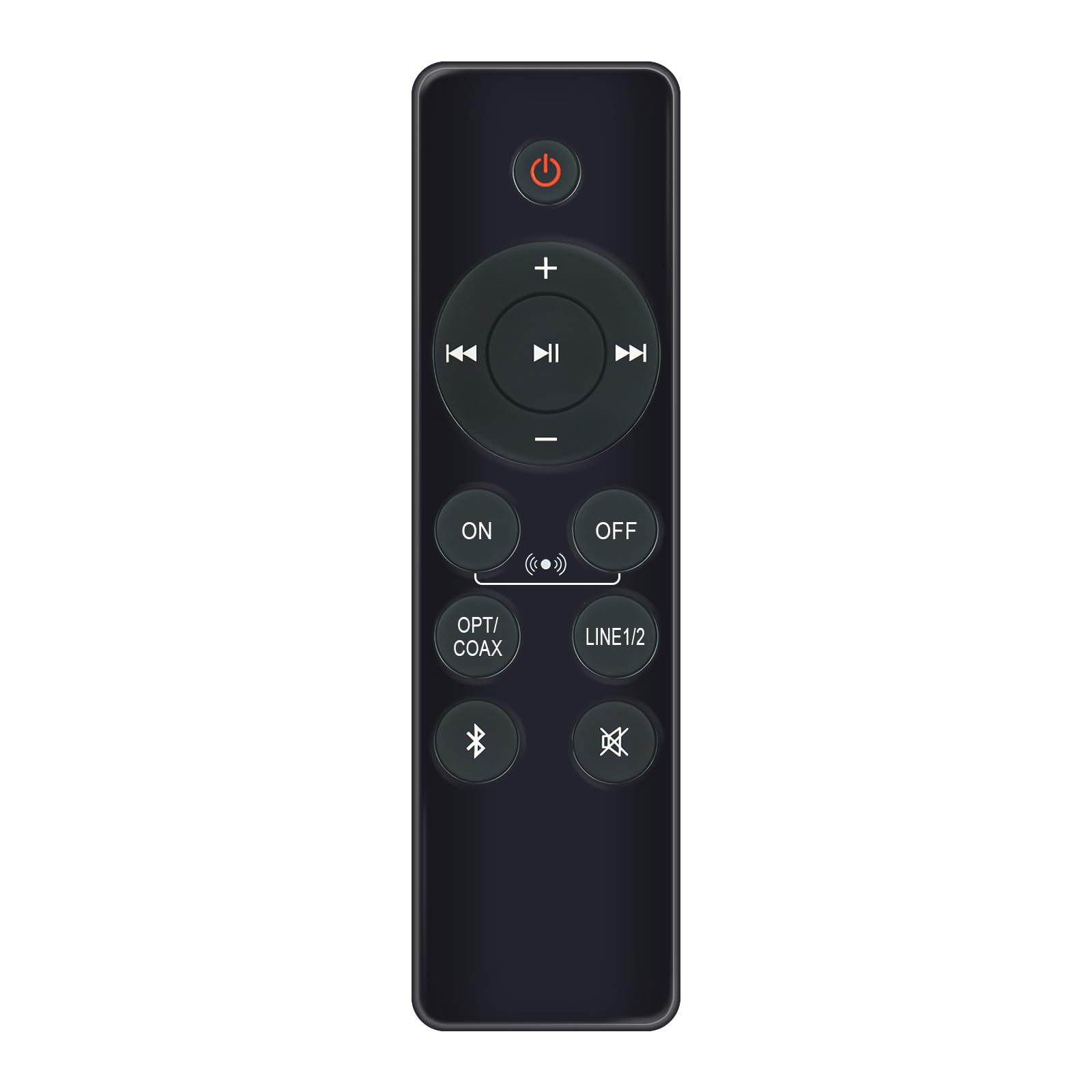
Image: AULCMEET RC80B Replacement Remote Control. The remote measures approximately 13.8 cm (5.43 inches) in length and 3.8 cm (1.5 inches) in width.
Funksionet e butonit:
- Butoni i energjisë (⏻): Turns the speakers ON or OFF.
- Rritja e volumit (+) / Ulja e volumit (-): Adjusts the speaker volume.
- Kënga e mëparshme (⏮) / Next Track (⏭): Skips to the previous or next audio track.
- Luaj/Ndalu (⏯): Plays or pauses audio playback.
- ON / OFF (Input Selection): Toggles between different input modes.
- OPT/COAX: Selects Optical or Coaxial input.
- LINE1/2: Selects Line In 1 or Line In 2 input.
- Bluetooth (☋): Activates or selects Bluetooth input.
- Hesht (🛇): Mutes or unmutes the speaker audio.
Konfigurimi
The AULCMEET RC80B remote control is designed for immediate use without complex setup procedures. Simply install the batteries, and it is ready to operate your compatible Edifier R1280DBs speakers.
Instalimi i baterisë:
- Gjeni ndarjen e baterisë në pjesën e pasme të telekomandës.
- Hapni kapakun e ndarjes së baterisë.
- Insert two AAA alkaline batteries, ensuring the correct polarity (+ and -) as indicated inside the compartment.
- Mbyllni mirë kapakun e ndarjes së baterisë.
Shënim: No programming or pairing is required for this replacement remote control. It functions directly with the specified Edifier R1280DBs active speakers.
Udhëzimet e funksionimit
To operate your Edifier R1280DBs speakers using the AULCMEET RC80B remote control, point the remote directly towards the speakers' infrared receiver. Ensure there are no obstructions between the remote and the speakers.
- Ndez/Fik: Shtypni ⏻ button to turn the speakers on or off.
- Rregullimi i volumit: Përdorni + dhe - butonat për të rritur ose ulur volumin.
- Zgjedhja e hyrjes: Shtypni ON/FIKUR, OPT/COAX, LINE1/2, ose Bluetooth buttons to switch between the available audio input sources.
- Kontrolli i riprodhimit: When using Bluetooth or other compatible sources, use the ⏮ (Më parë), ⏭ (Next), and ⏯ (Play/Pause) buttons to control media playback.
- Funksioni i heshtjes: Shtypni 🛇 button to temporarily silence the audio. Press it again to restore the sound.
Specifikimet
| Markë | AULCMEET |
| Model | RC80B |
| Pajisjet e përputhshme | Edifier R1280DBs Active Speakers |
| Ngjyra | E zezë |
| Veçoritë | Dizajn ergonomik |
| Ndërfaqja e komunikimit | Infra të kuqe (IR) |
| Numri i butonave | 30 |
| Gama maksimale | Përafërsisht 33 këmbë (10 metra) |
| Lloji i baterisë | 2 bateri alkaline AAA (nuk përfshihen) |
| Dimensionet (L x W) | 13.8 cm x 3.8 cm (5.43 in x 1.5 in) |
Zgjidhja e problemeve
If you encounter issues with your AULCMEET RC80B remote control, please refer to the following common solutions:
- Telekomanda nuk përgjigjet: Ensure the batteries are correctly installed and are not depleted. Replace batteries if necessary.
- Gama e shkurtër e funksionimit: Check for any obstructions between the remote and the speaker's IR receiver. Ensure the remote is pointed directly at the speakers. Low battery power can also reduce range.
- Një buton specifik nuk funksionon: Clean the remote control surface and buttons. If the issue persists, the button may be faulty, or the remote may require battery replacement.
- Speakers not responding to any remote: Ensure the speakers are powered on and functioning correctly. Try using the manual controls on the speaker unit if available.
Mirëmbajtja
Proper care and maintenance will extend the lifespan of your remote control:
- PastrimiFshijeni telekomandën me një leckë të butë dhe të thatë. Mos përdorni pastrues ose tretës gërryes.
- Kujdesi për baterinë: Remove batteries if the remote control will not be used for an extended period to prevent leakage.
- Magazinimi: Store the remote control in a cool, dry place, away from direct sunlight and extreme temperatures.
- Shmangni pikat: Protect the remote from physical impact, as drops can damage internal components.
Garancia dhe Mbështetja
Specific warranty information for this AULCMEET RC80B replacement remote control is not provided in the product details. For warranty claims, technical support, or further assistance, please contact the seller or manufacturer directly through your purchase platform. Keep your purchase receipt or order number handy for faster service.