
Hyrje
Thank you for choosing the Oakcastle HIFI150 Stereo System. This manual provides essential information for setting up, operating, and maintaining your device. Please read it thoroughly before use and retain it for future reference.
Informacioni i Sigurisë
Për të siguruar funksionimin e sigurt dhe për të parandaluar dëmtimet, ju lutemi të ndiqni masat paraprake të sigurisë:
- Mos e ekspozoni pajisjen ndaj shiut, lagështirës ose temperaturave ekstreme.
- Mos e hapni c-nëasing. Ia drejtoni të gjitha shërbimet personelit të kualifikuar.
- Sigurohuni që të ketë ventilim të duhur përreth njësisë. Mos bllokoni asnjë hapje ventilimi.
- Përdorni vetëm përshtatësin e energjisë të furnizuar me njësinë.
- Keep the unit away from heat sources such as radiators, stoves, or other heat-producing appliances.
- Pastroni njësinë vetëm me një leckë të thatë.
Përmbajtja e paketës
Ju lutemi kontrolloni që të gjitha artikujt të jenë të pranishëm në paketën tuaj:
- Oakcastle HIFI150 Stereo System
- Telekomandë
- Bateri për telekomandë
- Kabllo energjie
- Manuali i Përdoruesit
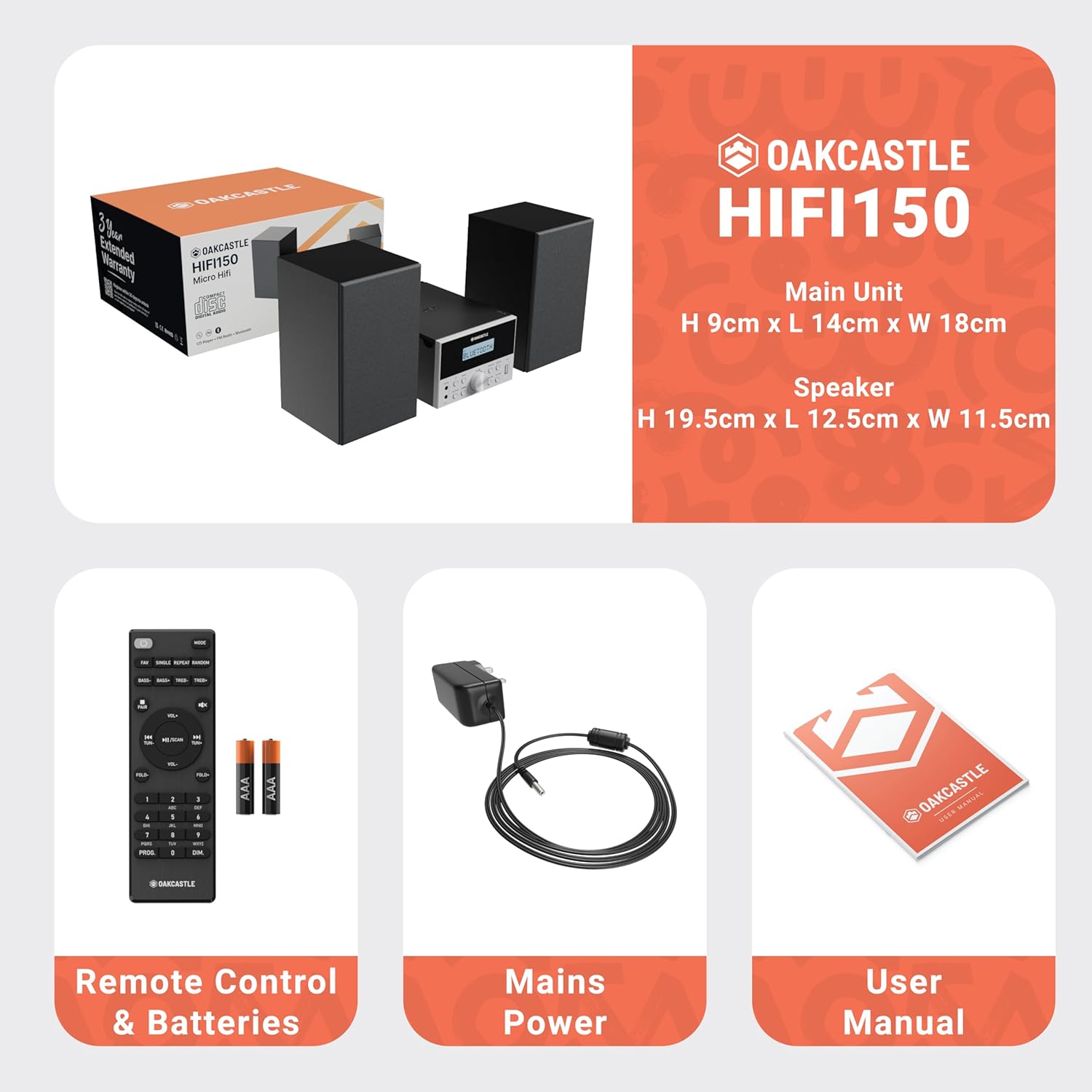
Image: The Oakcastle HIFI150 package contents, showing the main unit, two speakers, remote control with batteries, power adapter, and user manual.
Produkti Mbiview
The Oakcastle HIFI150 features a compact design with intuitive controls and multiple connectivity options.
Kontrollet dhe ekrani i panelit të përparmë

Image: A close-up of the Oakcastle HIFI150 main unit's front panel, highlighting the digital display, central volume knob, mode selection buttons, and front-facing AUX In and USB ports. The display shows 'BLUETOOTH'.
- Shfaq: Tregon modalitetin aktual, informacionin e këngës dhe frekuencën e radios.
- Butoni i energjisë: Ndez ose fiket njësinë.
- Butoni i modalitetit: Cycles through input sources (CD, FM, Bluetooth, AUX, USB).
- Çelësi i volumit: Rregullon volumin kryesor.
- Butoni i luajtjes/pauzës: Kontrollon luajtjen për CD, USB dhe Bluetooth.
- Butonat e Kapërcimit/Akordimit: Navigates tracks or tunes radio frequencies.
- AUX në port: Për lidhjen e pajisjeve të jashtme audio nëpërmjet një kablloje 3.5 mm.
- Porta USB: Për të luajtur audio files nga një disk USB.
Lidhjet e panelit të pasmë
The rear panel includes connections for speakers and power.
Konfigurimi
1. Lidhja e altoparlantëve
Connect the included speakers to the speaker terminals on the rear of the main unit. Ensure correct polarity (red to red, black to black) for optimal sound quality.
2. Lidhja e energjisë
Plug the power cable into the AC inlet on the rear of the main unit, then plug the other end into a standard wall outlet.
Udhëzimet e funksionimit
Ndez/Fik
Shtypni Fuqia butonin në panelin e përparmë ose në telekomandë për të ndezur ose fikur njësinë.
Zgjedhja e modalitetit
Shtypni Modaliteti button on the front panel or remote control repeatedly to cycle through the available input sources: CD, Radio FM, Bluetooth, AUX, dhe USB.
Operacioni Bluetooth
- Zgjidhni Bluetooth mode using the Mode button. The display will show 'BLUETOOTH' and the unit will enter pairing mode.
- Në telefonin tuaj inteligjent ose në një pajisje tjetër Bluetooth, aktivizoni Bluetooth dhe kërkoni për pajisje të disponueshme.
- Select 'OAKCASTLE HIFI150' from the list. Once connected, the unit will confirm the connection.
- You can now stream audio wirelessly from your device to the HIFI150.
Riprodhimi i CD-ve

Image: The Oakcastle HIFI150 with its top-loading CD player mechanism open, revealing a compact disc placed inside. The display shows 'CD'.
- Hapni kapakun e ndarjes së CD-së.
- Place a CD (MP3, CD, WMA, or CD-R format) onto the spindle with the label side facing up.
- Mbyllni kapakun e ndarjes së CD-së.
- Zgjidhni CD mode. The unit will read the disc and begin playback automatically.
- Përdorni butonat Luaj/Pauzë dhe Kapërce për të kontrolluar luajtjen.
Funksionimi i radios FM

Image: The Oakcastle HIFI150 main unit with its telescopic antenna extended, displaying an FM radio frequency on its screen. The unit is placed between two speakers.
- Zgjidhni Radio FM modaliteti.
- Zgjatni antenën teleskopike për marrje më të mirë.
- Skanimi automatik: Press and hold the Play/Pause button to automatically scan and save available FM stations (up to 30 presets).
- Akordimi manual: Use the Skip/Tune buttons to manually adjust the frequency.
- Kujtoni paracaktimet: Use the 'FAV/PROG' button on the remote to cycle through saved stations.
Riprodhimi USB
- Futni një makinë USB në portën USB në panelin e përparmë.
- Zgjidhni USB mode. The unit will automatically detect and begin playing compatible audio files (MP3, WMA).
- Përdorni butonat Luaj/Pauzë dhe Kapërce për të kontrolluar luajtjen.
Hyrja AUX
- Lidhni një pajisje audio të jashtme (p.sh., MP3 player, smartphone) me AUX Në port on the front panel using a 3.5mm audio cable (not included).
- Zgjidhni AUX modaliteti.
- Kontrolloni riprodhimin nga pajisja juaj e jashtme e lidhur.
Kontrolli i volumit
Rrotulloni Butoni i vëllimit on the front panel or use the VOL +/- butonat në telekomandë për të rregulluar nivelin e zërit.
Përdorimi i telekomandës
The included remote control provides full functionality for the HIFI150. Ensure batteries are correctly inserted. Point the remote control towards the front panel of the main unit for optimal response.
Mirëmbajtja
Pastrimi
- Fshijeni njësinë me një leckë të butë dhe të thatë.
- Mos përdorni pastrues gërryes, dyllë ose tretës pasi ato mund të dëmtojnë sipërfaqen.
Magazinimi
Nëse pajisja nuk përdoret për një periudhë të gjatë kohore, shkëputeni nga priza dhe ruajeni në një vend të freskët dhe të thatë.
Zgjidhja e problemeve
If you encounter issues with your HIFI150, please refer to the following common problems and solutions:
| Problem | Shkaku i mundshëm | Zgjidhje |
|---|---|---|
| Asnjë fuqi | Kablloja e energjisë nuk është e lidhur; Priza e energjisë është e dëmtuar | Sigurohuni që kablloja e energjisë është e lidhur mirë; provoni një prizë tjetër elektrike. |
| Asnjë zë | Volume too low; Incorrect input mode; Speakers not connected | Increase volume; Select correct input mode; Check speaker connections. |
| CD-ja nuk luhet | CD inserted incorrectly; Disc scratched/dirty; Incorrect format | Reinsert CD correctly; Clean or replace disc; Ensure disc is compatible (MP3, CD, WMA, CD-R). |
| Bluetooth nuk lidhet | Bluetooth mode not selected; Device too far; Device already connected to another unit | Select Bluetooth mode; Move device closer; Disconnect from other devices and try again. |
| Pritje e dobët FM | Antenna not extended; Weak signal | Fully extend the telescopic antenna; Try repositioning the unit. |
Specifikimet
| Numri i modelit | 1000002971 |
| Markë | Oakcastle |
| Lidhshmëria | Bluetooth 5.2, USB, AUX |
| Dalja audio | 20 W |
| Media e mbështetur | CD, MP3, WMA, CD-R, USB |
| Radio | Radio FM me 30 parazgjedhje |
| Pajisjet e përputhshme | MP3 Player, Smartphone, Tablet |
| Materiali i kabinetit | Druri |
| Ngjyra | E zezë |
| Dimensionet e artikullit (L x P x H) | 13.7 x 17.8 x 9 cm |
| Pesha e artikullit | 2 kilogramë |
Garancia dhe Mbështetja
The Oakcastle HIFI150 comes with an extended 3-year warranty. Registration is required to activate the full warranty period. Please refer to the warranty card included in your package or visit the official Oakcastle website for registration details and support information.
For technical assistance or further inquiries, please contact Oakcastle customer support through their official channels.