
1. Hyrje
This manual provides essential instructions for the safe and effective operation of your Fujifilm S4500 and S4530 Compact Digital Camera. Please read this manual thoroughly before using the camera and keep it in a safe place for future reference. The Fujifilm S4500/S4530 is equipped with a 14MP CCD sensor, a 30x optical zoom Fujinon lens, and is capable of recording 720p HD movies.
2. Produkti i Mbaruarview
Familiarize yourself with the main components of your camera.
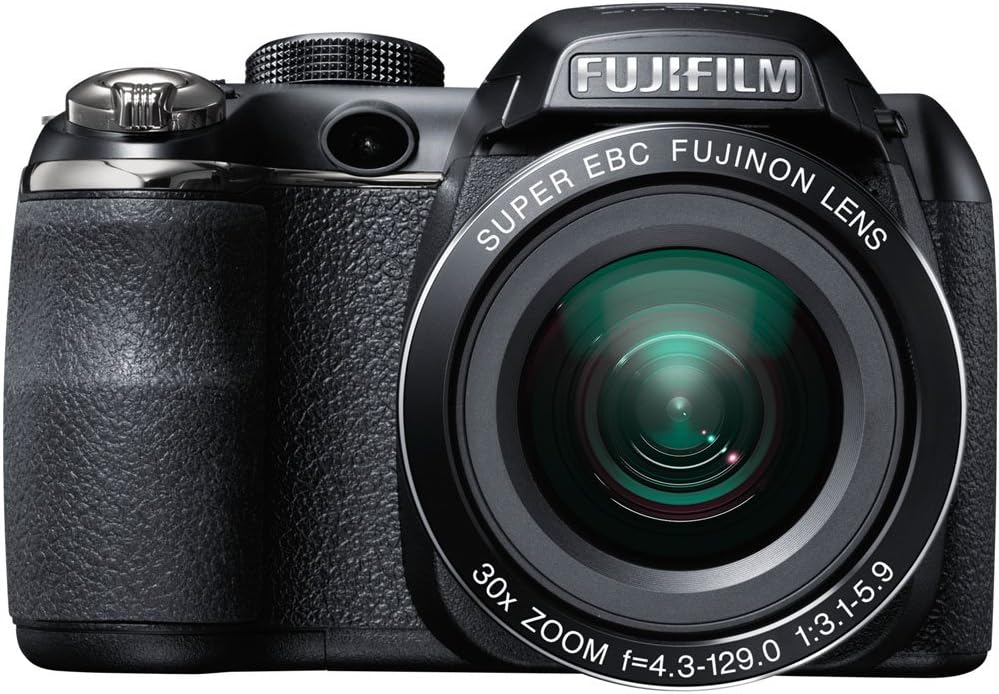
Figura 2.1: Përpara view of the Fujifilm S4500/S4530 camera with the built-in flash in the raised position, showcasing the Fujinon 30x optical zoom lens.

Figura 2.2: Përpara view of the Fujifilm S4500/S4530 camera with the built-in flash in the lowered position, highlighting the lens barrel and grip.

Figura 2.3: Anash view of the Fujifilm S4500/S4530 camera, showing the ergonomic grip and control layout.
Komponentët kryesorë:
- Lente: Fujinon 30x Optical Zoom Lens (24-720mm equivalent).
- Blic: Built-in pop-up flash.
- Ekrani LCD: 3-inch, 230,000-dot screen for viewing dhe navigim në menu.
- Viewgjetës: Elektronike Viewgjetës (EVF).
- Kontrolli Dial: For selecting shooting modes.
- Butoni i diafragmës: To capture photos.
- Leva e zmadhimit: Kontrollon zmadhimin optik dhe dixhital.
3. Konfigurimi
3.1. Futja e baterive
- Hapni kapakun e ndarjes së baterisë që ndodhet në pjesën e poshtme të kamerës.
- Insert four (4) AA alkaline batteries, ensuring correct polarity (+/-) as indicated inside the compartment.
- Mbyllni mirë kapakun e ndarjes së baterisë.
3.2. Futja e një karte memorie
- Hapni mbulesën e vendit të kartës së memories, e cila zakonisht ndodhet në anën ose pjesën e poshtme të kamerës.
- Insert an SD, SDHC, or SDXC memory card with the label facing the correct direction until it clicks into place.
- Mbylleni mirë kapakun e vendit të kartës së memories.
3.3. Ndezja fillestare dhe vendosja e datës/orës
- Shtypni ON/FIKUR butoni për të ndezur kamerën.
- The first time you power on, you will be prompted to set the date and time. Use the directional buttons to navigate and the MENU/OK butonin për të konfirmuar.
- Ndiqni udhëzimet në ekran për të përfunduar konfigurimin fillestar.
4. Udhëzimet e funksionimit
4.1. Bërja e fotografive
- Ndize kamerën.
- Zgjidhni një modalitet xhirimi duke përdorur rrotulluesin e modalitetit (p.sh., AUTO for automatic settings).
- Kadroni foton tuaj duke përdorur monitorin LCD ose ekranin elektronik viewgjetësi
- Përdorni levën e zmadhimit për të rregulluar gjatësinë fokale.
- Shtypni butonin e diafragmës deri në gjysmë për të fokusuar. Korniza e fokusit do të bëhet e gjelbër kur të arrihet fokusi.
- Shtypni butonin e diafragmës plotësisht për të bërë foton.
4.2. Regjistrimi i videove
- Turn the mode dial to the movie recording setting (often indicated by a film camera icon).
- Vendosni në kornizë subjektin tuaj.
- Press the dedicated movie record button (if available) or the shutter button to start recording.
- Press the button again to stop recording. The camera records in 720p HD resolution.
4.3. Riprodhimi
- Shtypni LUAJ butonin për të hyrë në modalitetin e riprodhimit.
- Përdorni butonat e drejtimit për të shfletuar fotot dhe videot tuaja.
- Shtypni MENU/OK te view opsione për imazhin/videon e zgjedhur.
4.4. Modalitetet e blicit
The camera offers various flash modes, including Auto and Red Eye Reduction. To change the flash mode, press the flash button (often indicated by a lightning bolt icon) and use the directional buttons to select your desired mode from the on-screen menu.
5. Mirëmbajtja
5.1. Pastrimi i Kamerës
- Lente: Përdorni një leckë të butë pa push ose një furçë për lente për të hequr butësisht pluhurin. Për njollat, përdorni një tretësirë të specializuar për pastrimin e lenteve të aplikuar në leckë, jo direkt në lente.
- Ekrani LCD: Wipe gently with a soft, dry cloth. Avoid pressing too hard.
- Trupi i kamerës: Use a soft, dry cloth to wipe away dust and fingerprints. Do not use organic solvents or strong cleaning agents.
5.2. Kujdesi për baterinë
- Hiqni bateritë kur kamera nuk do të përdoret për një periudhë të gjatë kohore për të parandaluar rrjedhjen.
- Ruani bateritë në një vend të freskët dhe të thatë.
- Replace all four AA batteries at the same time with new ones for optimal performance.
5.3. Magazinimi
When storing the camera, ensure it is turned off, and the lens cap is attached. Store in a dry, well-ventilated area away from direct sunlight, high temperatures, and humidity.
6. Troubleshooting
| Problem | Zgjidhje |
|---|---|
| Kamera nuk ndizet. | Check if batteries are inserted correctly and are fully charged. Replace with new AA batteries if necessary. |
| Imazhet janë të paqarta. | Ensure the lens is clean. Press the shutter button halfway to allow the camera to focus before taking the shot. Check if the camera is in a suitable shooting mode for the lighting conditions. |
| Blici nuk ndizet. | Check the flash mode settings. Ensure the flash is raised if it is a pop-up type. The flash may not fire if the battery level is low. |
| Gabim i kartës së kujtesës. | Ensure the memory card is inserted correctly. Try formatting the card (this will erase all data). If the problem persists, try a different memory card. |
| Nuk mund të regjistrojë video. | Ensure the camera is in video recording mode. Check if there is sufficient space on the memory card. |
7. Specifikimet
| Veçori | Detaj |
|---|---|
| Emri i modelit | Fujifilm S4500 / S4530 |
| Sensori i imazhit | 14 Megapixel 1/2.3-inch CCD |
| Lente | Fujinon 30x Optical Zoom (24-720mm equivalent) |
| Zmadhim dixhital | Deri në 6.7x |
| Stabilizimi i imazhit | Stabilizimi dixhital i imazhit |
| Ekran LCD | 3.0-inch, 230,000 dots |
| Video Regjistrimi | 720p HD (MP4 format) |
| Media ruajtëse | SD / SDHC / SDXC memory cards |
| Ndjeshmëria ISO | Auto, 100, 200, 400, 800, 1600, 3200, 6400 (expanded to 51200) |
| Shpejtësia e diafragmës | 8 sekonda deri në 1/2000 sekonda |
| Furnizimi me energji elektrike | 4x bateri alkaline AA |
| Lidhshmëria | HDMI, USB |
| Dimensionet (përafërsisht) | 1.2 paund (Pesha e artikullit) |
8. Garancia dhe Mbështetja
This Fujifilm S4500/S4530 camera typically comes with a 90-day limited warranty. Please refer to your purchase documentation for specific warranty terms and conditions. For technical support or service inquiries, please contact Fujifilm customer service or the retailer from whom the product was purchased.