
1. Hyrje
Thank you for choosing the PUTRIMS K12 Google TV Projector. This manual provides essential information for the safe and efficient use of your new projector. Please read it thoroughly before operation and keep it for future reference.

Figure 1.1: PUTRIMS K12 Projector
2. Informacion mbi sigurinë
- Mos shikoni drejtpërdrejt në lentet e projektorit kur lamp është ndezur.
- Siguroni ventilimin e duhur për të parandaluar mbinxehjen.
- Mbajeni projektorin larg ujit ose lëngjeve të tjera.
- Përdorni vetëm përshtatësin e dhënë të energjisë.
- Shmangni vendosjen e projektorit në sipërfaqe të paqëndrueshme.
- Mos u përpiqni ta çmontoni ose riparoni vetë projektorin. Kontaktoni mbështetjen e klientit për ndihmë.
3. Përmbajtja e paketës
Verifikoni që të gjitha artikujt janë të pranishëm në paketimin tuaj:
- Projektori PUTRIMS K12
- Telekomandë
- Kordoni elektrik
- Kabllo HDMI
- Mbulesa e lenteve të projektorit
- Manuali i Përdoruesit (ky dokument)
4. Produkti i Mbaruarview
The PUTRIMS K12 projector is designed for a versatile home theater and business experience. It features a sleek design with essential ports for connectivity.
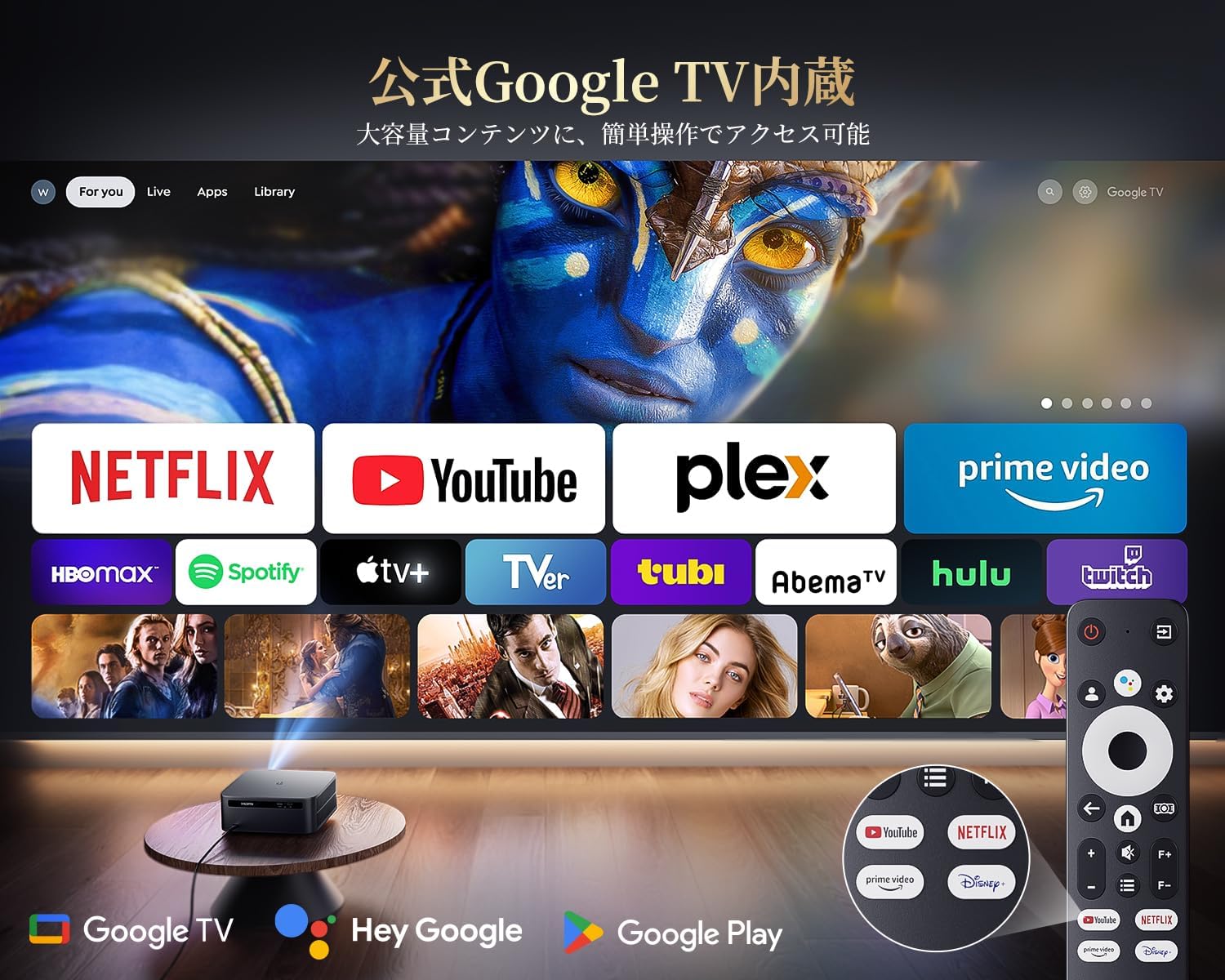
Figura 4.1: Përpara view of the K12 Projector, showing the lens and auto-focus sensors.

Figura 4.2: E pasme view of the K12 Projector, highlighting HDMI, USB, and audio ports.
Video 4.1: General product overview and feature demonstration of the PUTRIMS K12 projector.
5. Konfigurimi
5.1 Konfigurimi fizik
The K12 projector offers flexible installation options to suit various environments:
- Vendosja në tavolinë: Vendoseni projektorin në një sipërfaqe të qëndrueshme dhe të sheshtë.
- Montimi i Tripodit: Use the M5 screw hole on the bottom to attach a tripod.
- Montimi në tavan: Securely mount the projector to the ceiling using a compatible mount.
- Montimi në mur: Attach the projector to a wall using a suitable bracket.

Figure 5.1: Diverse installation methods for the K12 Projector.
5.2 Ndezja fillestare
- Lidheni kordonin e rrymës me projektorin dhe një prizë elektrike.
- Shtypni butonin e ndezjes në projektor ose në telekomandë për ta ndezur.
- The projector will automatically perform auto-focus and keystone correction.
5.3 Lidhja e Rrjetit (WiFi)
To access online streaming services and updates, connect your projector to a WiFi network:
- Shko te menyja 'Cilësimet' në projektor.
- Zgjidhni 'Rrjeti' ose 'Cilësimet e WiFi-t'.
- Aktivizoni WiFi-në dhe zgjidhni rrjetin e dëshiruar nga lista.
- Futni fjalëkalimin nëse ju kërkohet dhe lidheni.
5.4 Lidhja Bluetooth
Connect external Bluetooth speakers or headphones for enhanced audio:
- Go to 'Settings' and select 'Bluetooth'.
- Turn on Bluetooth and put your external device into pairing mode.
- Zgjidhni pajisjen tuaj nga lista për ta çiftuar.
5.5 Pasqyrimi i ekranit
Share content from your mobile devices or computer wirelessly:
- For iOS devices (Airplay): Ensure your iOS device and the projector are connected to the same WiFi network. Open the 'iOS Cast' interface on the projector. On your iOS device, open Control Center, tap 'Screen Mirroring', and select 'K12-xxxx' from the list.
- For Android/Windows devices (Miracast): Ensure your device and the projector are connected to the same WiFi network. Open the 'Miracast' interface on the projector. On your Android/Windows device, enable screen mirroring/cast feature and select 'K12-xxxx' to connect.
6. Udhëzimet e funksionimit
6.1 Karakteristikat e Google TV
The PUTRIMS K12 comes with official Google TV, providing access to a vast library of content and applications.
- Aplikacionet e transmetimit: Directly access Netflix, Disney+, YouTube, Prime Video, Hulu, and many more with a single click.
- Dyqani i Google Play: Download and install over 10,000 applications and games.
- Përditësimet e rregullta: The projector receives periodic updates to enhance security and stability.

Figure 6.1: Google TV interface with popular streaming applications.
6.2 Kontrolli zanor
Utilize the Google Voice Assistant for convenient control of your projector and content.
- Press the voice control button on your remote.
- Speak commands such as "Open Netflix," "Play One Piece," "Tell me the weather," or "Increase volume."

Figure 6.2: Using the Google Voice Assistant with the remote control.
6.3 Rregullimi i imazhit
The K12 projector features advanced image adjustment capabilities for optimal viewing.
- Fokusi automatik: The projector automatically adjusts the focus for a clear image upon startup or movement.
- Korrigjimi automatik i gurit kryesor: It automatically corrects horizontal and vertical trapezoidal distortions, ensuring a perfectly rectangular image even from an angle.
- Funksioni i zmadhimit: Adjust the screen size from 50% to 100% without moving the projector.
- Raporti i pamjes: Supports 4:3 and 16:9 aspect ratios.
- Shkëlqimi dhe kontrasti: Customize brightness and contrast settings to your preference.

Figure 6.3: Automatic focus and keystone correction in action.

Figure 6.4: Projection distances and corresponding screen sizes (100", 120", 150").
6.4 Lidhja e pajisjeve të jashtme
The K12 projector offers multiple connectivity options for various devices:
- ARC HDMI: Connect to soundbars, laptops, gaming consoles (Switch, PS5), or DVD players.
- USB: Play media directly from USB memory sticks.
- Porta e audios 3.5 mm: Lidhu me sisteme audio të jashtme.

Figure 6.5: Seamless connection with various external devices.
7. Mirëmbajtja
7.1 Pastrimi i lenteve
Për të ruajtur cilësinë optimale të imazhit, pastroni rregullisht lentet e projektorit.
- Sigurohuni që projektori të jetë i fikur dhe i shkëputur nga priza.
- Gently wipe the lens with a soft, lint-free cloth or a cotton swab.
- For stubborn smudges, use a lens cleaning solution specifically designed for optical surfaces.
- Avoid using abrasive materials or harsh chemicals that could damage the lens.
8. Troubleshooting
Ja zgjidhjet për problemet e zakonshme që mund të hasni:
- No image/signal: Check all cable connections (HDMI, power). Ensure the correct input source is selected on the projector.
- Imazhi i turbullt: The projector features auto-focus. If the image remains blurry, ensure the lens is clean and there are no obstructions.
- Image not rectangular: The projector has auto-keystone correction. If issues persist, ensure the projector is placed on a stable surface and try repositioning it.
- Nuk ka zë: Check volume settings on both the projector and connected devices. Ensure external speakers are properly connected via Bluetooth or audio cable. If using HDMI ARC, verify the connection and settings.
- WiFi/Bluetooth connection issues: Ensure the projector and your device are within range of the router/device. Restart both the projector and the router/device.
- App crashes or malfunctions (for unofficial Android TV versions): The PUTRIMS K12 has an official Google TV license, which ensures stability. If you experience issues, ensure your system is updated.
Për më shumë ndihmë, ju lutemi referojuni seksionit Garancia dhe Ndihma.
9. Specifikimet
| Veçori | Përshkrimi |
|---|---|
| Markë | PUTRIMS |
| Model | K12 |
| Shkëlqimi | 1500 Lumens ANSI |
| Rezolucioni | 1080P FHD (4K Support) |
| Sistemi Operativ | Official Google TV |
| Kontrolli i zërit | Google Voice Assistant |
| Fokusimi | Omnidirectional Auto Focus |
| Korrigjimi i gurëve kryesorë | Horizontal & Vertical Auto Keystone Correction |
| Zmadhoni | 50%-100% |
| Madhësia maksimale e ekranit | 300 inç |
| WiFi | WiFi 6 |
| Bluetooth | Bluetooth 5.3 |
| Dalja audio | 20W HIFI Speaker, 3.5mm Audio Jack |
| Portat hyrëse | HDMI ARC, USB |
| Dimensionet | 40.5 x 30.2 x 17 cm |
| Pesha | 3.31 kg |
10. Garancia dhe Mbështetja
PUTRIMS is committed to providing excellent customer service. Your K12 projector comes with comprehensive support:
- Shërbimi pas shitjes: 24 hours a day, 365 days a year.
- Mbështetje Teknike: Professional technical assistance is available.
- Garancia: Free exchange or 100% refund guarantee for initial defects or natural failures under normal use.
If you have any questions or require assistance, please contact PUTRIMS customer support via the official email address provided in your product packaging or on the official webfaqe.