
WONLINK WL-AP7202
WONLINK AC1200 Outdoor WiFi Extender User Manual
Model: WL-AP7202
1. Hyrje
The WONLINK AC1200 Outdoor WiFi Extender is designed to provide robust and stable wireless network coverage in outdoor environments. Featuring dual-band technology (2.4GHz and 5GHz) and Power over Ethernet (PoE) support, this device is ideal for extending Wi-Fi to gardens, yards, farms, parks, and other large outdoor areas. Its IP66-rated weather-resistant casing ensures reliable performance in various challenging conditions.
2. Çfarë ka në kuti
- 1 * Outdoor Access Point
- 1 * 48V PoE Adapter
- 2 * Stainless Steel Ties
- 2 * Vida
- 2 * Silicone Gaskets
- 1 * Quick Installation Guide
3. Karakteristikat e produkteve
- Dizajn rezistent ndaj motit: IP66-rated casing protects the device from harsh outdoor conditions, including extreme cold, heat, and continuous humidity. Key components are sealed with waterproof glue.
- High-Speed Dual-Band Network: Complies with IEEE 802.11ac/a/b/g/n standards, offering maximum dual-band speeds of up to 867Mbps on 5GHz and 300Mbps on 2.4GHz. Ideal for HD streaming and online gaming.
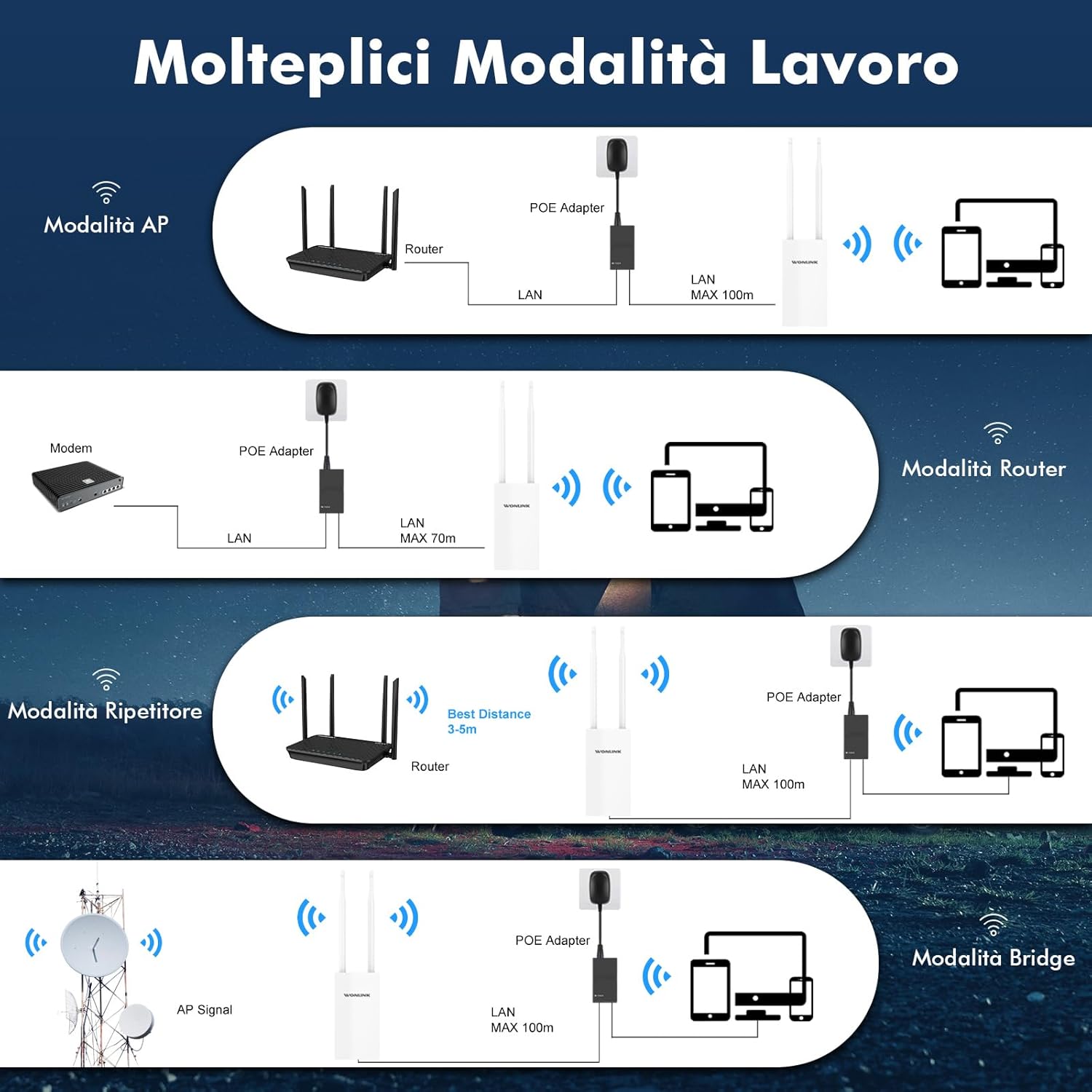
- Mënyra të shumta të funksionimit: Supports Repeater, AP (Access Point), Router, and Bridge modes to suit various network environments.
- Power Over Ethernet (PoE) & Dual Gigabit Ports: Integrated PoE allows flexible installation in areas without power outlets. Features dual Gigabit Ethernet (1000Mbps) LAN/WAN ports for excellent network speed.
- Stable Long-Range WiFi Coverage: Equipped with 2 high-gain external antennas and high-power PA+LNA amplifiers to extend WiFi signals and eliminate dead zones.


4. Udhëzuesi i konfigurimit
This section provides a step-by-step guide for setting up your WONLINK AC1200 Outdoor WiFi Extender. For a visual walkthrough, please refer to the official setup video below.
4.1. AP Mode Configuration Steps
- Lidhni pajisjen: Ensure correct cable connection and wait for the indicator light to turn on. Connect the device to your computer via Ethernet.
- Connect to WONLINK WiFi: On your computer, connect to the WONLINK device's default WiFi signal (e.g., "WONLINK-XXXX-5G" or "WONLINK-XXXX-2G").
- Qasja Web Ndërfaqja: Hap a web shfletuesin dhe futni adresën IP të paracaktuar 192.168.10.1 në shiritin e adresave.
- Identifikohu: Enter the default password "admin" to log in.
- Zgjidhni modalitetin AP: Navigate to "Wizard" and select "AP" mode.
- Configure LAN Settings: In "Lan Settings", enter a new IP address. (Note: The first three groups of numbers of the IP address should be the same as your router's IP, but the last digit must be different.)
- Konfiguro Cilësimet e Rrjetit Pa Tel: Set the SSID (network name) for Wireless 2.4G and Wireless 5G. Enter your desired password. (Note: The password should be the same as your router's password. The SSID can be customized as you prefer.)
- Përfundo: Click "Finish" to apply settings. Reconnect to the new WiFi network using the password you set.
4.2. Repeater Mode Configuration Steps
- Lidhni pajisjen: Ensure correct cable connection and wait for the indicator light to turn on. Connect the device to your computer via Ethernet.
- Connect to WONLINK WiFi: On your computer, connect to the WONLINK device's default WiFi signal (e.g., "WONLINK-XXXX-5G" or "WONLINK-XXXX-2G").
- Qasja Web Ndërfaqja: Hap a web shfletuesin dhe futni adresën IP të paracaktuar 192.168.10.1 në shiritin e adresave.
- Identifikohu: Enter the default password "admin" to log in.
- Zgjidhni Modalitetin e Përsëritësit: Navigate to "Wizard" and select "Repeater" mode.
- Scan for Host Network: Select the 2.4G or 5.8G band, then click "Scan" to find your host router's WiFi signal. Select your network from the scan results.
- Enter Host Password: Enter the WiFi password of your host router. (Note: The password must be identical to your router's password.)
- Përfundo: Click "Finish" to apply settings. Reconnect to the extended WiFi network using the password you set.
5. Modalitetet e operimit
The WONLINK AC1200 Outdoor WiFi Extender supports several operating modes to adapt to various networking needs:
- Modaliteti AP (Pika e Qasjes): Converts a wired internet connection into a wireless signal for expansion. Ideal for creating a new Wi-Fi hotspot.
- Modaliteti i routerit: Functions as a standard wireless router, connecting to a modem and providing independent network access.
- Modaliteti i përsëritësit: Extends the coverage of an existing Wi-Fi network by receiving and re-transmitting the signal.
- Modaliteti i urës: Similar to Repeater mode, but can form an independent SSID. Useful for connecting wired devices to a wireless network.
6. Mirëmbajtja
To ensure the longevity and optimal performance of your WONLINK AC1200 Outdoor WiFi Extender, follow these maintenance guidelines:
- Pastrim i rregullt: Periodically wipe the device's exterior with a soft, dry cloth to remove dust and debris. Avoid using harsh chemicals or abrasive materials.
- Inspektoni lidhjet: Regularly check all cable connections (Ethernet, PoE) to ensure they are secure and free from damage.
- Përditësimet e firmuerit: Kontrolloni të prodhuesit webfaqja e internetit për çdo përditësim të disponueshëm të firmware-it. Mbajtja e firmware-it të përditësuar mund të përmirësojë performancën, stabilitetin dhe sigurinë.
- Konsiderata mjedisore: Despite its IP66 rating, avoid placing the device in locations where it is constantly submerged in water or exposed to extreme physical impact. Ensure proper ventilation around the device.
7. Troubleshooting
If you encounter issues with your WONLINK AC1200 Outdoor WiFi Extender, try the following troubleshooting steps:
- Asnjë dritë rryme/treguese e fikur:
- Ensure the PoE adapter is properly connected to a power outlet and the device.
- Check the Ethernet cable connecting the PoE adapter to the device.
- Nuk mund të qaset Web Interface (192.168.10.1):
- Verify your computer is connected to the WONLINK device's default WiFi network or directly via Ethernet.
- Ensure your computer's IP settings are set to obtain an IP address automatically (DHCP).
- Provo të pastrosh memorien e përkohshme të shfletuesit tënd ose të përdorësh një shfletues tjetër.
- Nuk ka qasje në internet pas konfigurimit:
- In Repeater mode, ensure you selected the correct host WiFi network and entered its password accurately.
- In AP mode, verify the new IP address set in "Lan Settings" is compatible with your main router's network (same first three octets, different last octet).
- Check the internet connection of your main router.
- Weak or Unstable Signal:
- Adjust the position of the extender to minimize obstacles between it and your main router or client devices.
- Sigurohuni që antenat të jenë të fiksuara mirë dhe të orientuara saktë.
- Consider interference from other electronic devices or neighboring Wi-Fi networks.
For further assistance, please contact WONLINK customer support.
8. Specifikimet
| Veçori | Detaj |
|---|---|
| Markë | FITUAR |
| Model | WL-AP7202 |
| Wireless standard | 802.11a/b/g/n/ac |
| Shkalla e transferimit të të dhënave | 1200 Megabit për sekondë (Mbps) |
| Klasa e brezit të frekuencës | Band i dyfishtë (2.4 GHz dhe 5 GHz) |
| Antenat | 2 x 10dBi High Gain Antennas |
| Portet Ethernet | Dual Gigabit Ethernet (1000Mbps) |
| Furnizimi me energji elektrike | 48V PoE Power |
| Rezistenca ndaj motit | Vlerësuar me IP66 |
| Pajisjet e përputhshme | Smartphones, Tablets, Laptops, Computers, Smart TVs, Gaming Consoles, Printers, Security Cameras |
| Dimensionet | 22.5 x 19.5 x 5 cm |
| Pesha | 520 gram |
9. Garancia dhe Mbështetja
WONLINK is committed to providing high-quality products and excellent customer service.
- Mbështetja e produktit: If you encounter any issues with your product, please contact us. We aim to respond within 24 hours and provide satisfactory solutions.
- Politika e kthimit: This product is eligible for a refund or replacement within 14 days of purchase, subject to the seller's return policy.
- Përditësimet e softuerit: Information regarding guaranteed software updates is currently unknown. Please check the official WONLINK webfaqe për informacionin më të fundit.
For more information or to contact support, visit the WONLINK Store on Amazon.
Ask a question about this manual
Ask about setup, troubleshooting, compatibility, parts, safety, or missing instructions. Manuals+ will review the question and use this page’s manual context to help answer it.