
LIECTROUX M7S PRO
LIECTROUX M7S Pro Robot Vacuum Cleaner User Manual
Model: M7S Pro
1. Hyrje
Faleminderit për blerjenasing the LIECTROUX M7S Pro Robot Vacuum Cleaner. This manual provides essential information for the safe operation, maintenance, and troubleshooting of your device. Please read this manual thoroughly before using the product and retain it for future reference.
Udhëzimet e sigurisë
- Sigurohuni që roboti të jetë plotësisht i ngarkuar përpara përdorimit të parë.
- Mos e përdorni robotin në mjedise të lagështa ose pranë lëngjeve.
- Mbajini kabllot e lirshme, perdet dhe objektet e vogla larg rrugës së robotit për të parandaluar ngatërrimin.
- Mbikëqyrni fëmijët dhe kafshët shtëpiake kur roboti është në punë.
- Mos e përdorni robotin për të mbledhur mbeturina të mëdha, objekte të mprehta ose materiale që digjen.
- Only use the original charging dock and power adapter provided with the robot.
- Turn off the robot and unplug it from the charging dock before performing any maintenance.
2. Përmbajtja e paketës
Verifikoni që të gjitha sendet janë të pranishme në paketim:
- LIECTROUX M7S Pro Robot Vacuum Cleaner
- Doku i karikimit
- Përshtatës i energjisë
- Furça anësore (set)
- Filtri HEPA (i parainstaluar ose rezervë)
- Mjeti i pastrimit
- Telekomandë
- Manuali i Përdoruesit
3. Produkti i Mbaruarview
Familiarize yourself with the components of your LIECTROUX M7S Pro robot vacuum cleaner.

Figura 3.1: The LIECTROUX M7S Pro robot vacuum cleaner, showcasing its sleek black design, along with its remote control and a smartphone displaying the cleaning map via the app.
Përbërësit kryesorë:
- Paneli kryesor: Power button, Wi-Fi indicator, charging indicator.
- Parakolp i përparmë: Obstacle detection sensors.
- Furça anësore: Collect dust and debris from edges and corners.
- Rrotat lëvizëse: Lejoni lëvizjen nëpër lloje të ndryshme dyshemesh.
- dustbin: Collects dry debris.
- Water Tank (for mopping): Holds water for wet cleaning.
- Kontaktet e ngarkimit: Connects with the charging dock.
- Sensorë Shkëmbinjsh: Detects drops and prevents falls.
4. Konfigurimi
4.1 Vendosja e stacionit të karikimit
Place the charging dock against a wall in an open area, ensuring there are no obstacles within 1 meter (3 feet) to the sides and 2 meters (6 feet) in front of the dock. Connect the power adapter to the charging dock and plug it into a power outlet.
4.2 Ngarkimi fillestar
Place the robot onto the charging dock, ensuring the charging contacts align. The robot will begin charging automatically. For first use, allow the robot to charge completely (approximately 4-5 hours) before operation.

Figura 4.1: The robot vacuum cleaner automatically returning to its charging dock when its battery is low, ensuring it is always ready for the next cleaning cycle.
4.3 Lidhja me Aplikacionin (Aplikacioni TUYA)
- Download the "TUYA Smart" app from your smartphone's app store (iOS or Android).
- Regjistrohuni ose hyni në llogarinë tuaj TUYA.
- Ensure your robot is charged and powered on.
- Follow the in-app instructions to add your LIECTROUX M7S Pro robot vacuum cleaner. This typically involves pressing and holding a button on the robot to enter pairing mode and connecting to your home Wi-Fi network.
- Pasi të lidheni, mund ta kontrolloni robotin, view pastrimi i hartave dhe caktimi i orareve përmes aplikacionit.
4.4 Integrimi i Asistentit Zëror
The LIECTROUX M7S Pro supports voice control via Amazon Alexa and Google Home. Refer to the respective app (Alexa app or Google Home app) for instructions on how to link your TUYA Smart account and control your robot with voice commands.
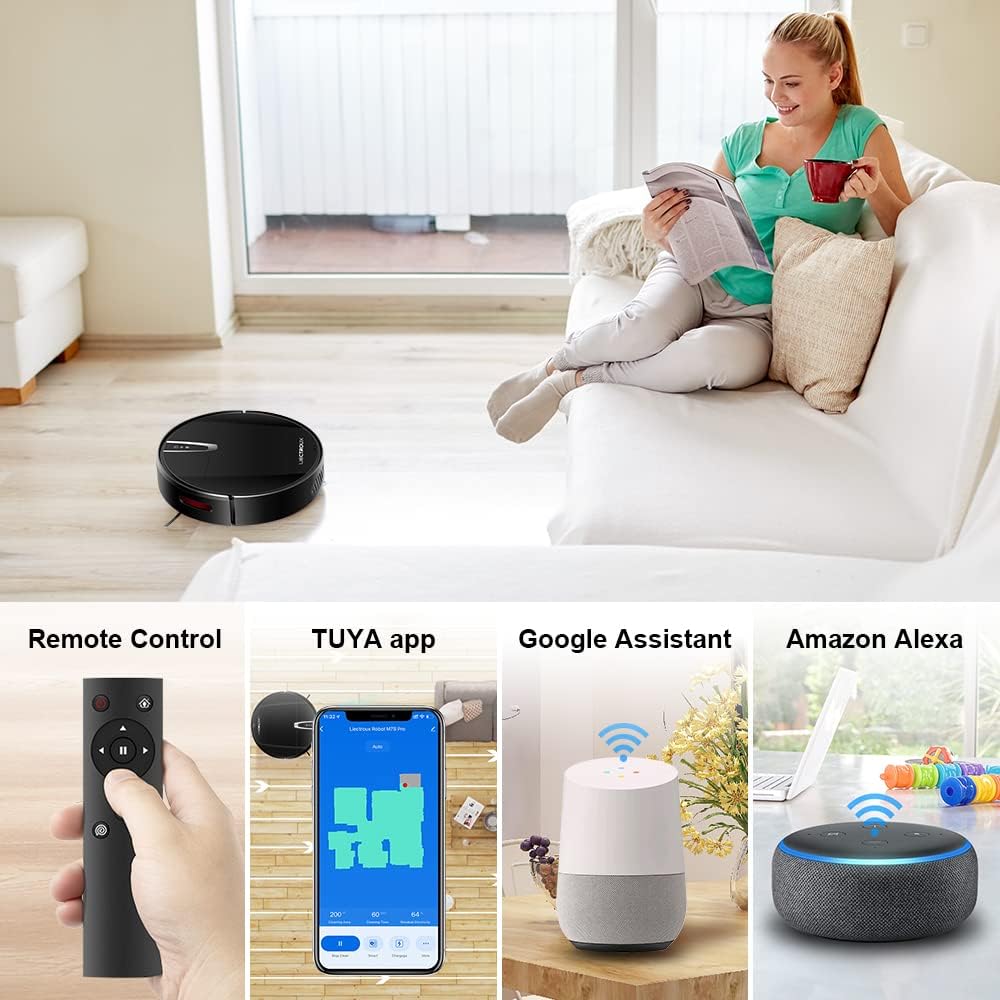
Figura 4.2: Various control methods for the robot vacuum, including a physical remote control, the TUYA smartphone application displaying a cleaning map, and integration with voice assistants like Google Assistant and Amazon Alexa.
5. Udhëzimet e funksionimit
5.1 Mënyrat e pastrimit
The robot offers multiple cleaning modes to suit different needs, accessible via the app, remote control, or voice commands:
- Pastrimi automatik: Roboti lundron dhe pastron në mënyrë inteligjente të gjithë sipërfaqen e dyshemesë.
- Pastrimi i pikave: Përqendrohet në një zonë specifike të ndotur, duke pastruar në një model spiral.
- Pastrimi i skajeve: Pastron përgjatë mureve dhe skajeve të mobiljeve.
- Modaliteti i fshesës: For wet cleaning, attach the water tank and mopping cloth.

Figura 5.1: The robot vacuum cleaner operating on a floor with scattered debris, illustrating its powerful suction and various cleaning modes: Scheduled Cleaning, Auto Cleaning, Edge Cleaning, and Spot Cleaning.
5.2 Navigimi dhe Hartimi
The M7S Pro utilizes smart gyroscope navigation to create a 2D map of your environment, allowing for precise positioning and efficient route planning. This ensures comprehensive coverage and minimizes missed spots.

Figura 5.2: The robot vacuum cleaner navigating a room, with a grid overlay illustrating its smart gyroscope navigation system for precise positioning and thorough cleaning.

Figura 5.3: A visual comparison showing the efficient, systematic cleaning path generated by the LIECTROUX M7S Pro's gyroscope navigation versus a less organized common route planning method, highlighting intelligent route planning.
5.3 Mbushje automatike
When the battery level is low or a cleaning task is complete, the robot will automatically return to its charging dock to recharge. Ensure the charging dock is always powered on and accessible.
5.4 Anti-Drop System
The robot is equipped with cliff sensors to detect stairs and elevated surfaces, preventing it from falling. It also intelligently detects different floor types and adjusts its direction within 10 milliseconds.
6. Mirëmbajtja
Mirëmbajtja e rregullt siguron performancë optimale dhe zgjat jetëgjatësinë e fshesës suaj robotike me korrent.
6.1 Zbrazja e koshit të plehrave
Empty the dustbin after each cleaning cycle or when the 'full' indicator appears. Open the top cover, remove the dustbin, and dispose of the collected debris.
6.2 Pastrimi i filtrit
The HEPA filter should be cleaned regularly (e.g., weekly) using the provided cleaning tool or a soft brush. Replace the HEPA filter every 3-6 months, depending on usage, to maintain suction efficiency.
6.3 Pastrimi i Furçave Anësore
Inspect and clean the side brushes regularly. Remove any tangled hair or debris. If brushes are worn or damaged, replace them with new ones.
6.4 Pastrimi i sensorëve dhe kontakteve të karikimit
Wipe the cliff sensors and charging contacts on both the robot and the charging dock with a clean, dry cloth to ensure proper function and charging.
6.5 Brush-less Suction Nozzle
The M7S Pro features an advanced brush-less suction nozzle designed to minimize hair entanglement, reducing the frequency of cleaning the main suction path.

Figura 6.1: An illustration of the robot vacuum's underside, highlighting the advanced brush-less suction nozzle designed to prevent hair entanglement and ensure consistent cleaning performance.
7. Troubleshooting
Nëse hasni probleme me fshesën tuaj robotike me korrent, referojuni problemeve dhe zgjidhjeve të zakonshme të mëposhtme:
| Problem | Shkaku i mundshëm | Zgjidhje |
|---|---|---|
| Roboti nuk ndizet. | Bateri e ulët; çelësi i energjisë është i fikur. | Charge the robot; ensure the main power switch is on. |
| Roboti nuk karikohet. | Charging contacts dirty; charging dock not powered. | Clean charging contacts; ensure charging dock is plugged in. |
| Roboti ngec shpesh. | Pengesa (kabllo, qilima); hapësira të ngushta. | Clear the cleaning area; use virtual walls if available. |
| Performancë e dobët e pastrimit. | Koshi i plehrave plot; filtri i bllokuar; furçat e ngatërruara. | Empty dustbin; clean/replace filter; clean brushes. |
| Probleme me lidhjen e aplikacionit. | Incorrect Wi-Fi password; robot not in pairing mode; 5GHz Wi-Fi network. | Verify Wi-Fi details; re-enter pairing mode; ensure 2.4GHz Wi-Fi is used. |
8. Specifikimet
| Veçori | Detaj |
|---|---|
| Markë | LIECTROUX |
| Emri i modelit | M7S PRO |
| Ngjyra | E zezë |
| Dimensionet e produktit | 32L x 32W x 7.8H cm |
| Pesha e artikullit | 4 kilogramë |
| Fuqia maksimale e thithjes | 4000 Pa |
| Kapaciteti i baterisë | 2500mAh jon litium |
| Koha e ekzekutimit | Deri në 120 minuta |
| Lloji i filtrit | HEPA |
| Lloji i kontrolluesit | App Control, Touchpad Control, Voice Control |
| Përputhshmëria e ndihmësit të zërit | Google Home, Amazon Alexa |
| Lloji i navigimit | Gyroscope Navigation (2D Map) |
| Veçori e veçantë | Anti-drop system, Brush-less suction nozzle |
| Rekomandim sipërfaqësor | Low-pile carpet, hard floors, ceramic tiles |
9. Garancia dhe Mbështetja
The LIECTROUX M7S Pro Robot Vacuum Cleaner comes with a standard manufacturer's warranty. Please refer to the warranty card included in your package for specific terms and conditions, including the warranty period and coverage details.
For technical support, troubleshooting assistance, or warranty claims, please contact the seller or LIECTROUX customer service. Contact information can typically be found on the product packaging, the seller's website, or within the TUYA Smart app.
When contacting support, please have your product model number (M7S Pro) and purchase details readily available.
Ask a question about this manual
Ask about setup, troubleshooting, compatibility, parts, safety, or missing instructions. Manuals+ will review the question and use this page’s manual context to help answer it.