
1. Produkti i Mbaruarview
The Fuers H.265+ 8-Channel Security DVR Recorder (Model A1008CH) is a versatile surveillance solution designed for home and business security. This DVR supports various camera types including HD-CVBS, TVI, CVI, XVI, AHD, and IP analog cameras, allowing for flexible system expansion. It features H.265+ video compression for efficient storage and comes with a pre-installed 1TB hard drive for 24/7 recording.
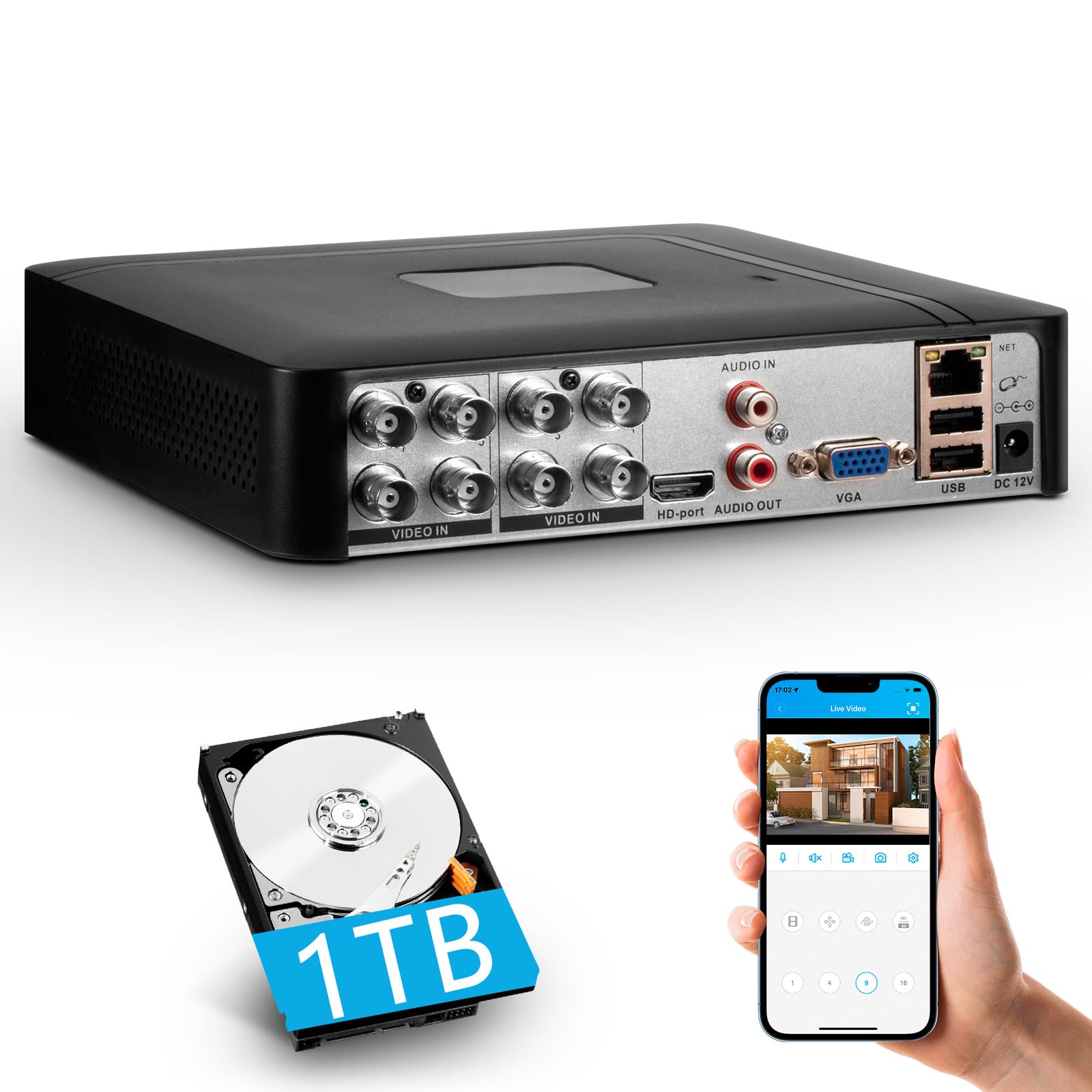
Image 1.1: Fuers H.265+ 8-Channel Security DVR Recorder.
Karakteristikat kryesore:
- 8-Channel System: Supports up to 8 cameras simultaneously, compatible with HD-TVI, CVBS, CVI, XVI, AHD, and IP cameras.
- Kompresimi i videos H.265+: Offers extended recording time and saves up to 50% storage space compared to H.265 systems.
- Pre-installed 1TB HDD: Security-grade hard drive for continuous surveillance recording. Expandable up to 14TB via SATA port.
- Qasja në distancë: View and manage your system remotely using the free iCSee App (iOS/Android) or VMS Client (Windows/Mac).
- Zbulimi inteligjent i lëvizjes: Receive mobile push notifications for detected motion types, including person and face detection.
- Konfigurimi i "Plug & Play": Easy connection with simultaneous VGA/HDMI output.
2. Konfigurimi dhe instalimi
2.1 Çfarë ka në kuti
Para se të filloni, sigurohuni që të gjithë përbërësit janë të pranishëm:
- 1x A1008 8CH DVR
- 1x 1TB HDD (Pre-installed on DVR)
- 1x DVR Power Adapter
- 1x USB mouse
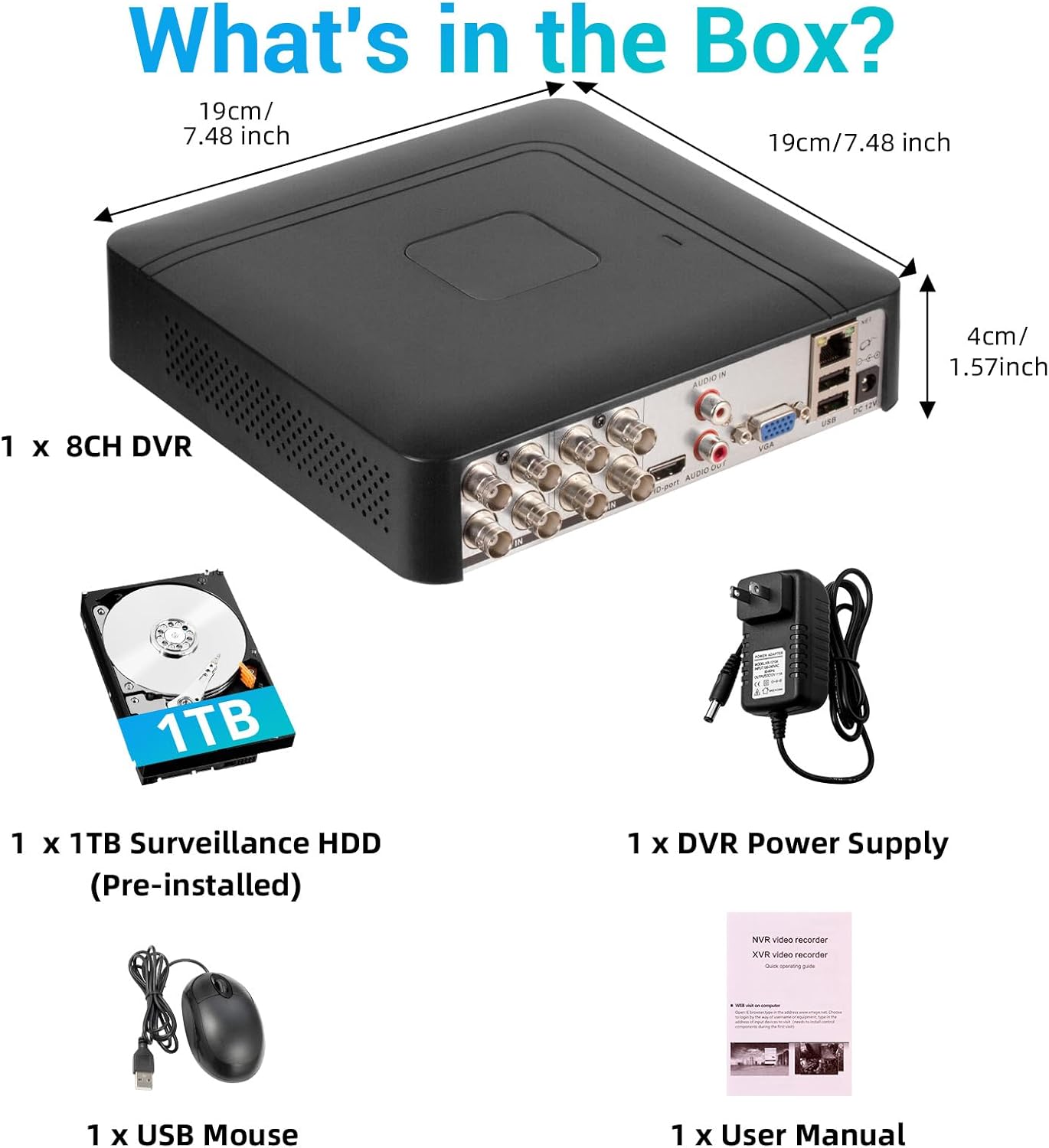
Image 2.1: Contents of the product package.
2.2 Hard Drive Installation (if not pre-installed or for upgrade)
The DVR comes with a pre-installed 1TB HDD. If you need to replace or upgrade the hard drive (up to 14TB), follow these steps:
- Unscrew the bottom cover of the DVR unit.
- Hapni me kujdes c-nëasing.
- Connect the SATA data cable and power cable from the DVR to the new hard drive.
- Secure the hard drive within the casing duke përdorur vidat e dhëna.
- Close the DVR casing dhe sigurojeni atë me vida.

Image 2.2: Hard drive installation and expansion options.
2.3 Connecting the DVR System
Ndiqni këto hapa për të lidhur sistemin tuaj DVR:
- Lidhni kamerat: Connect your security cameras to the 'VIDEO IN' ports on the back of the DVR using BNC cables.
- Lidh monitorin: Connect a monitor to the DVR using either the HDMI or VGA port.
- Lidhni mausin USB: Lidhni mausin USB të përfshirë në njërën nga portat USB në DVR.
- Connect Network (Optional for Remote Access): Për telekomandë viewing and notifications, connect an Ethernet cable from your router to the 'NET' port on the DVR.
- Ndezja: Connect the DVR power adapter to the 'DC 12V' port and then plug it into a power outlet.

Image 2.3: Connecting cameras and network to the DVR.
2.4 Initial Setup and Channel Type Selection
Upon first power-on, the system may prompt for initial setup. You may need to select the appropriate channel type for your cameras.
- Right-click on the screen to access the Main Menu.
- Navigoni te Sistemi > Dixhitale > Lloji i kanalit.
- Select the configuration that matches your camera setup:
- First row: Supports 8 XVI, CVBS, AHD, TVI, CVI coaxial cameras.
- Second row: Supports 8 XVI, CVBS, AHD, TVI, CVI coaxial + 4 IP cameras.
- Third row: Supports 16 1080P IP cameras.
- Fourth row: Supports 16 5MP IP cameras.
- Klikoni OK to apply changes. The system may restart.

Image 2.4: DVR Channel Type selection screen.
3. Udhëzimet e funksionimit
3.1 Drejtpërdrejt View dhe Regjistrimi
Once the DVR is powered on and cameras are connected, you should see the live feed on your connected monitor. The system is configured for 24/7 recording to the pre-installed 1TB hard drive.

Imazhi 3.1: Drejtpërdrejt view of multiple camera feeds.
3.2 Remote Access via Mobile App
To access your DVR remotely, download the free iCSee App (for iOS/Android) or VMS Client (for Windows/Mac).
- Download the iCSee App from your device's app store.
- Open the app and register an account if you don't have one.
- In the DVR's main menu, navigate to Informacion > Versioni to find the DVR's QR code.
- Use the iCSee app to scan the QR code to add your device.
- Pasi të shtohet, mundeni view transmetime të drejtpërdrejta, riprodhim regjistrimesh dhe marrjen e njoftimeve nga kudo me lidhje interneti.

Image 3.2: Steps for remote access via mobile app.
3.3 Playback Recorded Footage
Shqyerjeview video e regjistruar:
- Right-click on the screen to access the Main Menu.
- Zgjidhni Regjistro > pista mbështetëse.
- Choose the desired channel(s) and date/time range for playback.
- Klikoni Filloni riprodhimin te view budallaitage.

Image 3.3: Playback interface with timeline.
3.4 Alarme të Zbulimit të Lëvizjes
The DVR supports intelligent motion detection, including person and face detection. When motion is detected, you can receive instant mobile push notifications.
- Configure motion detection settings in the DVR's Alarmi menu.
- Ensure your mobile app is properly linked and notifications are enabled.

Image 3.4: Human and face detection in action.
4. Mirëmbajtja
4.1 Menaxhimi i hard diskut
The pre-installed 1TB hard drive provides ample storage. Due to H.265+ compression, storage is optimized. If more storage is needed, you can replace the internal HDD with a larger one (up to 14TB). Regularly check the hard drive status in the DVR's system settings to ensure optimal performance.
4.2 Kujdesi i Përgjithshëm
- Keep the DVR in a cool, dry, and well-ventilated area.
- Avoid exposing the unit to direct sunlight, extreme temperatures, or moisture.
- Clean the exterior of the DVR with a soft, dry cloth. Do not use liquid cleaners.
- Sigurohuni që të gjitha lidhjet e kabllove të jenë të sigurta.
5. Troubleshooting
5.1 No Video Output on Monitor
- Check if the DVR is powered on and the power adapter is securely connected.
- Verify the HDMI or VGA cable connection between the DVR and the monitor.
- Ensure the monitor is set to the correct input source (HDMI/VGA).
5.2 Kamerat nuk shfaqen
- Check all camera power and video cable connections.
- Verify that the camera type (AHD, TVI, CVI, etc.) is compatible with the DVR.
- Ensure the correct channel type is selected in the DVR settings (refer to Section 2.4).
- Test cameras individually if possible to isolate the issue.
5.3 Qasja në distancë nuk funksionon
- Confirm the DVR is connected to the internet via an Ethernet cable.
- Check your router's internet connection.
- Ensure the iCSee app is updated to the latest version.
- Verify that the DVR was added correctly to the app by scanning the QR code.
- For some networks, you might need to adjust router settings (e.g., port forwarding), consult your network administrator or ISP.
6. Specifikimet
| Veçori | Detaj |
|---|---|
| Markë | Fuers |
| Numri i modelit | A1008CH |
| Numri i kanaleve | 8 |
| Teknologjia e lidhjes | HDMI, USB, VGA |
| Pajisjet e përputhshme | Desktop, Tablet, Camera, Smartphone |
| Dimensionet e produktit | 7.48"Gj x 7.48"Gj x 1.57"L |
| Kapaciteti i ruajtjes së memories | 1 TB (Pre-installed) |
| Hard-Drive Size | 1 TB (Expandable up to 14 TB) |
| Media Format Digital Video | H.265 + |
| Hyrja e videos | AHD, CVI, HDMI, HDTVI, IP Input, VGA |
| UPC | 765142240850 |
7. Garancia dhe Mbështetja
7.1 Garancia e Produktit
This Fuers DVR Recorder is covered by a standard manufacturer's warranty. Please refer to the warranty card included with your product or visit the official Fuers webfaqja e internetit për kushtet dhe afatet e detajuara të garancisë. Ruajeni faturën e blerjes si provë blerjeje për kërkesat e garancisë.
7.2 Mbështetje teknike
For technical assistance, troubleshooting, or any questions regarding your Fuers DVR, please contact Fuers customer support. Contact information can typically be found on the product packaging, the official Fuers webnë faqen e internetit ose përmes shitësit tuaj me pakicë.
Burimet në internet:
- Vizitoni Dyqani Fuers në Amazon për informacion dhe përditësime mbi produktin.