
1. Hyrje
Thank you for choosing the GEARit Portable Bluetooth Wireless Speaker. This manual provides essential information for setting up, operating, and maintaining your speaker. Designed for versatility, this 40W speaker delivers crystal clear sound with deep bass, features IPX6 water resistance, and offers multiple connectivity options, making it ideal for both indoor and outdoor use.

Image: The GEARit Portable Bluetooth Speaker highlighting its powerful sound and IPX6 water resistance.
2. Përmbajtja e paketës
- GEARit Portable Bluetooth Wireless Speaker
- Kabllo karikimi USB-C në USB-A
- Kabllo AUX 3.5 mm
- Manuali i Përdoruesit

Image: The GEARit speaker shown with its USB-C charging cable and AUX cable, illustrating the complete package.
3. Produkti i Mbaruarview
3.1 Kontrollet dhe Portat
Familiarize yourself with the speaker's buttons and connection ports for optimal use.
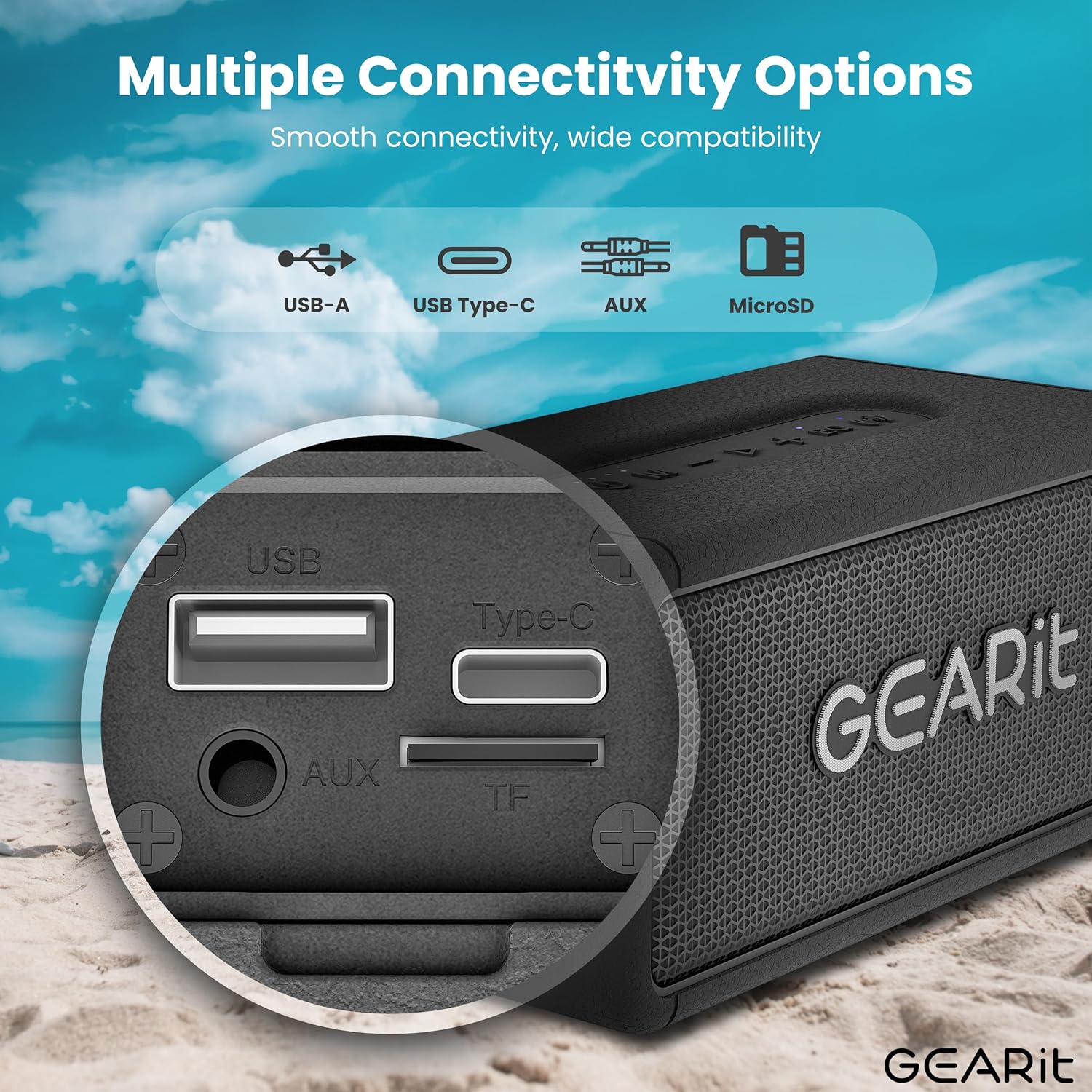
Imazh: Një i detajuar view of the speaker's connectivity panel, showing the USB-A, USB Type-C, AUX, and MicroSD card slots.
- Butoni i energjisë: Shtypni dhe mbani shtypur për të ndezur/fikur baterinë. Shtypni shkurt për të kontrolluar gjendjen e baterisë.
- Butoni i modalitetit (M): Short press to switch between Bluetooth, AUX, and MicroSD modes.
- Ule volumin (-): Shtypje e shkurtër për të ulur volumin. Shtypje e gjatë për këngën e mëparshme.
- Butoni Luaj/Pauzë (>): Short press to play/pause music. Short press to answer/end calls. Long press to reject calls.
- Vëllimi lart (+): Shtypje e shkurtër për të rritur volumin. Shtypje e gjatë për këngën tjetër.
- EQ Button (EQ): Short press to cycle through EQ modes (Indoor/Outdoor).
- TWS Button (Wireless Icon): Short press to initiate TWS pairing.
- Porta USB-C: Për karikimin e altoparlantit.
- Porta AUX-in: Për lidhje audio me tel.
- MicroSD Card Slot (TF): Për të luajtur muzikë direkt nga një kartë MicroSD.
- Porta USB-A: Për riprodhim nga USB.
4. Konfigurimi
4.1 Ngarkimi i Altoparlantit
- Lidhni kabllon e karikimit USB-C të dhënë me portën USB-C të altoparlantit.
- Lidhni anën tjetër të kabllit me një adaptor rryme USB (nuk përfshihet) ose me portën USB të një kompjuteri.
- Treguesi LED do të tregojë statusin e karikimit. Një karikim i plotë zakonisht zgjat afërsisht 3-4 orë.
4.2 Ndezja/Fikja
- Për ta ndezur, shtypni dhe mbani shtypur butonin e ndezjes derisa të dëgjoni një njoftim të dëgjueshëm.
- Për ta fikur, shtypni dhe mbani shtypur përsëri butonin e Energjisë derisa altoparlanti të fiket.
4.3 Çiftimi Bluetooth
Altoparlanti do të hyjë automatikisht në modalitetin e çiftëzimit Bluetooth kur të ndizet për herë të parë ose nëse nuk është lidhur asnjë pajisje.
- Ensure the speaker is powered on and in Bluetooth mode (blue LED blinking).
- Në pajisjen tuaj (smartfon, tablet etj.), aktivizoni Bluetooth dhe kërkoni për pajisje të disponueshme.
- Select "GEARit Speaker" from the list.
- Once connected, the blue LED will remain solid, and you will hear a confirmation tone.

Image: An illustration of the Bluetooth 5.3 chip, emphasizing stable and fast connectivity.
4.4 Çiftim Stereo Pa Tel (TWS) i Vërtetë
For an enhanced stereo experience, you can pair two GEARit Portable Bluetooth Wireless Speakers together.
- Sigurohuni që të dy altoparlantët janë të ndezur dhe nuk janë të lidhur me ndonjë pajisje tjetër Bluetooth.
- On one speaker (this will be the primary speaker), short press the TWS button (wireless icon). It will emit a pairing tone.
- The primary speaker will automatically search for and connect to the secondary speaker.
- Once paired, both speakers will emit a confirmation tone, and the TWS indicator on both speakers will light up.
- Tani, lidhni pajisjen tuaj me altoparlantin kryesor nëpërmjet Bluetooth siç përshkruhet në seksionin 4.3.

Image: Two GEARit speakers set up for True Wireless Stereo (TWS) pairing, providing an immersive audio experience for a group.
4.5 Opsione të tjera lidhjeje
- AUX-në: Connect an audio device using the 3.5mm AUX cable to the AUX-in port. The speaker will automatically switch to AUX mode.
- Karta MicroSD: Insert a MicroSD card with music files into the TF slot. The speaker will automatically switch to MicroSD mode and begin playback.
- Luajtja USB: Fusni një disk USB me muzikë files në portën USB-A. Altoparlanti do të kalojë automatikisht në modalitetin USB dhe do të fillojë riprodhimin.

Image: The speaker's versatile input options, including USB-A, USB Type-C, MicroSD, and AUX, for broad compatibility.
5. Udhëzimet e funksionimit
5.1 Riprodhimi Bazë
- Luaj/Ndalu: Shtypni shkurt butonin Luaj/Ndalu.
- Rregullimi i volumit: Shtypni shkurt butonat e rritjes së volumit (+) ose uljes së volumit (-).
- Pjesa tjetër / e mëparshme: Long press the Volume Up (+) for the next track or Volume Down (-) for the previous track.
5.2 Modalitete EQ
The speaker features two Equalizer (EQ) modes to optimize sound for different environments.
- Short press the EQ button to switch between Të brendshme dhe Në natyrë mënyrat.
- Modaliteti i brendshëm: Ofron një zë pro të balancuarfile suitable for enclosed spaces.
- Modaliteti i jashtëm: Enhances bass and volume for better projection in open environments.

Image: Visual representation of DSP Technology, highlighting 40W peak power and the two EQ modes (Indoor & Outdoor).
5.3 Thirrje pa duar
When connected via Bluetooth, you can manage phone calls directly from the speaker.
- Përgjigja/Përfundimi i telefonatës: Shtypni shkurt butonin Luaj/Ndalu.
- Refuzo thirrjen: Shtypni gjatë butonin Luaj/Ndalu.
Rezistencë ndaj ujit 5.4 (IPX6)
The GEARit speaker is IPX6 water-resistant, meaning it can withstand powerful water jets. It is suitable for use outdoors, by the pool, or at the beach. Mos e zhytni altoparlantin në ujë. Ensure the port cover is securely closed before exposure to water.

Image: The GEARit speaker being splashed with water, showcasing its IPX6 water-resistant design.

Image: A graphic emphasizing the IPX6 water-resistant feature of the speaker, suitable for wet environments.
5.5 Jetëgjatësia e baterisë
Altoparlanti ofron deri në 20 orë kohë dëgjimi me një karikim të vetëm, varësisht nga niveli i volumit dhe përmbajtja audio.

Image: The GEARit speaker in a natural outdoor environment, symbolizing its long-lasting battery for extended use.
6. Mirëmbajtja
- Pastrimi: Fshijeni altoparlantin me një të butë, damp pëlhurë. Mos përdorni kimikate të forta ose pastrues gërryes.
- Magazinimi: Ruajeni altoparlantin në një vend të freskët dhe të thatë, larg rrezeve të diellit dhe temperaturave ekstreme.
- Kujdesi për baterinë: Për të zgjatur jetëgjatësinë e baterisë, karikojeni plotësisht altoparlantin para periudhave të gjata të mosveprimit. Shmangni shkarkimin e plotë të baterisë shpesh.
- Port Cover: Always ensure the port cover is securely closed to maintain water resistance.
7. Troubleshooting
- Altoparlanti nuk ndizet: Sigurohuni që bateria është e ngarkuar. Lidheni altoparlantin me një burim energjie duke përdorur kabllon USB-C.
- Nuk mund të çiftëzohet nëpërmjet Bluetooth:
- Ensure the speaker is in Bluetooth pairing mode (blue LED blinking).
- Make sure Bluetooth is enabled on your device and it is within range (up to 33 feet/10 meters).
- Forget "GEARit Speaker" from your device's Bluetooth list and try pairing again.
- If multiple Bluetooth devices are nearby, turn them off to avoid interference.
- Nuk ka zë:
- Kontrolloni nivelet e volumit si në altoparlant ashtu edhe në pajisjen e lidhur.
- Ensure the correct input mode (Bluetooth, AUX, MicroSD, USB) is selected.
- Nëse përdorni AUX, sigurohuni që kablli të jetë futur plotësisht dhe funksional.
- TWS pairing failed:
- Sigurohuni që të dy altoparlantët nuk janë të lidhur me ndonjë pajisje tjetër Bluetooth përpara se të filloni çiftimin TWS.
- Place speakers close to each other during pairing.
- Provo të rivendosësh të dy altoparlantët dhe të përsëritësh procesin e çiftimit TWS.
8. Specifikimet
| Veçori | Specifikimi |
|---|---|
| Emri i modelit | Portable Bluetooth Speakers Wireless |
| Numri i modelit të artikullit | GI-SPKR-BT-NE-BK |
| Markë | GEARit |
| Lloji i altoparlantit | Në natyrë |
| Fuqia maksimale e daljes së altoparlantit | 40 Watts |
| Teknologjia e lidhjes | Ndihmës, Bluetooth |
| Teknologjia e komunikimit pa tela | Bluetooth |
| Modaliteti i daljes audio | Stereo |
| Metoda e kontrollit | App (referring to general Bluetooth control) |
| Vlerësimi i papërshkueshëm nga uji | IPX6 |
| Burimi i energjisë | Me bateri (kërkohet 1 bateri litium polimer) |
| Pesha e artikullit | 1.61 paund |
| Dimensionet e produktit | 2.95"D x 6.61"L x 3.39"H |
| Komponentët e përfshirë | Power Cable (USB-C to USB-A), AUX Cable |

Image: The GEARit Portable Bluetooth Wireless Speaker, showcasing dizajnin e tij kompakt dhe të qëndrueshëm.

Image: The GEARit speaker conveniently attached to a backpack, highlighting its portability for outdoor activities.
9. Video zyrtare e produktit
Video: Një prezantim zyrtar i videos së produktitasing the GEARit Portable Bluetooth Speaker, highlighting its IPX6 water resistance and 40W loud audio output.
10. Garanci dhe Mbështetje
The GEARit Portable Bluetooth Wireless Speaker comes with a Limited Warranty. For detailed warranty information, please refer to the warranty card included in your package or visit the official GEARit webfaqe.
For technical support, troubleshooting assistance, or any product-related inquiries, please contact GEARit customer service through their official webfaqja e internetit ose informacioni i kontaktit i dhënë në dokumentacionin e produktit tuaj.
Ndihma në internet: Visit the GEARit Store on Amazon