
1. Hyrje
This manual provides detailed instructions for the installation, operation, and maintenance of the ADVANTECH PCIE-1612C-AE 4-Port RS-232/422/485 PCIe Communication Card. This interface module is designed to expand your system's serial communication capabilities, offering robust and reliable data transfer for industrial and commercial applications. Please read this manual thoroughly before attempting to install or operate the device.
2. Informacion mbi sigurinë
Ndiqni masat paraprake të sigurisë për të parandaluar dëmtimin e pajisjes dhe për të siguruar sigurinë personale:
- Always disconnect power from your computer system before installing or removing any internal components.
- Wear an anti-static wrist strap and work on an anti-static mat to prevent electrostatic discharge (ESD) damage to the card and other components.
- Handle the card by its edges to avoid touching sensitive components.
- Sigurohuni që të ventiloni siç duhet brenda kutisë së kompjuterit tuaj për të parandaluar mbinxehjen.
- Mos e ekspozoni kartën ndaj lagështirës ose temperaturave ekstreme.
3. Përmbajtja e paketës
Verifikoni që të gjitha artikujt janë të pranishëm në paketim. Nëse ndonjë artikull mungon ose është i dëmtuar, kontaktoni menjëherë shitësin tuaj.
- 1 x ADVANTECH PCIE-1612C-AE 4-Port RS-232/422/485 PCIe Communication Card
- Documentation (e.g., Quick Start Guide, Driver CD/USB - may vary by package)
4. Produkti i Mbaruarview
The ADVANTECH PCIE-1612C-AE is a high-performance PCIe communication card designed for reliable serial data transmission. It features four independent serial ports, configurable for RS-232, RS-422, or RS-485 standards, making it versatile for various industrial and embedded applications.
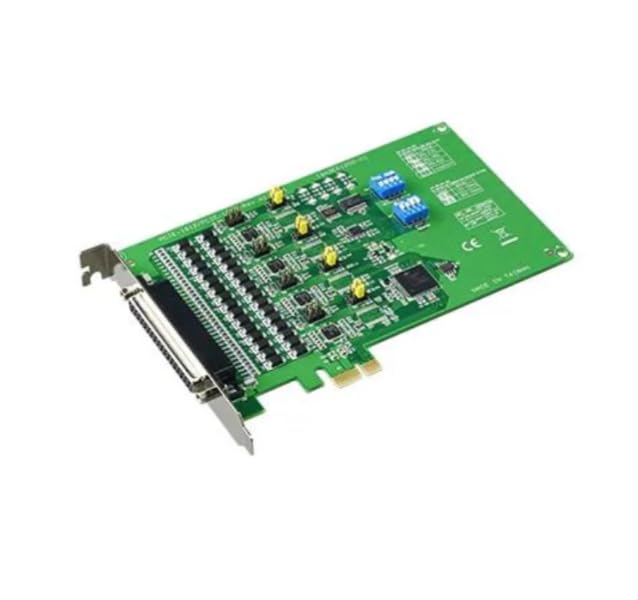
Figure 1: ADVANTECH PCIE-1612C-AE 4-Port RS-232/422/485 PCIe Communication Card. This image shows the physical card with its PCIe connector and four serial port connectors.
Karakteristikat kryesore:
- Number of Channels / Ports: 4 Port
- Shpejtësia maksimale e të dhënave: 921.6 kb/s
- Lloji i ndërfaqes: PCIe, RS-232/422/485
- Furnizimi Operativ Voltage: 3.3 V
- Gama e temperaturës së funksionimit: -10°C deri +60°C
5. Konfigurimi
Follow these steps to properly install the PCIE-1612C-AE card into your computer system:
- Përgatitni sistemin tuaj: Power off your computer and disconnect the power cord from the wall outlet. Disconnect all peripheral devices.
- Hapni kutinë e kompjuterit: Remove the side panel of your computer case to access the motherboard and expansion slots.
- Gjeni një vend të lirë PCIe: Identify an empty PCI Express (PCIe) slot on your motherboard. The PCIE-1612C-AE requires a standard PCIe slot.
- Hiqni mbulesën e hapësirës: Remove the metal slot cover corresponding to the chosen PCIe slot from the back of your computer case.
- Instaloni Kartën: Carefully align the PCIE-1612C-AE card with the PCIe slot. Apply even pressure to both ends of the card until it is firmly seated in the slot. Ensure the card's bracket is flush with the back of the computer case.
- Siguroni kartën: Secure the card's bracket to the computer case using the screw or latch mechanism provided by your case.
- Mbyll çështjen: Replace the computer's side panel and secure it.
- Rilidhni energjinë: Reconnect the power cord and all peripheral devices. Power on your computer.
- Instaloni drejtuesit: Once the operating system boots, it may automatically detect the new hardware. Install the necessary drivers from the provided media or download them from the ADVANTECH webfaqja. Ndiqni udhëzimet në ekran për instalimin e drajverit.
6. Operative
After successful installation and driver setup, the PCIE-1612C-AE card's serial ports will be available in your operating system's Device Manager (Windows) or equivalent system information utility (Linux). Each port can be configured for its specific communication parameters (baud rate, data bits, parity, stop bits, flow control) through your operating system's settings or application software.
- Pajisjet e lidhjes: Connect your RS-232, RS-422, or RS-485 compatible devices to the corresponding ports on the PCIE-1612C-AE card using appropriate serial cables.
- Konfigurimi i softverit: Use your serial communication software or application to select the correct COM port number assigned to each physical port on the card and configure the communication parameters to match your connected device.
- RS-422/485 Mode: For RS-422/485 modes, ensure proper termination and biasing are applied if required by your network topology. Refer to your device's documentation for specific requirements.
7. Mirëmbajtja
The PCIE-1612C-AE card is designed for long-term reliability with minimal maintenance. However, adhering to general computer maintenance practices will help ensure optimal performance:
- Heqja e pluhurit: Periodically open your computer case (after disconnecting power) and use compressed air to gently remove dust buildup from the card and surrounding components. Dust can impede heat dissipation and lead to component failure.
- Kontrolli i Mjedisit: Sigurohuni që mjedisi i funksionimit të mbetet brenda diapazoneve të specifikuara të temperaturës dhe lagështisë.
- Menaxhimi i kabllove: Keep internal cables tidy to maintain good airflow within the case.
8. Troubleshooting
If you encounter issues with your PCIE-1612C-AE card, consider the following troubleshooting steps:
- Karta nuk u zbulua:
- Sigurohuni që karta të jetë vendosur plotësisht në folenë PCIe.
- Try installing the card in a different PCIe slot.
- Check your computer's BIOS/UEFI settings to ensure PCIe slots are enabled.
- Drivers Not Installing/Working:
- Verify you have downloaded the correct drivers for your operating system and card model from the ADVANTECH webfaqe.
- Uninstall any previous serial port drivers before installing new ones.
- Check Device Manager for any error codes related to the serial ports.
- Gabimet në komunikim:
- Confirm that the serial cable is correctly connected and not damaged.
- Verify that the communication parameters (baud rate, data bits, parity, stop bits, flow control) in your software match those of the connected device.
- For RS-485, check for proper wiring (A/B lines) and termination.
- Test with a known working serial device or loopback test if possible.
9. Specifikimet
| Veçori | Specifikimi |
|---|---|
| Numri i modelit | PCIE-1612C-AE |
| Prodhuesi | ADVANTECH |
| Lloji i produktit | Modulet e ndërfaqes |
| Number of Channels / Ports | 4 Port |
| Lloji i ndërfaqes | PCIe, RS-232/422/485 |
| Shkalla Maksimale e të Dhënave | 921.6 kb/s |
| Furnizimi Operativ Voltage | 3.3 V |
| Temperatura minimale e funksionimit | -10°C |
| Temperatura maksimale e funksionimit | +60°C |
| Pesha e artikullit | 7 paund |
10. Garancia dhe Mbështetja
For warranty information, please refer to the documentation included with your purchase or contact your reseller or ADVANTECH directly. Warranty terms and conditions may vary by region and purchase agreement.
For technical support, driver downloads, or further assistance, please visit the official ADVANTECH website or contact their customer support services. Provide your product model number (PCIE-1612C-AE) and any relevant system information when seeking support.