
BYTECH BC-AU-BE-146-WT
User Manual: BYTECH TWS Earbuds
Model: BC-AU-BE-146-WT
Hyrje
Thank you for choosing the BYTECH TWS Earbuds. This manual provides essential information for setting up, operating, and maintaining your new wireless earbuds. Please read this manual carefully before use to ensure optimal performance and longevity of your device.
These earbuds feature advanced Bluetooth 5.3 technology and True Wireless Stereo (TWS) connectivity, offering a seamless audio experience.
Çfarë ka në Kuti?
- BYTECH TWS Earbuds (Left and Right)
- Kutia e karikimit me valë
- Manuali i Përdoruesit (ky dokument)
- (Note: Charging cable may be included but not explicitly listed in product specifications. Please check packaging.)
Produkti Mbiview

Figura 1: The BYTECH TWS Earbuds in their open wireless charging case. The case features a digital display indicating the battery level, and the earbuds are white with a sleek design. The case also shows subtle color gradients, possibly from an LED indicator.
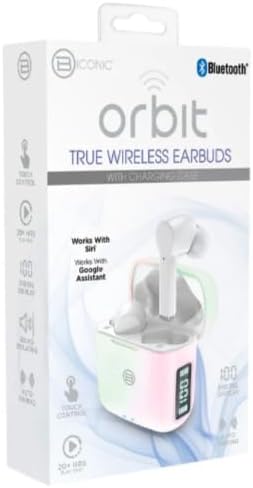
Figura 2: Retail packaging for the BYTECH Orbit True Wireless Earbuds. The box highlights key features such as Bluetooth connectivity, touch control, 20+ hours of play, auto pairing, and compatibility with Siri and Google Assistant.
Konfigurimi
1. Ngarkimi i kufjeve dhe i kutisë
Before first use, fully charge the earbuds and the charging case. Place the earbuds into the charging case. The case is equipped with wireless charging capability. Connect the charging case to a power source using a compatible charging cable (not explicitly listed as included, please check your package) or place it on a wireless charging pad.
- The digital display on the charging case will indicate the battery level.
- Ensure the earbuds are properly seated in their slots for charging.
2. Çiftimi me pajisjen tuaj (Bluetooth)
- Sigurohuni që kufjet e kufjeve të jenë të ngarkuara.
- Open the charging case. The earbuds will automatically enter pairing mode (indicated by flashing lights on the earbuds, if applicable).
- Në telefonin tuaj inteligjent ose në pajisjen tuaj me Bluetooth, shkoni te cilësimet e Bluetooth.
- Aktivizo Bluetooth.
- Kërko për new devices. You should see "BYTECH BC-AU-BE-146-WT" or a similar name appear in the list of available devices.
- Select the device name to connect. Once connected, a voice prompt will confirm the successful pairing, and the indicator lights on the earbuds will stop flashing.
- For subsequent uses, the earbuds will automatically connect to the last paired device when taken out of the case, provided Bluetooth is enabled on your device.
These earbuds support True Wireless Stereo (TWS) connectivity, meaning both earbuds connect to each other wirelessly to provide a stereo sound experience.
Përdorimi i kufjeve
The BYTECH TWS Earbuds feature intuitive touch controls for various functions. While specific touch gestures are not detailed in the product description, common functions typically include:
- Luaj/Ndalu: Një prekje e vetme në secilën kufje.
- Pjesa tjetër: Trokit dy herë në kufjen e djathtë.
- Pjesa e mëparshme: Trokit dy herë në kufjen e majtë.
- Përgjigja/Përfundimi i telefonatës: Trokitje e vetme në njërën nga kufjet gjatë një thirrjeje hyrëse.
- Refuzo thirrjen: Shtypni dhe mbani shtypur njërën nga kufjet për 2 sekonda gjatë një telefonate hyrëse.
- Aktivizo "Asistentin e zërit": Triple tap or press and hold (check specific model behavior) to activate Siri (for iOS devices) or Google Assistant (for Android devices).
- Kontrolli i volumit: Some models allow volume adjustment via touch (e.g., tap and hold left for volume down, right for volume up). If not, adjust volume directly on your connected device.
Please refer to the quick start guide included in your packaging for precise touch control instructions specific to your BC-AU-BE-146-WT model.
Mirëmbajtja
Mirëmbajtja e duhur siguron jetëgjatësinë dhe performancën optimale të kufjeve tuaja.
- Pastrimi: Regularly clean the earbuds and charging case with a soft, dry, lint-free cloth. Do not use abrasive cleaners, alcohol, or chemical solvents. Gently remove any earwax or debris from the earbud tips and speaker mesh using a small, soft brush or cotton swab.
- Magazinimi: Kur nuk janë në përdorim, ruajini gjithmonë kufjet në kutinë e tyre të karikimit për t'i mbrojtur nga pluhuri, papastërtia dhe dëmtimet fizike. Ruajeni kutinë në një vend të freskët dhe të thatë, larg rrezeve të diellit dhe temperaturave ekstreme.
- Kujdesi për baterinë: Për të ruajtur jetëgjatësinë e baterisë, shmangni shkarkimin e plotë të shpeshtë të kufjeve dhe të kutisë. Karikojini ato rregullisht, edhe nëse nuk përdoren për periudha të gjata kohore.
- Rezistenca ndaj ujit: These earbuds are not specified as water-resistant. Avoid exposure to water, sweat, and high humidity to prevent damage.
Zgjidhja e problemeve
If you encounter issues with your BYTECH TWS Earbuds, try the following solutions:
- Kufjet nuk çiftëzohen me pajisjen:
- Sigurohuni që kufjet të jenë të karikuara dhe të dala nga kutia.
- Aktivizoni dhe çaktivizoni Bluetooth-in në pajisjen tuaj.
- Forget the device ("BYTECH BC-AU-BE-146-WT") from your device's Bluetooth settings and try pairing again.
- Sigurohuni që të mos ketë pajisje të tjera të lidhura me kufjet.
- Vetëm një kufje funksionon:
- Vendosini të dyja kufjet përsëri në kutinë e karikimit, mbylleni kapakun, prisni disa sekonda dhe pastaj nxirrini përsëri.
- Sigurohuni që të dy kufjet të jenë të ngarkuara.
- Try resetting the earbuds (refer to quick start guide for specific reset procedure).
- Pa zë ose me volum të ulët:
- Kontrolloni nivelin e volumit si në pajisjen e lidhur ashtu edhe në kufjet e veshit.
- Sigurohuni që kufjet të jenë vendosur siç duhet në veshët tuaj.
- Pastroni çdo mbeturinë nga rrjeta e altoparlantit të kufjeve.
- Problemet e tarifimit:
- Ensure the charging cable (if used) is securely connected and functional.
- Nëse përdorni karikim pa tel, sigurohuni që kutia të jetë vendosur saktë në jastëkun e karikimit.
- Kontrolloni për çdo mbeturinë në portën e karikimit të kutisë.
Nëse problemet vazhdojnë, ju lutemi kontaktoni mbështetjen e klientit.
Specifikimet
| Veçori | Specifikimi |
|---|---|
| Markë | BYTECH |
| Emri i modelit | BC-AU-BE-146-WT |
| Numri i modelit | BC-AU-BE-146-WT |
| Teknologjia e lidhjes | Bluetooth 5.3 |
| Faktori i formës | Në vesh (Intraurales) |
| Ngjyra | E bardha |
| Komponentët e përfshirë | Kutia e karikimit me valë |
| Prodhuesi | Biconic |
| ASIN | B0DPRCBT76 |
| Data e parë e disponueshme | 6 dhjetor 2024 |
Garancia dhe Mbështetja
For warranty information and customer support, please refer to the documentation included with your product packaging or visit the official BYTECH webfaqja. Kushtet dhe afatet e garancisë mund të ndryshojnë sipas rajonit dhe shitësit me pakicë.
Ruajeni provën e blerjes për çdo kërkesë garancie.
Dokumentet përkatëseBC-AU-BE-146-WT


Ask a question about this manual
Ask about setup, troubleshooting, compatibility, parts, safety, or missing instructions. Manuals+ will review the question and use this page’s manual context to help answer it.