
1. Hyrje
This user manual provides comprehensive instructions for the Headwolf WPad7 Tablet. It covers setup, operation, maintenance, and troubleshooting to ensure optimal performance and user experience. Please read this manual thoroughly before using your device.
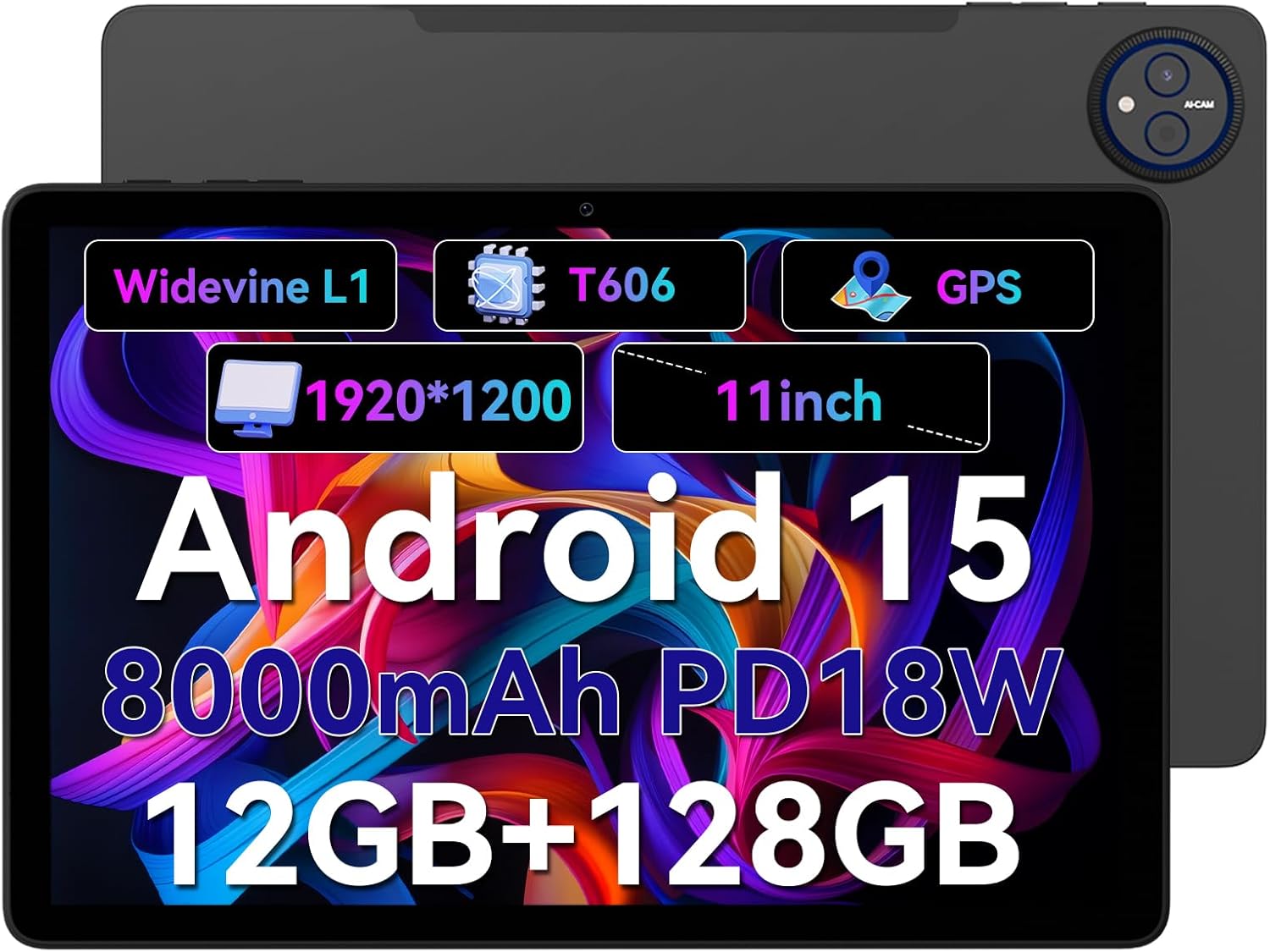
Figure 1.1: Headwolf WPad7 Tablet showcasing its 11-inch display, Android 15, 8000mAh battery, 12GB RAM, 128GB ROM, Widevine L1, T606 processor, and GPS capabilities.
2. Përmbajtja e paketës
Pasi ta hapni paketën, verifikoni që të gjitha artikujt e listuar më poshtë janë të pranishëm dhe në gjendje të mirë:
- 1 x Headwolf WPad7 Tablet
- 1 x karikues
- 1 x kabllo të tipit C
- 1 x Card Pin (for SIM/SD card tray)
- 1 x Manuali i Përdoruesit
3. Produkti i Mbaruarview
3.1 Veçoritë fizike
Familiarize yourself with the physical components of your Headwolf WPad7 Tablet:
- Shfaq: 11-inch IPS In-Cell screen with 1920x1200 resolution.
- Kamera e përparme: 8MP, located on the top bezel when held horizontally.
- Kamera e pasme: 13MP, located on the back panel.
- Butoni i energjisë: Zakonisht në anë, përdoret për të ndezur/fikur ose zgjuar/vënë pajisjen në gjumë.
- Çelësat e volumit: Ndodhet pranë butonit të ndezjes, për të rregulluar nivelet e audios.
- Porta USB Type-C: Për karikimin dhe transferimin e të dhënave.
- Dalja e kufjeve 3.5 mm: For connecting wired audio devices.
- Vendi i kartës: For inserting a SIM card (if supported) and a microSD card for expandable storage.
- Vrima e rivendosjes: A small pinhole for force restarting the device if unresponsive.

Figure 3.1: Physical aspects of the Headwolf WPad7 Tablet, showing its 8mm thickness, 495g weight, 13MP rear camera, 8MP front camera, and 3.5mm earphone jack.

Figure 3.2: Key features of the Headwolf WPad7 Tablet, including Android 15 OS, 12GB+128GB memory, T606-8 core processor, 8000mAh battery, GPS navigation, 1920x1200 FHD display, face recognition, dual cameras, 2.4G/5Ghz Wi-Fi, Widevine L1, and 300nit brightness.
4. Konfigurimi
4.1 Ngarkimi fillestar
Before first use, fully charge the tablet. Connect the provided Type-C cable to the tablet's USB-C port and the charger to a power outlet. The battery indicator on the screen will show charging status. A full charge typically takes several hours.

Figure 4.1: The 8000mAh battery of the Headwolf WPad7 Tablet, highlighting its safety and stability features, and showing typical usage times for processing, video playback, reading, and music playback.
4.2 Ndez/Fik
- Për të ndezur: Press and hold the Power button until the Headwolf logo appears on the screen.
- Për të fikur: Press and hold the Power button until a power-off menu appears. Select "Power off".
- Për të fjetur/zgjuar: Shtypni shkurtimisht butonin e ndezjes për ta vendosur tabletin në gjendje gjumi ose për ta zgjuar atë.
4.3 Instalimi i Kartës MicroSD
The Headwolf WPad7 supports microSD card expansion up to 2TB. To install:
- Gjeni folenë e kartës në anën e tabletit.
- Insert the provided card pin into the small hole next to the tray to eject it.
- Place the microSD card into the designated slot on the tray, ensuring correct orientation.
- Shtyjeni butësisht tabakanë përsëri në tabletë derisa të fiksohet në vendin e saj me një klik.

Figure 4.2: Details of the Unisoc T606 Octa-core Processor and memory configuration, showing 12GB RAM (6GB physical + 6GB virtual) and 128GB ROM, expandable up to 2TB via SD card.
5. Përdorimi i tabletit tuaj
5.1 Karakteristikat e Android 15
Your Headwolf WPad7 Tablet runs on Android 15, offering enhanced AI capabilities, improved privacy, optimized performance, and a refined user interface. Explore features like:
- AI Dynamic Adjustment: Adapts to your usage patterns for optimized performance.
- Multilingual Real-time Translation: Facilitates communication across languages.
- AI Automatic Scene Recognition: Enhances camera performance.
- Intelligent Audio Switching: Seamlessly manages audio output.
- AI Battery Saving Optimization: Extends battery life based on usage.
- Ndarja e ekranit: Use two apps simultaneously side-by-side.
- Njohja e fytyrës: Securely unlock your device with your face.

Figura 5.1: Mbiview of Android 15's intelligent AI features, including dynamic adjustment, real-time translation, automatic scene recognition, portrait mode processing, intelligent audio switching, accurate speech recognition, battery saving, game mode, and document auto summary.
5.2 Lidhshmëria
- Wi-Fi: Supports high-speed AC 2.4G/5G Wi-Fi for stable internet connection. Navigate to Settings > Network & internet > Wi-Fi to connect to available networks.
- Bluetooth: Connect to Bluetooth headphones, speakers, and other devices. Go to Settings > Connected devices > Bluetooth.
- GPS: The tablet supports GPS, GLONASS, BDS, and GALILEO satellite systems for precise location services and navigation.

Figure 5.2: The Headwolf WPad7 Tablet's 2.4G/5G Dual Band Wi-Fi and Bluetooth capabilities, demonstrating its versatility for work, presentations, and video calls.

Figure 5.3: The tablet's Four-In-One Satellite Positioning System, supporting GPS, Beidou, Galileo, and Glonass for accurate real-time location tracking and navigation.
5.3 Përdorimi i Kamerës
The tablet features an 8MP front camera and a 13MP rear camera. Open the Camera app to capture photos and videos. Utilize AI scene recognition for optimized shots.
5.4 Karakteristikat e ekranit
The 11-inch IPS in-cell display provides vivid colors and deep contrasts. It features Widevine L1 certification, enabling secure streaming of high-definition content from platforms like Netflix, Prime Video, and Disney+.

Figure 5.4: The 11-inch Widevine L1-compatible FHD display, showcasing its 1920x1200 resolution, 224 PPI, IPS incell technology, 300 nit brightness, 1500:1 contrast, and 75% NTSC color gamut, ideal for streaming services.
6. Mirëmbajtja
6.1 Pastrimi
Për të pastruar tabletin tuaj, përdorni një leckë të butë pa push. Për njollat kokëforta, fërkojeni pak.ampLani leckën me ujë ose me një pastrues ekrani. Shmangni përdorimin e kimikateve të ashpra, materialeve gërryese ose lagështirës së tepërt.
6.2 Kujdesi për baterinë
- Shmangni ekspozimin e tabletës ndaj temperaturave ekstreme (të nxehta ose të ftohta).
- Mos e lini baterinë të shkarkohet plotësisht shpesh.
- Use the original charger and cable for optimal charging and battery longevity.
- If storing the tablet for an extended period, charge it to about 50% before turning it off.
7. Troubleshooting
7.1 Tableti nuk ndizet
- Sigurohuni që bateria është e ngarkuar. Lidhni ngarkuesin dhe prisni disa minuta para se të përpiqeni ta ndizni.
- Shtypni dhe mbani shtypur butonin e ndezjes për të paktën 10-15 sekonda për të detyruar një rinisje.
7.2 Probleme me Lidhjen Wi-Fi
- Toggle Wi-Fi off and on in Settings.
- Rinisni routerin tuaj Wi-Fi.
- Harrojeni rrjetin dhe rilidhuni, duke futur përsëri fjalëkalimin.
7.3 Aplikacionet që bllokohen ose ngrijnë
- Mbyll aplikacionin problematik dhe rihape atë.
- Clear the app's cache (Settings > Apps > [App Name] > Storage & cache > Clear cache).
- Rinisni tabletin.
- Ensure the app and Android system are updated to the latest versions.
8. Specifikimet
| Veçori | Specifikimi |
|---|---|
| Markë | Ujku i kokës |
| Emri i modelit | W7 |
| Sistemi Operativ | Android 15 |
| Madhësia e ekranit | 11 inç |
| Rezolucioni i ekranit | 1920x1200 Pixels (FHD In-Cell) |
| Përpunues | Unisoc T606 Octa-core |
| RAM | 12GB (6GB fizike + 6GB virtuale) |
| Ruajtja e brendshme | 128 GB |
| Hapësirë ruajtëse e zgjerueshme | Deri në 2TB nëpërmjet kartës MicroSD |
| Kamera e pasme | 13 MP |
| Kamera e përparme | 8 MP |
| Kapaciteti i baterisë | 8000 mAh |
| Porta e karikimit | USB Type-C (supports 18W fast charge) |
| Lidhja me valë | 802.11a/b/g/n/ac/ax (2.4G/5G Wi-Fi), Bluetooth |
| Navigimi | GPS, GLONASS, BDS, GALILEO (with A-GPS) |
| Jack Audio | 3.5 mm |
| Dimensionet (LxWxH) | 11 x 2 x 8 inç |
| Pesha e artikullit | 1.98 paund (rreth 495g) |
| Ngjyra | Gri |
| Widevine Certification | L1 |
9. Garancia dhe Mbështetja
Headwolf provides a standard warranty for the WPad7 Tablet. For detailed warranty terms and conditions, please refer to the warranty card included in your package or visit the official Headwolf webfaqe.
For technical support, troubleshooting assistance, or service inquiries, please contact Headwolf customer support through their official channels. Keep your purchase receipt and product serial number handy when contacting support.
Burimet në internet: