1. Hyrje
Thank you for choosing the Auusda T156A 15.6-inch Business Laptop. This manual provides essential information for setting up, operating, and maintaining your new laptop. Please read this manual thoroughly before using the device to ensure proper function and longevity. This laptop is designed for productivity and portability, featuring a 4-core processor, 8GB DDR4 RAM, and a 512GB M.2 PCIe NVMe SSD, all running on Windows 11 Pro.
2. Përmbajtja e paketës
Verifikoni që të gjitha sendet janë të pranishme në paketim:
- Auusda T156A Laptop
- Përshtatës i energjisë dhe kabllo
- Transparent Keyboard Cover
- Spanish Keyboard Cover
- Manual udhëzimi (ky dokument)

Image: The laptop, power adapter, and keyboard covers as included in the package.
3. Produkti i Mbaruarview
3.1 Karakteristikat kryesore
- Performanca e fuqishme: Equipped with a 4-core N95 processor (1.7-3.4 GHz) and 8GB DDR4 RAM for efficient multitasking.
- AmpRuajtja: Features a 512GB M.2 PCIe NVMe SSD for fast data access and sufficient storage.
- Vibrant Full HD Display: A 15.6" Full HD IPS LCD screen offers clear visuals with wide viewkënde ing.
- Karakteristikat e përshtatshme: Includes a backlit keyboard for low-light use and a fingerprint reader for secure access.
- Connectivity & Versatility: Offers Bluetooth, an SD card reader, and essential ports for various devices.

Imazh: Një mbiview of the Auusda T156A laptop with its main features labeled.
3.2 Procesori dhe Memoria
The laptop is powered by an Intel N95 4-core processor, capable of speeds up to 3.4 GHz, ensuring smooth operation for business and academic tasks. It comes with 8GB of DDR4 RAM and a 512GB M.2 PCIe NVMe Solid State Drive (SSD) for quick boot times and application loading.

Image: A visual representation of the 4-core N95 processor chip.

Image: The laptop highlighting its 8GB RAM and 512GB SSD configuration.
3.3 Ekrani
Experience clear and vibrant visuals on the 15.6-inch Full HD (1920x1080) IPS LCD display. The screen features a narrow bezel and supports 16 million colors, providing an immersive viewing experience. A privacy shutter is integrated for the webqelqi.

Image: The laptop's 15.6-inch Full HD IPS LCD display and its features.
3.4 Tastiera dhe Touchpad
The laptop features a full-size backlit keyboard, allowing comfortable typing in various lighting conditions. The integrated touchpad includes a fingerprint sensor for secure and quick login.

Image: The backlit keyboard and the fingerprint ID sensor on the touchpad.
3.5 Portat dhe Lidhshmëria
The Auusda T156A offers a range of connectivity options:
- Hyrja e energjisë DC
- USB-A Ports (multiple)
- Dalja HDMI
- Lexuesi i kartave microSD
- Jack i kufjeve
- Bluetooth and Wi-Fi (802.11ac, 802.11ax)
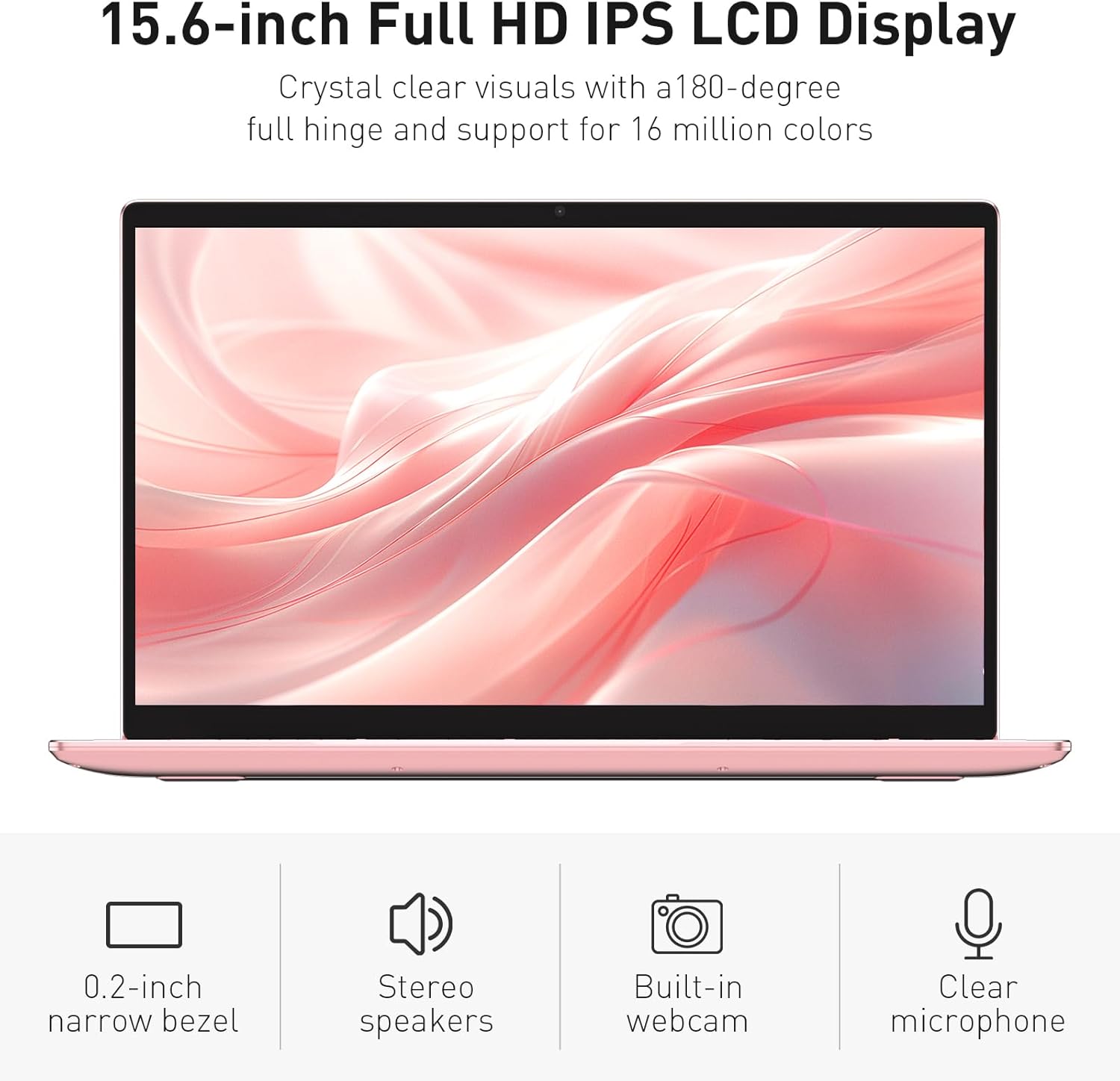
Image: The various ports available on the sides of the laptop.
4. Konfigurimi
4.1 Ndezja dhe karikimi fillestar
- Hiqeni laptopin dhe adaptorin e energjisë nga kutia.
- Connect the power adapter to the DC power input port on the laptop and then to a power outlet.
- Allow the laptop to charge for at least 30 minutes before initial use, or until the charging indicator light shows a full charge.
- Shtypni butonin e energjisë për të ndezur laptopin.
4.2 Windows 11 Pro Setup
Follow the on-screen instructions to complete the initial Windows 11 Pro setup. This will include:
- Zgjedhja e rajonit dhe paraqitjes së tastierës.
- Lidhja me një rrjet Wi-Fi.
- Pranimi i marrëveshjes së licencës.
- Krijimi i një llogarie përdoruesi ose hyrja me një llogari Microsoft.
4.3 Konfigurimi i sensorit të gjurmëve të gishtave
For enhanced security, set up the fingerprint sensor:
- Once Windows is set up, navigate to Cilësimet > Llogaritë > Opsionet e hyrjes.
- Nën 'Windows Hello Fingerprint', klikoni Konfiguro.
- Follow the on-screen prompts to register your fingerprint. You will be asked to lift and place your finger multiple times on the sensor until it is fully registered.
5. Përdorimi i laptopit
5.1 Përdorimi bazë
- Ndezja/Fikja e energjisë: Shtypni butonin e ndezjes që ndodhet në pjesën e sipërme të djathtë të tastierës për të ndezur ose fikur laptopin.
- Modaliteti i gjumit: Mbylleni kapakun ose shtypni shkurtimisht butonin e ndezjes për ta vendosur laptopin në modalitetin e gjumit.
- Restart/Shut Down: Access these options from the Start Menu in Windows.
5.2 Kontroll i tastierës me ndriçim nga prapa
The keyboard backlight can be adjusted or turned off using the function keys. Look for the key with a keyboard icon (often F5 or F6) to cycle through brightness levels or toggle the backlight on/off.
5.3 Webcam Privacy Shutter
I integruar webcam includes a physical privacy shutter. Slide the small cover located directly above the webcam lens to open or close it, ensuring your privacy when the camera is not in use.
5.4 Lidhja e pajisjeve të jashtme
Use the available ports to connect peripherals:
- Pajisjet USB: Plug USB drives, mice, or keyboards into the USB-A ports.
- Ekran i jashtëm: Connect an external monitor or projector using the HDMI port.
- Audio: Use the headphone jack for headphones or external speakers.
- Karta MicroSD: Insert a microSD card into the dedicated slot for additional storage or data transfer.
5.5 Performanca e Lojërave
The Auusda T156A is capable of handling light gaming and provides a smooth experience for many popular titles. For optimal performance, ensure your drivers are updated and close unnecessary background applications.
Video: Demonstration of the Auusda T156A laptop's light gaming capabilities.
Video: A short clip showcasing the laptop's performance during racing games.
6. Mirëmbajtja
- Pastrimi: Përdorni një leckë të butë pa push për të pastruar ekranin dhe pjesën e jashtme. Për njollat kokëforta, dampPastrojeni leckën me ujë ose me një pastrues të sigurt për ekranin. Shmangni kimikatet e ashpra.
- Kujdesi për baterinë: To prolong battery life, avoid fully discharging the battery frequently. It is recommended to keep the battery charged between 20% and 80% when possible. Store the laptop in a cool, dry place.
- Përditësimet e softuerit: Kontrolloni dhe instaloni rregullisht përditësimet e Windows dhe përditësimet e drajverëve për të siguruar performancë dhe siguri optimale.
- Ventilimi: Sigurohuni që vrimat e ventilimit të laptopit të mos jenë të bllokuara për të parandaluar mbinxehjen. Përdoreni laptopin në një sipërfaqe të fortë dhe të sheshtë.
- Rezervimi i të dhënave: Bëni rregullisht kopje rezervë të të dhënave të rëndësishme në një disk të jashtëm ose në një ruajtje në cloud për të parandaluar humbjen e të dhënave.
7. Troubleshooting
This section addresses common issues you might encounter with your Auusda T156A laptop.
| Problem | Zgjidhja e mundshme |
|---|---|
| Laptopi nuk ndizet. | Ensure the power adapter is securely connected and the outlet is working. Try charging the laptop for a while before attempting to power it on again. |
| Ekrani është bosh ose i zi. | Check if the laptop is powered on. Try pressing Fn + F1 (or the display toggle key) to ensure the display is not turned off. Connect to an external monitor to check if the issue is with the laptop's screen. |
| Probleme me lidhjen Wi-Fi. | Sigurohuni që Wi-Fi është i aktivizuar në cilësimet e Windows. Rinisni routerin dhe laptopin. Kontrolloni për drajverë të përditësuar të Wi-Fi. |
| Sensori i gjurmëve të gishtave nuk funksionon. | Ensure your finger is clean and dry. Re-register your fingerprint in Windows settings. Check for driver updates for the fingerprint sensor. |
| Ndriçimi i prapmë i tastierës nuk funksionon. | Press the dedicated backlight function key (e.g., Fn + F5 or F6) to toggle or adjust brightness. |
| Laptopi po funksionon ngadalë. | Close unnecessary applications. Check Task Manager for resource-intensive processes. Ensure sufficient free space on the SSD. Run a malware scan. |
8. Specifikimet
Detailed technical specifications for the Auusda T156A laptop:
| Veçori | Detaj |
|---|---|
| Markë | Auusda |
| Emri i modelit | T156A |
| Madhësia e ekranit | 15.6 inç |
| Madhësia e diskut të ngurtë | 512 GB (SSD) |
| Modeli i CPU-së | Intel N95 (4-Core, 1.7 GHz base, up to 3.4 GHz turbo) |
| Madhësia e Memories RAM të Instaluar | 8 GB DDR4 |
| Sistemi Operativ | Windows 11 Pro |
| Karakteristika të veçanta | Backlit Keyboard, Fingerprint Reader |
| Bashkëprocesor grafik | UHD Graphics (Integrated) |
| Teknologjia e lidhjes | Bluetooth, Wi-Fi (802.11ac, 802.11ax) |
| Numri i Porteve | 2 (USB-A, HDMI, microSD, Headphone Jack) |
| Lloji i celularit të baterisë | Polimer litiumi (6000 mAh) |
| Dimensionet e artikullit (L x P x Trashësia) | 14"Gj x 9"Gj x 0.7"Th |
| Rezoluta amtare | 1920 x 1080 piksele |
| Shpejtësia e rifreskimit | 60 Hz |
| Webcam Capability | Yes (with privacy shutter) |
9. Garanci dhe Mbështetje
9.1 Garancia e Produktit
The Auusda T156A laptop comes with a Garanci 2-vjeçare nga prodhuesi. Please retain your proof of purchase for warranty claims. For detailed warranty terms and conditions, refer to the documentation provided with your product or contact Auusda customer support.
9.2 Mbështetja e klientit
For technical assistance, troubleshooting, or service inquiries, please visit the official Auusda Store or contact their customer support channels. You can find more information and support resources at the Auusda Official Store on Amazon.
Video: A short promotional video from the Auusda Official Store, showcasing the laptop's features for college students.