
WONLINK WL-NE3502
WONLINK WL-NE3502 WiFi Range Extender User Manual
Model: WL-NE3502
Hyrje
Thank you for choosing the WONLINK WL-NE3502 WiFi Range Extender. This device is designed to expand your existing WiFi network coverage, eliminate dead zones, and provide a stable, high-speed internet connection throughout your home or office. With dual-band support (2.4GHz and 5GHz) and speeds up to 1200Mbps, it is ideal for 4K streaming, online gaming, and connecting multiple devices. This manual provides detailed instructions for setup, operation, maintenance, and troubleshooting to ensure optimal performance.

Image: The WONLINK WL-NE3502 WiFi Range Extender, a black device with four external antennas and LED indicators, designed to boost WiFi signals.
Informacioni i Sigurisë
- Mos e ekspozoni pajisjen ndaj ujit, zjarrit, lagështirës ose mjediseve të nxehta.
- Mos u përpiqni të çmontoni, riparoni ose modifikoni pajisjen.
- Use only the power adapter provided or recommended by the manufacturer.
- Siguroni ventilimin e duhur rreth pajisjes për të parandaluar mbinxehjen.
- Mbajeni pajisjen larg fushave të forta elektromagnetike.
- Kjo pajisje është vetëm për përdorim të brendshëm.
Përmbajtja e paketës
Ju lutemi kontrolloni me kujdes përmbajtjen e paketimit. Nëse ndonjë artikull mungon ose është i dëmtuar, kontaktoni shitësin tuaj.
- 1 x WONLINK WL-NE3502 WiFi Range Extender
- 1 x Kabllo Ethernet
- 1 x Udhëzues Instalimi i Shpejtë
- 1 x kartë garancie
Produkti Mbiview
The WL-NE3502 features a compact design with multiple antennas for enhanced signal transmission and reception. It includes LED indicators for power, WiFi signal strength, and connection status, providing clear visual feedback on its operational state.
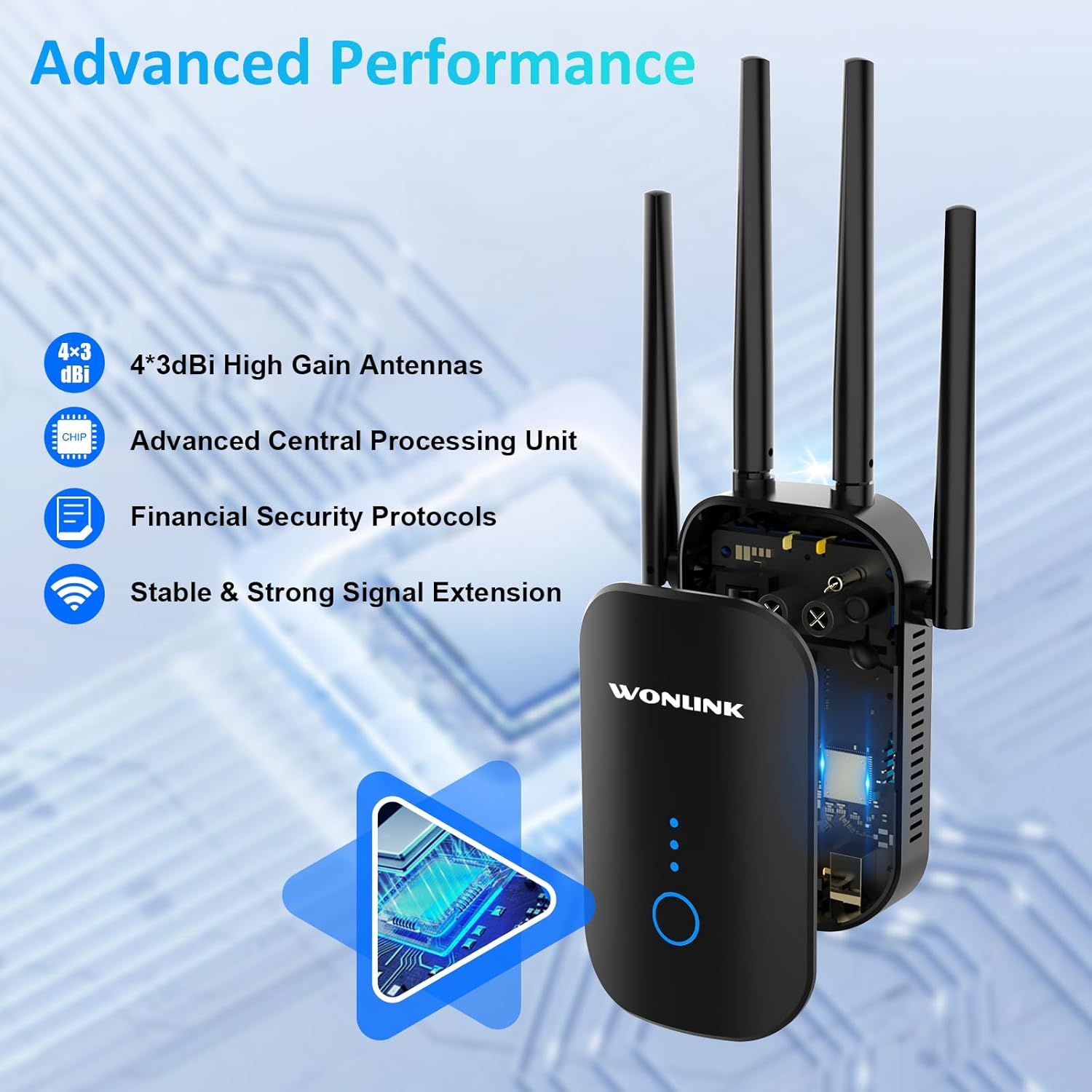
Image: An illustration highlighting the advanced performance features of the WONLINK WL-NE3502, including 4x3dBi high gain antennas, an advanced CPU, financial security protocols, and stable signal extension.
Treguesit LED:
- Fuqia LED: Tregon statusin e fuqisë.
- LED i WiFi-së: Indicates WiFi signal status.
- LED të fuqisë së sinjalit: Indicate the strength of the extended WiFi signal.
Butonat dhe Portet:
- Butoni WPS/Rivendosje: Used for quick setup via WPS or to reset the device to factory settings.
- Porti Ethernet: For wired connections to devices or your main router.
Konfigurimi
The WONLINK WL-NE3502 can be set up using a web browser or via WPS.
Metoda 1: Web Browser Setup (Recommended)
- Ndezja: Plug the extender into a power outlet near your main router. Wait for the Power LED to turn solid.
- Lidhu me WiFi-në e Zgjeruesit: On your computer or mobile device, connect to the WiFi network named "XXXXX-2G" or "XXXXX-5G" (the default SSID of the extender). No password is required for the initial connection.
- Qasja Web Ndërfaqja: Hap a web shfletues (p.sh., Chrome, Firefox) dhe shkruani 192.168.10.1 në shiritin e adresave, më pas shtypni Enter.
- Identifikohu: Enter "admin" for both the username and password (default credentials). Click "Login".
- Zgjidhni modalitetin: Choose your desired operating mode (Repeater, AP, or Router). For extending existing WiFi, select "Repeater Mode".
- Select WiFi Network: The extender will scan for available WiFi networks. Select the WiFi network you wish to extend from the list.
- Futni fjalëkalimin: Enter the password for your main WiFi network.
- Configure Extended Network: You can choose to keep the same SSID as your main network or create a new one for the extended network.
- Zbato Cilësimet: Click "Apply" or "Save". The extender will restart.
- Zhvendos Zgjeruesin: Once restarted, unplug the extender and move it to a location halfway between your router and the WiFi dead zone. Ensure the Signal Strength LEDs indicate a good connection.
- Connect to Extended WiFi: Reconnect your devices to the newly configured extended WiFi network.

Image: A visual guide demonstrating the web-based setup process for the WONLINK WL-NE3502, showing connection to the extender's WiFi, accessing the web interface, and selecting the network to extend.

Image: Screenshots illustrating the easy setup process for the WONLINK WL-NE3502 using a smartphone, detailing steps to connect to the extender's WiFi, access the web interface, and select the WiFi signal to extend.
Method 2: WPS Setup (If your router supports WPS)
- Ndezja: Plug the extender into a power outlet near your main router. Wait for the Power LED to turn solid.
- Shtypni WPS në Zgjerues: Press the WPS button on the WONLINK WL-NE3502 extender. The WiFi LED will start blinking.
- Shtypni WPS në router: Brenda dy minutash, shtypni butonin WPS në routerin tuaj kryesor.
- Prisni për lidhje: The extender will automatically connect to your router. The Signal Strength LEDs on the extender will light up, indicating a successful connection.
- Zhvendos Zgjeruesin: Once connected, unplug the extender and move it to a location halfway between your router and the WiFi dead zone. Ensure the Signal Strength LEDs indicate a good connection.
Mënyrat e funksionimit
The WONLINK WL-NE3502 supports multiple operating modes to suit various networking needs:
- Modaliteti i përsëritësit: Extends the coverage of an existing wireless network. This is the most common mode for eliminating WiFi dead zones.
- Modaliteti i pikës së hyrjes (AP): Converts a wired network connection into a wireless one. Ideal for creating a new WiFi hotspot from an Ethernet port.
- Modaliteti i routerit: Functions as a basic router, creating a new private network. This mode is less common for an extender but can be useful in specific scenarios.
Udhëzimet e funksionimit
Once set up, the WL-NE3502 operates automatically to provide extended WiFi coverage. Here are some key aspects of its operation:
Vendosja optimale:
For best performance, place the extender in a location where it can receive a strong signal from your main router and also effectively transmit to the areas needing coverage. A good indicator is when the Signal Strength LEDs show at least two or three bars.

Image: Illustrations showing optimal placement of the WONLINK WL-NE3502 WiFi extender in various rooms of a home, including the living room, kitchen, bedroom, and bathroom, to ensure comprehensive coverage.

Image: A cross-section diagram of a multi-story house illustrating how the WONLINK WL-NE3502 WiFi extender eliminates dead zones by extending the WiFi signal from the main router to all areas, including basements and courtyards.
Lidhshmëria me dy breza:
The WL-NE3502 supports both 2.4GHz and 5GHz WiFi bands. The 2.4GHz band offers wider coverage, while the 5GHz band provides faster speeds for demanding applications like 4K streaming and online gaming.

Image: A graphic illustrating the 1200Mbps ultra-speed internet capability of the WONLINK WL-NE3502, showing 5.8GHz band at 867Mbps and 2.4GHz band at 300Mbps, suitable for HD streaming, gaming, and video calls.

Image: A comparison graphic showing the high-speed performance of the WONLINK WL-NE3502, highlighting 802.11ac standard with 867Mbps on 5.8GHz and 300Mbps on 2.4GHz, improving speed by 35% over 802.11n.
Pajisjet e lidhjes:
Once the extender is set up, your devices (smartphones, tablets, laptops, smart TVs, gaming consoles, etc.) can connect to the extended WiFi network just as they would to any other WiFi network. Look for the SSID you configured during setup.

Image: A collage showing various WiFi-enabled devices, including mobile phones, desktops, gaming consoles, smart TVs, and security cameras, enjoying a lag-free connection provided by the WONLINK WL-NE3502 extender.

Image: A diagram illustrating MU-MIMO technology, showing how the WONLINK WL-NE3502 improves network utilization by allowing simultaneous communication with multiple wireless terminals, unlike older technology.
Mirëmbajtja
To ensure the longevity and optimal performance of your WONLINK WL-NE3502, follow these maintenance guidelines:
- Pastrimi: Fshijeni butësisht pajisjen me një leckë të butë dhe të thatë. Mos përdorni pastrues të lëngshëm ose aerosolë.
- Ventilimi: Ensure the ventilation holes are not blocked. Avoid placing the device in enclosed spaces.
- Përditësimet e firmuerit: Periodically check the WONLINK official webfaqe interneti për përditësime të firmware-it. Përditësimi i firmware-it mund të përmirësojë performancën, të shtojë veçori të reja dhe të rregullojë defektet.
- Rinisja: If you experience network issues, try restarting the extender by unplugging it for 10 seconds and then plugging it back in.
Zgjidhja e problemeve
If you encounter issues with your WONLINK WL-NE3502, refer to the following common problems and solutions:
| Problem | Shkaku/zgjidhja e mundshme |
|---|---|
| Nuk ka LED energjie | Ensure the extender is properly plugged into a working power outlet. Try a different outlet. |
| Nuk mund të hyni web management page (192.168.10.1) |
|
| Poor signal strength from extender |
|
| Extended network not visible or no internet |
|
| Slow speeds on extended network |
|
Specifikimet
| Veçori | Detaj |
|---|---|
| Numri i modelit | WL-NE3502 |
| Markë | FITUAR |
| Shkalla e transferimit të të dhënave | Deri në 1200 Mbps (867 Mbps në 5 GHz, 300 Mbps në 2.4 GHz) |
| Brezat e frekuencës | 2.4 GHz dhe 5 GHz (Band i Dyfishtë) |
| Standardet Wireless | IEEE 802.11ac/a/b/g/n |
| Antenat | 4 x 3dBi High Gain Antennas |
| Protokollet e Sigurisë | WPA3, WPA2-PSK, WPA-PSK, WEP (64/128-bit) |
| Portet | Porta Ethernet 1 x 10/100 Mbps |
| Mënyrat e funksionimit | Repeater, AP, Router |
| Pajisjet e përputhshme | Smartphones, Tablets, Computers, WiFi-enabled Devices |
| Dimensionet | 8.15 x 3.82 x 3.03 inç (përafërsisht) |
| Pesha e artikullit | 7 ons (afërsisht) |
Garancia dhe Mbështetja
WONLINK products come with a standard manufacturer's warranty. Please refer to the warranty card included in your package for specific terms and conditions. For technical support, product inquiries, or warranty claims, please contact WONLINK customer service.
- Ndihma në internet: Visit the official WONLINK website for FAQs, drivers, and firmware updates.
- Mbështetja me email: Refer to your warranty card or the quick installation guide for the support email address.
- 24H Technical Support: WONLINK offers online technical support.

Image: A graphic highlighting key features: wide compatibility with 99% of routers, advanced security with 64/128bit WEP, WPA/WPA2 encryption, and 24-hour online technical support.
Ask a question about this manual
Ask about setup, troubleshooting, compatibility, parts, safety, or missing instructions. Manuals+ will review the question and use this page’s manual context to help answer it.