
Hyrje
This manual provides comprehensive instructions for the TKOWTB MK321U Programmable Macro Mini Keyboard. Please read this manual carefully before using the product to ensure proper operation and to maximize its functionality. This device is designed to enhance your computing experience through customizable key functions for various applications, including gaming, multimedia control, and office tasks.
Karakteristikat e produktit
- Çelësat e programueshëm: Customize button functions for keyboard, mouse, multimedia, character strings, game functions, and macro definitions.
- Ndërprerëset mekanike: Features strong tactile feedback and crisp sound for a comfortable typing experience.
- Dizajni ergonomik: Button curves are designed for comfortable use.
- Jastëkë anti-rrëshqitës: Equipped with anti-slip pads on the bottom to prevent movement during use.
- Aplikim i gjerë: Suitable for various uses including office work, gaming, and multimedia control.
- Përputhshmëria e sistemit: Key definition setting software is system-based and can be used across various operating systems after initial setup.
Përmbajtja e paketës
Ju lutemi kontrolloni përmbajtjen e paketimit pasi ta hapni kutinë. Nëse ndonjë artikull mungon ose është i dëmtuar, kontaktoni mbështetjen ndaj klientit.
- 1 x TKOWTB MK321U Mini Keyboard
- 1 x Kabllo USB (Tipi C)

Image: The TKOWTB MK321U Mini Keyboard shown with its included USB cable. The keyboard features three large, white mechanical keys and a Type-C port for connection.
Udhëzimet e konfigurimit
- Lidhni tastierën: Insert the Type-C end of the provided USB cable into the port on the mini keyboard.
- Lidhu me kompjuterin: Plug the standard USB-A end of the cable into an available USB port on your computer.
- Instalimi i shoferit: The keyboard is typically plug-and-play. Your operating system should automatically detect and install the necessary drivers.
- Software Installation (for Programming): To customize key functions, you will need to download and install the dedicated key definition setting software from the manufacturer's official website. (Note: For Linux or macOS users, initial setup and programming must be done on a compatible system, then the device can be used on your preferred OS.)

Imazh: Një pamje nga afër view of the TKOWTB MK321U Mini Keyboard's ports, showing the Type-C input and an adjacent switch. This illustrates where to connect the USB cable for power and data transfer.
Udhëzimet e funksionimit
Operacioni bazë
Once connected, the mini keyboard will function according to its default settings or previously programmed configurations. Pressing a key will execute its assigned function.
Programming Key Functions
The primary feature of the MK321U is its programmability. Follow these steps to customize key functions:
- Shkarkoni softuerin: Obtain the key definition setting software from the official TKOWTB webfaqe.
- Instaloni softuerin: Ndiqni udhëzimet në ekran për të instaluar programin në kompjuterin tuaj.
- Nisja e softuerit: Open the installed programming software.
- Lidhni tastierën: Ensure your MK321U keyboard is connected to the computer. The software should detect the device.
- Zgjidh tastin: Within the software interface, select the key you wish to program.
- Assign Function: Choose from the available function types:
- Funksioni i tastierës: Assign standard keyboard keys (e.g., A, Ctrl, Shift, Enter).
- Funksioni i mausit: Assign mouse clicks (left, right, middle), scroll up/down, etc.
- Funksioni multimedial: Assign media controls (e.g., Play/Pause, Volume Up/Down, Mute).
- Character String Function: Assign a sequence of characters to be typed with a single press.
- Game Function: Assign specific game commands.
- Macro Definition Function: Record and assign a complex sequence of key presses and delays.
- Ruaj konfigurimin: After assigning functions, save the configuration to the keyboard's onboard memory. This allows the settings to persist even when connected to different computers without the software.

Image: The TKOWTB MK321U Mini Keyboard with graphical overlays indicating its key features: good-quality material, multifunctional use, and ease of use. A prominent note highlights that all keys are programmable.

Image: A hand interacting with the TKOWTB MK321U Mini Keyboard, emphasizing its standard as a mini keyboard. Icons illustrate its sensitive switches, smooth linear typing experience, and lower sound profile.
Mirëmbajtja
Proper maintenance ensures the longevity and optimal performance of your mini keyboard.
- Pastrimi: Përdorni një leckë të butë dhe të thatë për të fshirë sipërfaqen e tastierës. Për papastërti kokëfortë, fërkojeni pak.ampLani leckën me ujë ose me një tretësirë të butë pastrimi. Shmangni lagështinë e tepërt.
- Shmangni lëngjet: Do not spill liquids directly onto the keyboard. If liquid contact occurs, immediately disconnect the keyboard and allow it to dry completely before reconnecting.
- Magazinimi: Ruajeni tastierën në një vend të freskët dhe të thatë, larg rrezeve të diellit dhe temperaturave ekstreme.
- Trajto me kujdes: Shmangni rënien ose ekspozimin e tastierës ndaj goditjeve të forta.
Zgjidhja e problemeve
If you encounter issues with your TKOWTB MK321U, refer to the following common problems and solutions:
- Tastiera nuk përgjigjet:
- Sigurohuni që kablloja USB të jetë e lidhur mirë si me tastierën ashtu edhe me kompjuterin.
- Provo ta lidhësh tastierën me një port tjetër USB në kompjuterin tënd.
- Testoni tastierën në një kompjuter tjetër për të përjashtuar problemet specifike të sistemit.
- Rinisni kompjuterin tuaj.
- Keys Not Performing Assigned Functions:
- Verify that the key definition setting software was used to save the configuration to the keyboard.
- Sigurohuni që softueri të jetë i azhurnuar.
- If using on Linux or macOS, confirm that the programming was done on a compatible Windows system first.
- Try resetting the keyboard to factory defaults via the software and reprogram the keys.
- Softueri nuk e zbulon tastierën:
- Make sure the keyboard is properly connected via USB.
- Close and reopen the programming software.
- Reinstall the programming software.
- Check your computer's device manager to see if the keyboard is recognized.
Specifikimet
| Markë | TKOWTB |
| Emri i modelit | MK321U (500757523) |
| Ngjyra | E bardha |
| Materiali | Plastike |
| Dimensionet e produktit | 3.15 x 2.36 x 1.57 inç (8 x 6 x 4 cm) |
| Pesha e artikullit | 2.47 ons (70 gram) |
| Lidhshmëria | USB Type-C |
| Programueshmëria | All keys programmable via dedicated software |

Image: A close-up of the TKOWTB MK321U Mini Keyboard next to a laptop, highlighting its Type-C charging port and rechargeable design, indicating modern connectivity and power options.

Image: A collage showing the TKOWTB MK321U Mini Keyboard being used in different environments: an office setting, a laboratory, and a gaming setup, demonstrating its wide scope of application.
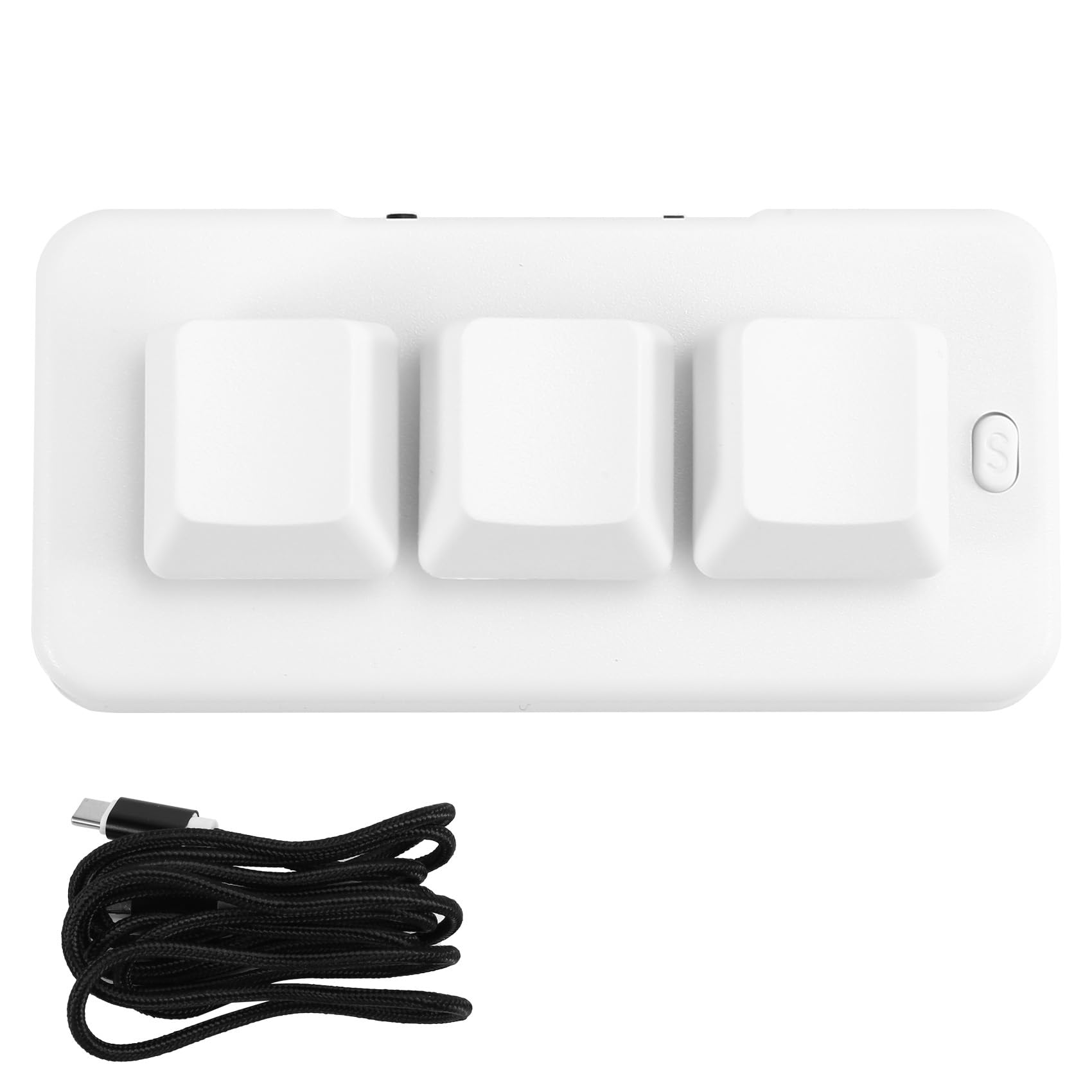
Image: A person placing the TKOWTB MK321U Mini Keyboard into a small carrying pouch, illustrating its compact and portable design, making it easy to transport.
Garancia dhe Mbështetja
For warranty information, please refer to the documentation included with your purchase or visit the official TKOWTB webfaqja e internetit. Burimet e mbështetjes, duke përfshirë pyetjet e shpeshta dhe informacionin e kontaktit, mund të gjenden gjithashtu në faqen e internetit të prodhuesit. webfaqe.
Prodhuesi: TKOWTB
Webfaqe: TKOWTB Official Page (via Amazon)