
1. Hyrje
Welcome to the Hot Pepper K82A Smartphone User Manual. This guide provides essential information to help you set up, operate, maintain, and troubleshoot your new device. The Hot Pepper K82A is an advanced Android smartphone featuring a 6.67-inch AMOLED display, a powerful Octa-Core processor, 256GB of storage, 8GB of RAM, and a long-lasting 5000mAh battery. It also boasts a versatile triple camera system with a 50MP main sensor and a 24MP selfie camera.
2. Çfarë ka në kuti
Upon unboxing your Hot Pepper K82A, please ensure all the following items are present:
- Hot Pepper KR10 Smartphone
- Përshtatës USB
- Kabllo karikimi USB-C
- Manuali i Përdoruesit
- Mjeti i nxjerrjes së kartës SIM

Image: Contents of the Hot Pepper K82A retail box.
3. Pajisja Mbaroiview
Familiarize yourself with the physical components and ports of your Hot Pepper K82A smartphone.

Image: Hot Pepper K82A device overview, showing camera modules, side-mounted fingerprint sensor, and bottom ports.
- Kamera kryesore: High-resolution rear camera.
- Kamera me kënd të gjerë: For broader landscape shots.
- Kamera e thellësisë: Enhances portrait mode effects.
- Zhbllokimi me fytyrë me inteligjencë artificiale: Front-facing camera for secure facial recognition.
- Sensori i gjurmës së gishtit: Side-mounted for quick and secure unlocking.
- Mikrofoni i integruar: Për thirrje dhe regjistrime zëri.
- Type-C 2.0 Charger Port: Për karikimin dhe transferimin e të dhënave.
4. Konfigurimi
4.1. Futja e kartës/kartave SIM
- Gjeni sirtarin e kartës SIM në anën e telefonit tuaj.
- Fut mjetin e nxjerrjes së kartës SIM në vrimën e vogël pranë tabakasë dhe shtyje butësisht derisa tabaka të dalë jashtë.
- Place your Nano-SIM card(s) and/or microSD card (if applicable) into the tray with the gold contacts facing down. Ensure they are correctly seated.
- Shtyjeni me kujdes sirtarin përsëri në telefon derisa të fiksohet në vendin e tij.
4.2. Ndezja/Fikur
- Për të ndezur: Press and hold the Power button (usually on the right side) until the Hot Pepper logo appears.
- Për të fikur: Shtypni dhe mbani shtypur butonin e ndezjes derisa opsionet e ndezjes të shfaqen në ekran, pastaj trokitni lehtë mbi "Fik".
- Për të rifilluar: Press and hold the Power button, then tap "Restart".
4.3. Konfigurimi fillestar
The first time you power on your phone, you will be guided through an initial setup process:
- Zgjidhni gjuhën tuaj të preferuar.
- Lidhu me një rrjet Wi-Fi.
- Review dhe pranoni termat dhe kushtet.
- Hyni me llogarinë tuaj Google ose krijoni një të re.
- Konfiguro kyçjen e ekranit (PIN, model, fjalëkalim, gjurmë gishtash ose zhbllokim me fytyrë).
- Rivendos të dhënat nga një pajisje e mëparshme (opsionale).
5. Përdorimi i telefonit tuaj inteligjent
5.1. Navigimi bazë
- Trokit: Për të zgjedhur një artikull ose për të hapur një aplikacion.
- Rrëshqitni: Për të lëvizur nëpër ekrane ose lista.
- Majë: Për të zmadhuar ose zvogëluar fotot dhe web faqet.
- Shtypi i gjatë: Për të hyrë në menutë kontekstuale ose për të lëvizur ikonat.
5.2. Kryerja e thirrjeve dhe dërgimi i mesazheve
- Hapni Telefoni app to dial numbers or access contacts.
- Hapni Mesazhet aplikacion për të dërguar dhe marrë SMS/MMS.
5.3. Lidhja me rrjetet
- Wi-Fi: Shko tek Cilësimet > Rrjeti dhe interneti > Wi-Fi për t'u lidhur me rrjetet e disponueshme.
- Bluetooth: Shko tek Cilësimet > Pajisjet e lidhura > Bluetooth për t'u çiftëzuar me pajisje të tjera Bluetooth.
- Të dhënat celulare: Sigurohuni që karta juaj SIM të jetë aktive dhe të dhënat celulare të jenë të aktivizuara në Cilësimet > Rrjeti dhe interneti > Rrjeti celular.
6. Përdorimi i kamerës
Capture every moment with the Hot Pepper K82A's versatile AI Triple Camera system.
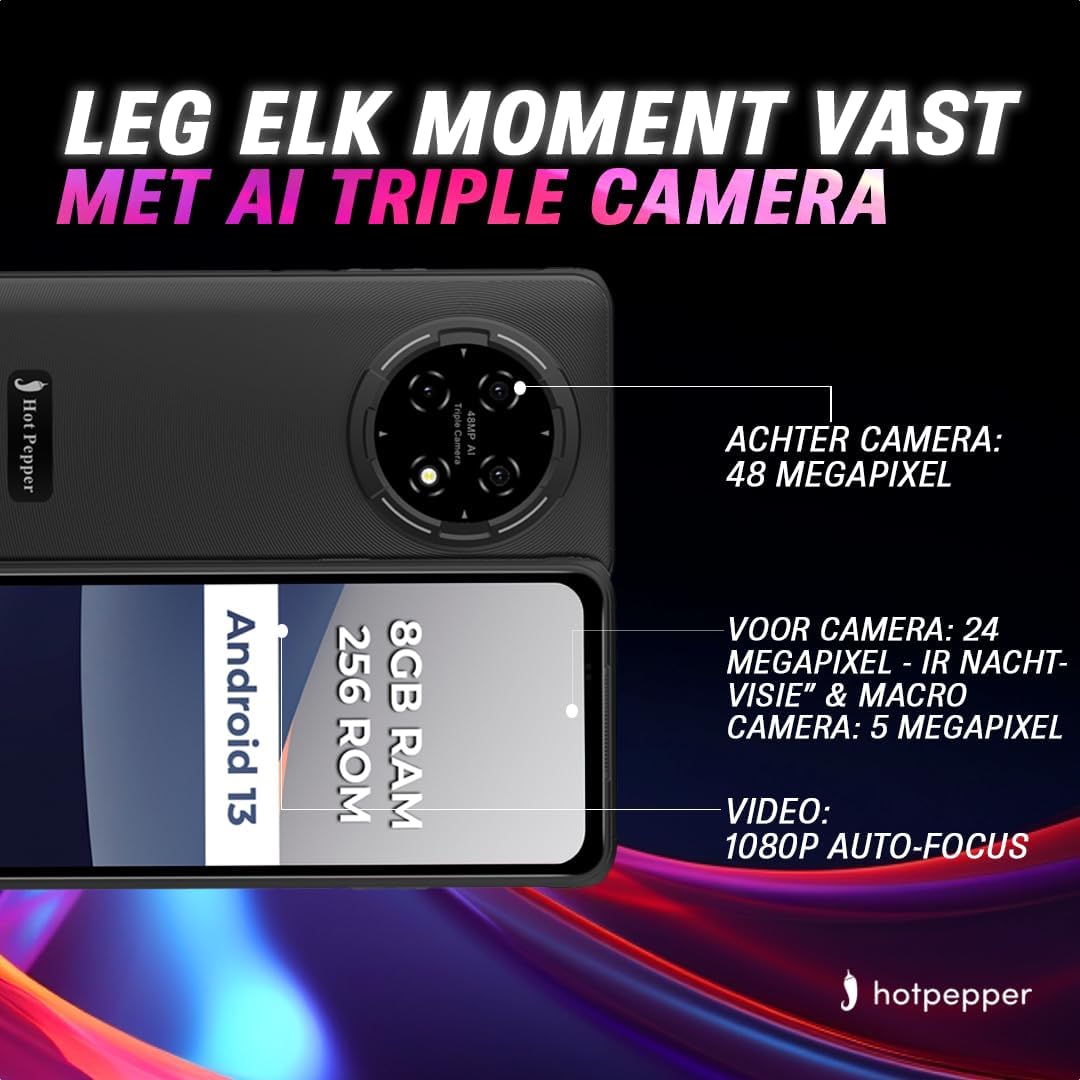
Image: Hot Pepper K82A camera specifications.
- Kamera e pasme: 48 Megapixels for high-resolution photos.
- Kamera e përparme: 24 Megapixels, featuring IR Night Vision and Macro capabilities for detailed selfies and close-up shots.
- Kamera makro: 5 Megapixels for extreme close-up photography.
- Regjistrimi i videos: Supports 1080p video with auto-focus.
To use the camera, open the Kamera app. You can switch between photo and video modes, adjust settings, and select different lenses (e.g., wide-angle, macro) as available.
7. Menaxhimi i baterive
The Hot Pepper K82A is equipped with a 5000mAh battery designed for extended use. To optimize battery life and ensure proper charging:

Image: Hot Pepper K82A battery life and charging details.
- Ngarkimi: Use the provided 18W fast charger and USB-C cable for optimal charging speed.
- Përdorimi i pritshëm: Up to 24 hours call time, 14 hours web usage, 8 hours video playback, 7 hours gaming, and 660 hours standby time.
- Këshilla për kursimin e baterisë: Reduce screen brightness, disable unused features like Bluetooth or GPS, close background apps, and enable battery saver mode in settings.
8. Outdoor Features
The Hot Pepper K82A is built to withstand various outdoor conditions, making it an ideal companion for your adventures.

Image: Hot Pepper K82A outdoor durability features.
- Dizajn i fortë: Engineered for durability, suitable for various environments.
- Sinjali GPS: GPS i integruar për navigim dhe shërbime vendndodhjeje.
- Rezistencë ndaj ujit dhe pluhurit IP68: Protects against immersion in water and ingress of dust.
- Rezistenca e rënies: I projektuar për t'i bërë ballë rënieve nga një lartësi deri në 1.5 metra.
9. Specifikimet
Detailed technical specifications for the Hot Pepper K82A smartphone:
| Veçori | Specifikimi |
|---|---|
| Markë | Piper djegës |
| Emri i modelit | Hot Pepper K82A |
| Numri i modelit | 10 KR |
| Sistemi Operativ | Android 13.0 |
| Madhësia e ekranit | 6.78 inç |
| Rezolucioni | 1080 x 2400 |
| Madhësia RAM | 8 GB |
| Kapaciteti i ruajtjes | 256 GB |
| Modeli i CPU-së | MediaTek Helio (Octa-Core) |
| Rezolucioni i kamerës së pasme | 48 Megapixels (Effective) |
| Rezolucioni i kamerës së përparme | 24 megapikselë |
| Përbërja e baterisë | Litium-jon (5000 mAh) |
| Lidhshmëria | USB, Jack 3.5 mm |
| Teknologjia celulare | 5G |
| Karakteristika të veçanta | Robust Body, Dual SIM, Expandable Memory, Water Resistant (IP68) |
| Ngjyra | Blu |
10. Mirëmbajtja
To ensure the longevity and optimal performance of your Hot Pepper K82A smartphone, follow these maintenance guidelines:
- Pastrimi: Përdorni një leckë të butë pa push për të pastruar ekranin dhe trupin. Shmangni materialet gërryese ose kimikatet e ashpra.
- Përditësimet e softuerit: Regularly check for and install system updates to ensure your device has the latest features, security patches, and performance improvements. Go to Cilësimet > Sistemi > Përditësimi i sistemit.
- Menaxhimi i ruajtjes: Fshini periodikisht të panevojshmet files, çinstaloni aplikacionet e papërdorura dhe transferoni media të mëdha files to cloud storage or a computer to free up internal storage.
- Kujdesi për baterinë: Avoid extreme temperatures. Do not leave the phone fully charged or fully discharged for extended periods.
11. Troubleshooting
Ja zgjidhjet për disa probleme të zakonshme që mund të hasni:
11.1. Pajisja nuk ndizet
- Sigurohuni që bateria është e ngarkuar. Lidheni telefonin me karikuesin për të paktën 15-30 minuta.
- Shtypni dhe mbani shtypur butonin e ndezjes për 10-15 sekonda për të detyruar një rinisje.
11.2. Ekrani nuk përgjigjet
- Rinisni pajisjen me forcë (shih më sipër).
- If the issue persists, consider a factory reset (data will be lost, back up first).
11.3. Network Issues (No Signal/Wi-Fi)
- Aktivizoni dhe çaktivizoni Modalitetin e Aeroplanit.
- Rinisni telefonin.
- Kontrolloni futjen e kartës SIM.
- Për Wi-Fi, rinisni routerin tuaj.
11.4. Bateria shkarkohet shpejt
- Kontrolloni përdorimin e baterisë në Cilësimet > Bateria për të identifikuar aplikacionet që konsumojnë shumë energji.
- Reduce screen brightness and disable unnecessary features.
- Mbyll aplikacionet në sfond.
11.5. Rivendosja në cilësimet e fabrikës (Mundësia e fundit)
If your device experiences persistent software issues, a factory reset may be necessary. Paralajmërim: Kjo do të fshijë të gjitha të dhënat në telefonin tuaj. Krijoni kopje rezervë të të dhënave të rëndësishme përpara se të vazhdoni.
- Shko tek Cilësimet > Sistemi > Opsionet e rivendosjes.
- Prekni Fshini të gjitha të dhënat (rivendosje në gjendje fabrike).
- Konfirmoni vendimin tuaj dhe futni PIN/fjalëkalimin nëse ju kërkohet.
12. Garancia dhe Mbështetja
Your Hot Pepper K82A smartphone comes with a standard manufacturer's warranty. Please refer to the warranty card included in your product packaging for specific terms and conditions, including coverage duration and limitations.
For technical support, warranty claims, or further assistance, please visit the official Hot Pepper website or contact their customer service through the contact information provided in your product documentation.