
1. Hyrje
This manual provides detailed instructions for the proper use and maintenance of your Oakcastle HIFI500 Remote Control. This remote is designed as a replacement or spare for the Oakcastle HIFI500 audio system, ensuring seamless control over its functions. Please read this manual thoroughly before use to ensure optimal performance and longevity of your remote control.
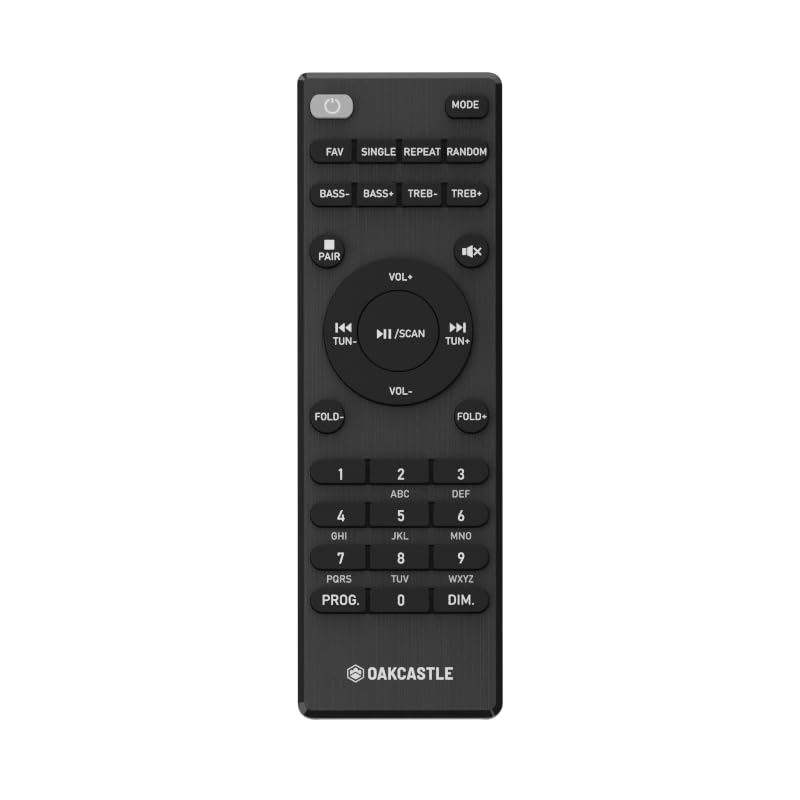
Figura 1.1: Përpara view of the Oakcastle HIFI500 Remote Control. This image displays the compact design and button layout, including power, volume, source selection, and playback controls, typical for operating the HIFI500 audio system.
2. Konfigurimi
2.1. Instalimi i baterisë
The Oakcastle HIFI500 Remote Control requires two AAA batteries (not included) for operation. Follow these steps to install the batteries:
- Gjeni ndarjen e baterisë në pjesën e pasme të telekomandës.
- Press down on the tab and slide the battery cover downwards to open it.
- Vendosni dy bateri AAA, duke u siguruar që terminalet pozitive (+) dhe negative (-) të jenë në përputhje të saktë me shenjat brenda ndarjes.
- Rrëshqiteni kapakun e baterisë përsëri në vend derisa të klikojë mirë.
Shënim: Always use new batteries and dispose of old batteries responsibly. Do not mix old and new batteries, or different types of batteries.
2.2. Përdorimi fillestar
Once batteries are installed, the remote control is ready for use with your Oakcastle HIFI500 audio system. Point the remote directly at the infrared (IR) receiver on your HIFI500 system. No additional pairing is typically required for this replacement remote.
3. Përdorimi i telekomandës
The Oakcastle HIFI500 Remote Control provides full functionality for your HIFI500 audio system. Below is a general guide to common button functions:
- Butoni i energjisë (⏻): Turns the HIFI500 system on or off.
- Vëllimi lart/poshtë (Vol+ / Vol-): Rregullon nivelin e daljes audio.
- Hesht (🔇): Hesht përkohësisht daljen audio.
- Source/Input (Burimi): Cycles through available audio inputs (e.g., CD, FM, Bluetooth, AUX).
- Playback Controls (▶ / ⏸ / ⏹ / ⏪ / ⏩): Controls media playback (Play, Pause, Stop, Rewind, Fast Forward) for compatible sources like CD or USB.
- Butonat e navigimit (▲ / ▼ / ◀ / ▶): Used to navigate menus and selections on the HIFI500 system display.
- Butoni OK/Enter: Konfirmon zgjedhjet.
- Tastiera numerike (0-9): For direct input of radio frequencies, track numbers, or other numerical data.
Refer to your Oakcastle HIFI500 audio system's main user manual for specific functions and advanced operations.
4. Mirëmbajtja
4.1. Pastrimi
To clean your remote control, gently wipe the surface with a soft, dry cloth. For stubborn dirt, slightly dampen the cloth with water or a mild, non-abrasive cleaner. Avoid using harsh chemicals, solvents, or abrasive materials, as these can damage the remote's finish or internal components.
4.2. Ndërrimi i baterisë
Replace batteries when the remote's response becomes sluggish or stops working. Follow the battery installation steps outlined in Section 2.1. Always replace both batteries simultaneously with new ones.
4.3. Magazinimi
When not in use for extended periods, it is recommended to remove the batteries from the remote control to prevent leakage, which can cause damage. Store the remote in a cool, dry place away from direct sunlight and extreme temperatures.
5. Troubleshooting
If you encounter issues with your Oakcastle HIFI500 Remote Control, please refer to the following common problems and solutions:
- Telekomanda nuk përgjigjet:
- Kontrolloni nëse bateritë janë instaluar saktë me polaritetin e saktë.
- Zëvendësoni bateritë me të reja.
- Ensure there are no obstructions between the remote control and the HIFI500 system's IR receiver.
- Make sure you are within the effective range and pointing the remote directly at the HIFI500 system.
- Intermittent function:
- Kjo shpesh tregon fuqi të ulët të baterisë. Zëvendësoni bateritë.
- Ensure the remote's IR emitter is clean and free from dirt or smudges.
If the problem persists after trying these solutions, please contact Oakcastle customer support.
6. Specifikimet
| Veçori | Specifikimi |
|---|---|
| Model | HIFI500 Remote Control |
| Markë | Oakcastle |
| Teknologjia e lidhjes | Infra të kuqe (IR) |
| Burimi i energjisë | 2 x bateri AAA (nuk përfshihen) |
| Numri maksimal i pajisjeve të mbështetura | 1 (Oakcastle HIFI500 Audio System) |
| Veçori e veçantë | Të lehta |
| Pesha e artikullit | 2.82 ons (rreth 80 gram) |
| Dimensionet e paketës | 8 x 3.2 x 2.5 inç (rreth 20.3 x 8.1 x 6.3 cm) |
| Prodhuesi | SHUMICËRIA |
7. Garancia dhe Mbështetja
7.1. Informacioni i garancisë
This Oakcastle HIFI500 Remote Control is covered by a manufacturer's warranty. Please refer to the warranty card included with your original Oakcastle HIFI500 audio system or visit the official Oakcastle webfaqja e internetit për kushtet dhe afatet e detajuara të garancisë. Ruajeni provën e blerjes për kërkesat e garancisë.
7.2. Mbështetja e klientit
For technical assistance, troubleshooting beyond this manual, or warranty inquiries, please contact Oakcastle customer support. You can typically find contact information, including phone numbers, email addresses, and support portals, on the official Oakcastle webfaqe.
Please have your product model (HIFI500 Remote Control) and purchase details ready when contacting support.