
Oakcastle IR200
Oakcastle IR200 Internet Radio User Manual
Modeli: IR200
1. Hyrje
Thank you for choosing the Oakcastle IR200 Internet Radio. This manual provides essential information for the safe and efficient operation of your device. Please read it thoroughly before use and retain it for future reference.
The Oakcastle IR200 is a versatile audio system offering multiple listening options, including Internet Radio, DAB+, FM, Bluetooth 5.3, and AUX input. It features a color display, remote control, and podcast support for a comprehensive audio experience.
2. Përmbajtja e paketës
Carefully unpack the box and ensure all items listed below are present and in good condition:
- Oakcastle IR200 Internet Radio Unit
- Kabllo energjie
- Telekomandë
- Manuali i Përdoruesit (ky dokument)
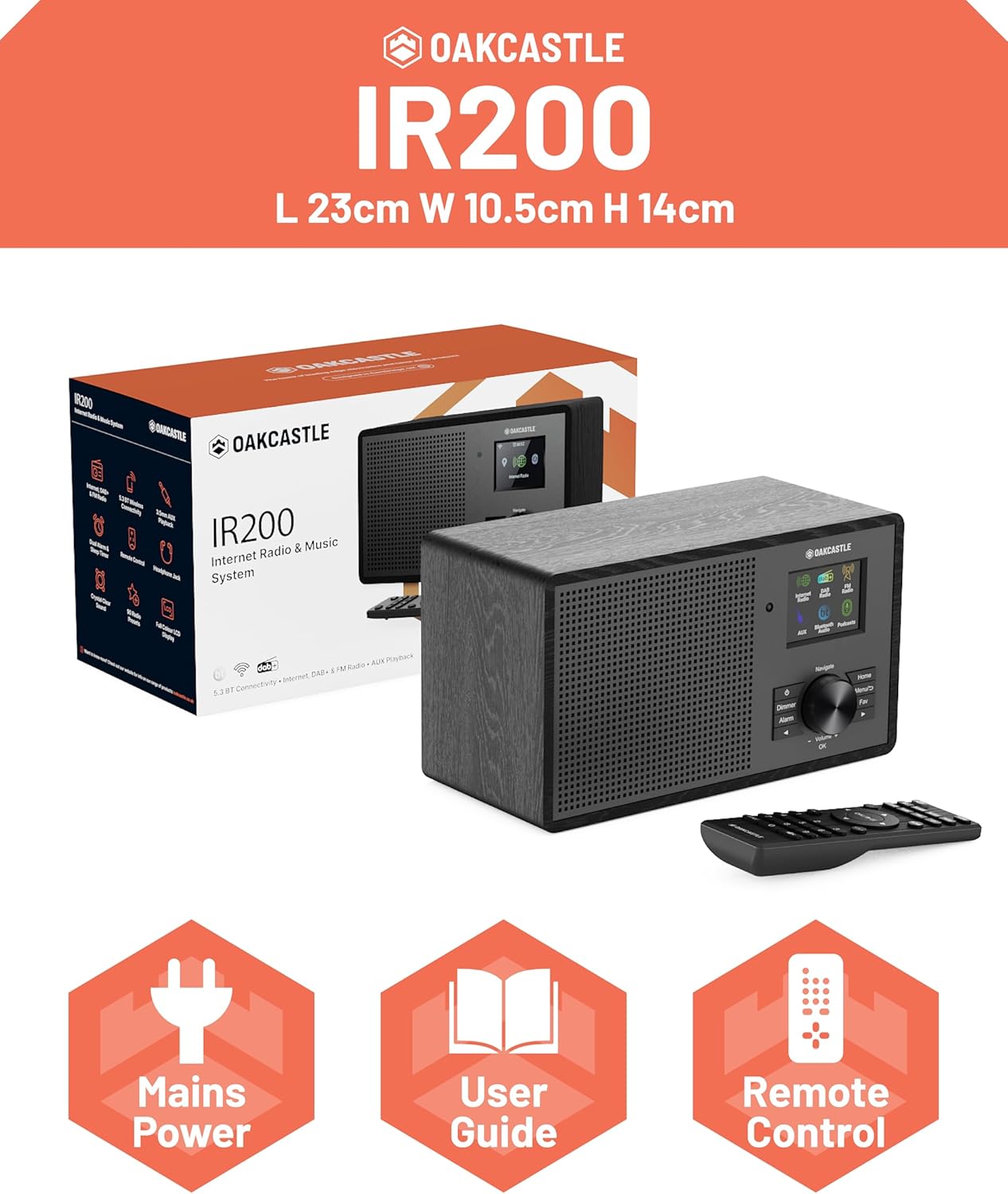
Image 2.1: Contents of the Oakcastle IR200 package, including the radio unit, its box, power cable, remote control, and user manual.
3. Produkti i Mbaruarview
Familiarize yourself with the main components and controls of your Oakcastle IR200 radio.
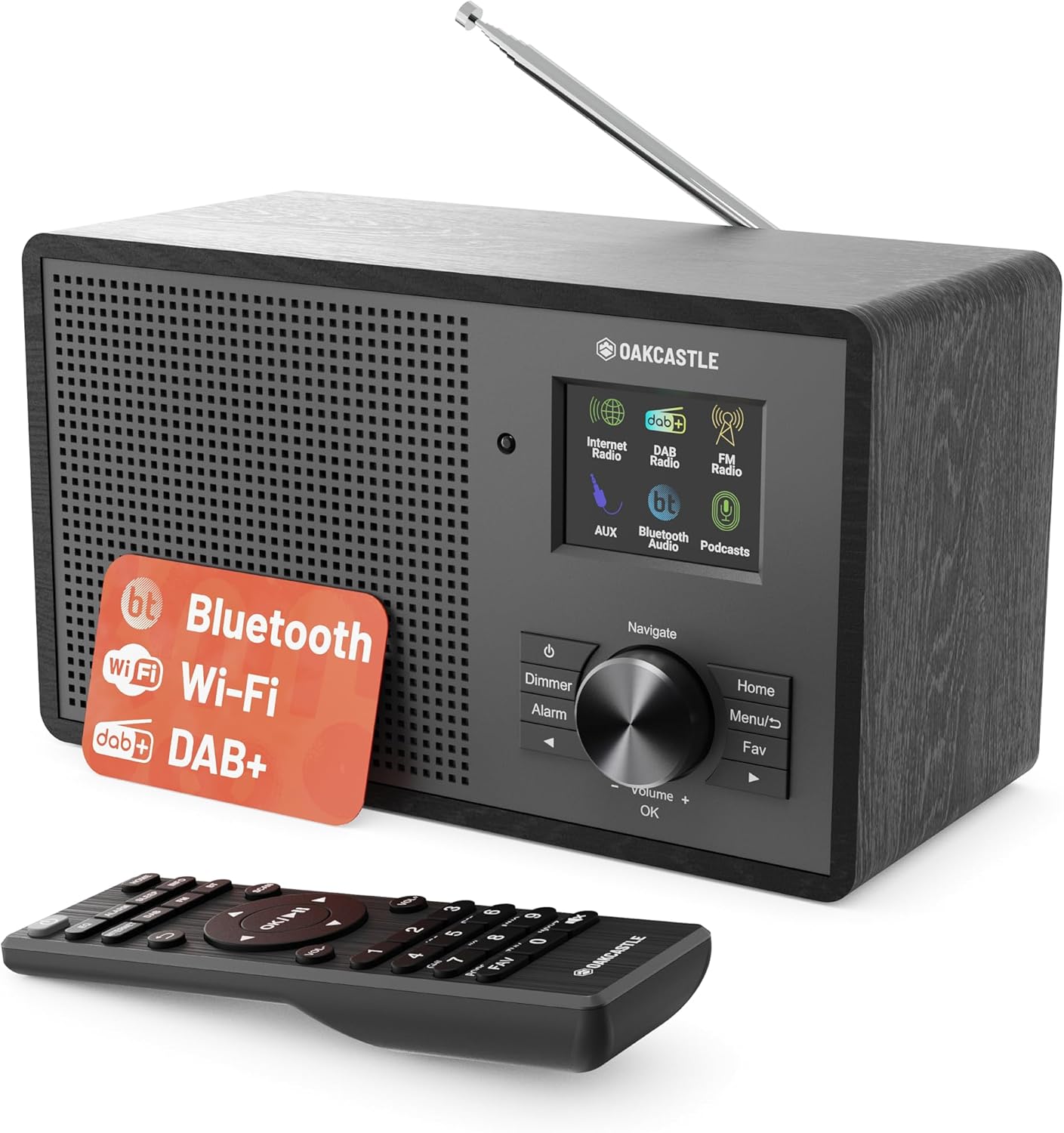
Imazhi 3.1: Përpara view of the Oakcastle IR200 radio, showcasing the display, control knob, buttons, and the included remote control.
3.1 Kontrollet e panelit të përparmë
- Ekrani i shfaqjes: Tregon informacionin e stacionit, kohën dhe opsionet e menysë.
- Navigate/Volume/OK Knob: Rotate to navigate menus or adjust volume; press to confirm selections.
- Butoni i energjisë: Turns the unit on/off or puts it into standby.
- Butoni zbehës: Rregullon ndriçimin e ekranit.
- Butoni i alarmit: Qasje në cilësimet e alarmit.
- Butoni kryesor: Kthehet në menunë kryesore.
- Butoni i menysë: Accesses mode-specific menus.
- Fav Button: Accesses favorite station presets.
3.2 Lidhjet e panelit të pasmë

Imazhi 3.2: E pasme view of the Oakcastle IR200, highlighting the headphone output and AUX input ports.
- Antenë teleskopike: For DAB+ and FM reception.
- Hyrja AUX: Lidhni pajisjet e jashtme audio.
- Dalja e kufjeve: Lidhni kufjet për dëgjim privat.
- DC N IN: Lidhja e përshtatësit të energjisë.
4. Konfigurimi fillestar
4.1 Lidhja e energjisë
- Insert the power cable into the DC IN port on the rear of the radio.
- Plug the other end of the power cable into a wall socket.
- Press the Power button on the front panel or remote control to turn on the radio.
4.2 Rregullimi i Antenës
For optimal DAB+ and FM reception, fully extend the telescopic antenna located at the rear of the unit.
4.3 Network Connection (for Internet Radio)
- Pas ndezjes së parë, radioja do t'ju udhëzojë përmes konfigurimit të rrjetit.
- Select "Network Wizard" or "Wi-Fi Setup" from the menu.
- Radioja do të skanojë për rrjete Wi-Fi të disponueshme. Zgjidhni rrjetin tuaj nga lista.
- Enter your Wi-Fi password using the navigation knob and OK button.
- Pasi të lidhet, radioja do të shfaqë një mesazh konfirmimi.
5. Modalitetet e operimit
The Oakcastle IR200 offers several listening modes. Press the "Home" button to access the main menu and select your desired mode.
5.1 Radio Interneti
Access thousands of global radio stations via your Wi-Fi connection.

Image 5.1: The radio's display screen in Internet Radio mode, showing station information.
- Nga menyja kryesore, zgjidhni "Radio në Internet".
- You can browse stations by location, genre, or search by name.
- Rotate the Navigate knob to scroll through options and press OK to select.
- To save a station as a favorite, press the "Fav" button during playback.
Radio 5.2 DAB+
Shijoni transmetime radiofonike dixhitale me cilësi të lartë.

Image 5.2: The radio's display screen in DAB+ Radio mode, showing the current station.
- From the main menu, select "DAB+ Radio".
- The radio will automatically scan for available DAB+ stations.
- Use the Navigate knob to select a station from the list.
- To save a station as a favorite, press the "Fav" button during playback.
Radio FM 5.3
Tune into traditional analog FM broadcasts.
- Nga menyja kryesore, zgjidhni "Radio FM".
- To auto-scan for stations, press and hold the OK button or use the scan function via the menu.
- To manually tune, rotate the Navigate knob.
- To save a station as a favorite, press the "Fav" button during playback.
5.4 Lidhshmëria Bluetooth
Transmetoni audio pa tel nga pajisjet tuaja të aktivizuara me Bluetooth.

Image 5.3: The radio's display screen in Bluetooth mode, indicating readiness for pairing.
- From the main menu, select "Bluetooth". The radio will enter pairing mode.
- On your external device (e.g., smartphone), enable Bluetooth and search for "Oakcastle IR200".
- Select "Oakcastle IR200" to pair. Once connected, you can stream audio.
5.5 Hyrja AUX
Connect external audio sources using a 3.5mm audio cable.
- Connect one end of a 3.5mm audio cable to the AUX IN port on the rear of the radio.
- Lidhni anën tjetër me prizën e kufjeve ose daljen audio të pajisjes suaj të jashtme.
- From the main menu, select "AUX".
- Kontrolloni riprodhimin nga pajisja juaj e jashtme.
5.6 Podkastet
Browse and listen to a wide range of podcasts.
- From the main menu, select "Podcasts".
- Browse podcasts by category or search for specific titles.
- Select a podcast to start listening.
6. Cilësimet dhe veçoritë
6.1 Cilësimet e sistemit
Access general system settings via the main menu to configure time, language, display, and more.
- Ora/Data: Set time format, synchronize time.
- Gjuha: Select your preferred language for the menu.
- Shfaq: Adjust backlight, color scheme.
- Rrjeti: Reconfigure Wi-Fi settings.
- Përditësimi i softuerit: Kontrolloni dhe instaloni përditësimet e firmware-it.
6.2 Barazues (EQ)
Customize the audio output to your preference using the equalizer settings, accessible via the remote control or system menu.
6.3 paravendosje
The radio supports over 90 presets for your favorite Internet, DAB+, and FM stations. To recall a preset, press the "Fav" button and select from the list.
6.4 Alarmet
Set alarms to wake up to your favorite radio station or a buzzer sound. Access alarm settings via the "Alarm" button on the front panel or remote.
7. Telekomanda
The included remote control provides convenient access to all radio functions from a distance.
Ensure batteries are correctly inserted. Point the remote control towards the front of the radio for optimal response.
7.1 Funksionet e telekomandës
- Fuqia: On/Off/Standby.
- Vëllimi +/-: Rregulloni nivelin e volumit.
- Butonat e navigimit (Lart/Poshtë/Majtas/Djathtas): Navigoni në menu.
- NE RREGULL: Konfirmo zgjedhjen.
- Mode Buttons (Internet, DAB, FM, Bluetooth, AUX): Kaloni ndërmjet mënyrave.
- Butonat e paracaktuar (1-90+): Directly select saved favorite stations.
- EQ: Hyni në cilësimet e barazuesit.
- Menuja: Access mode-specific menus.
- E preferuar: Access favorite station list.
8. Mirëmbajtja
8.1 Pastrimi
To clean the radio, use a soft, dry cloth. Do not use abrasive cleaners, waxes, or solvents as these may damage the finish.
8.2 Kujdesi i Përgjithshëm
- Mbajeni pajisjen larg rrezeve të diellit direkte, burimeve të nxehtësisë dhe lagështisë.
- Shmangni rrëzimin e njësisë ose nënshtrimin e saj ndaj goditjeve të forta.
- Siguroni ventilimin e duhur rreth njësisë.
9. Troubleshooting
| Problem | Shkaku i mundshëm | Zgjidhje |
|---|---|---|
| Asnjë fuqi | Power cable not connected; wall socket not active. | Check power cable connection; try a different wall socket. |
| Asnjë zë | Volumi është shumë i ulët; Heshtja është aktivizuar; Burimi i zgjedhur është i gabuar. | Increase volume; Check mute status; Select correct input mode. |
| Radioja e internetit nuk lidhet | Incorrect Wi-Fi password; Weak Wi-Fi signal; Router issue. | Re-enter Wi-Fi password; Move radio closer to router; Restart router. |
| Marrje e dobët e sinjalit DAB+/FM | Antenna not extended; Poor signal area. | Fully extend antenna; Reposition radio for better signal. |
| Bluetooth nuk çiftohet | Radio not in pairing mode; Device too far; Device already paired. | Ensure radio is in Bluetooth mode; Move device closer; Unpair from other devices. |
10. Specifikimet
| Veçori | Detaj |
|---|---|
| Markë | Oakcastle |
| Model | IR200 |
| Ngjyra | E zezë |
| Teknologjia e lidhjes | Wi-Fi, Bluetooth 5.3, AUX |
| Teknologjia e Akordimit | Radio interneti, DAB+, FM |
| Karakteristika të veçanta | Bluetooth, EQ, Podcasts, Internet Radio, Remote Control |
| Burimi i energjisë | Electric Cable (Mains) |
| Dimensionet e produktit (H x P x D) | 14 cm x 10.5 cm x 23 cm (përafërsisht) |
| Pesha e produktit | 0.94 kg |
| Pajisjet e përputhshme | MP3 Player, Smartphone, Tablet |
11. Garancia dhe Mbështetja
11.1 Informacioni i garancisë
The Oakcastle IR200 comes with a standard warranty. An extended 3-year warranty is available upon product registration on the manufacturer's website. Please refer to the warranty card included in your package or visit the official Oakcastle webfaqe per detaje.
11.2 Mbështetja e klientit
For technical assistance, troubleshooting, or further inquiries, please contact Oakcastle customer support. Contact details can typically be found on the official Oakcastle webnë vend ose në kartën e garancisë.
Ask a question about this manual
Ask about setup, troubleshooting, compatibility, parts, safety, or missing instructions. Manuals+ will review the question and use this page’s manual context to help answer it.