1. Hyrje
This manual provides essential information for the safe operation and maintenance of your 4DRC V31 RC Plane with Camera. Please read this manual thoroughly before operating the aircraft to ensure proper function and to avoid damage or injury. Keep this manual for future reference.

Figure 1: 4DRC V31 RC Plane, designed for beginner-friendly operation.
2. Përmbajtja e paketës
Verifikoni që të gjitha artikujt e listuar më poshtë janë të përfshirë në paketën tuaj. Nëse ndonjë artikull mungon ose është i dëmtuar, kontaktoni mbështetjen ndaj klientit.
- 4DRC V31 RC Plane
- Transmetues i telekomandës
- Rechargeable Batteries (2 C batteries included)
- Kabllo karikimi USB
- Helika rezervë
- Kaçavidë
- Manuali i Përdoruesit (ky dokument)
Note: The charger is included as part of the USB charging cable.
3. Karakteristikat e produkteve
- 360° Flip & Aerial Stunts: Perform aerobatic rolls and 360-degree circling.
- Kamera e integruar: Advanced WiFi-enabled camera for real-time video streaming and capturing flight moments.
- Color LED Lights: Equipped with bright LED lights for visibility and aesthetic appeal during evening flights.
- Lehtë për t'u përdorur: No assembly required. Features one-key takeoff/landing, altitude hold, and three speed options.
- Siguria dhe qëndrueshmëria: Four built-in propellers with protective structure and sturdy EPP material construction for impact resistance.
- Modaliteti pa kokë: Simplifies control by eliminating the need to adjust the aircraft's position before flight.
- Ngritje/Ulje me një çelës: Simplifies starting and ending flights.
- Mbajtja e lartësisë: Maintains a consistent altitude for stable hovering.
- Tre opsione shpejtësie: Adjustable flight speeds for different skill levels.
4. Konfigurimi
4.1 Ngarkimi i baterisë
- Connect the USB charging cable to the aircraft's battery port.
- Plug the USB end of the cable into a 5V/1A USB power adapter (not included) or a computer's USB port.
- The indicator light on the USB cable will illuminate during charging and turn off when fully charged.
- Koha e karikimit është afërsisht 60-90 minuta.

Figure 2: The aircraft features a module battery and a low battery alert system. Two batteries provide approximately 40 minutes of flight time.
4.2 Instalimi i baterive në telekomandë
- Hapni ndarjen e baterisë në pjesën e pasme të telekomandës.
- Insert 2 C batteries (included), ensuring correct polarity (+/-).
- Mbyllni mirë ndarjen e baterisë.
4.3 Çiftimi i Avionit me Telekomandë
- Place the aircraft on a flat surface.
- Turn on the aircraft's power switch. The LED lights on the aircraft will flash.
- Ndiz telekomandën.
- Push the left joystick (throttle) all the way up, then all the way down. The aircraft's LED lights will stop flashing and remain solid, indicating successful pairing.
5. Udhëzimet e funksionimit
5.1 Kontrollet Bazë të Fluturimit
- Nisja: Press the One-Key Takeoff button or push both joysticks outwards and downwards simultaneously to start the propellers, then push the left joystick up to ascend.
- Ulje: Press the One-Key Landing button or pull the left joystick down to descend.
- Ngjitje/Zbritje: Përdorni levën e majtë të komandimit (gazin) lart/poshtë.
- Përpara/Prapa: Përdorni levën e djathtë lart/poshtë.
- Ktheni majtas/djathtas: Përdorni joystick-un e majtë majtas/djathtas.
- Fluturo majtas/djathtas (Strafe): Përdorni levën e djathtë majtas/djathtas.
- Rregullimi i shpejtësisë: Press the speed button on the remote control to cycle through three speed modes (low, medium, high).

Figure 3: Key flight functions including Headless Mode and One-Click Takeoff/Landing.
5.2 Modaliteti pa kokë
In Headless Mode, the aircraft's orientation is locked to the remote control's orientation at the time of activation. This means pushing the right joystick forward will always make the aircraft fly away from you, regardless of which way the front of the aircraft is facing.
- To activate Headless Mode, press the Headless Mode button on the remote control. The aircraft's lights will flash to indicate activation.
- To exit Headless Mode, press the Headless Mode button again.
5.3 Altitude Hold
The Altitude Hold function allows the aircraft to maintain a stable altitude without constant throttle input. This makes it easier to control and capture stable photos/videos.

Figure 4: The aircraft's Altitude Hold feature for stable flight and One-Click Quick Stop for emergency landings.
6. Camera and FPV Operation
6.1 Lidhja me aplikacionin
- Download the "4DRC" app from your smartphone's app store.
- Ndizni avionin.
- On your smartphone, go to Wi-Fi settings and connect to the Wi-Fi network named "4DRC-V31-XXXX".
- Open the 4DRC app. You should see the live FPV feed from the aircraft's camera.
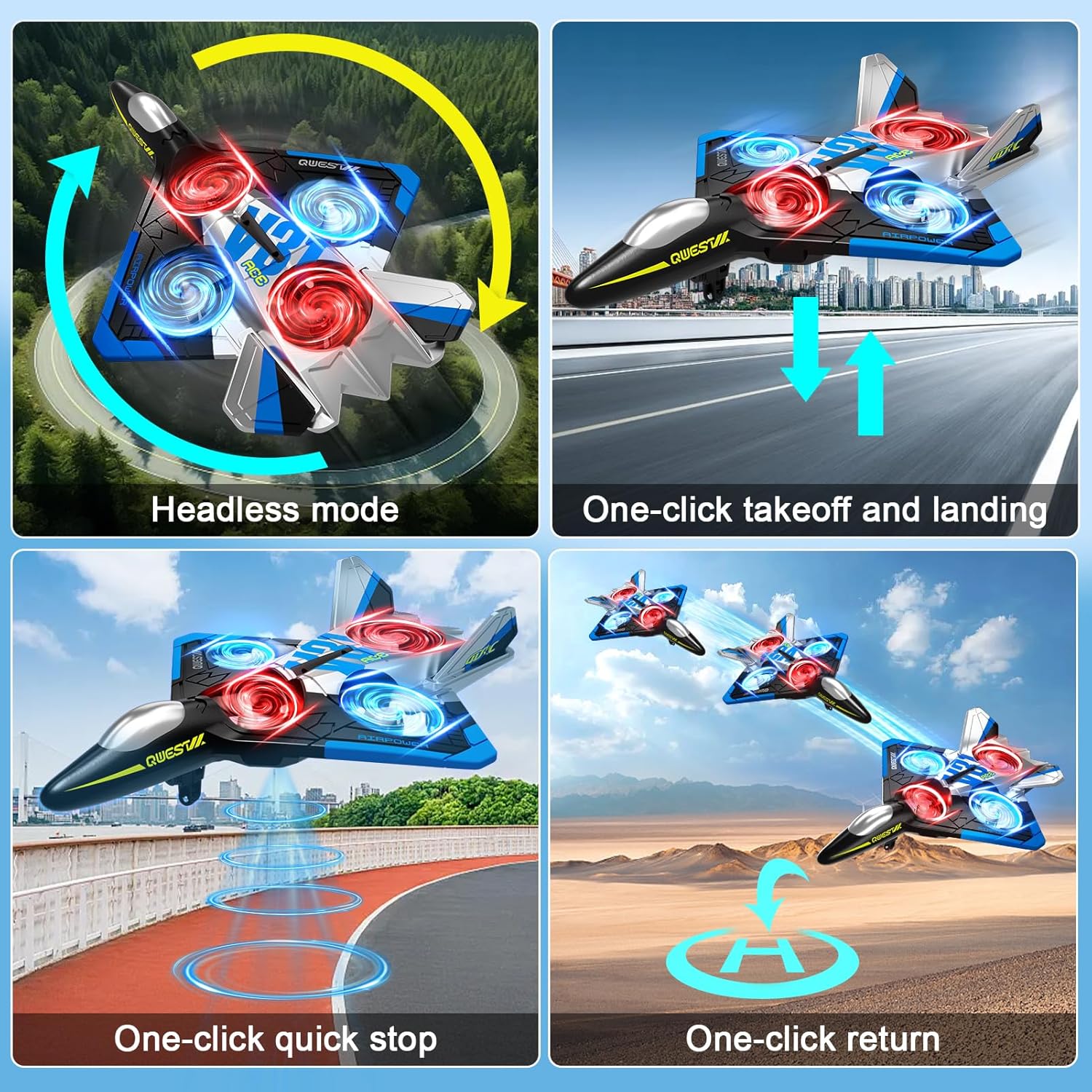
Figure 5: Experience real-time FPV transmission directly to your smartphone.
6.2 Bërja e Fotove dhe Videove
Once connected to the app, you can use the on-screen controls to capture photos and record videos.
- Foto: Tap the camera icon in the app to take a photo.
- Video: Tap the video icon to start recording. Tap again to stop.
- Kontrolli i gjesteve: The aircraft supports gesture control for taking photos and videos. Refer to the app interface for specific gesture commands.

Figure 6: Utilize gesture control for hands-free photo and video capture.

Figure 7: The camera captures 1080P Full HD aerial images and videos.
7. Special Flight Modes
7.1 360° Ktheje
To perform a 360° flip:
- Fly the aircraft to a height of at least 3 meters.
- Press the 360° Flip button on the remote control.
- Immediately push the right joystick in the desired direction (forward, backward, left, or right) to execute the flip.

Figure 8: The aircraft is capable of performing exciting 3D flips.
7.2 360° Circling
To perform a 360° circling stunt:
- Ensure the aircraft is flying stably at a sufficient height.
- Press the One-Click Circling button on the remote control. The aircraft will automatically perform a 360-degree circle.
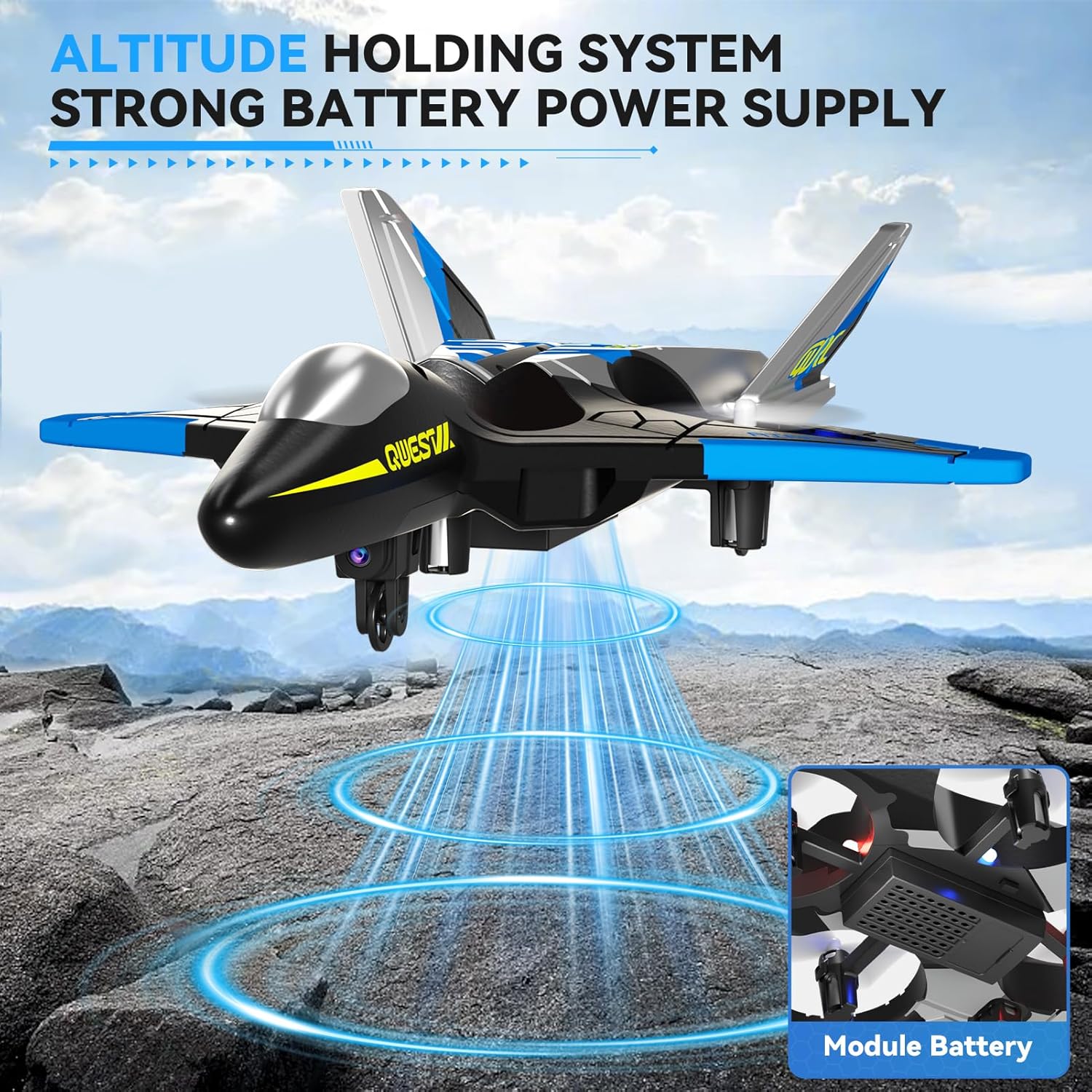
Figure 9: Execute impressive 360° circle flight stunts with ease.
7.3 Trajectory Flight
Using the app, you can draw a flight path on your smartphone screen, and the aircraft will follow it automatically.
- Connect your smartphone to the aircraft's Wi-Fi.
- Open the 4DRC app and enter the flight interface.
- Tap the Trajectory Flight icon.
- Draw your desired flight path on the screen. The aircraft will then fly along the specified route.

Figure 10: Utilize Trajectory Flight and Gesture Control for advanced flight maneuvers.
8. Siguria dhe Qëndrueshmëria
The 4DRC V31 RC Plane is designed with safety and durability in mind.
- Mbrojtja e helikës: Four built-in propellers are protected by the aircraft's frame, reducing the risk of injury from spinning blades.
- EPP Material: Constructed from soft yet sturdy EPP material, allowing the aircraft to withstand minor impacts and tumbles.
- Omnidirectional Obstacle Avoidance: The aircraft may feature an omnidirectional obstacle avoidance module to prevent collisions.
Video 1: Demonstrates various flight features including LED lights, one-click taxi takeoff, multi-gear speed adjustment, HD camera, real-time transmission, gesture photography/video, gravity induction, bump-proof design, jettisoning mode, optical flow localization, omnidirectional obstacle avoidance, 360° circling, 360° effect tumbling, trajectory flight, and one-touch landing.
9. Mirëmbajtja
- Pastrimi: Wipe the aircraft with a soft, dry cloth after each use. Avoid using water or harsh chemicals.
- Inspektimi i helikës: Regularly check propellers for damage (cracks, bends). Replace damaged propellers immediately using the provided spare parts.
- Kujdesi për baterinë:
- Mos i mbingarkoni ose mos i mbingarkoni bateritë.
- Ruani bateritë në një vend të freskët dhe të thatë larg nga rrezet e diellit direkte.
- If not used for an extended period, charge the battery to about 50% before storing.
- Magazinimi: Store the aircraft and remote control in a dry, cool environment, away from extreme temperatures and direct sunlight.
10. Troubleshooting
| Problem | Shkaku i mundshëm | Zgjidhje |
|---|---|---|
| Aircraft does not respond to remote control. | Not paired; low battery in aircraft or remote. | Re-pair the aircraft and remote. Charge aircraft battery. Replace remote control batteries. |
| Avionët fluturojnë në mënyrë të çrregullt ose devijojnë nga vendi. | Uncalibrated gyroscope; damaged propeller. | Perform gyroscope calibration (refer to app or remote instructions). Check and replace damaged propellers. |
| Camera feed is not visible on smartphone. | Not connected to aircraft Wi-Fi; app not open. | Ensure smartphone is connected to the aircraft's Wi-Fi network. Open the 4DRC app. |
| Koha e shkurtër e fluturimit. | Bateria nuk është ngarkuar plotësisht; bateri e vjetër. | Sigurohuni që bateria të jetë plotësisht e ngarkuar. Merrni në konsideratë zëvendësimin e baterive të vjetra. |
11. Specifikimet
- Emri i modelit: 4D-V31-BLUE-WIFI (V31 Series)
- Marka: 4DRC
- Lloji i materialit: Plastic (EPP Foam)
- Dimensionet e artikullit: 8 x 3 x 11 inç
- Lloji i baterisë: Litium-Jon
- Numri i baterive: 2 C batteries (included)
- Komponentët e përfshirë: Charger (USB cable)
- Gama e moshës: Kid Adults (Manufacturer Minimum Age: 96 months)
- Karakteristikat shtesë: RC plane, RC plane with camera, remote control airplane, 360° Flip, Headless Mode, One-Key Takeoff/Landing, Altitude Hold, Three Speed Options, Color LED Light.
12. Garancia dhe Mbështetja
For warranty information and customer support, please refer to the contact details provided on the product packaging or visit the official 4DRC webfaqe interneti. Ruajeni faturën e blerjes si provë të blerjes.
Prodhuesi: 4DRC