
Hyrje
This manual provides detailed instructions for the LOKMAT APPLLP 4G Android Smart Watch. Please read thoroughly to ensure proper usage and maintenance of your device. This smartwatch combines advanced communication, health monitoring, and entertainment features in a durable design.
Çfarë ka në Kuti
- Orë inteligjente
- Watch Band * 2
- Kabllo karikimi
- Manuali i Përdoruesit
Konfigurimi fillestar
Ngarkimi i orës inteligjente
Before first use, charge the watch for at least 2 hours. Use a 5V/1A or higher charger. If the watch cannot be turned on, charge it for more than 20 minutes to activate the battery.

Image: The magnetic charging cable connected to the back of the LOKMAT APPLLP smartwatch for charging.
Instalimi i kartës SIM
The LOKMAT APPLLP Smart Watch supports a Nano SIM card. Ensure the device is powered off before inserting or removing the SIM card. After inserting the Nano SIM, restart the device to ensure proper signal acquisition.
Video: Demonstration of the correct procedure for inserting a Nano SIM card into the LOKMAT APPLLP smartwatch.

Image: Close-up of the LOKMAT APPLLP smartwatch showing the Nano SIM card slot on the side of the watch.
Ndezja/Fikur
To power on, long press the power button. To power off, long press the power button and select "Power Off" from the on-screen options.
App Connection (for iOS and Android)
To fully utilize all features, download the companion app (e.g., "HiSportPro" or similar as indicated in the user manual) from your smartphone's app store (Google Play Store or Apple App Store).
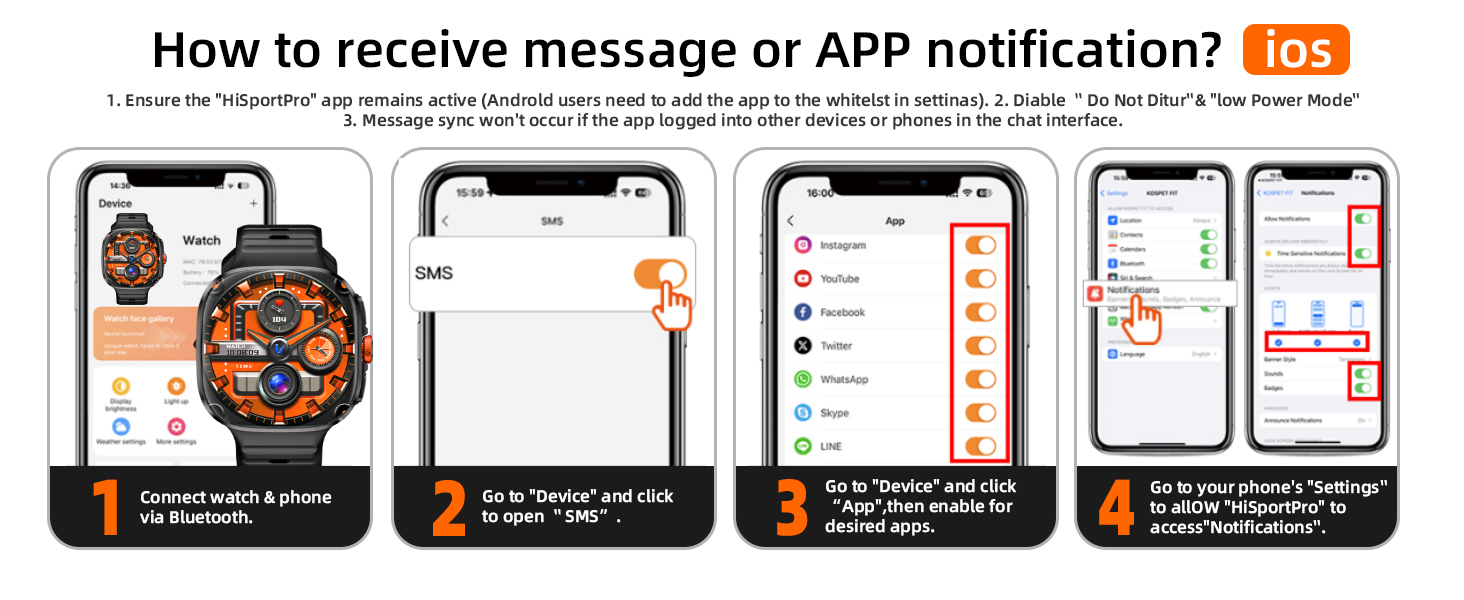
Image: Step-by-step visual guide on connecting the LOKMAT APPLLP smartwatch to a smartphone via Bluetooth using the companion app.
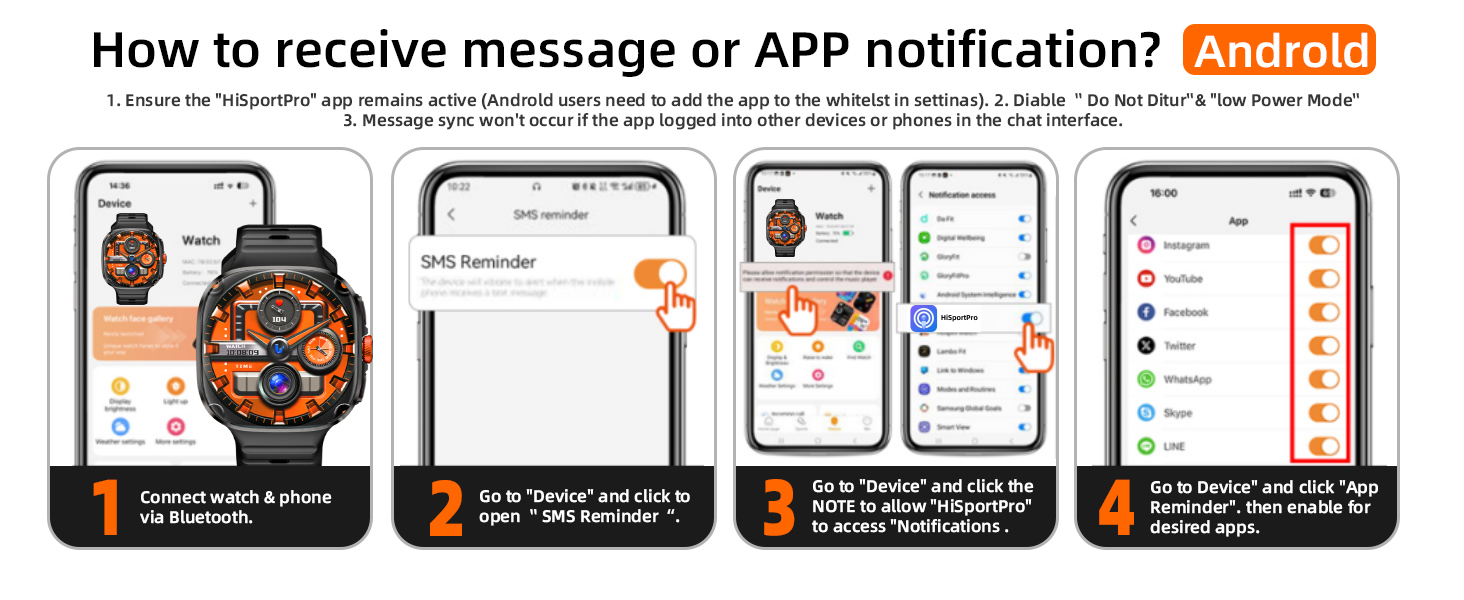
Image: Instructions for iOS users on enabling message and app notifications for the LOKMAT APPLLP smartwatch through the app settings.
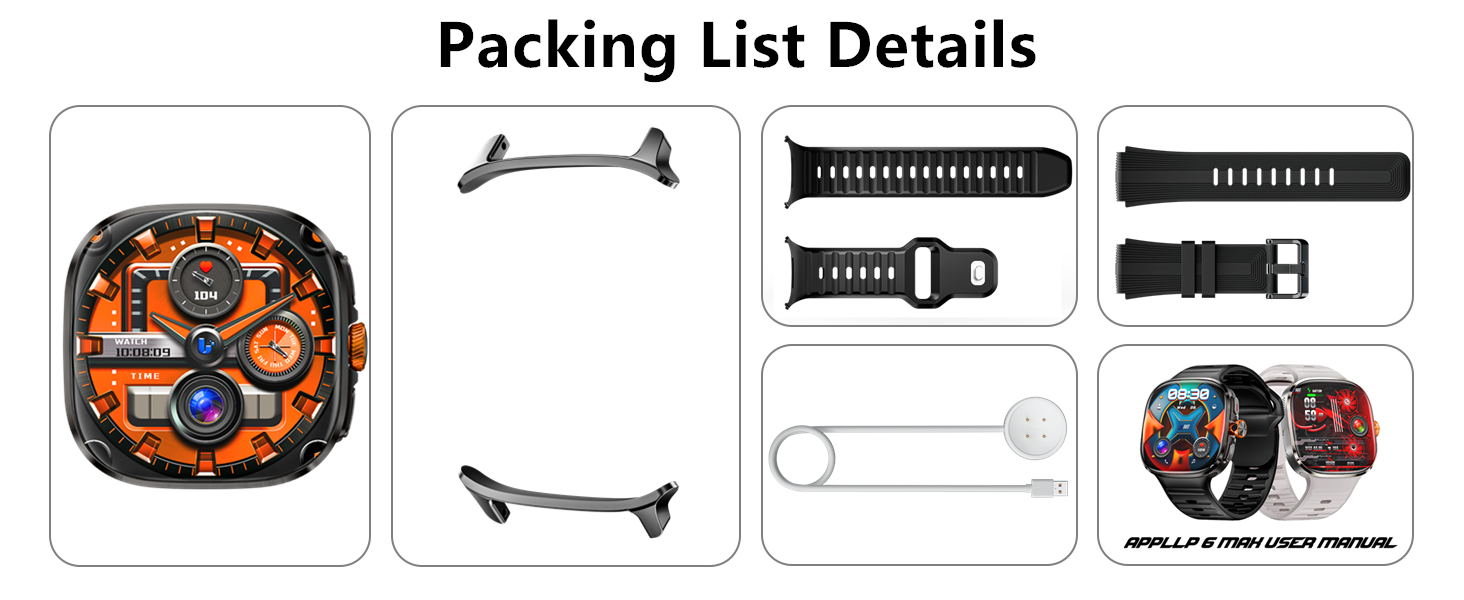
Image: Instructions for Android users on enabling message and app notifications for the LOKMAT APPLLP smartwatch through the app settings.
Udhëzimet e funksionimit
Navigimi bazë
The 2.16-inch AMOLED touchscreen allows for intuitive navigation. Swipe left/right/up/down to access different functions and menus. Use the physical buttons for quick access to specific features or to return to the main screen.

Image: Highlighting the vibrant 2.16-inch AMOLED HD screen of the LOKMAT APPLLP smartwatch.
Kamera rrotulluese
The 190-degree rotating camera allows for flexible photo and video capture. Rotate the lens to adjust the shooting angle for selfies or landscape shots. The camera supports high-definition photography and video calls.

Image: Demonstrating the 190-degree rotating camera feature on the LOKMAT APPLLP smartwatch, adjusted for a selfie.
Video: A seller video demonstrating how to use the rotating camera and adjust its shutter sound on a smartwatch.
Komunikimi 4G
With a Nano SIM card inserted, the watch supports independent 4G calls and video calls, functioning independently of a mobile phone. It covers multiple frequency bands (GSM/WCDMA/LTE) for seamless global connectivity.
Video: A seller video demonstrating how to adjust incoming call ringtone and vibration settings on the smartwatch.
Përdorimi i aplikacionit
The smartwatch supports free installation of third-party applications, covering various types of apps such as social media, tools, games, and learning. The 3GB RAM ensures smooth multitasking, and 32GB storage allows for ample app and data storage.

Image: Displaying various applications like YouTube, Facebook, and Instagram running on the LOKMAT APPLLP smartwatch screen.
Video: A seller video showcasing the smooth performance of games and apps on a large screen smartwatch.
Funksioni NFC
The NFC function enables access control unlocking, providing a convenient way to interact with compatible systems.

Image: The LOKMAT APPLLP smartwatch being used for NFC access control to unlock a door.
Monitorimi i Shëndetit dhe Fitnesit
Mënyrat sportive
The smartwatch features multiple built-in sports modes to real-time monitor health data such as heart rate, steps, and calories during various physical activities. This helps in scientific exercise and health management.

Image: Visual representation of various sports modes available on the LOKMAT APPLLP smartwatch, including outdoor running, hiking, and cycling.
Të dhënat shëndetësore
The device provides intelligent health monitoring with clear health status at a glance, including heart rate monitoring, blood oxygen detection, breathing exercises, and sleep monitoring. These functions help you gain insight into your own health status. Note: This product is not a medical device, and the measurement data and results are for reference only and should not be used as a basis for diagnosis and treatment.

Image: Illustrating the intelligent health monitoring features of the LOKMAT APPLLP smartwatch, including heart rate, blood oxygen, breathing exercise, and sleep tracking.
Mirëmbajtja dhe Kujdesi
Jetëgjatësia e baterisë
The 1150mAh polymer lithium battery offers long-lasting power. Battery life can vary based on usage (e.g., heavy app usage, video calls). New batteries must be fully charged before use. Activating the battery twice can improve its longevity.

Image: Important notes regarding battery consumption and initial charging for the LOKMAT APPLLP smartwatch.
Hidroizolim
The watch is designed to withstand certain water conditions. Avoid exposing it to hot water, soapy water, or chemicals, as these can compromise its water resistance. The waterproof performance is not permanent and may decrease over time. Supports hand washing, rain, and short-term soaking. Not suitable for hot showers or other extreme water conditions.
Kujdesi për ekranin
The screen is made of durable material. Avoid sharp objects that could cause scratches. Clean the screen with a soft, dry cloth.
Zgjidhja e problemeve
SIM Card Not Recognized
- Ensure the SIM card slot is clean and the card is inserted correctly.
- Restart the device after inserting the SIM card.
- Verify the SIM card is a Nano SIM and not damaged or deformed.
Jetëgjatësia e shkurtër e baterisë
- High power consumption occurs with prolonged app usage (videos, games). Normal usage time is about 3-8 hours under such conditions.
- Ensure the battery is fully activated by charging it twice before extensive use.
Shikoni mbinxehjen
- High power applications and prolonged use can cause the watch to heat up. Reduce usage of demanding apps to prevent overheating.
GPS Function Failure
- For first-time GPS use, ensure you are in an open outdoor area for optimal signal acquisition.
- If issues persist, perform a factory reset as per the user manual.
Specifikimet
| Veçori | Detaj |
|---|---|
| Madhësia e ekranit në këmbë | 2.16 inç |
| Kapaciteti i ruajtjes së memories | 32 GB |
| Madhësia e Memories RAM të Instaluar | 3 GB |
| Sistemi Operativ | Android |
| Veçori e veçantë | Camera, GPS, Phone Call, Text Messaging |
| Kapaciteti i baterisë | 1150 milionamp orët |
| Teknologjia e lidhjes | Wi-Fi |
| Standardi i komunikimit pa tel | Bluetooth |
| Përbërja e qelizave të baterisë | Litium Polimer |
| GPS | GPS i integruar |
| Forma | Drejtkëndëshe |
| Prodhuesi | LOKMAT |
| Numri i modelit të artikullit | APPLLP |
| Pesha e artikullit | 7.4 ons |
| Dimensionet e paketës | 3.98 x 3.86 x 2.83 inç |
Garancia dhe Mbështetja
For warranty information and technical support, please refer to the official LOKMAT website or contact customer service. You can also visit the LOKMAT Store për më shumë produkte dhe informacione.