
1. Hyrje
Thank you for choosing the taopodo P114 Smartwatch. This device is designed to enhance your daily life with features such as health monitoring, communication capabilities, and various practical functions. This manual provides detailed instructions on how to set up, operate, and maintain your smartwatch to ensure optimal performance and longevity. Please read this manual thoroughly before using the product.
2. Përmbajtja e paketës
Ju lutemi kontrolloni përmbajtjen e paketimit pasi ta hapni kutinë. Nëse ndonjë artikull mungon ose është i dëmtuar, ju lutemi kontaktoni mbështetjen ndaj klientit.
- taopodo P114 Smartwatch (with strap)
- Kabllo karikimi
- Manuali i Përdoruesit
3. Konfigurimi
3.1 Ngarkimi i orës inteligjente
Before initial use, fully charge your smartwatch. The device features magnetic fast charging.
- Lidhni kabllon magnetik të karikimit me kontaktet e karikimit në pjesën e pasme të orës inteligjente.
- Connect the USB end of the charging cable to a standard USB power adapter (5V/1A recommended) or a computer's USB port.
- Ekrani i orës do të tregojë statusin e karikimit. Një karikim i plotë zakonisht zgjat afërsisht 2 orë.

Image: Magnetic Fast Charging and Battery Life. The image shows the smartwatch being charged magnetically, highlighting its IP68 waterproof rating and battery specifications (30 days standby, 7 days battery life, 2 hours charging time).
3.2 Instalimi i aplikacionit
To unlock the full functionality of your smartwatch, you need to install the companion application on your smartphone. Kërko për the official app (e.g., "FitCloudPro" or similar, refer to packaging for exact app name) in your smartphone's app store (App Store for iOS, Google Play Store for Android) and install it.
3.3 Çiftimi i pajisjes
After installing the app, follow these steps to pair your smartwatch with your smartphone:
- Sigurohuni që ora juaj inteligjente të jetë e karikuar dhe e ndezur.
- Aktivizo Bluetooth në smartphone tuaj.
- Hapni aplikacionin shoqërues në smartphone tuaj.
- Ndiqni udhëzimet brenda aplikacionit për të shtuar një pajisje të re. Aplikacioni do të kërkojë për ora inteligjente të disponueshme.
- Select "P114" or the corresponding device name from the list.
- Konfirmoni kërkesën e çiftëzimit si në telefonin tuaj inteligjent ashtu edhe në orën inteligjente nëse ju kërkohet.
- Once paired, the app will synchronize data with your smartwatch.
4. Udhëzimet e funksionimit
4.1 Navigimi bazë
- Ekran me prekje: Swipe left, right, up, or down to navigate through menus and screens. Tap to select an item.
- Butoni anësor: Press the side button to return to the home screen or wake up the display. Long press may access power options or specific functions.
4.2 Telefonata me Bluetooth
The P114 Smartwatch supports Bluetooth calls, allowing you to make and answer calls directly from your wrist when connected to your smartphone.
- Kryerja e thirrjeve: Access the "Call" or "Phone" function on your watch. You can dial numbers, access contacts synced from your phone, or view historia e thirrjeve.
- Duke iu përgjigjur thirrjeve: Kur të vijë një telefonatë, ora do të shfaqë ID-në e thirrësit. Prekni ikonën jeshile për t'u përgjigjur ose ikonën e kuqe për ta refuzuar.

Image: Bluetooth Making Calls and Answer. This image illustrates the smartwatch's capability for Bluetooth calls, showing options for contacts, call history, and a built-in microphone. It also displays text and message notifications from social media apps and the voice assistant feature.
4.3 Text & Message Notifications
Receive notifications for incoming calls, text messages, and alerts from various social media applications directly on your smartwatch. Ensure notification permissions are enabled in the companion app on your smartphone.
4.4 All-Day Health Monitoring
The smartwatch continuously monitors key health metrics throughout the day.
- Monitorimi i gjumit: Tracks your sleep patterns, including deep sleep, light sleep, and wake times.
- Monitorimi i rrahjeve të zemrës: Measures your heart rate in real-time.
- Monitorimi i oksigjenit në gjak (SpO2): Estimates your blood oxygen saturation levels.
Shënim: Kjo pajisje nuk është një pajisje mjekësore. Të dhënat shëndetësore janë vetëm për referencë dhe nuk duhet të përdoren për diagnozë ose trajtim mjekësor.

Image: All-Day Health Monitoring. This image shows the smartwatch's ability to monitor sleep, heart rate, and blood oxygen, with a visual representation of sleep tracking.
4.5 120+ Sport Modes
The smartwatch offers over 120 sport modes to track your workouts. Select your desired activity from the "Sports" menu to record data such as steps, distance, calories burned, and heart rate during exercise.

Image: 120+ Sport Modes and Health Data Monitoring. The image highlights the smartwatch's extensive sport tracking capabilities and detailed health data monitoring, such as steps, distance, calories, and heart rate.
4.6 Rich and Practical Functions
The P114 Smartwatch integrates several convenient features to assist your daily routine:
- Kontrolli i muzikës: Kontrolloni luajtjen e muzikës në telefonin tuaj inteligjent (luani, ndaloni, kapërceni këngët) direkt nga ora juaj.
- Kamera në distancë: Përdor orën tënde si buton mbyllësi në distancë për kamerën e telefonit tënd inteligjent.
- Parashikimi i Motit: View current weather conditions and forecasts for your location (requires app synchronization).
- Kronometri: A built-in stopwatch for timing activities.
- Asistent zanor: Activate your smartphone's voice assistant (e.g., Siri, Google Assistant) through the watch.
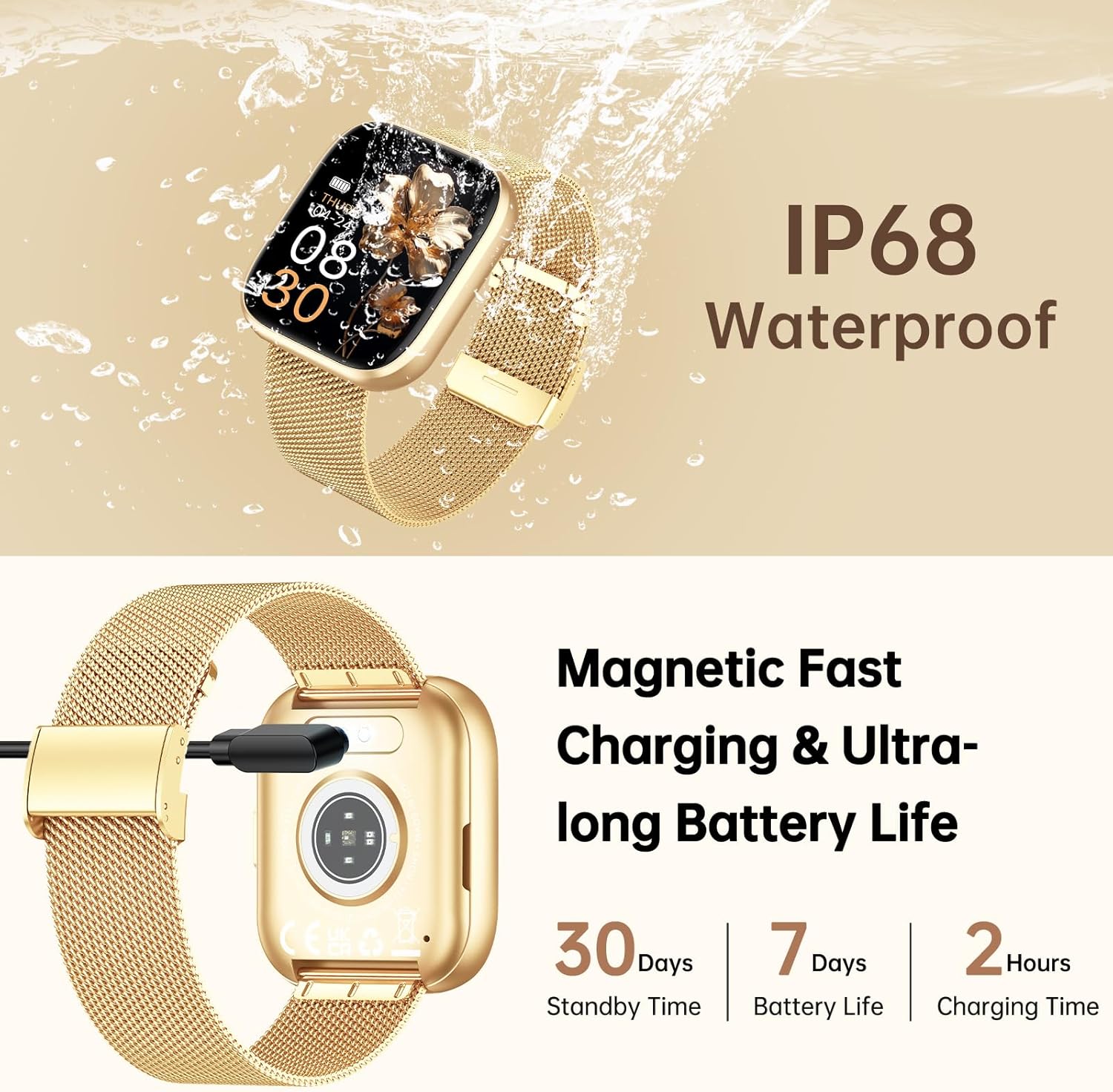
Image: Rich and Practical Functions. This image demonstrates the smartwatch's additional features, including music control, remote camera operation, weather display, and a stopwatch.
4.7 fytyra ore të personalizueshme
Personalize your smartwatch with over 200 stylish dials or create your own DIY watch faces through the companion app.
Image: 200+ Stylish Dials and DIY Dials. The image displays the smartwatch on a wrist, highlighting the extensive collection of customizable watch faces available.
5. Mirëmbajtja
5.1 Rezistencë ndaj ujit (IP68)
The taopodo P114 Smartwatch is rated IP68 for water resistance, meaning it is protected against dust ingress and can withstand immersion in water up to 1.5 meters for 30 minutes. It is suitable for daily use, such as hand washing, rain, and shallow swimming. However, it is not recommended for hot showers, saunas, or diving, as steam and high water pressure can compromise the seals.
5.2 Pastrimi dhe Kujdesi
- Regularly clean the watch screen and strap with a soft, dry cloth.
- If the watch or strap gets wet, dry it thoroughly before charging or prolonged use.
- Avoid exposing the watch to extreme temperatures, direct sunlight for extended periods, or corrosive liquids.
6. Troubleshooting
| Problem | Shkaku i mundshëm | Zgjidhje |
|---|---|---|
| Ora nuk ndizet | Bateri e ulët | Karikoni orën për të paktën 30 minuta. |
| Nuk mund të çiftëzohet me smartphone | Bluetooth off, app issue, watch too far | Ensure Bluetooth is on, restart phone/watch, reinstall app, keep devices close. |
| Asnjë njoftim | App permissions, Bluetooth disconnected | Check app notification permissions, ensure watch is paired and app is running in background. |
| Të dhëna të pasakta shëndetësore | Improper fit, movement, sensor obstruction | Ensure watch is worn snugly on the wrist, clean sensors, avoid excessive movement during measurement. |
7. Specifikimet
| Veçori | Detaj |
|---|---|
| Markë | taopodo |
| Model | P114 |
| Madhësia e ekranit | 1.85 inç |
| Lidhshmëria | Bluetooth |
| Pajisjet e përputhshme | Smartphone |
| Hyrja e ndërfaqes njerëzore | Butona, Ekran me prekje |
| Rezistenca ndaj ujit | IP68 |
| Jetëgjatësia e baterisë (tipike) | Deri në 7 ditë |
| Koha e gatishmërisë | Deri në 30 ditë |
| Koha e karikimit | Përafërsisht. 2 orë |
| GPS | Nuk ka GPS |
| Pesha e artikullit | 140 g (Package dimensions: 27.7 x 26.4 x 1.9 cm) |
8. Garancia dhe Mbështetja
For warranty information and customer support, please refer to the warranty card included in your package or visit the official taopodo webfaqe interneti. Nëse hasni ndonjë problem që nuk trajtohet në këtë manual, ju lutemi kontaktoni ekipin tonë të shërbimit ndaj klientit për ndihmë.