
1. Hyrje
Welcome to the OnePlus 15 user manual. This guide provides essential information for setting up, operating, maintaining, and troubleshooting your new smartphone. The OnePlus 15 is designed for high performance and extended battery life, featuring a Snapdragon 8 Elite Gen 5 processor, a 7300mAh battery, and a triple 50 MP camera system. Please read this manual thoroughly to ensure optimal use of your device.
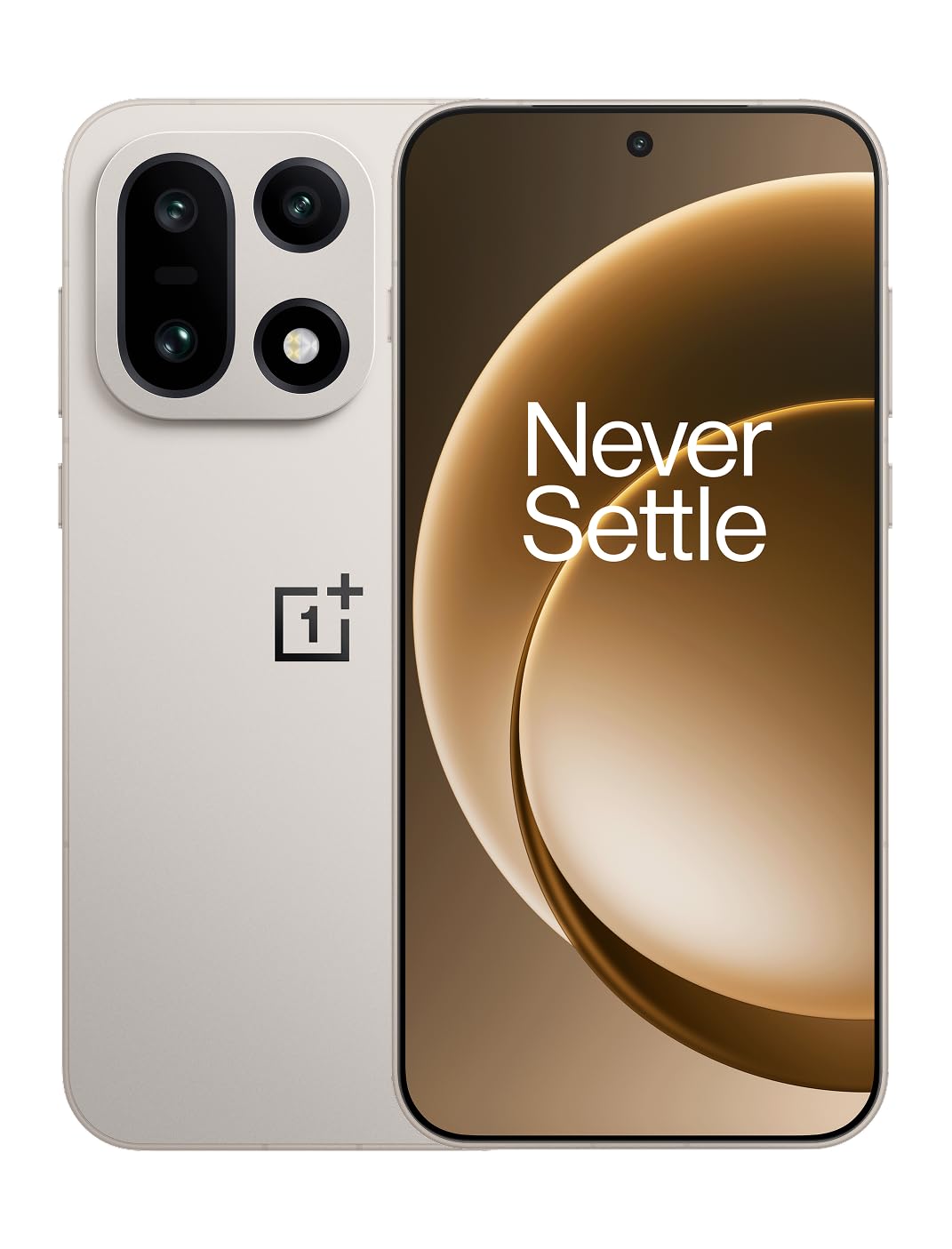
Figura 1: Përpara view of the OnePlus 15 smartphone.
2. Çfarë ka në kuti
Verifikoni që të gjitha artikujt janë të pranishëm në paketimin e produktit tuaj:
- OnePlus 15 Smartphone (x1)
- Karikues (x1)
- USB Data Cable (x1)
- SIM Ejector Tool (x1)
- Quick Guide (x1)
- Safety Guide (x1)

Figure 2: Included items in the OnePlus 15 package.
3. Konfigurimi
3.1. Instalimi i kartës SIM
The OnePlus 15 supports Dual-SIM functionality. To install your SIM card(s):
- Gjeni sirtarin e kartës SIM në anën e pajisjes.
- Fut mjetin e nxjerrjes së kartës SIM në vrimën e vogël pranë tabakasë dhe shtype fort derisa tabaka të dalë jashtë.
- Vendosni kartën/kartat tuaja Nano-SIM në sirtar me kontaktet e arta poshtë. Sigurohuni që ato të jenë vendosur siç duhet.
- Vendoseni me kujdes sirtarin e kartës SIM në telefon.

Figura 3: Ana view of the OnePlus 15, highlighting the SIM card tray.
3.2. Ndezja dhe Konfigurimi Fillestar
Për ta ndezur pajisjen tuaj për herë të parë:
- Press and hold the Power button (located on the right side) until the OnePlus logo appears.
- Ndiqni udhëzimet në ekran për të përfunduar konfigurimin fillestar, duke përfshirë përzgjedhjen e gjuhës, lidhjen Wi-Fi, hyrjen në llogarinë Google dhe cilësimet e sigurisë.
3.3. Ngarkimi i baterisë
The OnePlus 15 is equipped with a 7300mAh battery. To charge your device:
- Karikimi me tel: Connect the provided USB Data Cable to the Type-C port on the bottom of the phone and the other end to the charger. Plug the charger into a power outlet.
- Karikimi me valë: Place the phone on a compatible wireless charging pad. Ensure the phone is centered on the pad for efficient charging.
A full charge provides approximately 68.7 hours of talk time.

Figure 4: Illustration of the 7300mAh battery capacity.
4. Përdorimi i pajisjes suaj
4.1. Ekrani
The OnePlus 15 features a 6.78-inch AMOLED display with a 2772x1272 resolution and a 165 Hz refresh rate. This provides smooth visuals and vibrant colors. Adjust display settings such as brightness, color mode, and refresh rate in the device settings menu.
4.2. Performanca
Powered by the Snapdragon 8 Elite Gen 5 processor and 16GB of RAM, the OnePlus 15 delivers fast and efficient performance for multitasking, gaming, and demanding applications. The Tri-Chip System, combining the Snapdragon 8 Elite Gen 5 with a dedicated Wi-Fi chip and CPU scheduler, optimizes for speed, connectivity, and power efficiency.
Video 1: Mbiview of the OnePlus 15's performance capabilities and user experience.
4.3. Sistemi i kamerave
The device is equipped with a Triple 50 MP camera system, offering wide, ultra-wide, and telephoto lenses for versatile photography. The DetailMax Engine enhances photo quality in various lighting conditions, including day, night, and motion shots. Both front and rear cameras are available for capturing images and videos.

Figura 5: E pasme view of the OnePlus 15, showcasing the triple camera system.
Figure 6: DetailMax Engine for stunning photos.
4.4. Lidhshmëria
The OnePlus 15 supports a range of connectivity options:
- Wireless: Wi-Fi, Bluetooth, NFC, Infrared.
- Me tel: USB Type-C.
- Navigimi: Dual-band GPS (L1+L5) and Galileo (E1+E5a).
- SIM: Dual SIM support for managing multiple networks.
4.5. Sistemi Operativ
The device runs on Android 16 with OxygenOS 16, providing a fast and smooth user experience. Regular software updates will be provided to enhance features and security.
5. Mirëmbajtja
5.1. Qëndrueshmëri dhe Mbrojtje
The OnePlus 15 is built with IP66/IP68/IP69 and IP19K ratings, offering resistance against dust and water. While designed to be durable, avoid exposing the device to extreme conditions or prolonged submersion in water.

Figure 7: OnePlus 15 demonstrating water resistance.
5.2. Pastrimi i pajisjes suaj
Use a soft, lint-free cloth to clean the screen and body of your phone. Avoid using abrasive materials or harsh chemicals, which can damage the display or finish.
5.3. Përditësimet e softuerit
Periodically check for software updates in the device settings. Keeping your software up-to-date ensures you have the latest features, security patches, and performance improvements.
6. Troubleshooting
This section addresses common issues you might encounter with your OnePlus 15.
6.1. Pajisja nuk ndizet
- Sigurohuni që bateria është e ngarkuar. Lidheni telefonin me karikuesin dhe prisni disa minuta përpara se të provoni ta ndizni përsëri.
- Shtypni dhe mbani shtypur butonin e ndezjes për të paktën 10-15 sekonda për të detyruar një rinisje.
6.2. Lidhshmëri e dobët e rrjetit
- Kontrolloni nëse karta juaj SIM është futur saktë.
- Verify that airplane mode is not enabled.
- Rinisni pajisjen.
- If issues persist, contact your network provider.
6.3. Aplikacionet që bllokohen ose ngrijnë
- Mbyllni dhe rihapni aplikacionin.
- Clear the app's cache and data in device settings.
- Sigurohuni që aplikacioni të jetë i përditësuar në versionin e tij më të fundit.
- If the issue is widespread, consider restarting the phone.
6.4. Bateria shkarkohet shpejt
- Reduce screen brightness and screen timeout duration.
- Çaktivizoni veçoritë e papërdorura si Wi-Fi, Bluetooth ose GPS kur nuk janë të nevojshme.
- Identify and close power-intensive applications running in the background.
- Check for recent software updates, as they often include battery optimizations.
7. Specifikimet
Detailed technical specifications for the OnePlus 15 (Model: CPH2749).
| Veçori | Detaj |
|---|---|
| Emri i modelit | OnePlus 15 |
| Numri i modelit të artikullit | CPH2749 |
| Dimensionet e produktit | 6.36 x 3.02 x 0.32 inç |
| Pesha e artikullit | 1.28 paund |
| Sistemi Operativ | Android 16 |
| Modeli i CPU-së | Snapdragon 8 Elite Gen 5 |
| Shpejtësia e CPU-së | 4.61 GHz |
| Madhësia e Memories RAM të Instaluar | 16 GB |
| Kapaciteti i ruajtjes së memories | 512 GB |
| Madhësia e ekranit në këmbë | 6.78 inç |
| Rezolucioni | 2772*1272 |
| Shpejtësia e rifreskimit | 165 Hz |
| Kapaciteti i baterisë | 7300 milionamp Hours (7300mAh) |
| Koha e bisedës në telefon | 68.7 orë |
| Teknologjitë e Lidhshmërisë | Infrared, NFC, USB, Wi-Fi, Bluetooth |
| GPS | Dual band: GPS(L1+L5) Galileo(E1+E5a) |
| Karakteristika të veçanta | Dual SIM, Wireless Charging |
| Jack Audio | Type-C headphones: supported Type-C digital headphones & Type-C analog headphones |
| Karakteristika të tjera të kamerës | Front, Rear (Triple 50 MP Camera System) |
| Vlerësimi IP | IP66/IP68/IP69 and IP19K rated |
| Ngjyra | Sand Storm |
8. Informacioni i garancisë
Your OnePlus 15 device is covered by a limited manufacturer's warranty. Please refer to the included Safety Guide or visit the official OnePlus website for detailed warranty terms and conditions, including coverage duration and service procedures. Keep your proof of purchase for warranty claims.
9. Mbështetje
For further assistance, technical support, or to access additional resources, please visit the official OnePlus support website or contact customer service. You can find contact details and FAQs on the OnePlus webfaqe.
Burimet në internet: www.oneplus.com/support