
1. Hyrje
This manual provides instructions for the safe and effective use of your DEFENTAC HD1080P Camera and 500 Lumens Light Combo Bundle, Model DF-9031. Please read this manual thoroughly before operating the device and retain it for future reference.
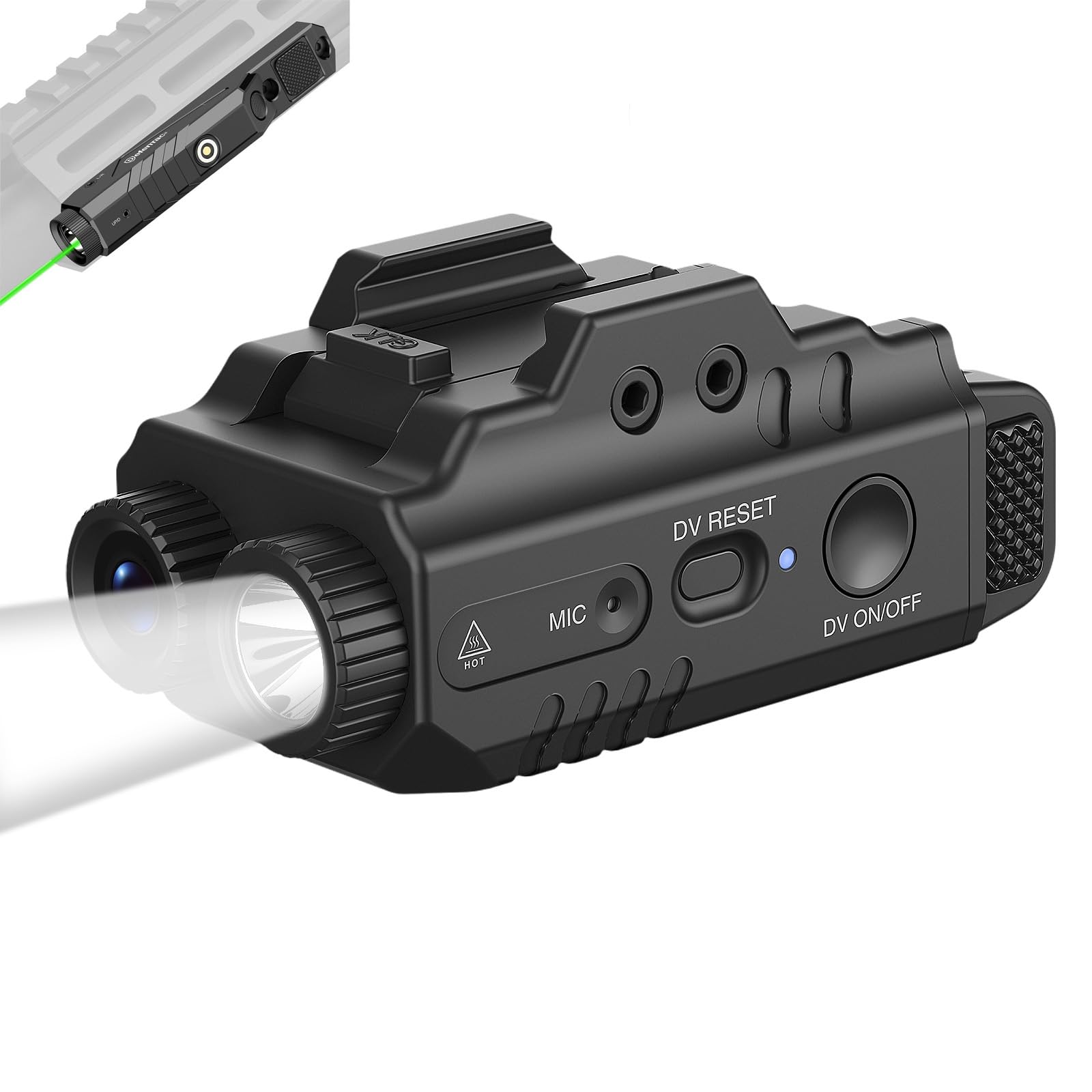
Figure 1: DEFENTAC HD1080P Camera and 500 Lumens Light Combo Bundle (Model DF-9031).
2. Përmbajtja e paketës
Verifikoni që të gjitha artikujt e listuar më poshtë janë të përfshirë në paketën tuaj. Nëse ndonjë artikull mungon ose është i dëmtuar, ju lutemi kontaktoni mbështetjen ndaj klientit.
- DEFENTAC HD1080P Camera and 500 Lumens Light Combo Device (DF-9031)
- Kabllo USB për karikim/të dhëna
- Mounting Tool (Hex Key)
- Përshtatës montimi
- Manuali i Përdoruesit

Figure 2: Included components: the DF-9031 device, USB cable, user manual, mounting tool, and mounting adapter.
3. Produkti i Mbaruarview
Familiarize yourself with the various parts and controls of your DF-9031 device.

Figura 3: Përpara dhe anash view of the DF-9031, highlighting the Flashlight Switch, Charging/Data Port, Power Indicator, Mounting Bolt, Camera On/Off/Pause Switch, Camera Working Indicator, Camera Reset Button, and Microphone.
- Ndërprerësi i dritës së dores: Controls the flashlight modes.
- Charging/Data Port: USB port for charging the device and transferring data to a computer.
- Treguesi i fuqisë: LED light indicating power status and charging.
- Mounting Bolt: Secures the device to a rail system.
- Camera On/Off/Pause Switch: Controls the video recording function.
- Camera Working Indicator: LED light indicating camera recording status.
- Camera Reset Button (DV RESET): Përdoret për të rivendosur pajisjen.
- Mikrofoni (MIC): Regjistron audio gjatë regjistrimit të videos.
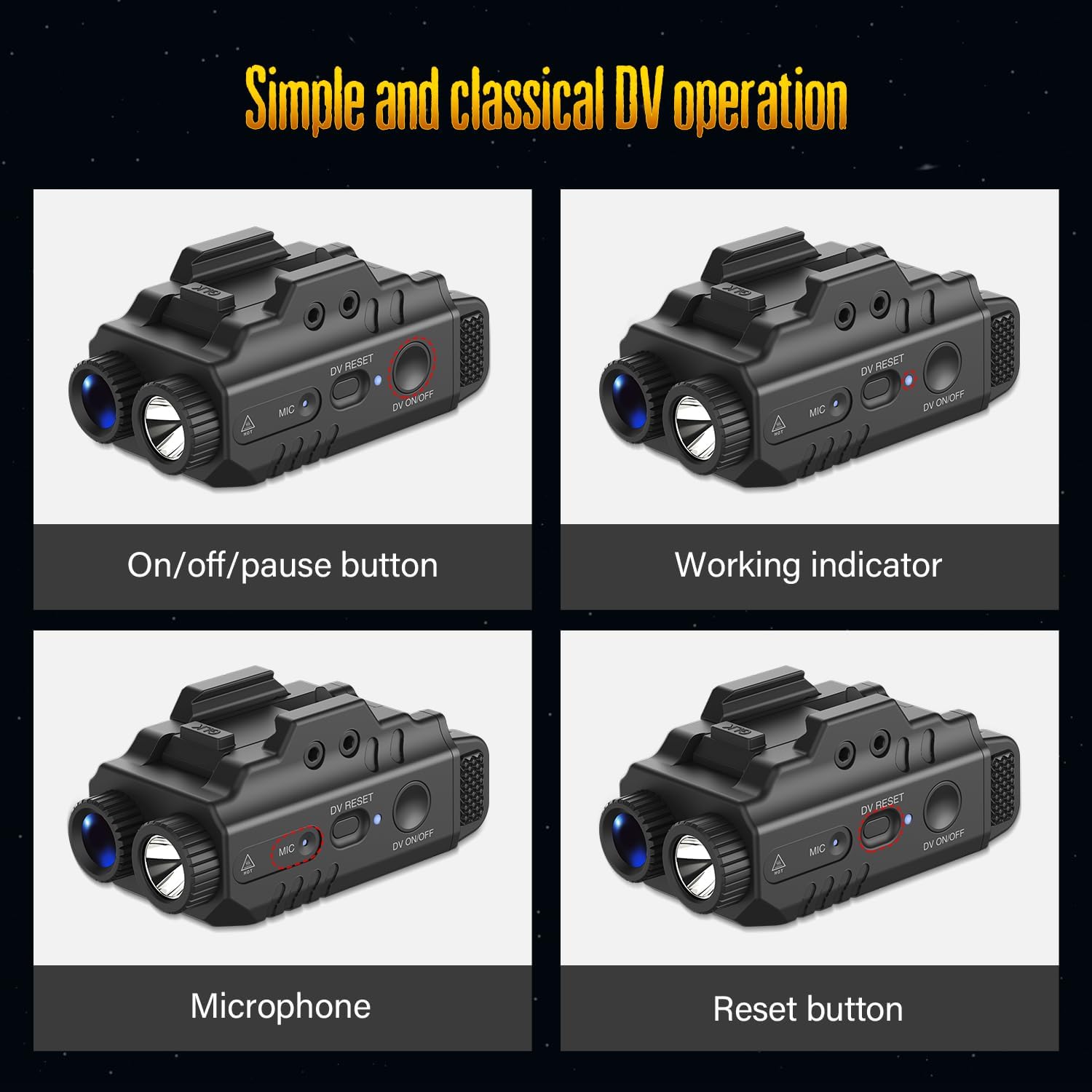
Figura 4: E detajuar view of the camera controls, including the On/Off/Pause button, Working indicator, Microphone, and Reset button.
4. Specifikimet
| Veçori | Specifikimi |
|---|---|
| Dalja e dritës së elektrikut dore | 500 lumen (maksimumi) |
| Rezolucioni i videos | 1080P HD |
| Regjistrimi audio | Po (Mikrofon i integruar) |
| Memoria e brendshme | 16 GB |
| Flashlight Run Time | Deri në 2 orë |
| Camera Run Time | Deri në 2.5 orë |
| Pesha | 56 gram |
| Dimensionet (përafërsisht) | 70 mm (Length) x 35 mm (Height) |
| Power Output (Laser) | Less than 5mW (Class IIIa) |
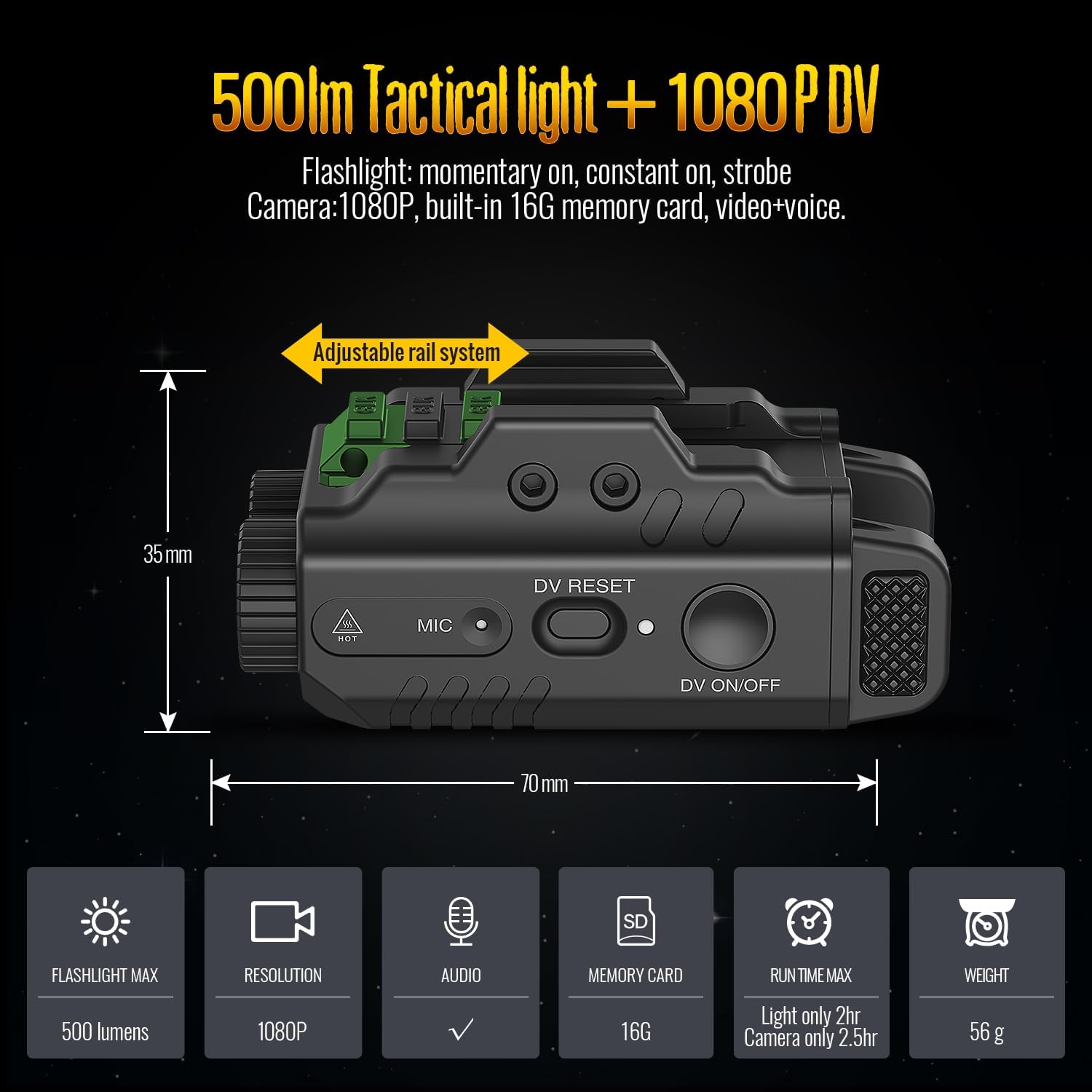
Figure 5: Visual representation of the DF-9031's dimensions and core specifications.
5. Konfigurimi
5.1 Ngarkimi i pajisjes
- Locate the Charging/Data Port on the side of the device (refer to Figure 3).
- Connect the small end of the provided USB cable to the Charging/Data Port.
- Connect the large end of the USB cable to a standard USB power adapter (not included) or a computer's USB port.
- The Power Indicator light will illuminate to show charging status.
- Pasi të jetë ngarkuar plotësisht, shkëputni kabllon USB.
5.2 Montimi i pajisjes
The DF-9031 features an adjustable rail system for mounting. Use the provided mounting tool (hex key) and adapter if necessary.
- Identify the mounting rail on your compatible equipment.
- Align the DF-9031's adjustable rail system with your equipment's rail.
- Insert the Mounting Bolt into the appropriate slot and tighten it securely using the hex key. Ensure the device is firmly attached and does not wobble.
6. Operacioni
6.1 Funksionimi i kamerës
- Ndezja/Fikja e energjisë: Press and hold the Camera On/Off/Pause Switch (DV ON/OFF) for approximately 3 seconds. The camera will begin a 5-second booting process, indicated by a solid blue light on the Camera Working Indicator.
- Filloni regjistrimin: After the 5-second booting process, the blue indicator will start flashing, signifying that video recording is in progress.
- Ndërprit/Rifillo regjistrimin: While recording, click the Camera On/Off/Pause Switch once to pause recording. The blue indicator will remain solid. Click the switch again to resume recording; the blue indicator will flash.
- Fike: To turn off the camera, press and hold the Camera On/Off/Pause Switch for 3 seconds.
Note: The camera has an 8-second activation time (3 seconds for switch press + 5 seconds for booting process).
6.2 Funksionimi i llambës së dorës
The flashlight offers multiple modes: momentary on, constant on, and strobe. Use the Flashlight Switch to cycle through these modes.

Figure 6: The DF-9031 supports various operational modes: simultaneous light and video recording, light-only (constant or strobe), and video-only recording.
- Aktive momentale: Press and hold the Flashlight Switch. Release to turn off.
- Vazhdimisht Aktiv: Click the Flashlight Switch once to activate constant light. Click again to turn off.
- Modaliteti i strobeve: Double-click the Flashlight Switch to activate strobe mode. Click once to turn off.
The device can operate with light only, video only, or both simultaneously.
6.3 Transferimi i të dhënave
To access recorded videos and images, connect the device to a computer using the provided USB cable. The device will appear as a removable storage drive, allowing you to copy files.
7. Mirëmbajtja
- Pastrimi: Përdorni një leckë të butë dhe të thatë për të pastruar pjesën e jashtme të pajisjes. Mos përdorni pastrues ose tretës gërryes.
- Magazinimi: Ruajeni pajisjen në një vend të freskët dhe të thatë, larg rrezeve të diellit direkte dhe temperaturave ekstreme.
- Kujdesi për baterinë: Për jetëgjatësi optimale të baterisë, karikojeni pajisjen rregullisht, edhe nëse nuk e përdorni shpesh. Shmangni shkarkimin e plotë të baterisë për periudha të gjata.
- Kujdesi për lente: Keep the camera lens and flashlight lens clean and free of dust or smudges for clear recording and illumination.
8. Troubleshooting
| Problem | Shkaku i mundshëm | Zgjidhje |
|---|---|---|
| Pajisja nuk ndizet. | Bateri e ulët ose e zbrazur. | Ngarkoni pajisjen duke përdorur kabllon USB të dhënë. |
| Camera not recording. | Not properly activated; indicator not flashing. | Ensure the camera is powered on and the indicator is flashing blue. Press and hold the Camera On/Off/Pause Switch for 3 seconds to start, then wait for the 5-second boot process. |
| Nuk mund të transferohet files në kompjuter. | Improper USB connection; driver issue. | Ensure the USB cable is securely connected to both the device and the computer. Try a different USB port or cable. Restart the computer. |
| Pajisja nuk përgjigjet. | Gabim i softuerit. | Use a small, pointed object (like a paperclip) to press the Camera Reset Button (DV RESET) for a few seconds. This will restart the device without deleting data. |
9. Informacion mbi sigurinë
- Mos e ekspozoni pajisjen ndaj temperaturave ekstreme, rrezeve të diellit direkte ose lagështisë së lartë.
- Mbajeni pajisjen larg ujit dhe lëngjeve të tjera.
- Mos u përpiqni ta çmontoni ose modifikoni pajisjen. Kjo do të anulojë garancinë dhe mund të shkaktojë dëmtime.
- Handle the device with care to avoid dropping or impact.
- The laser component has a power output of less than 5mW and is classified as Class IIIa. Avoid direct eye exposure.
- Mbajeni jashtë mundësive të fëmijëve.
10. Garancia dhe Mbështetja
DEFENTAC products are designed for reliability and performance. For warranty information, technical support, or service inquiries, please refer to the contact information provided on the DEFENTAC official webfaqja e internetit ose dokumentacioni juaj i blerjes.
Ju lutemi ruani dëshminë tuaj të blerjes për pretendimet e garancisë.