
1. Hyrje
Thank you for choosing the DEFENTAC DF-51 HD1080P Camera and 500 Lumens Flashlight Combo. This device integrates a high-definition camera, a powerful flashlight, and a Class IIIa laser into a compact unit, designed for various applications including recording and illumination. This manual provides essential information for the safe and effective use of your device.
2. Informacion mbi sigurinë
- Siguria me lazer: This product contains a Class IIIa laser with a power output of less than 5mW. Avoid direct eye exposure to the laser beam. Do not aim the laser at aircraft or vehicles.
- Paralajmërim për nxehtësinë: The flashlight can generate heat during prolonged use. Avoid touching the flashlight head directly after extended operation.
- Siguria e baterisë: Do not attempt to disassemble or replace the internal battery. Use only the provided charging cable.
- Rezistenca ndaj ujit: The device is rated IPX4 water-resistant, meaning it is protected against splashing water from any direction. It is not designed for submersion.
- Magazinimi: Ruajeni pajisjen në një vend të freskët dhe të thatë, larg rrezeve të diellit direkte dhe temperaturave ekstreme.
3. Përmbajtja e paketës
Verifikoni që të gjitha artikujt janë të pranishëm në paketimin tuaj:
- DEFENTAC DF-51 Device
- Magnetic Charging Cable (USB)
- Adjustment Tools (Hex Key)
- Vida rezervë
- Manuali i Përdoruesit (ky dokument)

Figure 3.1: Contents of the DEFENTAC DF-51 package.
4. Produkti i Mbaruarview
Familiarize yourself with the various components and controls of your DEFENTAC DF-51 device.

Figure 4.1: Labeled components of the DEFENTAC DF-51.
- Ndërprerësi i dritës së dores: Controls the flashlight modes (On, Strobe, Off).
- Charging/Data Port: Magnetic port for charging the device and connecting to a computer for data transfer.
- Treguesi i fuqisë: LED light indicating charging status and power.
- Mounting Bolt: For securing the device to compatible rails.
- Camera On/Off/Pause Switch (DV ON/OFF): Controls the camera's recording functions.
- Camera Working Indicator (Blue LED): Indicates camera status (booting, recording, paused).
- Camera Reset Button (DV RESET): Used to reset the camera.
- Mikrofoni (MIC): Regjistron audio gjatë kapjes së videos.
5. Konfigurimi
5.1. Ngarkimi i pajisjes
- Connect the magnetic charging cable to the Charging/Data Port on the device.
- Lidhni skajin USB të kabllit në një përshtatës standard të energjisë USB (nuk përfshihet) ose në një portë USB të kompjuterit.
- The Power Indicator will show the charging status. Ensure the device is fully charged before first use.
5.2. Montimi i pajisjes
The DEFENTAC DF-51 is designed to be mounted on compatible rails. Use the provided mounting bolt and adjustment tools to secure the device firmly.
- Align the device's mounting interface with the rail.
- Insert the mounting bolt and tighten it using the adjustment tool until the device is securely attached. Do not overtighten.
6. Udhëzimet e funksionimit
6.1. Funksionimi i kamerës
- Ndezur/Fikur: Press and hold the Camera On/Off/Pause Switch (DV ON/OFF) for 3 seconds. The camera will begin a 5-second booting process, indicated by a solid blue light from the Camera Working Indicator. Once the blue indicator starts flashing, video recording is in progress.
- Ndërprit/Rifillo regjistrimin: While recording, click the Camera On/Off/Pause Switch (DV ON/OFF) once to pause recording. The blue indicator will remain solid. Click the switch again to resume recording; the blue indicator will flash.
- Koha e aktivizimit: The total activation time from pressing the switch to active recording is approximately 8 seconds (3 seconds switch press + 5 seconds booting).
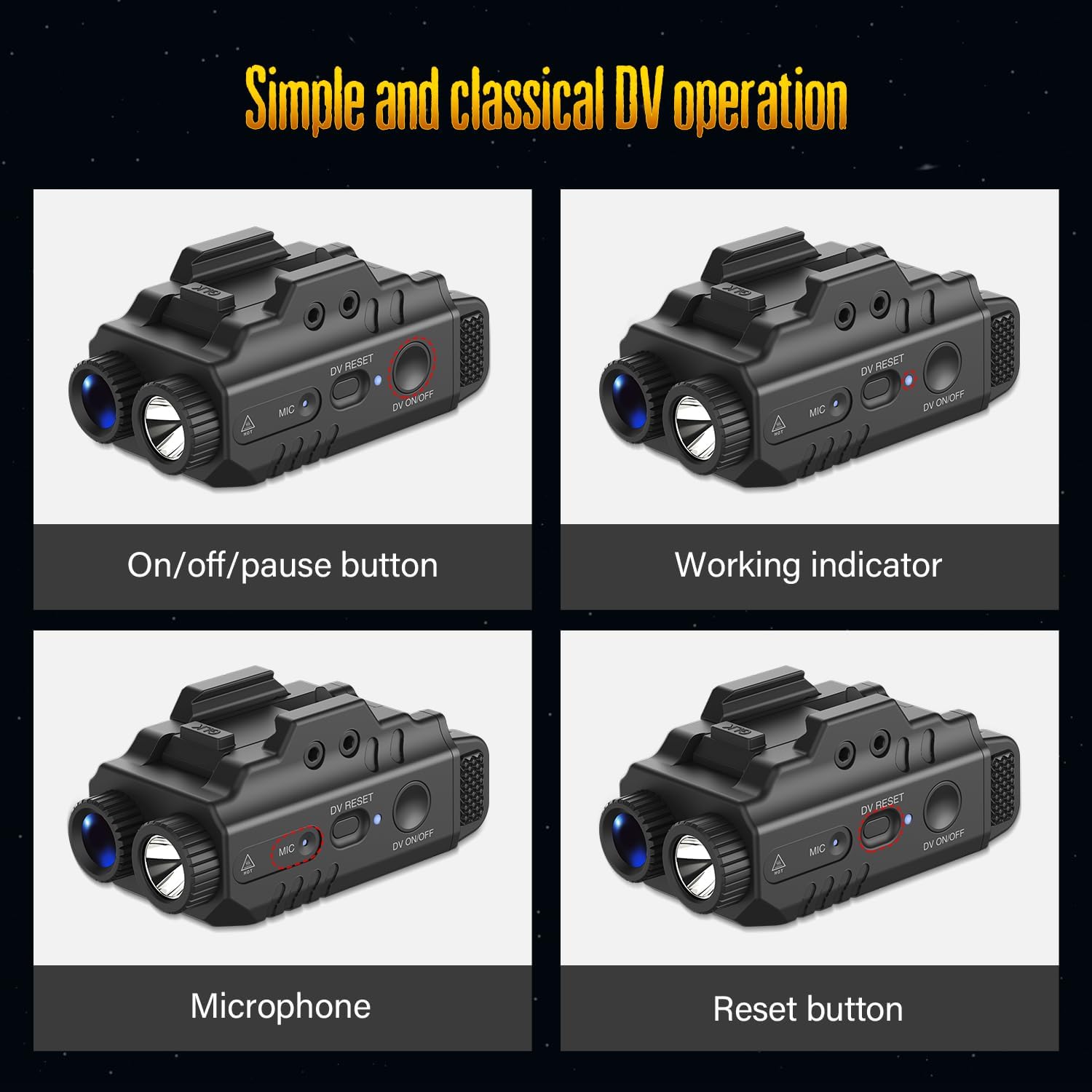
Figure 6.1: Camera control buttons and indicators.
6.2. Flashlight and Laser Operation
Use the Flashlight Switch to cycle through the available modes:
- Dritë e vazhdueshme: Press the Flashlight Switch once for continuous illumination.
- Drita strobe: Press the Flashlight Switch again to activate the strobe mode.
- Lazer: The laser can be activated independently or in conjunction with the flashlight. Refer to the specific controls for laser activation (often a separate button or a combination press).
- Joaktiv: Press the Flashlight Switch a third time to turn off the flashlight and laser.
6.3. Operacion i kombinuar
The DEFENTAC DF-51 supports various combinations of camera, flashlight, and laser operation:
- Light and Video: Activate both the flashlight and camera simultaneously for illuminated recording.
- Light Only (Constant/Strobe): Use the flashlight independently without camera recording.
- Only Video: Record video without activating the flashlight or laser.

Figure 6.2: Operational modes of the DEFENTAC DF-51.
6.4. Transferimi i të dhënave
To access recorded videos and images:
- Sigurohuni që pajisja të jetë e fikur.
- Connect the magnetic charging cable to the Charging/Data Port on the device and the USB end to a computer.
- The device will appear as a removable storage drive on your computer.
- You can then easily read and download your files.
7. Mirëmbajtja
- Pastrimi: Use a soft, dry cloth to clean the exterior of the device. Do not use abrasive cleaners or solvents. For the camera lens, use a specialized lens cleaning cloth.
- Magazinimi: When not in use for extended periods, store the device in a protective case in a cool, dry environment. Ensure the battery is partially charged (around 50%) before long-term storage.
- Kujdesi për baterinë: Avoid fully discharging the battery frequently. Recharge the device regularly, even if not in use, to maintain battery health.
8. Troubleshooting
- Pajisja nuk ndizet: Ensure the device is fully charged. If the issue persists, try performing a reset using the Camera Reset Button.
- Kamera nuk po regjistron: Check if the blue indicator is flashing. If it's solid, recording is paused. If no indicator, ensure the device is on and charged.
- Elektrik dore nuk funksionon: Ensure the device is powered on and the Flashlight Switch is pressed correctly.
- Nuk mund të transferohet Files në Kompjuter: Ensure the device is connected correctly via the USB cable and is powered off. Try a different USB port or cable.
- Cilësi e dobët e videos: Ensure the camera lens is clean and free from obstructions. Record in well-lit conditions for optimal results.
9. Specifikimet

Figure 9.1: Key specifications and dimensions of the DEFENTAC DF-51.
| Veçori | Specifikimi |
|---|---|
| Markë | DEFENTAC |
| Model | DF-51 |
| Rezolucioni i kamerës | HD1080P |
| Shkëlqimi i dritës së dorezës | 500 Lumens (maksimumi) |
| Flashlight Beam Distance | 200 metra |
| Flashlight Run Time | 1 orë |
| Klasa e lazerit | IIIa |
| Prodhimi i Fuqisë së Lazerit | < 5 mW |
| Laser Beam Distance | 200-2000 metra |
| Materiali | Nylon reinforced fiber (Polymer) |
| Vlerësimi i papërshkueshëm nga uji | IPX4 |
| Dimensionet (përafërsisht) | 1.1 in (W) x 1.7 in (H) x 2.5 in (L) |
10. Informacioni i garancisë
Specific warranty details for the DEFENTAC DF-51 are not provided in this manual. Please refer to the product packaging, the retailer's return policy, or the official DEFENTAC webfaqe interneti për informacion të plotë mbi garancinë.
11. Mbështetja e klientit
For technical assistance, troubleshooting, or product inquiries, please contact DEFENTAC customer support through their official website or the retailer from whom you purchased the product. Keep your purchase receipt and product model number (DF-51) handy when contacting support.