
1. Produkti i Mbaruarview
The ATK N9 Tri-Mode Gaming Headset is designed for gamers requiring flexible connectivity, clear audio, and reliable communication across multiple devices. It supports 3.5 mm wired, 2.4G wireless, and Bluetooth connections, allowing seamless switching between gaming consoles, PC, and mobile devices. Stereo-tuned dynamic drivers deliver balanced sound, enhancing in-game audio cues such as footsteps, gunfire, and environmental effects. The detachable noise-canceling microphone improves voice clarity for team communication, online gaming, and voice calls. Its over-ear design, with soft ear cushions and an adjustable headband, ensures a comfortable fit for extended gaming sessions. The headset is compatible with PS5, PS4, PC, Nintendo Switch, and mobile devices. For Xbox Series X|S, audio and microphone functions are supported via the 3.5 mm wired connection.

2. Përmbajtja e paketës
Verifikoni që të gjitha artikujt e listuar më poshtë janë të përfshirë në paketën tuaj:
- ATK N9 Pro/White Gaming Headset
- Detachable Noise-Canceling Microphone
- Kabllo karikimi USB-C
- Kabllo audio 3.5 mm
- 2.4G Wireless USB Adapter
- Manuali i Përdoruesit (ky dokument)

3. Konfigurimi fillestar
3.1. Ngarkimi i kufjeve
Before first use, fully charge the headset using the provided USB-C charging cable. Connect the USB-C end to the headset's charging port and the USB-A end to a compatible USB power source (e.g., PC, wall adapter). The LED indicator will show charging status.
3.2. Ngjitja e mikrofonit
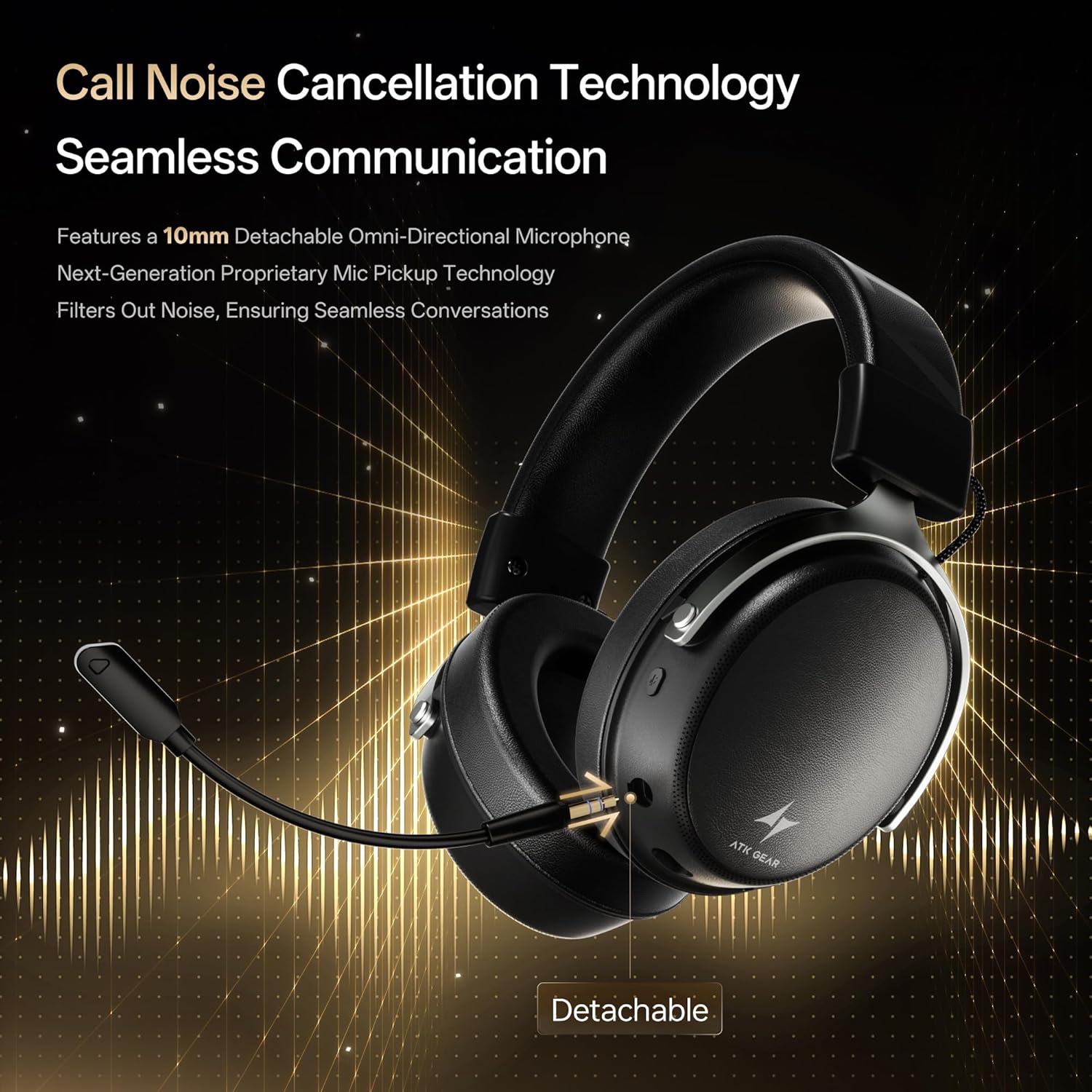
Insert the detachable boom microphone into the microphone port on the left earcup until it clicks into place. Ensure it is securely connected for optimal voice pickup.
3.3. Opsionet e lidhjes
The ATK N9 Pro/White headset offers three connectivity modes:
- Modaliteti pa tela 2.4G: For PC, PS4, PS5, and Nintendo Switch (docked mode).
- Plug the 2.4G wireless USB adapter into an available USB port on your device.
- Ndizni kufjet.
- Switch the headset to 2.4G mode using the mode switch. The headset will automatically pair with the adapter.
- Adjust audio output settings on your device if necessary to select the headset.
- Modaliteti Bluetooth: For mobile devices, PC, and Nintendo Switch (handheld mode).
- Power on the headset and switch to Bluetooth mode. The LED indicator will flash, indicating pairing mode.
- On your device, go to Bluetooth settings and select "ATK N9 Pro" from the list of available devices.
- Once connected, the LED indicator will show a steady light.
- Modaliteti me tel 3.5 mm: For Xbox Series X|S, PS4, PS5, PC, Nintendo Switch, and mobile devices.
- Lidhni njërën anë të kabllit audio 3.5 mm me prizën 3.5 mm të kufjeve.
- Connect the other end to the 3.5mm audio port on your device (e.g., controller, PC audio jack).
- Kufjet do të funksionojnë në modalitetin me tel, duke anashkaluar funksionet pa tel.

4. Udhëzimet e funksionimit
4.1. Headset Controls
The ATK N9 Pro/White headset features intuitive controls located on the earcups:
- Butoni i energjisë: Press and hold to power on/off. Short press for play/pause (in 2.4G/Bluetooth mode).
- Ndërrimi i modalitetit: Toggle between 2.4G wireless, Bluetooth, and wired modes.
- Volume Up/Down Wheel: Rotate to adjust audio volume.
- Butoni i heshtjes së mikrofonit: Shtypni për të heshtur/çaktivizuar mikrofonin.
- Spatial Audio Button: Press to activate/deactivate 3D Spatial Audio.
- Mic Monitoring Button: Press to enable/disable microphone monitoring (sidetone).
4.2. Përdorimi i mikrofonit
The detachable noise-canceling microphone is designed for clear communication. Position the microphone approximately 1-2 inches from your mouth for optimal voice pickup. Use the microphone mute button on the headset to quickly mute your voice when needed.
4.3. Rregullimi i përshtatshmërisë
The headset features an adjustable headband and soft ear cushions for comfort. Extend or retract the headband to achieve a snug yet comfortable fit. The earcups are designed to fully enclose your ears for passive noise isolation and comfort during long gaming sessions.
5. Specifikimet teknike
| Veçori | Specifikimi |
|---|---|
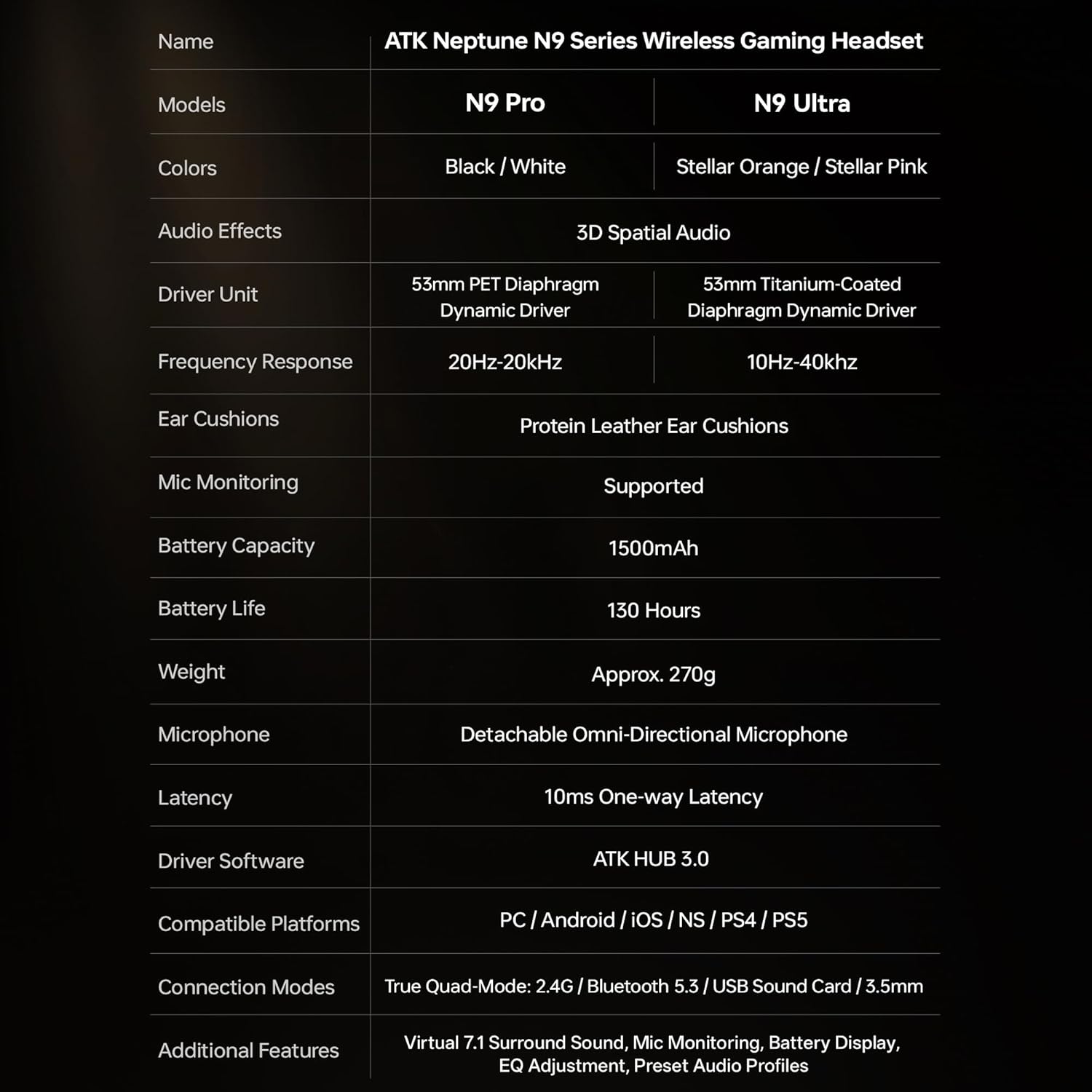
| Emri i modelit | ATK N9 Pro |
| Lidhshmëria | 3.5mm Wired, 2.4G Wireless, Bluetooth 5.3 |
| Lloji i shoferit | Drejtues dinamik |
| Madhësia e shoferit | 53 mm |
| Gama e frekuencës | 20 Hz - 20,000 Hz |
| Impedanca | 64 Ohm |
| Mikrofoni | Detachable Noise-Canceling Omni-Directional |
| Kapaciteti i baterisë | 1500 mAh |
| Jetëgjatësia e baterisë | Deri në 130 orë |
| Latency (2.4G) | 10 Milliseconds (one-way) |
| Pesha | 270 gram |
| Vendosja e veshit | Mbi vesh |
| Pajisjet e përputhshme | PS5, PS4, PC, Nintendo Switch, Mobile Devices, Xbox Series X|S (wired) |
| Karakteristika Shtesë | 3D Spatial Audio, Mic Monitoring, Volume Control |

6. Kujdesi dhe mirëmbajtja
- Pastrimi: Përdorni një leckë të butë dhe të thatë për të pastruar kufjet. Shmangni përdorimin e kimikateve të ashpra ose materialeve gërryese.
- Magazinimi: Ruajeni kufjet në një vend të freskët dhe të thatë, larg rrezeve të diellit dhe temperaturave ekstreme.
- Kujdesi për baterinë: Për të zgjatur jetëgjatësinë e baterisë, shmangni shkarkimin e plotë të shpeshtë të kufjeve. Karikojini ato rregullisht, edhe nëse nuk janë në përdorim për periudha të gjata kohore.
- Rezistenca ndaj ujit: The headset is not water-resistant. Avoid exposure to liquids.
7. Troubleshooting
7.1. No Audio / Low Volume
- Ensure the headset is powered on and connected in the correct mode (2.4G, Bluetooth, or 3.5mm wired).
- Check the volume wheel on the headset and your device's volume settings.
- For wireless modes, ensure the headset is paired correctly and selected as the audio output device in your system settings.
- Nëse përdorni kabllo 3.5 mm, sigurohuni që kablloja të jetë futur plotësisht si në kufje ashtu edhe në pajisje.
7.2. Mikrofoni nuk funksionon
- Sigurohuni që mikrofoni të jetë i lidhur mirë me kufjet.
- Check if the microphone mute button on the headset is engaged.
- Verify that the headset microphone is selected as the input device in your device's sound settings.
- For Xbox Series X|S, ensure you are using the 3.5mm wired connection for microphone support.
7.3. Probleme me Lidhjen
- 2.4G pa tel: Ensure the USB adapter is firmly plugged in. Try a different USB port.
- Bluetooth: Ensure the headset is in pairing mode. Forget the device on your phone/PC and re-pair. Keep the headset within the 5-meter Bluetooth range.
- Të përgjithshme: Power cycle both the headset and your connected device.
8. Garancia dhe Mbështetja
8.1. Informacioni i garancisë
The ATK N9 Pro/White Gaming Headset comes with a Garanci 6 mujore nga data e blerjes. Kjo garanci mbulon defektet e prodhimit dhe punën nën përdorim normal. Nuk mbulon dëmet e shkaktuara nga keqpërdorimi, aksidentet, modifikimet e paautorizuara ose konsumimi normal.
8.2. Mbështetja e klientit
For further assistance, technical support, or warranty claims, please contact ATK customer service through the retailer where the product was purchased or visit the official ATK webfaqe për informacionin e kontaktit të mbështetjes.


