Hyrje
This manual provides detailed instructions for the proper use and care of your Audiovox CE-145G Personal CD Player. Please read this manual thoroughly before operating the device to ensure optimal performance and longevity.
Karakteristikat e produktit
- 40-Second Anti-Skip Protection: Ensures continuous audio playback even during movement, utilizing a digital buffer.
- Multi-Directional Anti-Roll Sensors: Provides additional protection against playback interruption from various movements.
- 22-Track Programmable Memory: Allows customization of CD playback order.
- Bass Boost System: Përmirëson daljen audio me frekuencë të ulët.
- 3-Beam Laser Pickup: Designed for accurate CD tracking and clear sound reproduction.
- Mënyra të shumta riprodhimi: Includes random play and various repeat functions.
- Mbaj çelësin: Prevents accidental button presses and program changes.
- Fikja automatike: Conserves battery life by automatically shutting down the player when not in use.
- Line-Out Jack: For connecting to external audio systems or power adapters.
- Built-in Rechargeable Circuitry: Supports the use of rechargeable Ni-Cad batteries (not included).
- Stereo Headphones: Included for immediate listening.
Konfigurimi
1. Instalimi i baterisë
The Audiovox CE-145G operates on two (2) AA batteries (not included) or an optional AC/car adapter (not included) connected via the line-out jack. For rechargeable Ni-Cad batteries, the unit features built-in charging circuitry.
- Locate the battery compartment on the underside of the CD player.
- Hapeni kapakun e ndarjes së baterisë.
- Vendosni dy (2) bateri AA, duke u siguruar që polariteti të jetë i saktë (+/-) siç tregohet brenda ndarjes.
- Mbyllni mirë kapakun e ndarjes së baterisë.

Image: The Audiovox CE-145G Personal CD Player in translucent green, shown with included stereo headphones. This image illustrates the overall product design and the headphones that come with the unit.
2. Lidhja e kufjeve
Insert the stereo headphone plug into the headphone jack located on the side of the CD player.

Image: A close-up of the stereo headphones included with the Audiovox CE-145G CD player, showing the earcups and the 3.5mm audio jack.
Udhëzimet e funksionimit
1. Basic CD Playback
- Open the CD compartment lid by pressing the "OPEN" button or sliding the latch.
- Place a CD onto the center spindle with the label side facing up.
- Mbylleni fort kapakun e ndarjes së CD-së derisa të klikojë.
- Shtypni LUAJ/PAUZI button to begin playback. The track number and elapsed time will display.
- Për të ndaluar riprodhimin, shtypni LUAJ/PAUZI përsëri. Shtypeni edhe një herë për të vazhduar.
- Për të ndaluar riprodhimin, shtypni butonin STOP butonin.
- Për të kaluar te pjesa tjetër, shtypni KALIM PARA butoni (►►|).
- To return to the beginning of the current track or go to the previous track, press the KAQ PRAPA butoni (|◄◄).
- To fast forward or rewind within a track, press and hold the KALIM PARA or KAQ PRAPA butonin, përkatësisht.
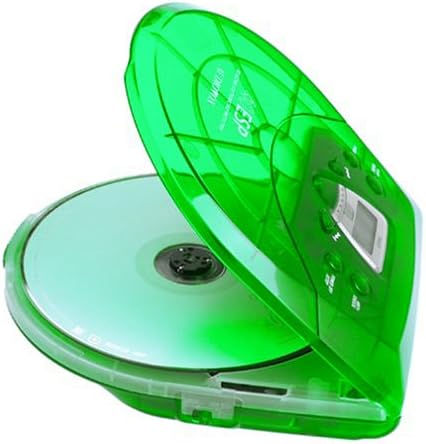
Image: The Audiovox CE-145G Personal CD Player with its translucent green lid open, revealing a compact disc placed inside the compartment.
2. Anti-Skip Protection (ESP)
The CE-145G features a 40-second Electronic Skip Protection (ESP) buffer. This system stores up to 40 seconds of audio data, allowing for uninterrupted playback even if the player experiences minor shocks or vibrations. This feature is automatically active during playback.
3. Programmable Memory (22 Tracks)
Mund të programoni deri në 22 këngë për t'i luajtur në një renditje specifike.
- Në modalitetin STOP, shtypni butonin PROGRAM butonin. Ekrani do të shfaqë "PROG" dhe "01".
- Përdorni KALIM PARA or KAQ PRAPA buttons to select the desired first track.
- Shtypni PROGRAM again to confirm the track. The display will show "02".
- Repeat steps 2 and 3 to add up to 22 tracks to your program.
- After programming the last track, press LUAJ/PAUZI to start playback of your programmed sequence.
- Për të fshirë programin, shtypni butonin STOP butoni dy herë.
4. Rritja e basit
To enhance the bass frequencies, locate the NDIHM BASS switch (or button) on the unit and activate it. Deactivate it to return to standard audio output.
5. Funksioni mbajtës
Të MBAJ switch prevents accidental button presses. Slide the MBAJ switch to the "ON" position to disable all control buttons. Slide it to "OFF" to re-enable controls.
6. Auto Power-Off
To conserve battery life, the CD player will automatically power off after a period of inactivity (e.g., when a CD finishes playing and no buttons are pressed). To restart, press the LUAJ/PAUZI butonin.
Mirëmbajtja
- Pastrimi i njësisë: Wipe the exterior of the player with a soft, damp pëlhurë. Mos përdorni pastrues gërryes ose tretës.
- Pastrimi i lentes së CD-së: If playback issues occur due to a dirty lens, use a specialized CD lens cleaning kit. Do not touch the lens directly.
- Kujdesi për CD: Kapeni CD-të nga skajet. Mbajini të pastra dhe pa gërvishtje. Ruajini në kutitë e tyre kur nuk janë në përdorim.
- Kujdesi për baterinë: Hiqni bateritë nëse pajisja nuk do të përdoret për një periudhë të gjatë kohore për të parandaluar rrjedhjet.
Zgjidhja e problemeve
| Problem | Shkaku i mundshëm | Zgjidhje |
|---|---|---|
| Asnjë fuqi | Bateritë kanë mbaruar ose janë futur gabimisht; adaptori AC nuk është i lidhur ose është me defekt. | Replace batteries, check polarity, or ensure AC adapter is properly connected and functional. |
| CD-ja anashkalon ose ndalet | CD is dirty or scratched; unit is subjected to excessive shock; lens is dirty. | Clean CD, use a different CD, avoid strong impacts, clean the CD lens. |
| Asnjë zë | Headphones not connected properly; volume too low; headphones faulty. | Ensure headphones are fully plugged in, increase volume, try different headphones. |
| Butonat nuk reagojnë | Çelësi HOLD është i aktivizuar. | Slide the HOLD switch to the "OFF" position. |
Specifikimet
- Modeli: CE-145G
- Marka: Audiovox
- Mbrojtje kundër kapërcimit: 40 sekonda (Mbrojtje Elektronike nga Kalimi)
- Programmable Tracks: 22
- Burimi i energjisë: 2 x AA batteries (not included) or optional AC/car adapter
- Dalja audio: 3.5mm headphone jack, Line-out jack
- Dimensionet (përafërsisht): 11.8 x 8.3 x 2.6 inç (Dimensionet e paketës)
- Pesha (Afërsisht): 1.35 paund (Pesha e artikullit)
- Ngjyra: Translucent Green
Garancia dhe Mbështetja
The Audiovox CE-145G Personal CD Player is backed by a 90-day parts-and-labor warranty nga data e blerjes. Ju lutemi ruani provën e blerjes për kërkesat e garancisë.
For technical support or warranty service, please refer to the contact information provided with your product packaging or visit the official Audiovox webfaqe.


