1. Hyrje
The Buffalo DriveStation HD-HB250U2 is an external hard drive designed for reliable data storage and backup. It offers a 250 GB capacity, allowing users to store large files, digital images, and documents without consuming space on a computer's main drive. This device features a fanless design for quiet operation and a heat sink chassis to maintain optimal internal temperatures. Its versatile design supports both vertical and horizontal placement.
This manual provides instructions for setting up, operating, and maintaining your DriveStation HD-HB250U2.
2. Çfarë ka në kuti
Verifikoni që të gjitha sendet janë të pranishme në paketim:
- Buffalo DriveStation HD-HB250U2 External Hard Drive
- Kordoni elektrik
- Kabllo USB
- Udhëzues për vendosjen e shpejtë
- Deklaratë garancie
3. Konfigurimi
The DriveStation HD-HB250U2 is designed for easy installation and is pre-formatted for immediate use.
-
Vendosja: Position the DriveStation vertically or horizontally on a stable surface. The unique chassis design allows for flexible placement to conserve desktop space.
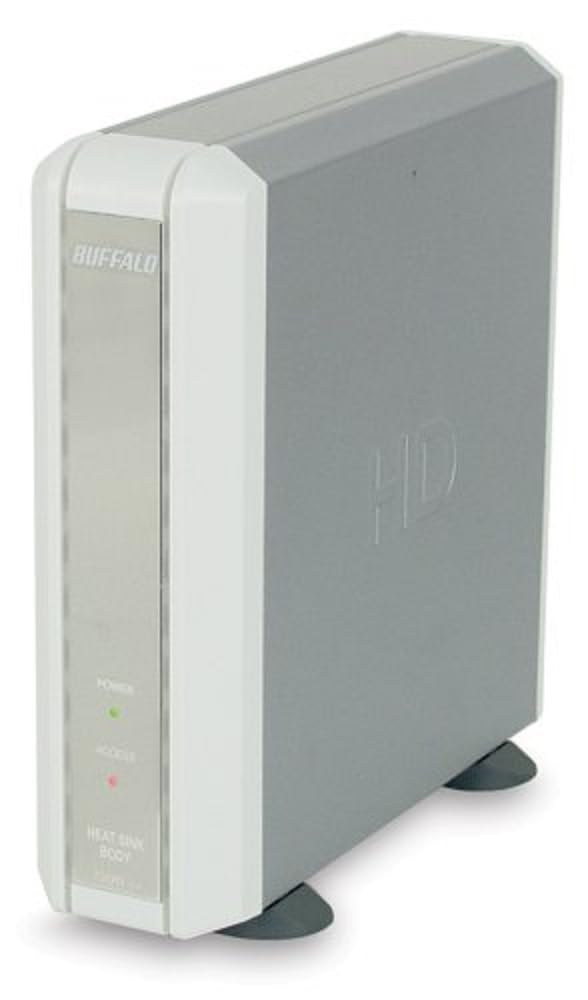
Image 1: Buffalo DriveStation HD-HB250U2. This image displays the Buffalo DriveStation HD-HB250U2 external hard drive in a vertical orientation. The front panel features the 'BUFFALO' logo, a green 'POWER' indicator light, and a red 'ACCESS' indicator light. The device has a sleek, grey and white design, with small black feet for stability.
- Lidhni fuqinë: Connect the power cord to the DriveStation and then plug it into an electrical outlet.
- Lidhu me kompjuterin: Use the provided USB cable to connect the DriveStation to an available USB port on your computer. The DriveStation supports both USB 2.0 and USB 1.1 interfaces.
- Konfigurimi automatik: For most operating systems (Windows 2000/XP/Vista/7/8/10, macOS), the DriveStation will be automatically detected and configured. No driver installation is typically required, except for older operating systems like Windows 98/98SE.
4. Operating the DriveStation
Once connected, the DriveStation is ready for use as an external storage device.
- Ndezja automatike: The DriveStation features an auto power-on function. It will automatically power on or off in conjunction with your attached computer's power state.
- Transferimi i të dhënave: Mund të tërhiqni dhe lëshoni files to and from the DriveStation, or use it as a target for backup software.
- Softuer për kopje rezervë: The included backup utility allows you to customize backup scheduling for data protection. Refer to the Quick Setup Guide for instructions on using the backup software.
- Power-Saving Shutdown: Utilize the power-saving shutdown feature to schedule when the DriveStation powers off, helping to conserve energy.
5. Mirëmbajtja
The DriveStation HD-HB250U2 is designed for minimal maintenance.
- Ftohja: The fanless design ensures silent operation, while the integrated heat sink chassis effectively cools internal components, preventing overheating. Ensure adequate airflow around the device.
- Pastrimi: Përdorni një leckë të butë dhe të thatë për të pastruar pjesën e jashtme të pajisjes. Mos përdorni pastrues të lëngshëm ose tretës.
- Përditësimet e firmuerit: Periodically check the official Buffalo website for any available firmware updates for your model to ensure optimal performance and compatibility.
6. Troubleshooting
If you encounter issues with your DriveStation, consider the following:
-
Pajisja nuk u zbulua:
- Ensure the power cord is securely connected and the device is powered on.
- Verify the USB cable is firmly connected to both the DriveStation and your computer.
- Provoni të lidheni me një port tjetër USB në kompjuterin tuaj.
- Rinisni kompjuterin tuaj.
-
Performanca e ngadaltë:
- Ensure you are using a USB 2.0 port for optimal transfer speeds.
- Close any unnecessary applications running on your computer.
-
Power Indicator Not On:
- Check the power cord connection and the electrical outlet.
- Ensure your computer is powered on if using the auto power-on feature.
Për më shumë ndihmë, referojuni informacionit të mbështetjes në Seksionin 8.
7. Specifikimet
| Veçori | Detaj |
|---|---|
| Numri i modelit | HD-HB250U2 |
| Markë | BUALLI |
| Kapaciteti i ruajtjes dixhitale | 250 GB |
| Shpejtësia e rrotullimit të diskut të ngurtë | 7200 rpm |
| Ndërfaqja e harduerit | USB 2.0, USB 1.1 |
| Pajisjet e përputhshme | Kompjutera Desktop |
| Karakteristika të veçanta | Compact, Fanless Design, Heat Sink Chassis, Auto Power-On, Power-Saving Shutdown |
| Ngjyra | Black (Note: Product image shows grey/white casing, but specification lists black) |
| Dimensionet (përafërsisht) | 34.04 x 22.35 x 12.19 cm (Dimensionet e Paketës) |
| Pesha (përafërsisht) | 2.06 kg (Pesha e Pakos) |
8. Garancia dhe Mbështetja
Your Buffalo DriveStation HD-HB250U2 is backed by a limited 1-year warranty.
For technical assistance, Buffalo offers toll-free 24/7 technical support. Please refer to the warranty statement included in your product package for detailed terms and contact information.
You can also visit the official Buffalo webfaqe interneti për regjistrimin e produkteve, shkarkimin e drajverëve dhe pyetje të shpeshta.


