Hyrje
The NETGEAR SC101 Storage Central is a network storage device designed to provide shared, expandable, and secure storage for all personal computers on your network. It allows you to store, share, and back up digital content such as music, photos, videos, and documents, making it accessible as a simple letter drive from any connected PC.
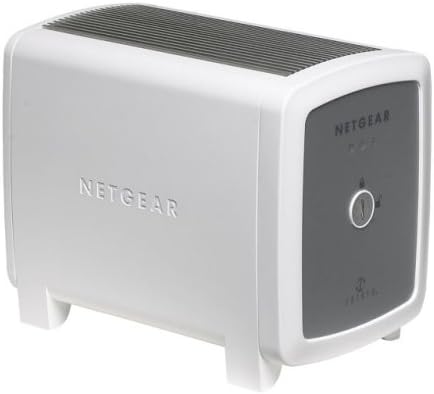
This image displays the NETGEAR SC101 Storage Central device. The front panel features indicators for power and drive status, along with the NETGEAR logo. The side of the unit also prominently displays the NETGEAR branding.
Konfigurimi
Përmbajtja e paketës
Verifikoni që të gjitha sendet janë të pranishme në paketim:
- SC101 Storage Central Unit
- CD e burimeve
- Përshtatës i energjisë
- Kabllo Ethernet
- Udhëzuesi i instalimit
- CD e softuerit rezervë SmartSync Pro
- Karta e Informacionit të Garancisë/Mbështetjes
Instalimi i harduerit
- Prepare Hard Drives: The SC101 requires one or two 3.5" IDE (Parallel ATA) disk drives. Ensure the drives are compatible with ATA6 or above. Hard drives are sold separately.
- Instaloni disqet e forta:
- Locate the latch on the SC101 unit. Turn the latch (a coin may be used) to open the unit. No tools are typically required.
- Attach the power connectors and IDE cables to the hard drive(s).
- Set the jumpers on the hard drive(s) according to the drive manufacturer's instructions (e.g., Master/Slave/Cable Select).
- Slide the hard drive(s) into the designated bays within the SC101 unit.
- Close the unit and secure the latch.
- Lidhu me Rrjetin: Connect the SC101 to your wired or wireless router or switch using the provided Ethernet cable.
- Lidhni fuqinë: Plug the power adapter into the SC101 unit and then into an electrical outlet.
Instalimi i softuerit
- Vendos CD-në e Burimeve: Vendosni CD-në e Burimeve në njësinë CD-ROM të kompjuterit tuaj.
- Run Smart Wizard: Follow the on-screen instructions to launch the Smart Wizard installation assistant. This wizard will guide you through the configuration process.
- Install Drivers and Utilities: The software installation includes necessary drivers and utilities for your computer to access and manage the SC101 drives.
- Create Disk Partitions: After installation, use the software to create disk partitions on the installed hard drives within the SC101.
- Disqet e Qasjes: Once configured, the SC101 drives will appear as network drives (e.g., a new letter drive) on your computer, accessible like any local drive.
Note: The NETGEAR SC101 is compatible only with Windows operating systems (Windows 2000 SP4, XP Home/Pro SP1/SP2, Windows 2003 SP4). It is not compatible with macOS or Linux.
Udhëzimet e funksionimit
Duke hyrë Files
Once the SC101 is set up, you can access files from any connected PC on your network. The drives will appear as a letter drive, allowing you to drag and drop files, save documents, and access media directly.
Storage Options (Mirroring and Spanning)
When two hard drives are installed in the SC101, you have two primary configuration options:
- Mirroring (RAID 1): This option creates an exact copy of your data on both drives. If one drive fails, your data remains safe on the other drive, providing data redundancy and protection against data loss. Both drives will appear as a single volume with the capacity of the smaller drive.
- Spanning (JBOD): This option combines the capacity of both drives into a single, larger volume. The drives appear as one logical drive, and data is written sequentially across them. This maximizes storage capacity but does not offer data redundancy.
Select your preferred storage option during the software configuration process.
Data Protection and Backup
The SC101 automatically stores and, if configured for mirroring, duplicates your data. The included SmartSync Pro advanced backup software can be used to create scheduled backups of your valuable files to the Storage Central.
Treguesit e panelit të përparmë
The front panel of the SC101 features three LED indicators to provide status at a glance:
- Fuqia LED: Tregon statusin e fuqisë së njësisë.
- Hard Disk LED: Indicates activity or status of the installed hard drive(s).
- LED i rrjetit: Indicates network connectivity and activity.
Mirëmbajtja
Kujdesi i Përgjithshëm
- Mbajeni njësinë në një zonë të ajrosur mirë për të parandaluar mbinxehjen.
- Shmangni ekspozimin e njësisë ndaj temperaturave ose lagështisë ekstreme.
- Pastroni pjesën e jashtme me një leckë të butë dhe të thatë. Mos përdorni pastrues të lëngshëm.
Azhurnimet e firmuerit
Kontrolloni periodikisht mbështetjen për NETGEAR website for any available firmware updates for the SC101. Firmware updates can improve performance, add features, or resolve issues.
Data Backup Strategy
Even with mirroring enabled, it is recommended to maintain an additional backup strategy for critical data. This could include off-site backups or cloud storage solutions.
Zgjidhja e problemeve
Nuk ka fuqi
- Ensure the power adapter is securely connected to both the SC101 and a working electrical outlet.
- Verifikoni që priza e energjisë është funksionale duke lidhur një pajisje tjetër.
Cannot Access Drives on Network
- Check that the Ethernet cable is securely connected to both the SC101 and your router/switch.
- Verify that the Network LED on the SC101 is active.
- Ensure your network has a DHCP server enabled, as the SC101 requires an IP address from it.
- Confirm that the NETGEAR software and drivers are correctly installed on your computer.
- Temporarily disable any firewall software on your computer to see if it is blocking access. If this resolves the issue, configure your firewall to allow communication with the SC101.
- Restart the SC101 unit and your computer.
Hard Drive Not Detected or Errors
- Ensure the hard drive(s) are properly seated and connected inside the SC101.
- Verify that the hard drive jumpers are set correctly (Master/Slave/Cable Select).
- Confirm that the hard drive(s) are compatible ATA6 or above IDE drives.
- If using two drives, check the mirroring/spanning configuration in the software.
- The SC101 uses a proprietary Zetera formatting. Drives installed in the SC101 cannot be directly read by a standard Windows machine if removed from the unit.
Slow Data Transfer Speeds
- Ensure your network connection is 10/100 Mbps.
- Network congestion can affect transfer speeds. Try transferring files during off-peak hours or when fewer devices are using the network.
- I madh file transfers will naturally take longer.
Specifikimet
| Numri i modelit | SC101 |
| Markë | NETGEAR |
| Dimensionet e produktit | 6.64 x 4.21 x 5.57 inç (Th x G x L) |
| Pesha e artikullit | 3 paund |
| Materiali | Plastike |
| Pajisjet e përputhshme | Desktop, Laptop (Windows OS only) |
| Ndërfaqja e rrjetit | Ethernet 10/100 Mbps |
| Hard Drive Compatibility | One or two 3.5" IDE (Parallel ATA) hard disks, ATA6 or above |
| Kërkesat e Sistemit Operativ | Windows 2000 (SP4), XP Home or Pro (SP1 or SP2), Windows 2003 (SP4) |
| Kërkesat e rrjetit | Serveri DHCP në rrjet |
| Fuqia hyrëse | 100-240V (multiple voltage pajtueshme) |
Informacioni i Garancisë
The NETGEAR SC101 Storage Central is backed by a 1 vit garanci e kufizuar from the date of purchase. This warranty covers defects in materials and workmanship under normal use. Please refer to the warranty/support information card included in your package for full terms and conditions.
For warranty claims or detailed information, please visit the official NETGEAR support webfaqe.
Mbështetje
For technical assistance, product registration, or to download the latest drivers and firmware, please visit the official NETGEAR support webfaqe:
Before contacting support, it is recommended to review the troubleshooting section of this manual and check the NETGEAR support website for frequently asked questions (FAQs) and knowledge base articles.


